What's your beginners tip?
-
Well, here is my tip (hope someone hasn't said this yet, if so... its never enough to repeat)
Since Sketchup works with front and back faces (a plane has both) be sure that front faces are always facing you and the camera. Having a mixture of front/back faces makes applying materials harder in Sketchup and a lot of other problems when, later on, you will export sketchup scenes to be rendered in an external renderer software.
By default, back faces display in a blue/gray shade which sometimes is confusing with the front faces (which display white). So, I always work with red back-faces: the switch can be done in the styles/edit panel of Sketchup.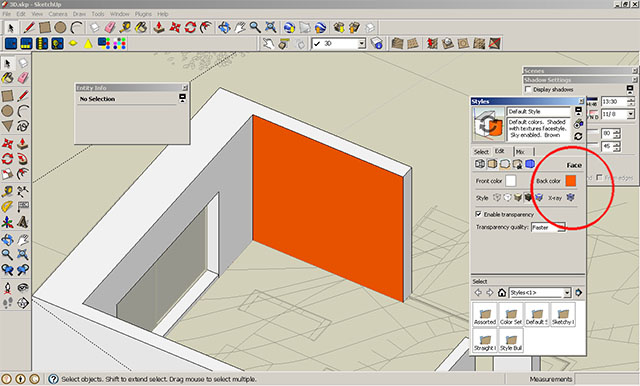
-
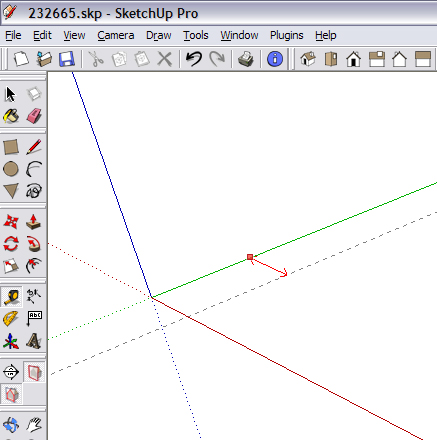
If this was mentioned before sorry. However, here is something I use all the time. Use the X, Y & Z axis to create construction lines with the Tape Measure tool . There is no need to have a face already drawn.
-
DON'T bring your old CAD preconceptions to SketchUp! Groups, components, guides, and accuracy are just fine, but FIRST, discover what's DIFFERENT about SU: the 'sticky' geometry! Get comfortable with 'Move' and 'toggle autofold'; these two tools are all you need to create amazing objects from elementary geometry. Forget everything you know about CAD and discover what is possible! Have fun!
-
First open beer, then open sketchup!
pmo
-
I have one,
If you are working in a big detailed model that is slow to open or change scenes. Set up a scene with only the basic geometry on so you can use it to move around. This is helpful when creating an animation.
-
Beginners of an appropriate age of course.
-
Remember that once you've changed the arc/circle segment resolution ( by typing the number of segments in the mesurements window while drawing them i.e. 100s instead of 24s etc) it remains that way until you change it again.
For example let's say you're drawing a 50' Dia. Circle it'll be all right to type in a large number of segments, but then it'll stay at that number for any new circles you draw. so you might end up drawing 200 segment circles for a 3" dia Pipe component and your model will just collapse under all the weight of edges!
The easier way to have finer segmented curves is to change the resolution afterwards from the entity info window.
-
set your units first
pay careful attention to "OPTIONS" while importing/exporting.
be skillful on selection methods.(usinf context meno, shift , Ctrl,...)
make group/components (depending on your aim) to avoid "gluing" all objects to each other.
while you have even 2 repetitive object, start using components instead of doing repetitive jobs. -
Como todavía soy un principiante, toma esto por lo que vale la pena. La mejor ayuda para mí fue la serie de Aidan Chopra de videos en YouTube. Ahora también tienen la guía complementaria .. "de SketchUp para Dummies". Está muy claro que habla y fácil de entender y tiene un montón de buenas sugerencias. Es perfecto para un novato de gráficos 3D como yo!
Espero que esto ayude! -
@halane34 said:
Como todavía soy un principiante, toma esto por lo que vale la pena. La mejor ayuda para mí fue la serie de Aidan Chopra de videos en YouTube. Ahora también tienen la guía complementaria .. "de SketchUp para Dummies". Está muy claro que habla y fácil de entender y tiene un montón de buenas sugerencias. Es perfecto para un novato de gráficos 3D como yo!
Espero que esto ayude!Translation:
@unknownuser said:
As I'm still a beginner, take this for what it's worth. The best help for me was the number of Aidan Chopra videos on YouTube. Now also have the companion guide .. SketchUp for Dummies ". It's very clear and easy to understand speech and has lots of good suggestions. It's perfect for beginners to 3D graphics as I do hope this helps!
SO true!
-
These tips helped greatly, thanks!
-
It took me a while, but I finally learned the "Intersect with Model" tool. This is a good (only?) way to make accurate mortise and tenons for woodworking. It's explained on page 222 of the (downloadable...887 pages!) SU User's Guide which I downloaded from the official SU website (at http://sketchup.google.com/support/bin/answer.py?hl=en&answer=116174). It is a powerful tool.

-
hello everyone and all the french community in the world ^^ my tips for beginners it's to learn with the video on youtube cut your screen in two , one youtube one sketchup and practice on one things everyday first the basics with sketchup4school but they are american so it's hard to undrestand because of there texas accent eating bublle gum ^^
and go far , found "good" technical tuto is quite difficult like how using the light in vray or how smooth or connect the edge but there is !!!
like "andeciuala" he speak a undertandle englih speak slowly i think he was indian cool people and explain very well and so technic amazing i use a plugin for firefox to save this tuto it's download helper a free plugin that's all .
i design for jewellery in france . -
@mm5949 said:
It took me a while, but I finally learned the "Intersect with Model" tool. This is a good (only?) way to make accurate mortise and tenons for woodworking. It's explained on page 222 of the (downloadable...887 pages!) SU User's Guide which I downloaded from the official SU website (at http://sketchup.google.com/support/bin/answer.py?hl=en&answer=116174). It is a powerful tool.
To save the palaver of deleting a lot of unwanted geometry after using an intersect operation, I find Bool Tools from Smustard indispensable.
-
Never draw anything twice. Never draw anything twice. In my cad days it was Blocks.
In SU, make it a component. My tip, Bob -
use the shift key, early and often.
08-Feb-2010 edit: avoid using mouse to select "hide" from context-click menu. every once in a while the mouse will mistakenly click "erase", and the result will appear the same as if mouse had clicked "hide". Unfortunately, much later (even later after a few unhide-all's) you will wonder to where some parts have disappeared.
-
CONVERT INTERSECTION CONTOUR LINES TO UNIFORM B SPLINES FROM FREDO's PLUGIN!!! THEN EXTRUDE BY RAILS!!!! FROM TIG's PLUGGINS!!! ANYTIME YOU INTERSECT TO FACES TO CREATE A CONTOUR LINE FOR COMMAND EXTRUDE PROFILE AND RAILS!!.. AND DO IT AT 100!!!! SO IT IS SOFT AS A BABY'S BOBO!!
-
It may have been said several times in this topic:
Go through all of the 9 or so pages in this thread.
Then look up the Duh/Doh thread. There "may" be some gems there, too. -
@pmolson said:
Beginners of an appropriate age of course.
Awww...really?
-
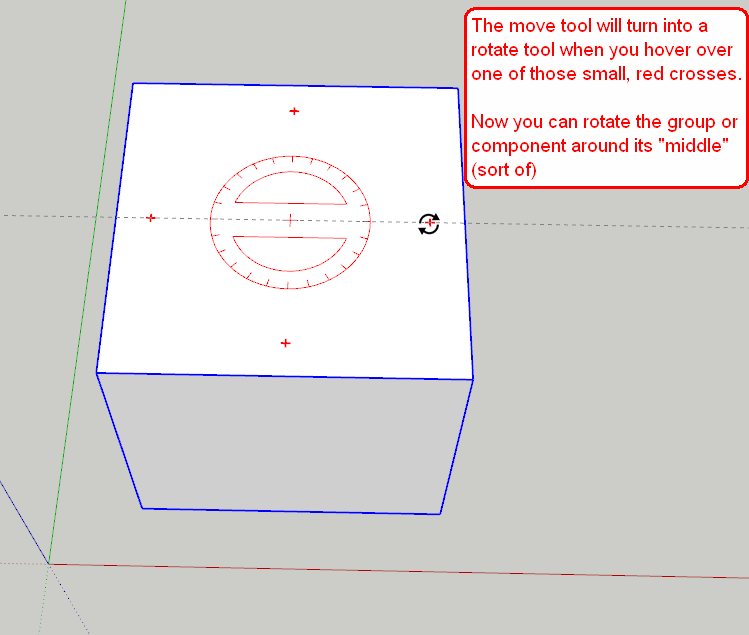
I've no idea if this has been covered before but one think I have just discovered (embarassing!) is the fact that when moving/rotating groups or components, rather than having to use the rotate tool (which can be tricky if the object hasn't a flat face, e.g a person or a tree) you can just use the move function and rotate with the little red crosses that appear on the faces.
I know this is probably old news but it saved me a load of time/heartache.









Advertisement