sketchucation logo sketchucation
    • Login
    Oops, your profile's looking a bit empty! To help us tailor your experience, please fill in key details like your SketchUp version, skill level, operating system, and more. Update and save your info on your profile page today!
    Mac User? | Join the Rayscaper Beta for Mac Learn More

    GML texturizer 2.0

    Scheduled Pinned Locked Moved Extensions & Applications Discussions
    extensions
    33 Posts 18 Posters 24.1k Views 18 Watching
    Loading More Posts
    • Oldest to Newest
    • Newest to Oldest
    • Most Votes
    Reply
    • Reply as topic
    Log in to reply
    This topic has been deleted. Only users with topic management privileges can see it.
    • L
      l.frisken
      last edited by

      Has anyone found a version that works with sketchup 7

      1 Reply Last reply
      Reply Quote 0
      • Chris FullmerC
        Chris Fullmer
        last edited by

        Have you tried it and it does not work? Almost all plugins that work with 6 work with 7. There are VERY few exceptions.

        But if you tried it and doesn't work, then I guess add this one to the list of those that are not compatible... 😄

        Chris

        Lately you've been tan, suspicious for the winter.
        All my Plugins I've written

        1 Reply Last reply
        Reply Quote 0
        • J
          johnsenior1973
          last edited by

          It works fine with SU7 for me.

          Thinking about this further, have you made sure you've installed GML Text. into SU7, rather than just taking the rubies from the SU6 folder and pasting them into the SU7 folder?

          1 Reply Last reply
          Reply Quote 0
          • L
            l.frisken
            last edited by

            hmm maybe that was the problem, i'll try and reinstall it

            1 Reply Last reply
            Reply Quote 0
            • T
              tomislavm
              last edited by

              Thank You!

              1 Reply Last reply
              Reply Quote 0
              • V
                Vänsterbacken
                last edited by

                Hi,

                Me too is looking for the 2.0 version. Tried in a couple places to find it but I just get sent to the contact pages for two people of MSU.

                Does anyone know if this still available for download and if so where?

                Thanks,
                Stefan

                1 Reply Last reply
                Reply Quote 0
                • D
                  dedmin
                  last edited by

                  Some treasure here for Photoshop (not only) users
                  http://graphics.cs.msu.ru/en/science/research/imageprocessing/matting

                  1 Reply Last reply
                  Reply Quote 0
                  • EdsonE
                    Edson
                    last edited by

                    i still have a copy of the installer. since it was distributed for free i am assuming there is no problem in posting it here for download.


                    gmltexturizersetup.exe.zip

                    edson mahfuz, architect| porto alegre • brasil
                    http://www.mahfuz.arq.br

                    1 Reply Last reply
                    Reply Quote 0
                    • D
                      dtrarch
                      last edited by

                      Hi All
                      Here is the GML Undistorter. ☀
                      GMLUndistorterSetup.zip
                      Also GML GrowCut clipout plugin for PS and others.
                      Similar to Fluid Mask and FREE.
                      Really super for 2d face_me cutouts.
                      😄
                      dtr


                      growcut_setup.zip

                      1 Reply Last reply
                      Reply Quote 0
                      • D
                        dtrarch
                        last edited by

                        Good News 😍
                        Just found
                        GML Texturizer tutorial.(English)
                        Bad News 💚
                        Links to downloads are all in Russian.

                        dtr


                        How%20to%20cut%20around%20objects%20in%20Photoshop_Red3[2].pdf

                        1 Reply Last reply
                        Reply Quote 0
                        • D
                          danielito
                          last edited by

                          @edson said:

                          i still have a copy of the installer. since it was distributed for free i am assuming there is no problem in posting it here for download.

                          Hi
                          I have installed 1.0 version. But nothing happens?
                          I have down loaded gmltexturizersetup.exe and I put it in the katalog: C:\Program\Google\Google SketchUp 7\Plugins. And install it in plugins katalog.

                          I have noticed that it missing an exe file to start the program in the directory.
                          how to find my 'GML Texturizer' toolbar button i Sketch Up 7.1?

                          Please guide me!

                          danielito12345@gmail.com

                          1 Reply Last reply
                          Reply Quote 0
                          • GaieusG
                            Gaieus
                            last edited by

                            Hi Danielito,

                            When installing the plugin (with the exe file), it offers to install here:
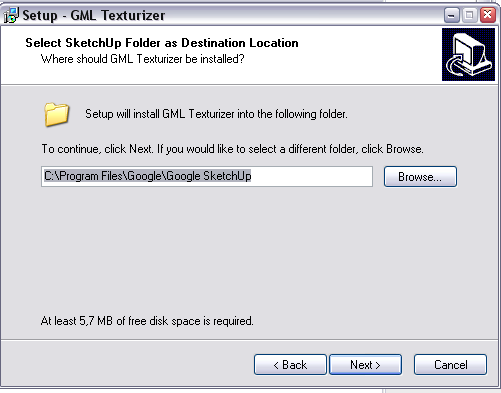
                            GML1.png
                            Change that destination folder to SketchUp 7 (with the browse button on the right). It will then find the Plugins folder automatically.

                            If the toolbar is not activated automatically, find it under View > Toolbars (for some reason, the buttons do not appear for me).
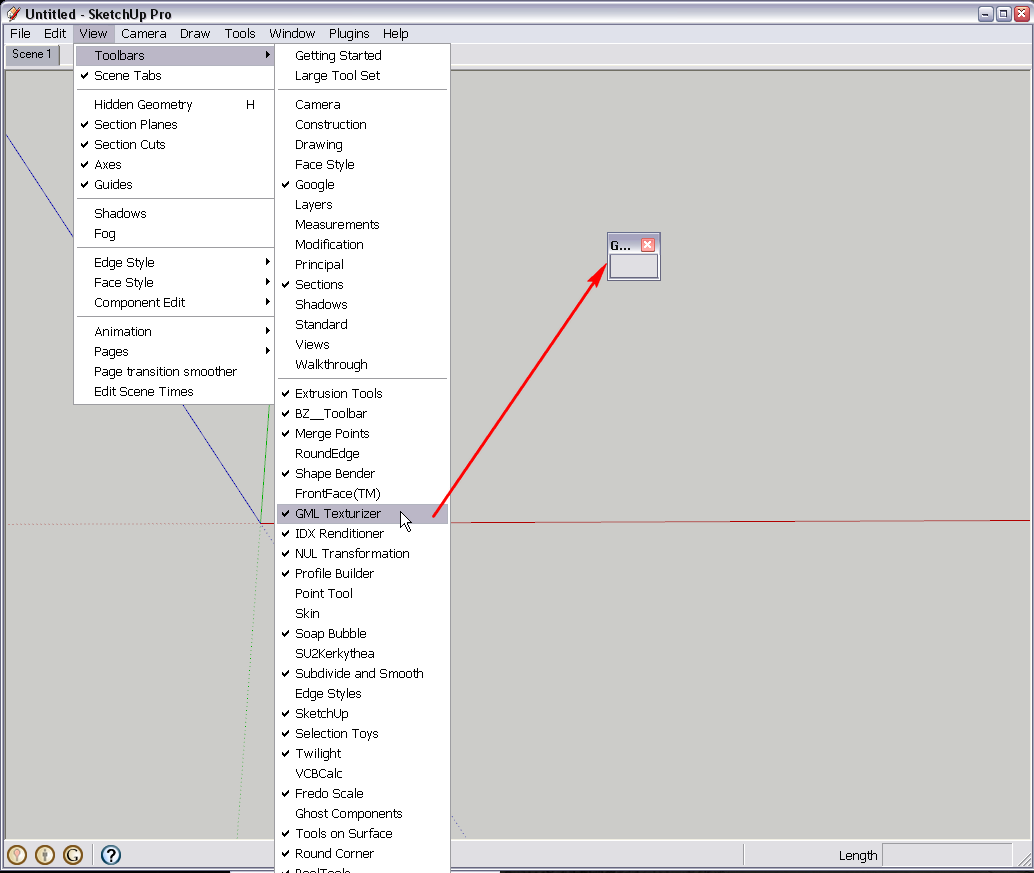

                            GML2.png

                            Gai...

                            1 Reply Last reply
                            Reply Quote 0
                            • D
                              danielito
                              last edited by

                              Hi

                              tanks I did it like you said but the buttons do not appear for me to.
                              how do you start the plug in?

                              @gaieus said:

                              Hi Danielito,

                              When installing the plugin (with the exe file), it offers to install here:

                              [attachment=1:38jtuhen]<!-- ia1 -->GML1.png<!-- ia1 -->[/attachment:38jtuhen]
                              Change that destination folder to SketchUp 7 (with the browse button on the right). It will then find the Plugins folder automatically.

                              If the toolbar is not activated automatically, find it under View > Toolbars (for some reason, the buttons do not appear for me).

                              1 Reply Last reply
                              Reply Quote 0
                              • GaieusG
                                Gaieus
                                last edited by

                                Hm. The buttons do not show up for me but also when I press the first button which should launch a window, everything loses focus (as if the window launched) but nothing can be seen.

                                Really weird.


                                Update; I also installed it under SU 6. There, I can see the buttons but the same problem happens when I try to launch it.

                                Gai...

                                1 Reply Last reply
                                Reply Quote 0
                                • J
                                  johnsenior1973
                                  last edited by

                                  From my experience there seems to be some conflict between GML Text and some image editors. If I have SU and some image editors open at the same time then I have similar problems to Gaieus. The problems will persist even if the image editing program is closed. If I restart SU then the GML Text works fine.

                                  1 Reply Last reply
                                  Reply Quote 0
                                  • T
                                    tosiharuk
                                    last edited by

                                    If an icon is changed into .png and a script is rewritten several lines, an icon will appear.
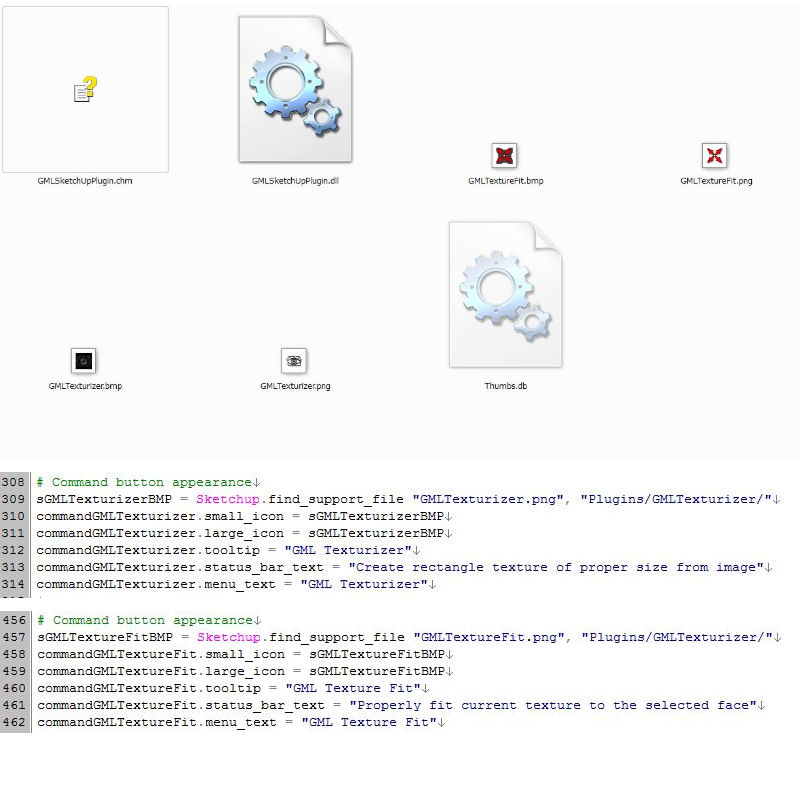

                                    JPG4.jpg

                                    1 Reply Last reply
                                    Reply Quote 0
                                    • D
                                      dtrarch
                                      last edited by

                                      Hi ALL
                                      Attached zip file has the info above, the edited GML Texturizer.rb and png files (in GML Texurizer folder.)
                                      Works for me OK in SU 7.1 but not tested in other versions.
                                      A really useful plugin and a small (very) payback.
                                      Just install the original exe file and copy the edited folder and rb over the installed version.
                                      FYI: version 2.0 was available as a shareware on the GML website but in Russian only.
                                      This update is for GML Texturizer v1.0

                                      dtr


                                      GML TEXTURIZER FIX.zip

                                      1 Reply Last reply
                                      Reply Quote 0
                                      • D
                                        danielito
                                        last edited by

                                        You are the best! It works!!!yeaaaaaaaa

                                        @dtrarch said:

                                        Hi ALL
                                        Attached zip file has the info above, the edited GML Texturizer.rb and png files (in GML Texurizer folder.)
                                        Works for me OK in SU 7.1 but not tested in other versions.
                                        A really useful plugin and a small (very) payback.
                                        Just install the original exe file and copy the edited folder and rb over the installed version.
                                        FYI: version 2.0 was available as a shareware on the GML website but in Russian only.
                                        This update is for GML Texturizer v1.0

                                        dtr

                                        1 Reply Last reply
                                        Reply Quote 0
                                        • A
                                          alhlhli
                                          last edited by

                                          Is it possible to modify the rb file
                                            To run on 2020
                                          Attachment is wrong

                                          Error Loading File GMLTexturizer.rb
                                          Error; #<LoadError; Exec format error>
                                          C;/Program Files/SketchUp/SketchUp 2020/Tools/RubyStdLib/fiddle.rb;47;in `initialize'
                                          C;/Program Files/SketchUp/SketchUp 2020/Tools/RubyStdLib/fiddle.rb;47;in `new'
                                          C;/Program Files/SketchUp/SketchUp 2020/Tools/RubyStdLib/fiddle.rb;47;in `dlopen'
                                          C;/Program Files/SketchUp/SketchUp 2020/Tools/RubyStdLib/Win32API.rb;25;in `initialize'
                                          C;/ProgramData/SketchUp/SketchUp 2020/SketchUp/Plugins/GMLTexturizer.rb;8;in `new'
                                          C;/ProgramData/SketchUp/SketchUp 2020/SketchUp/Plugins/GMLTexturizer.rb;8;in `<top (required)>'
                                          
                                          
                                          1 Reply Last reply
                                          Reply Quote 0
                                          • Dave RD
                                            Dave R
                                            last edited by

                                            You should contact the author and see if they can help you with this ancient old plugin.

                                            From your error message it does look like you installed it into the wrong directory. Maybe it would help if you put it in the right one which should be User/App Data/Roaming/SketchUp/SketchUp 2020/SketchUp/Plugins. You shouldn't be installing extensions into the Program Data directory.


                                            Etaoin Shrdlu

                                            %

                                            (THERE'S NO PLACE LIKE)

                                            G28 X0.0 Y0.0 Z0.0

                                            M30

                                            %

                                            1 Reply Last reply
                                            Reply Quote 0

                                            Hello! It looks like you're interested in this conversation, but you don't have an account yet.

                                            Getting fed up of having to scroll through the same posts each visit? When you register for an account, you'll always come back to exactly where you were before, and choose to be notified of new replies (either via email, or push notification). You'll also be able to save bookmarks and upvote posts to show your appreciation to other community members.

                                            With your input, this post could be even better 💗

                                            Register Login
                                            • 1
                                            • 2
                                            • 2 / 2
                                            • First post
                                              Last post
                                            Buy SketchPlus
                                            Buy SUbD
                                            Buy WrapR
                                            Buy eBook
                                            Buy Modelur
                                            Buy Vertex Tools
                                            Buy SketchCuisine
                                            Buy FormFonts

                                            Advertisement