sketchucation logo sketchucation
    • Login
    Oops, your profile's looking a bit empty! To help us tailor your experience, please fill in key details like your SketchUp version, skill level, operating system, and more. Update and save your info on your profile page today!
    Mac User? | Join the Rayscaper Beta for Mac Learn More

    [Plugin] GreyscaleMode

    Scheduled Pinned Locked Moved Plugins
    133 Posts 56 Posters 168.5k Views 56 Watching
    Loading More Posts
    • Oldest to Newest
    • Newest to Oldest
    • Most Votes
    Reply
    • Reply as topic
    Log in to reply
    This topic has been deleted. Only users with topic management privileges can see it.
    • J
      JuanV.Soler
      last edited by

      thats is a great plugin Jim.
      i would make it in voice too for a better and quicker understanding.
      i think.
      and thankyou ๐Ÿ˜„)

      ,))),

      1 Reply Last reply
      Reply Quote 0
      • urgenU
        urgen
        last edited by

        ...thanks! ๐Ÿ‘ ๐Ÿ‘ ๐Ÿ‘

        --pupil forever...------

        1 Reply Last reply
        Reply Quote 0
        • utilerU
          utiler
          last edited by

          First of all I'll echo Dave_R's comments. Jim, you are a generous fella...

          For those of you who didn't see how this evolved, see http://www.sketchucation.com/forums/scf/viewtopic.php?f=40&t=12226&p=88778#p88778

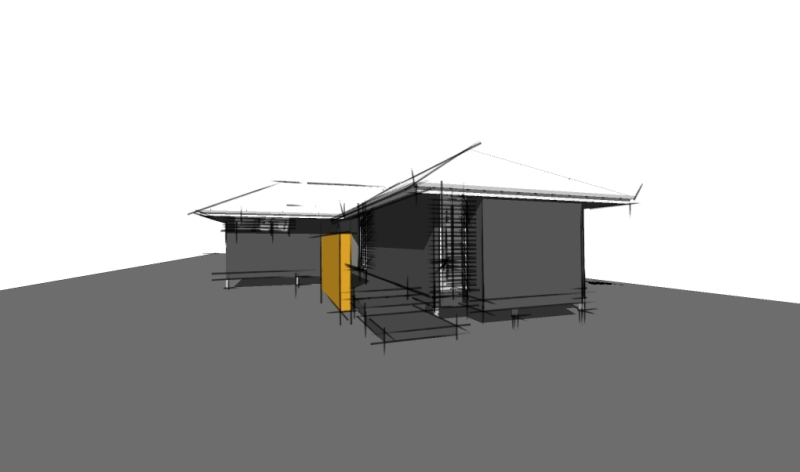
          Sometime, a schematic presentations seem to be best a little less 'in your face' in grey scale...

          I tried it out on a little modular house I designed...

          The only problem with it is that it doesn't act like 'face styles' in that changing from one scene to another it doesn't save with styles....

          Not complaining though!!! Would love to see it included in SU7.0 face styles...
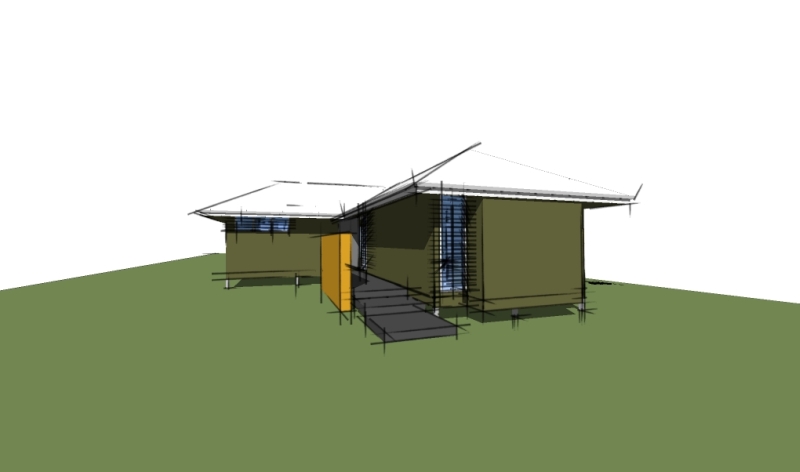

          GreyRuby-color.jpg


          GreyRuby-grey.jpg

          Just Curious...

          1 Reply Last reply
          Reply Quote 0
          • jujuJ
            juju
            last edited by

            Thanks Jim.

            Save the Earth, it's the only planet with chocolate.

            1 Reply Last reply
            Reply Quote 0
            • plot-parisP
              plot-paris
              last edited by

              thanks a lot Jim! this ruby is a nice enhancement for producing stylised output with SketchUp
              utiler, you did a perfect example what the script can be used for. ๐Ÿ‘

              @Remus (completely off topic): I really like the reincarnation of your avatar-image. its a bit like Gandalf the Grey / Gandalf the White - I had to look twice, but I did recognice you in your new guise. ๐Ÿ˜„

              1 Reply Last reply
              Reply Quote 0
              • PixeroP
                Pixero
                last edited by

                Jim: I see you use the average of r, g and b to get the greyscale color.
                A often used and more visually correct way is to use this formula:

                Greyscale = (r * 0.3) + (g * 0.59) + (b * 0.11);
                
                1 Reply Last reply
                Reply Quote 0
                • D
                  Daniel S
                  last edited by

                  Great!!! ๐Ÿ˜
                  Thank you Jim!!!

                  Daniel S

                  1 Reply Last reply
                  Reply Quote 0
                  • Dave RD
                    Dave R
                    last edited by

                    Coen, I couldn't find a way to do this with existing style settings. I'd be happy to learn it though.

                    Etaoin Shrdlu

                    %

                    (THERE'S NO PLACE LIKE)

                    G28 X0.0 Y0.0 Z0.0

                    M30

                    %

                    1 Reply Last reply
                    Reply Quote 0
                    • O
                      otb designworks
                      last edited by

                      Thanks Jim!

                      Cheers, Chuck

                      OTB Designworks is on Youtube

                      6 core nMP, 32 gig RAM, (2) D700 GPU's, dual monitors

                      1 Reply Last reply
                      Reply Quote 0
                      • D
                        drewpoeppel
                        last edited by

                        Thanks a ton this is VERY helpful.

                        1 Reply Last reply
                        Reply Quote 0
                        • G
                          gaucho
                          last edited by

                          Good stuff Jim, thanks!

                          "eat well, stay fit, die anyway..."

                          1 Reply Last reply
                          Reply Quote 0
                          • S
                            sepo
                            last edited by

                            Nice ...It renders black and white in Podium but keeps the colour of the sky ( i presume ground as well)
                            It would be nice to be able to choose say one colour which could stay as colour ...
                            Thanks Jim ....

                            1 Reply Last reply
                            Reply Quote 0
                            • Dave RD
                              Dave R
                              last edited by

                              Sepo, after making the model all grey, right click on a face containing the color you wish to show. Choose Revert color from the menu. ๐Ÿ˜‰

                              Etaoin Shrdlu

                              %

                              (THERE'S NO PLACE LIKE)

                              G28 X0.0 Y0.0 Z0.0

                              M30

                              %

                              1 Reply Last reply
                              Reply Quote 0
                              • S
                                sepo
                                last edited by

                                Aha...cheers Dave did not pick that up...Cool. Any chance to actually have more than 10 shades of grey. That would make renders nicer.

                                1 Reply Last reply
                                Reply Quote 0
                                • Dave RD
                                  Dave R
                                  last edited by

                                  As I understand it, Jim's method of creating the gray values is to average the RGB values and apply that number to all of the RGB settings. I don't think we're limited to 10 steps as was discussed in the other thread.

                                  Etaoin Shrdlu

                                  %

                                  (THERE'S NO PLACE LIKE)

                                  G28 X0.0 Y0.0 Z0.0

                                  M30

                                  %

                                  1 Reply Last reply
                                  Reply Quote 0
                                  • S
                                    sepo
                                    last edited by

                                    Actually I think you are correct ... discard the last bit ๐Ÿ˜‰

                                    1 Reply Last reply
                                    Reply Quote 0
                                    • utilerU
                                      utiler
                                      last edited by

                                      @unknownuser said:

                                      I like it and thanks, but can't this be done using a Style?

                                      I agree, Coen. A face style. That way we could save it to styles and scenes.....

                                      It wound allow us to 'revert color' in a style / scene though I wouldn't think..... Jim?

                                      Just Curious...

                                      1 Reply Last reply
                                      Reply Quote 0
                                      • Z
                                        zed252000
                                        last edited by

                                        TY " You're Good !!"

                                        Whatever we IMAGINE....

                                        1 Reply Last reply
                                        Reply Quote 0
                                        • J
                                          Jim
                                          last edited by

                                          @utiler said:

                                          @unknownuser said:

                                          I like it and thanks, but can't this be done using a Style?

                                          I agree, Coen. A face style. That way we could save it to styles and scenes.....

                                          It wound allow us to 'revert color' in a style / scene though I wouldn't think..... Jim?

                                          Thanks and you're welcome, everyone.

                                          Having it work as a Face Style would be nice. Face Styles can be selected in Ruby by setting an option called the RenderMode. There is just not a way to create a new Face Style that I can see.

                                          Like Dave said, I don't think a Style is an option either. There is no control over individual colors in a Style.

                                          The idea of saving material changes between Scenes is a completely separate plugin...

                                          Hi

                                          1 Reply Last reply
                                          Reply Quote 0
                                          • utilerU
                                            utiler
                                            last edited by

                                            You're right Jim, that's the only thing that restricts it from being a 'face style' option. It would be nice to be able to "update scene" individually rather than a ruby that effects the model period....but that takes away from the "reverse color" option....

                                            I guess if this was a face style and we wanted to 'spot color' an element, we could set up diferent components and scenes then import into Layout and overlay scenes.....a round about way of doing things though and getting into another topic, 'more than one style in a drawing / file'.

                                            Five Star, Jim.
                                            Just Curious...

                                            1 Reply Last reply
                                            Reply Quote 0

                                            Hello! It looks like you're interested in this conversation, but you don't have an account yet.

                                            Getting fed up of having to scroll through the same posts each visit? When you register for an account, you'll always come back to exactly where you were before, and choose to be notified of new replies (either via email, or push notification). You'll also be able to save bookmarks and upvote posts to show your appreciation to other community members.

                                            With your input, this post could be even better ๐Ÿ’—

                                            Register Login
                                            • 1
                                            • 2
                                            • 3
                                            • 4
                                            • 5
                                            • 6
                                            • 7
                                            • 4 / 7
                                            • First post
                                              Last post
                                            Buy SketchPlus
                                            Buy SUbD
                                            Buy WrapR
                                            Buy eBook
                                            Buy Modelur
                                            Buy Vertex Tools
                                            Buy SketchCuisine
                                            Buy FormFonts

                                            Advertisement