sketchucation logo sketchucation
    • 登入
    Oops, your profile's looking a bit empty! To help us tailor your experience, please fill in key details like your SketchUp version, skill level, operating system, and more. Update and save your info on your profile page today!
    🔌 Easy Offset | Offset selected faces in SketchUp in positive and negative offsets. Download

    Problem with export: materials

    已排程 已置頂 已鎖定 已移動 SketchUp Discussions
    sketchup
    23 貼文 7 Posters 2.5k 瀏覽 7 Watching
    正在載入更多貼文
    • 從舊到新
    • 從新到舊
    • 最多點贊
    回覆
    • 在新貼文中回覆
    登入後回覆
    此主題已被刪除。只有擁有主題管理權限的使用者可以查看。
    • Y 離線
      Yorky5
      最後由 編輯

      hello,
      I have problems with exporting skp to 3d model:
      I make a model, add multiple materials, export to let's say .3ds, confirm 'export texture maps',... and a windows pops up and says: exported material: 1.
      Importing in a renderprogram shows that there are no materials assigned to it. What am i doing wrong?
      thx,
      York

      1 條回覆 最後回覆 回覆 引用 0
      • GaieusG 離線
        Gaieus
        最後由 編輯

        York, there might be several reasons.

        • materials with non-English characters (and maybe with spaces) don't export to 3ds;
        • materials applied on back faces don't export to 3ds;
        • maybe (I cannot really remember) material names shouldn't even be more than 8 character long.
          Probably others can add some more to the list. Could you upload the skp file?

        Also I'm moving this topic for this section is for sharing materials and their resources.

        Gai...

        1 條回覆 最後回覆 回覆 引用 0
        • plot-parisP 離線
          plot-paris
          最後由 編輯

          I am not sure if this counts for 3ds export...

          but the only thing I would add to your list, Gaieus, is that if you apply a texture outside a group, it may not be exported with uv-coordinates and therefore displayed only as a colour instead of as a texture. at least that is what happens with Indigo

          1 條回覆 最後回覆 回覆 引用 0
          • soloS 離線
            solo
            最後由 編輯

            York

            Firstly welcome to SCF, if you post the SU model with textures assigned I can have a look at it and test the export for you and see if and where you are going wrong.

            http://www.solos-art.com

            If you see a toilet in your dreams do not use it.

            1 條回覆 最後回覆 回覆 引用 0
            • Y 離線
              Yorky5
              最後由 編輯

              Hi, thx for the responses.

              I guess the problem is solved, after restarting my computer... very very strange.

              I have another big problem, and i can't find an answer.

              I have summarized al with the pictures below. The problem you see, i also have with downloaded (similar) objects from sketchup warehouse (let's say a sink with watercrane). Seems like all this kinds of models sketchup has, causes major problems during texturing. I wonder if there's anyone who can solve this, tried the 3D forum where i am active, but still no go.

              PLEASE HELP, thx

              http://lookatimages.files.wordpress.com/2008/08/11.jpg

              http://lookatimages.files.wordpress.com/2008/08/21.jpg

              http://lookatimages.files.wordpress.com/2008/08/31.jpg

              http://lookatimages.files.wordpress.com/2008/08/41.jpg

              http://lookatimages.files.wordpress.com/2008/08/52.jpg

              1 條回覆 最後回覆 回覆 引用 0
              • R 離線
                remus
                最後由 編輯

                Pics arent showing...

                http://remusrendering.wordpress.com/

                1 條回覆 最後回覆 回覆 引用 0
                • GaieusG 離線
                  Gaieus
                  最後由 編輯

                  This is what it gives: (a 403 error - you have to be logged in):
                  http://lookatimages.files.wordpress.com/2008/08/11.jpg

                  Please, upload the images or place them on an open host.

                  Gai...

                  1 條回覆 最後回覆 回覆 引用 0
                  • plot-parisP 離線
                    plot-paris
                    最後由 編輯

                    imageshack is a good site to do that (at least it works good for me 😉 )

                    1 條回覆 最後回覆 回覆 引用 0
                    • GaieusG 離線
                      Gaieus
                      最後由 編輯

                      @plot-paris said:

                      imageshack is a good site to do that (at least it works good for me 😉 )

                      And slow as a snail... 😒

                      Gai...

                      1 條回覆 最後回覆 回覆 引用 0
                      • plot-parisP 離線
                        plot-paris
                        最後由 編輯

                        indeed 😄
                        which one do you use? obviously not picasa (doesn't work)

                        1 條回覆 最後回覆 回覆 引用 0
                        • GaieusG 離線
                          Gaieus
                          最後由 編輯

                          I have a couple of webspaces actually so I can upload anything on them but I know there are a couple of really good (and fast) ones here in Hungary.

                          For some funny reasons these US image (and other file) hosting services are sooo commercial that they tend to even slow down connectuion speed to make you pay (I don't know how this is at imageshack as a amtter of fact but have a look at rapidshare for instance).

                          Gai...

                          1 條回覆 最後回覆 回覆 引用 0
                          • Y 離線
                            Yorky5
                            最後由 編輯

                            Pls try again now, content should no longer be protected,...
                            many thanks

                            http://lookatimages.files.wordpress.com/2008/08/11.jpg

                            http://lookatimages.files.wordpress.com/2008/08/21.jpg

                            http://lookatimages.files.wordpress.com/2008/08/31.jpg

                            http://lookatimages.files.wordpress.com/2008/08/41.jpg

                            http://lookatimages.files.wordpress.com/2008/08/52.jpg

                            1 條回覆 最後回覆 回覆 引用 0
                            • GaieusG 離線
                              Gaieus
                              最後由 編輯

                              OK, there are two problems here basically:

                              1. back (bluish grey) faces: this is a modeling problem - right click on it and "Reverse faces". If unwanted faces also reverse (to grey), turn on hidden geometry (View menu) and do it with individual faces.
                                In many external rendering softwares these reversed (back) faces do not render at all.

                              2. UV mapping. This is tricky in SU as it does not have good mapping tools. On the cylinder part you can try this:

                              3. turn on hidden geometry (see above)

                              4. right click on one of the facets > texture > position > hit enter

                              5. now sample it with the Allt+Paint bucket (=Eye dropper) tool

                              6. turn off hidden geometry

                              7. paint the cylinder.
                                On the bending part this will not work properly however, there (or on the whole pipe) you can try the "Project" submenu item at step b) instead of position but I doubt that you will get a proper projection (If you knew how much I tried with simple arches!).

                              Gai...

                              1 條回覆 最後回覆 回覆 引用 0
                              • R 離線
                                REGIS
                                最後由 編輯

                                Hi Yorky

                                I've seen your post on Cheetah3D forum (I use C3D too)

                                Why the arc is grey and not white ?

                                It depens on the color of the face you select to use follow me :
                                The face you click on with follow me tool is grey so the result is white
                                The face you click on with follow me tool is white so the result is grey

                                I think you've got to keep your mesh untextured and try to use Cheetah 3D unwrap tool to have a nice result on the arc.

                                regards

                                ( just a question : do you speak french Yorky )

                                @+

                                1 條回覆 最後回覆 回覆 引用 0
                                • R 離線
                                  REGIS
                                  最後由 編輯

                                  Hi Yorky

                                  I made a little try

                                  In sketchup
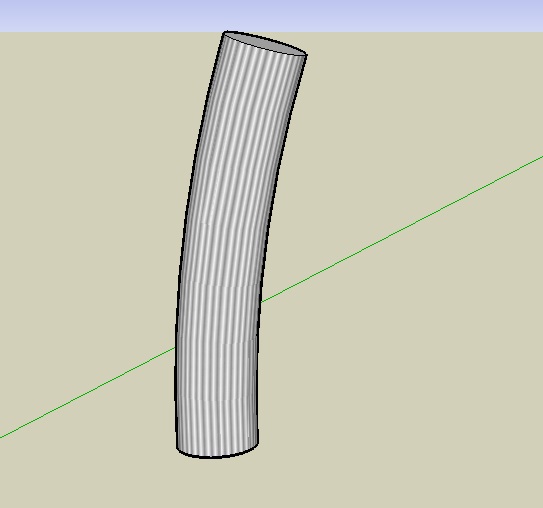
                                  texture arc.jpg

                                  exporting at fbx format keep the faces non triangulated if they aren't in sketchup
                                  rendered with Cheetah3D ( very fast and basic )
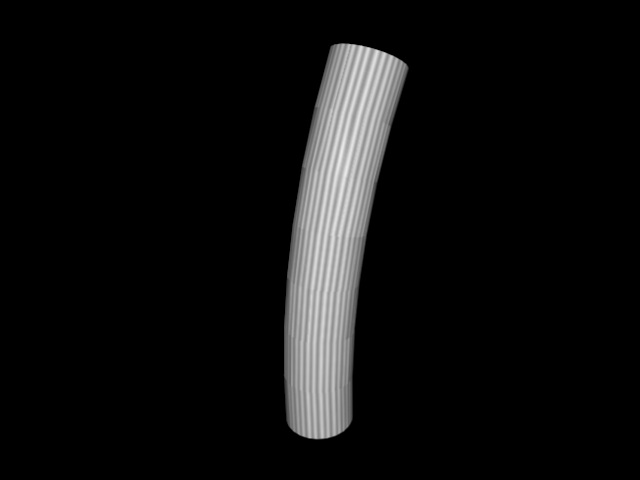
                                  essai texture arc.jpg

                                  regards

                                  @+

                                  1 條回覆 最後回覆 回覆 引用 0
                                  • Y 離線
                                    Yorky5
                                    最後由 編輯

                                    @regis said:

                                    Hi Yorky

                                    I made a little try

                                    In sketchup
                                    [attachment=1:3mhs2w0s]<!-- ia1 -->texture arc.jpg<!-- ia1 -->[/attachment:3mhs2w0s]

                                    exporting at fbx format keep the faces non triangulated if they aren't in sketchup
                                    rendered with Cheetah3D ( very fast and basic )
                                    [attachment=0:3mhs2w0s]<!-- ia0 -->essai texture arc.jpg<!-- ia0 -->[/attachment:3mhs2w0s]

                                    regards

                                    @+

                                    Hi, thx all,

                                    There seems to be no 'voodoo' solution for texturing arc-stuff... I still believe that sketchup makes a mess with polygons, unless i do something terribly wrong...

                                    Gaieus, i tried your advice... it's still not the wanted result. Maybe someone could write some tutorial about the best way to model an arc, texture and render it the right way... I guess sketchup can't do better, and that the UV-mapping should be done in your favorite 3d program.
                                    In the cheetah3d forum, Frank Beckman suggests his method... http://www.cheetah3d.de/forum/showthread.php?t=3363

                                    Regis: je ne parle pas le français, en petit peu 😉 Some people texture in sketchup and tweak it in cheetah (like Peer in the c3d forum), you texture completely in cheetah? Can you pls explain your last post? What do you mean or suggest?

                                    Regards,

                                    Yorky

                                    1 條回覆 最後回覆 回覆 引用 0
                                    • R 離線
                                      REGIS
                                      最後由 編輯

                                      Hi Yorky

                                      the first image shown before is the model textured in SU and the second is the model exported at fbx format and just rendered within Cheetah3D.

                                      I would like to learn UV mapping within C3D but at the moment, I don't know hpw to like Frank Beckmann.
                                      If I've got time I can make a little video showing how to tecture an arc ( 🤢 lot of time consuming )

                                      regards

                                      @+

                                      1 條回覆 最後回覆 回覆 引用 0
                                      • Y 離線
                                        Yorky5
                                        最後由 編輯

                                        @regis said:

                                        If I've got time I can make a little video showing how to tecture an arc ( 🤢 lot of time consuming )

                                        That would be wonderful! I know it's time consuming ;-( ,but the upside is that you learn instead... So, if you have some time left
                                        and start this tut, let me know, i (and many other) would really appreciate. Screencapturing (like 'ishowu') is pretty easy.

                                        greetings,

                                        Yorky

                                        1 條回覆 最後回覆 回覆 引用 0
                                        • bigstickB 離線
                                          bigstick
                                          最後由 編輯

                                          There are some good video tutorials on YouTube dealing with texturing that might help you. This (http://www.youtube.com/watch?v=NV0mLPQDcJ4&feature=user) is one. This (http://www.youtube.com/watch?v=HHsRRLCAOm8&feature=related)is another.

                                          1 條回覆 最後回覆 回覆 引用 0
                                          • R 離線
                                            REGIS
                                            最後由 編輯

                                            OK Yorky

                                            I'll do a video screen capture this week end.
                                            I don't know about IshowU but i like a lot ScreenFlow.

                                            regards

                                            @+

                                            1 條回覆 最後回覆 回覆 引用 0
                                            • 1
                                            • 2
                                            • 1 / 2
                                            • 第一個貼文
                                              最後的貼文
                                            Buy SketchPlus
                                            Buy SUbD
                                            Buy WrapR
                                            Buy eBook
                                            Buy Modelur
                                            Buy Vertex Tools
                                            Buy SketchCuisine
                                            Buy FormFonts

                                            Advertisement
