[Plugin][$] Tools On Surface - v2.6a - 01 Apr 24




-
Is there any free alternative to Tools On Surface
-
@magedalex said:
Is there any free alternative to Tools On Surface
You can draw planar shapes and extrude them through your curved surface. Then use Intersect faces.
Please correct your forum profile. There is no SketchUp 2018 Make version. That information helps us help you if it is correct.
-
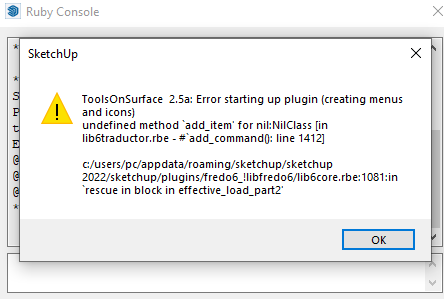
hello. Any help in this situation?
-
@sabex said:
hello. Any help in this situation?
Does it repeat after you restart SketchUp? Its normal to get this the first time you install because Fredo's extensions are complex and restarting SketchUp is needed to finalize it.
-
You also need the latest version of LibFredo installing...
Also, because this is licensed, you need the newest version of SketchUcation tools for this...
After installation you must restart SketchUp to sync everything... -
NEW RELEASE: Tools on Surface 2.6a- 01 Apr 24
Requirements
- LibFredo6: v14.3b
- Sketchucation PluginStore: v4.4.0
- Sketchup version: SU2017 and above
This maintenance release is for future compatibility
Please see main post for discussion
See Plugin download page for download
-
Hello @fredo6 how are you.
I am writing to you about some differences I have had with the option of cutting the mesh.
Normally when one makes the cut on the surface, there are two options, the geodesic and the straight one.
In the case of Tools On Surface, it seems more like a geodesic cut, but I make comparisons with other software in AutoCAD and the difference is a lot.
I am passing it on to you in order to improve the plugin and make it better every day.Geodesic cut.
A geodesic is a curve that represents in some sense the shortest path between two points on a surface.
GeodesicI also wanted to request adding one more command, which would be the straight cut, I currently do it with another plugin, but I would not like to depend on third parties.
Cross section from two points or straight cut
Cross section takes two points as a cutting line and drops an imaginary vertical plane onto a surface. This is usually accomplished by viewing the surfaces from above in the XY view.I attach an example file, so you can see the differences and the new function I requested.
Sample file.Excuse my English, I only speak Spanish.
If you can't understand me, you can tell me and I will find a way to explain myself better.
If you need any collaboration from me on the topic of geodesics, you can tell me.
If you can help me with the issue, I appreciate it.
Thank you. -
Thanks for the request, which I understand.
Currently, ToolsOnSurface does not use geodesic or any particular geometry-defined path on the surface. It just tries to go from the origin to the end with a cut path taken from the plane passing by the origin and ed, and roughly perpendicular to the surface met between the point (kind of average).
This is therefore approximate and error-prone, since this depends on the surface itself, which may be convoluted..
-
Hello, how are you, thanks for your response.
Well, I hope that at some point you can update the cut to geodesics, which is the most correct and there would be no errors.
And you can also add the straight cut.As always, thank you very much for your dedication and the collaboration you give us.
-
 T tuna1957 referenced this topic on
-
Hello, I’m using ToolsOnSurface 2.6a with SketchUp 2026 on Windows. Manage License shows “OK – Active,” the license history shows successful validations, and the local license file is present. However, every time I launch the tool, it says “Trial Expired,” even after restarting SketchUp. The license window shows 9 seats assigned for a maximum of 3, and clicking “Seats” does nothing. Could you check my seat assignments and help me restore access to ToolsOnSurface?
-
Is both LibFredo and ToS the latest releases? Is Sketchucation Tools also v5.0.8
Please run the Window > Libfredo Settings > Fredo6 Plugins Information for Sketchucation Support menu command in SketchUp and copy/paste the output into your reply.
That should help us understand more.
-
@belle-maison I have erased your seats and made a small change in the code. Copuld you please try to activate again?




Hello! It looks like you're interested in this conversation, but you don't have an account yet.
Getting fed up of having to scroll through the same posts each visit? When you register for an account, you'll always come back to exactly where you were before, and choose to be notified of new replies (either via email, or push notification). You'll also be able to save bookmarks and upvote posts to show your appreciation to other community members.
With your input, this post could be even better 💗
Register Login


Advertisement