sketchucation logo sketchucation
    • 登入
    Oops, your profile's looking a bit empty! To help us tailor your experience, please fill in key details like your SketchUp version, skill level, operating system, and more. Update and save your info on your profile page today!
    🔌 Smart Spline | Fluid way to handle splines for furniture design and complex structures. Download

    [Plugin][$] Tools On Surface - v2.6a - 01 Apr 24


    已排程 已置頂 已鎖定 已移動 Plugins
    638 貼文 203 Posters 1.6m 瀏覽 202 Watching
    正在載入更多貼文
    • 從舊到新
    • 從新到舊
    • 最多點贊
    回覆
    • 在新貼文中回覆
    登入後回覆
    此主題已被刪除。只有擁有主題管理權限的使用者可以查看。
    • Dave RD 離線
      Dave R
      最後由 編輯

      Endpoints and Extensions are controlled in the Styles window which you can get to via the Window menu or in the Default Tray in SU2016 for PC.
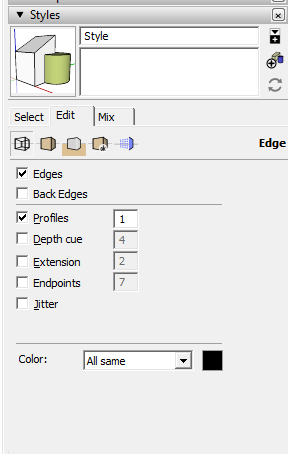
      Screenshot - 3_14_2016 , 1_40_00 PM.png

      there are many more style setting options available in the Styles window than you can access through the View menu.

      Etaoin Shrdlu

      %

      (THERE'S NO PLACE LIKE)

      G28 X0.0 Y0.0 Z0.0

      M30

      %

      1 條回覆 最後回覆 回覆 引用 0
      • jgbJ 離線
        jgb
        最後由 編輯

        Thank you Dave.

        I looked quickly at Styles, but not at that level below.


        jgb

        1 條回覆 最後回覆 回覆 引用 0
        • A 離線
          AsiaStarArt
          最後由 編輯

          😎 😎 😎 谢谢!

          1 條回覆 最後回覆 回覆 引用 0
          • H 離線
            Hannessy
            最後由 編輯

            Hello,

            I was excited finally to use this wonderful tool, but then this:

            ToolsOnSurface 2.2a: Error starting up plugin (creating menus and icons)
            undefined method declare_topmenu' for #<Traductor::Plugin:0x007fe1c8dcf6e8> [in bootstrap_OnSurface.rb: - #startup(): line 324]

            /Users/Library/Application Support/SketchUp 2016/SketchUp/Plugins/Fredo6_!LibFredo6/Lib6Core.rb:959:in `rescue in block in effective_load_part2'

            can someone help me? Thank you!

            Greetz

            Hannessy

            1 條回覆 最後回覆 回覆 引用 0
            • TIGT 離線
              TIG Moderator
              最後由 編輯

              Did you install it from the latest downloaded RBZ using the Preferences > Extensions > Install Extensions... button ?

              Did you also install the latest LibFredo ?

              This Library is needed by almost all of Fredo's tools...

              Install and restart SketchUp to see what happens...

              TIG

              1 條回覆 最後回覆 回覆 引用 0
              • TIGT 離線
                TIG Moderator
                最後由 編輯

                If you have copied older files over from another SketchUp version you might have some old files ?
                I suggest you open your Plugins folder and manually delete any subfolders and loader RB files that clearly relate to Fredo's tools/lib and reinstall them all.

                Fredo will probably chip in when he reads this...

                TIG

                1 條回覆 最後回覆 回覆 引用 0
                • R 離線
                  rmsnmz
                  最後由 編輯

                  I get an error when I install this: "Installation of fredo6_ToolsOnSurface is probably incorrect. Subfolder is missing." Any insight from anyone?

                  1 條回覆 最後回覆 回覆 引用 0
                  • Dave RD 離線
                    Dave R
                    最後由 編輯

                    How are you attempting to install it? What version of SketchUp? What operating system? Your profile doesn't say. If you want help you have to give us some useful information.

                    Etaoin Shrdlu

                    %

                    (THERE'S NO PLACE LIKE)

                    G28 X0.0 Y0.0 Z0.0

                    M30

                    %

                    1 條回覆 最後回覆 回覆 引用 0
                    • R 離線
                      rmsnmz
                      最後由 編輯

                      @dave r said:

                      How are you attempting to install it? What version of SketchUp? What operating system? Your profile doesn't say. If you want help you have to give us some useful information.

                      Yes, trying to install this extension. Su 2016 + Windows 7 Pro. And I see the same error message when try to install some of the Fredo's other extensions as well; topo shaper, visu hole and the animator. Others install ok.

                      1 條回覆 最後回覆 回覆 引用 0
                      • Dave RD 離線
                        Dave R
                        最後由 編輯

                        Unfortunately you failed to answer my question about how you are attempting to install it. Please tell us HOW you are installing them. And give us the exact text of the error message you are getting. Help us help you.

                        Etaoin Shrdlu

                        %

                        (THERE'S NO PLACE LIKE)

                        G28 X0.0 Y0.0 Z0.0

                        M30

                        %

                        1 條回覆 最後回覆 回覆 引用 0
                        • R 離線
                          rmsnmz
                          最後由 編輯

                          @dave r said:

                          Unfortunately you failed to answer my question about how you are attempting to install it. Please tell us HOW you are installing them. And give us the exact text of the error message you are getting. Help us help you.

                          Trying to install through the sketchucation extension store 3.0... See the warning popup... Each time I try to install the extension this error message pops up. I tried installing through using the *.rbz file as well (with the skecthucation archive installer) but the same result. This same error message pops up when i try to install Fredo's Visu hole, toposhaper and animator extensions as well. Any more information?
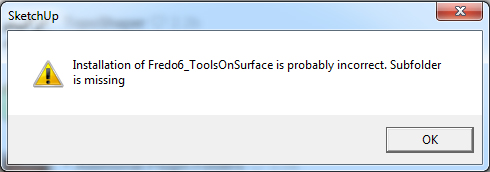

                          error message 3.jpg

                          1 條回覆 最後回覆 回覆 引用 0
                          • G 離線
                            ganhorg
                            最後由 編輯

                            😛 😛 😛 😛 😛 😛 😛 😛 😛

                            1 條回覆 最後回覆 回覆 引用 0
                            • F 離線
                              FZSarasota
                              最後由 編輯

                              Ok, Just tested it on SU2017, works great (found no bug splats so far). To have more control over primitives in SU isn't only a major time saver, but a necessity most of the time. Yea, I'm new to SU (came over from the VFX industry, modeling with different packages -LW, Maya, MAX, etc...). Don't get me wrong, SU is wonderful, but some it's tools are a bit lacking (user control wise) IMHO... Sure, SU is geared towards a different market (I get it).

                              That being said, I'm really glad you (and others) have taken the time to develop these plugins & tool sets that improve upon SU's functionality.

                              So far I've DL'ed and installed 3 of you're plugins (will DL all of them this weekend).

                              Joint Push Pull.
                              RoundCorner.
                              Tools On Surface.

                              All are doing their thing in ver.2017 without issues

                              Thanks again,

                              -Terry

                              1 條回覆 最後回覆 回覆 引用 0
                              • jgbJ 離線
                                jgb
                                最後由 編輯

                                FZSarasota » Wed, 14 Dec 2016 4:59 pm
                                That being said, I'm really glad you (and others) have taken the time to develop these plugins & tool sets that improve upon SU's functionality.

                                Take a good look at Curviloft and its associated tools. 😍


                                jgb

                                1 條回覆 最後回覆 回覆 引用 0
                                • U 離線
                                  ursulaod
                                  最後由 編輯

                                  @dave r said:

                                  Unfortunately you failed to answer my question about how you are attempting to install it. Please tell us HOW you are installing them. And give us the exact text of the error message you are getting. Help us help you.

                                  I also have this same problem and error- install through sketchucation extension manager 3.0, sketchup pro 2016, windows 10 Pro

                                  The sketchucation manager shows they're installed, but no drop down in windows- extensions, and no toolbar.

                                  There are other extensions downloaded through trimbles extension manager in the same plugin folder that work fine, so it's not the location.

                                  Thanks!

                                  1 條回覆 最後回覆 回覆 引用 0
                                  • Dave RD 離線
                                    Dave R
                                    最後由 編輯

                                    @ursulaod said:

                                    I also have this same problem and error- install through sketchucation extension manager 3.0, sketchup pro 2016, windows 10 Pro

                                    The sketchucation manager shows they're installed, but no drop down in windows- extensions, and no toolbar.

                                    There are other extensions downloaded through trimbles extension manager in the same plugin folder that work fine, so it's not the location.

                                    Thanks!

                                    Did you also install LibFredo6 on which this extension depends?

                                    From the first page of this thread:
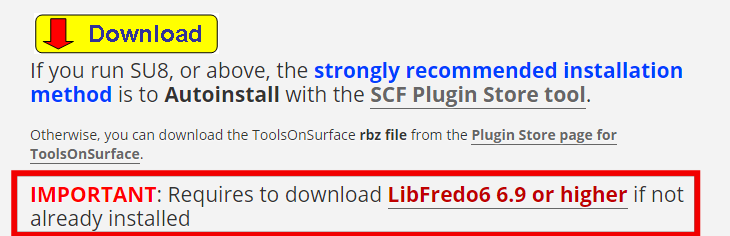
                                    Screenshot - 12_30_2016 , 3_53_38 AM.png

                                    And from the SCF Extension Store page.
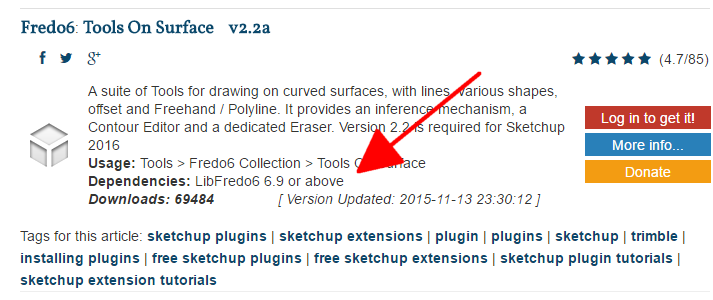
                                    Screenshot - 12_30_2016 , 3_55_21 AM.png

                                    Etaoin Shrdlu

                                    %

                                    (THERE'S NO PLACE LIKE)

                                    G28 X0.0 Y0.0 Z0.0

                                    M30

                                    %

                                    1 條回覆 最後回覆 回覆 引用 0
                                    • A 離線
                                      aaahn
                                      最後由 編輯

                                      I can't find the download button for Tools on Surface. Do you still offer it?

                                      1 條回覆 最後回覆 回覆 引用 0
                                      • Dave RD 離線
                                        Dave R
                                        最後由 編輯

                                        @aaahn said:

                                        I can't find the download button for Tools on Surface. Do you still offer it?

                                        Really? See my post immediately above yours. downloading the extension is very clearly spelled out under the word Download with the red arrow in the yellow box in the first post of this thread.

                                        Etaoin Shrdlu

                                        %

                                        (THERE'S NO PLACE LIKE)

                                        G28 X0.0 Y0.0 Z0.0

                                        M30

                                        %

                                        1 條回覆 最後回覆 回覆 引用 0
                                        • Dave RD 離線
                                          Dave R
                                          最後由 編輯

                                          @fletch said:

                                          The other thing I was careful to do is to choose the same plugin folder every time (C:/ProgramData/SketchUp...). I think what happened to get the error the first time is that I somehow chose the wrong plugin installation location for Libfredo6.

                                          This time around I installed them all into a single location and they all show up ONLY under the "SketchUcation Extensions Manager" they do NOT show up at all now under the "Plugin Manager"

                                          The correct location for all user-installed extensions including the ones by Fredo is In User/App Data/Roaming/SketchUp/SketchUp 2017/SketchUp/Plugins. You should not install into the Program Data directory.

                                          There are several reasons for this. Unless you modified the security settings for the directory, the extensions won't be installed correctly. This is the problem we had back when the Plugins folder was in Program Files/SketchUp... and which they got around by moving it to the user/App Data...

                                          If you ever have any need to reinstall SketchUp, the Program Data Plugins folder will most likely get overwritten and you'll lose anything you added to it. You can even uninstall SketchUp entirely and the User/App Data plugins folder will not be touched.

                                          Etaoin Shrdlu

                                          %

                                          (THERE'S NO PLACE LIKE)

                                          G28 X0.0 Y0.0 Z0.0

                                          M30

                                          %

                                          1 條回覆 最後回覆 回覆 引用 0
                                          • F 離線
                                            Fletch
                                            最後由 編輯

                                            good tip, Dave ❗ 😄
                                            however, it did solve the problem.
                                            I think the answer is that the Fredo collection must all be placed in the same folder, not split up among the two folders.
                                            I'll modify my post above to match your suggestion.

                                            Fletch
                                            Twilight Render Cross-platform Plugin for SketchUp on PC or Mac

                                            1 條回覆 最後回覆 回覆 引用 0
                                            • 1
                                            • 2
                                            • 13
                                            • 14
                                            • 15
                                            • 16
                                            • 17
                                            • 31
                                            • 32
                                            • 15 / 32
                                            • 第一個貼文
                                              最後的貼文
                                            Buy SketchPlus
                                            Buy SUbD
                                            Buy WrapR
                                            Buy eBook
                                            Buy Modelur
                                            Buy Vertex Tools
                                            Buy SketchCuisine
                                            Buy FormFonts

                                            Advertisement