sketchucation logo sketchucation
    • 登入
    Oops, your profile's looking a bit empty! To help us tailor your experience, please fill in key details like your SketchUp version, skill level, operating system, and more. Update and save your info on your profile page today!
    🔌 Smart Spline | Fluid way to handle splines for furniture design and complex structures. Download

    [Plugin][$] Tools On Surface - v2.6a - 01 Apr 24


    已排程 已置頂 已鎖定 已移動 Plugins
    638 貼文 203 Posters 1.6m 瀏覽 202 Watching
    正在載入更多貼文
    • 從舊到新
    • 從新到舊
    • 最多點贊
    回覆
    • 在新貼文中回覆
    登入後回覆
    此主題已被刪除。只有擁有主題管理權限的使用者可以查看。
    • I 離線
      ibrahim zambak
      最後由 編輯

      tools on surface v1.8a plugin, sketchup 8 does not work. windows 8 operating system

      1 條回覆 最後回覆 回覆 引用 0
      • GaieusG 離線
        Gaieus
        最後由 編輯

        Ibrahim,

        More info is needed here. I have SU 8 on Windows 8 and the tool works fine on my computer so a "general doesn't work" is not enough.

        Gai...

        1 條回覆 最後回覆 回覆 引用 0
        • S 離線
          sasrabirawa
          最後由 編輯

          works fine on SKP 8 but doesn't work on SKP 2013. The libfred doesn't compatible w/ SKP 2013. even if I use the latest one... can anybody tell me how to fix ??

          Just an ordinary Sketchup user

          1 條回覆 最後回覆 回覆 引用 0
          • TIGT 離線
            TIG Moderator
            最後由 編輯

            The latest LibFredo... and several related tools were remade to be compatible with all previous versions and v2013.
            We must assume you are using the latest versions available from the SCF PluginStore...

            So you must be doing something wrong ?
            Are you properly installing things ?
            Since you haven't told us your OS I must guess at PC.

            If it's a new v2013 installation into the usual 'Program Files' folder, then Windows will have given the new SketchUp folder [and all of its subfolders] Read-only permissions. Then you can't Write new files into the Plugins folder; but to confuse you Windows might make it look like you have, but it has a actually put the files into a VirtualStore to protect you from yourself, so they don't auto-load as SketchUp starts! A link/button in the top-bars of the Plugins folder's Windows Explorer window is an indication of such limitations...

            If you use an RBZ archive and then 'install' button under Preferences > Extensions, or use the SCF Plugin Store dialog's AutoInstall feature from within SketchUp then it might still install properly, despite your own limited permissions; but that depends on several other things though...

            It is always best to have your Plugins folder set to have FULL read/write permissions for every entry in the 'users' uder the Security list: to do this...
            right-click > context-menu > Properties > Security > Edit ... tick FULL for each and Apply & OK...
            [you will need admin rights to do this].
            Note that even if you are setup in the Users Control Panel to have full 'admin' rights, that will not change the initial permissions the OS sets to the SketchUp folder and its contents, even admins are limited.
            Note that it is also advisable to always install apps as as admin... AND for SketchUp.exe I'd also set its Properties > Compatibility, with the 'Run this program as an administrator' box ticked...

            TIG

            1 條回覆 最後回覆 回覆 引用 0
            • E 離線
              elisaha
              最後由 編輯

              Hi everyone,

              I'm a SU-newbie with SU 8 on a Mac with OS X 10.7.5, however I have troubles installing ToolsOnSurface 1.8a. I do have the ZLoarder, LibFredo and the Tutorial Offset on Surface in the correct plugin folder. It even shows up in my extensions, but there is no line-up. What can I do?

              I do have a general problem with installing plug-ins.. I don't know what I would be doing wrong, please help!

              Thanks alot,
              Elisa

              1 條回覆 最後回覆 回覆 引用 0
              • mitcorbM 離線
                mitcorb
                最後由 編輯

                Hi:
                On the very first page of this thread under Installation, for Mac is this:
                [On Mac the SU plugin directory should be:
                Macintosh HD/Library/Application Support/Google SketchUp 7/SketchUp/plugins]
                In your case, it will be Sketchup 8 but the rest of the path should be correct.

                Alternatively, go to the top of this page, mouse over Resources, and select Plugin Store Download. This automates the process. Watch the video, read the information.

                I take the slow, deliberate approach in my aimless wandering.

                1 條回覆 最後回覆 回覆 引用 0
                • G 離線
                  giltora
                  最後由 編輯

                  tools on surface not responding.. help please!!!!

                  1 條回覆 最後回覆 回覆 引用 0
                  • TIGT 離線
                    TIG Moderator
                    最後由 編輯

                    @giltora said:

                    tools on surface not responding.. help please!!!!
                    More info is needed.
                    HOW isn't it 'responding' ?
                    Do you get the extension/toolbar ?
                    Are there error messages?
                    [Try it with the Ruby Console window open...]
                    Did you get the latest versions of this tool AND the required LibFredo...
                    Both are available in the SCF PluginStore...

                    TIG

                    1 條回覆 最後回覆 回覆 引用 0
                    • P 離線
                      popfunky
                      最後由 編輯

                      Thank but i can't install 😢

                      1 條回覆 最後回覆 回覆 引用 0
                      • TIGT 離線
                        TIG Moderator
                        最後由 編輯

                        @popfunky said:

                        Thank but i can't install 😢
                        Please explain your problem better, so we can help you properly.

                        How are you trying to install this ?

                        Do you have the required support 'Lib' installed as explained in the download details ?

                        TIG

                        1 條回覆 最後回覆 回覆 引用 0
                        • A 離線
                          archdeacon
                          最後由 編輯

                          Fredo thank you for these great tools. i am having a hard time installing this one though. I am on sketchup 8 pro - Windows 7. any ideas...? i have observed the footprint and everything. I do not appear to have the LibFredo6.rb that you are mentioning (i have the newer library). Is this because you have updated the lbrary to the new version? can you instruct me on how to cure this problem.
                          thanks for your help.

                          1 條回覆 最後回覆 回覆 引用 0
                          • fredo6F 離線
                            fredo6
                            最後由 編輯

                            @archdeacon said:

                            Fredo thank you for these great tools. i am having a hard time installing this one though. I am on sketchup 8 pro - Windows 7. any ideas...? i have observed the footprint and everything. I do not appear to have the LibFredo6.rb that you are mentioning (i have the newer library). Is this because you have updated the lbrary to the new version? can you instruct me on how to cure this problem.
                            thanks for your help.

                            Since you have Sketchup 8, you should

                            • first, install the Sketchucation Plugin Store tool
                            • Then Auto-install my scripts with this tool. You'll have zero problem and it's much easier and faster than with the ZIP file. You will also get the latest versions available

                            You may need to do a clean up of your SU Plugins directory before if you had a wrong installation

                            Fredo

                            1 條回覆 最後回覆 回覆 引用 0
                            • A 離線
                              archdeacon
                              最後由 編輯

                              oops...
                              i just restarted sketchup (i had done it before as well and it did not work)
                              BUT IT WORKS FINE NOW!
                              thank you very much! 😍

                              1 條回覆 最後回覆 回覆 引用 0
                              • Dave RD 離線
                                Dave R
                                最後由 編輯

                                Karen, can you post a screen shot that shows the problem?

                                Etaoin Shrdlu

                                %

                                (THERE'S NO PLACE LIKE)

                                G28 X0.0 Y0.0 Z0.0

                                M30

                                %

                                1 條回覆 最後回覆 回覆 引用 0
                                • K 離線
                                  kdrr1607
                                  最後由 編輯

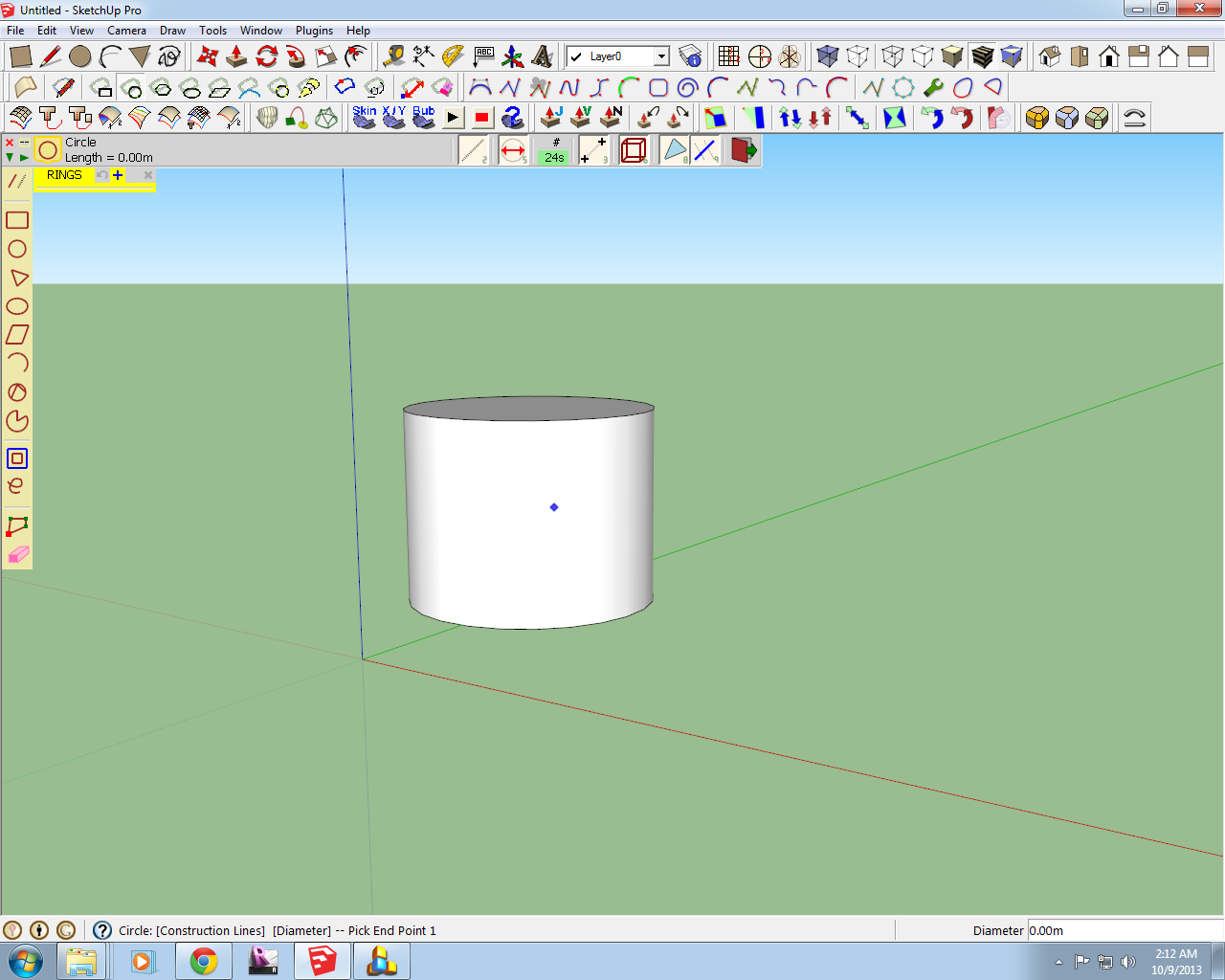
                                  Hi! I have a question. The construction lines are not showing every time I click on the surface after picking the initial point, so I cant pick an end point. Uhm, how can I solve this? Thanks.

                                  1 條回覆 最後回覆 回覆 引用 0
                                  • K 離線
                                    kdrr1607
                                    最後由 編輯

                                    @dave r said:

                                    Karen, can you post a screen shot that shows the problem?

                                    Here is the screen shot. I pressed print screen then pasted it on paint, but the mouse was did not appear on paint, so i took another photo that shows it on close-up. The construction line isnt showing as i move my pointer away from the initial point. I tried specifying a diameter/distance, but nothing happened.
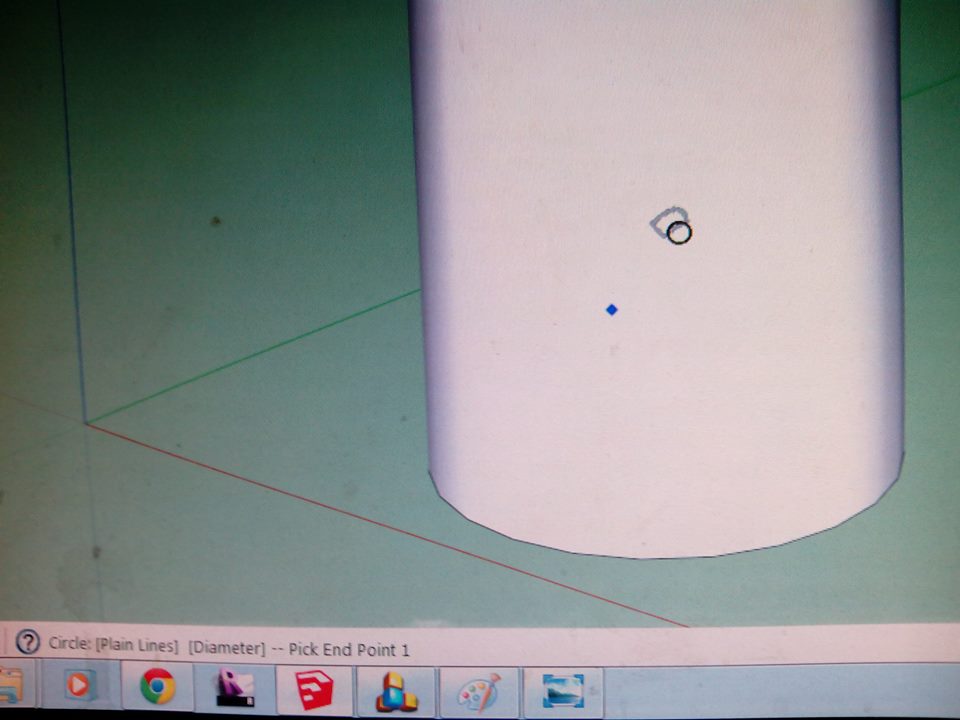
                                    Here is another photo showing the toolsonsurface as a mouse pointer.


                                    155712_10202164697658969_547416921_n.jpg

                                    1 條回覆 最後回覆 回覆 引用 0
                                    • Dave RD 離線
                                      Dave R
                                      最後由 編輯

                                      Do you get guidelines if you use the yellow Tape measure tool? I'm wondering if this is an OpenGL setting issue.

                                      Etaoin Shrdlu

                                      %

                                      (THERE'S NO PLACE LIKE)

                                      G28 X0.0 Y0.0 Z0.0

                                      M30

                                      %

                                      1 條回覆 最後回覆 回覆 引用 0
                                      • K 離線
                                        kdrr1607
                                        最後由 編輯

                                        @dave r said:

                                        Do you get guidelines if you use the yellow Tape measure tool? I'm wondering if this is an OpenGL setting issue.

                                        Yes, everything works fine but my tools on surface plugin.

                                        1 條回覆 最後回覆 回覆 引用 0
                                        • Dave RD 離線
                                          Dave R
                                          最後由 編輯

                                          Is it possible the construction lines are inside your cylinder? What do you see if you switch to X-ray face style?

                                          Etaoin Shrdlu

                                          %

                                          (THERE'S NO PLACE LIKE)

                                          G28 X0.0 Y0.0 Z0.0

                                          M30

                                          %

                                          1 條回覆 最後回覆 回覆 引用 0
                                          • K 離線
                                            kdrr1607
                                            最後由 編輯

                                            Yes, Ive done that, still no lines showing.

                                            1 條回覆 最後回覆 回覆 引用 0
                                            • 1
                                            • 2
                                            • 3
                                            • 4
                                            • 5
                                            • 6
                                            • 7
                                            • 31
                                            • 32
                                            • 5 / 32
                                            • 第一個貼文
                                              最後的貼文
                                            Buy SketchPlus
                                            Buy SUbD
                                            Buy WrapR
                                            Buy eBook
                                            Buy Modelur
                                            Buy Vertex Tools
                                            Buy SketchCuisine
                                            Buy FormFonts

                                            Advertisement