[Plugin][$] Tools On Surface - v2.6a - 01 Apr 24




-
Merci Fredo, I watched the video, that gives us new horizons....

MALAISE
-
@unknownuser said:
You can specify the default position in the SeTtings dialog box of LibFredo6 (so in the Windows > LibFredo6 Settings menu).
Thanks a lot, Fredo!
I completely forgot I can use it to change the default parameters...
This is one of the most complete plugins I see.
Thanks again! -
@dan said:
@unknownuser said:
Can't get Daniels icons to show. If I choose them from Default Parameters and ok it, nothing happens. If I open again, the tick in the box is gone.
I replaced the icons in "IMAGES_Standard" subfolder with the icons set of choice and all went ok.
That did the trick:)------> Thanks.
-
@dan said:
@unknownuser said:
Can't get Daniels icons to show. If I choose them from Default Parameters and ok it, nothing happens. If I open again, the tick in the box is gone.
I replaced the icons in "IMAGES_Standard" subfolder with the icons set of choice and all went ok.
Dan and Dylan (and any others having the problem of non-persistence of the choice of Icons)
I have a few questions:
-
does it happen on Mac only?
-
Are all other parameters shown in the Button palettes saved across Sketchup sessions (i.e. nb of segments, options, etc...) ?
-
Could someone send me by PM the file ToolsOnSurface.def in the subfolder DEFPARAM_Dir.
Thanks
Fredo
-
-
Hi Fredo. Grandiose plugins that have created. But I have a problem, after that installed the new version of ToolsOnSurface 1.5. In SketchUp the option to translate the tools with LibFredo6 appears blank, as also the option to translate ToolsOnSurface. The remainder of the tools to translate function very well, as those of GhostComponent or RoundCorner. In spite of the inconvinient of can translate all tools function perfect they...Oh, I am sorry if not very clear for my poor speak english.
-
@gaonirico said:
:sketchstatic: Hi Fredo. Grandiose plugins that have created. But I have a problem, after that installed the new version of ToolsOnSurface 1.5. In SketchUp the option to translate the tools with LibFredo6 appears blank, as also the option to translate ToolsOnSurface.
I noticed the problem which seems to be only in SU6 and only the very first time you open the translation dialog box. I am going to investigate.
In between, if you slightly resize the dialog box or close and re-open it, you'll get the content. This is not specific to ToolsOnSurface.Are you going to translate into Spanish? Any language...., thank you in advance
Fredo
-
@unknownuser said:
@gaonirico said:
:sketchstatic: Hi Fredo. Grandiose plugins that have created. But I have a problem, after that installed the new version of ToolsOnSurface 1.5. In SketchUp the option to translate the tools with LibFredo6 appears blank, as also the option to translate ToolsOnSurface.
I noticed the problem which seems to be only in SU6 and only the very first time you open the translation dialog box. I am going to investigate.
In between, if you slightly resize the dialog box or close and re-open it, you'll get the content. This is not specific to ToolsOnSurface.Are you going to translate into Spanish? Any language...., thank you in advance
Fredo
Thanks for your answer. The problem proved to be that I must erase the ToolsOnSurface 1.2 TOS_Dir_13 folder. Now it works well. When I am finishes make the corresponding translation to the Spanish will give you the corresponding LANG file.
-
will definitely give this a try!, A BIG THANK YOU!! for this awesome plugin!!
-
@unknownuser said:
@unknownuser said:
Can't get Daniels icons to show. If I choose them from Default Parameters and ok it, nothing happens. If I open again, the tick in the box is gone.
It seems there is a problem with that, but only on Mac.
I am checking this issue.Fredo
I just installed the update and I don't even have the option to choose an icon set in the Default Parameters. I am on a PC with XP.
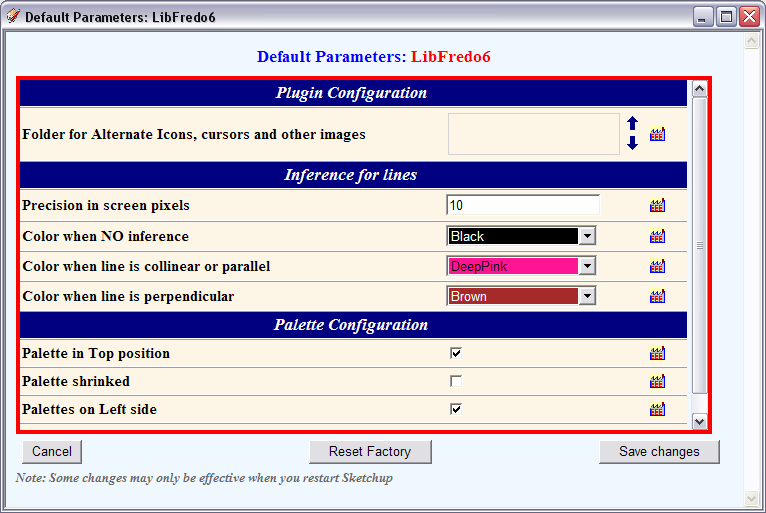 Also, I noticed that when I deleted the old LIBFREDO6_Dir_32 and TOS_Dir_13 folders my TOS toolbar disappeared. It reappeared after restoring those folders.
Any ideas?Thanks.
-
I've had a chance to really play with the refreshed version....WOW!! You have really thought of everything! I find myself using these drawing tools for so much more than just on a curved surface. They are great to use on coplanar surfaces as well!
Between Joint Push Pull, Round Edges, Tools on Surface and Bezier Tools, you've single handedly propelled SU into a league of it's own. You make other apps feel down right tedious. THANK YOU AGAIN!!
-
@unknownuser said:
I just installed the update and I don't even have the option to choose an icon set in the Default Parameters. I am on a PC with XP.
The options for alternate icons (and icons shown in the toolbar) are in the Default Parameter of ToolsOnSurface, not of LibFredo6.
Also, do not forget to install LibFredo6 3.4
Fredo
-
@unknownuser said:
The options for alternate icons (and icons shown in the toolbar) are in the Default Parameter of ToolsOnSurface, not of LibFredo6.
And I think this is the second time I asked you about this, sorry
It is working fine.I did have LibFredo 3.4 installed when I removed the older directories. I restarted SU and the toolbar went away. However, somehow (assuredly due to operator error) when I remove it now and restart SU everything is fine.
Sorry for the bother and thanks again for the plugin.
-
Fredo... Is not working the explicit selection for the offset on surface? (Select first Edges and Faces in the model, then start the tool).
Most of the things are possible with the implicit selection but now that I want to offset some edges it becomes impossible.Daniel S
-
@daniel s said:
Fredo... Is not working the explicit selection for the offset on surface?
Daniel,
Thanks for signaling this bug (which was introduced with 1.5a).
I made a fix and updated the main post with version 1.5d. It also includes the Spanish translation by Gaonirico.Fredo
-
Great!!! Thank you for the updated version!!!
Daniel S
-
New maintenance release 1.5e.
I fixed bugs in 1.5d on the generation of Circles and Polygons when no face.
I also restablish the post-edition functionality which mysteriously disappeared in v1.5 (or maybe in earlier versions).see main post for the new zip file
http://forums.sketchucation.com/viewtopic.php?f=180&t=11212#p76625Fredo
-
Today I saw something strange...
try to make a triangle with initial point in the construction point...
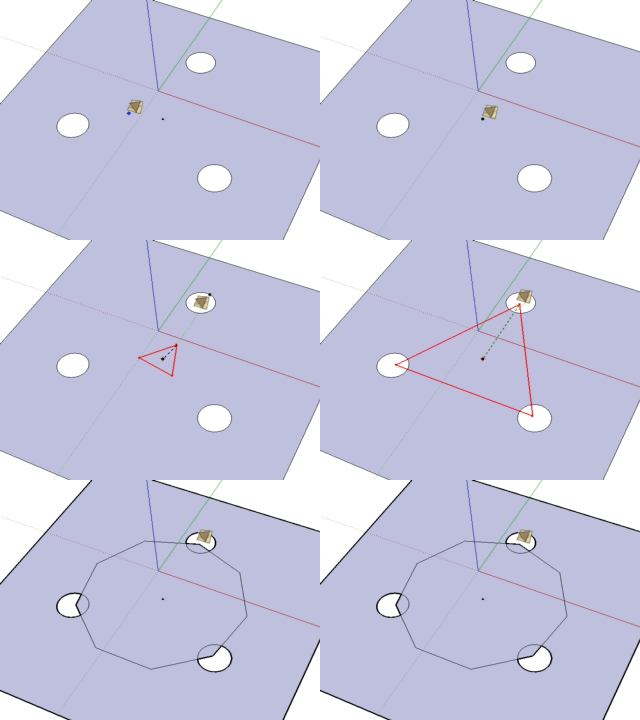
polygononsurf.skpDaniel S
-
Daniel,
You are an incredible tester. There was 1 chance out 10 million that this situation occurs!! I mean a triangle with 8 sides!
I published a fix in version 1.5f
See main post at http://forums.sketchucation.com/viewtopic.php?f=180&t=11212&p=76625#p76625Fredo
-
With all the great reviews of this ruby script I couldn't wait to try this one out... tried and tried to download this into my plugins and sadly all I'm get is an error saying..
Error Loading File ZLoader__OnSurface.rb
No such file to load -- LibFredo6.rbIve tried to wade through this thread but am confused .....The version I tried was 1.5c and then i tried 1.5e.... still not working
Can anyone point me in the right direction... what is the secret to getting this to work...???
-
Have you installed libfred06? http://forums.sketchucation.com/viewtopic.php?f=180&t=17947#p144178
ToS needs it to work, i think.






Advertisement