sketchucation logo sketchucation
    • 登入
    Oops, your profile's looking a bit empty! To help us tailor your experience, please fill in key details like your SketchUp version, skill level, operating system, and more. Update and save your info on your profile page today!
    🔌 Smart Spline | Fluid way to handle splines for furniture design and complex structures. Download

    [Plugin][$] Tools On Surface - v2.6a - 01 Apr 24


    已排程 已置頂 已鎖定 已移動 Plugins
    638 貼文 203 Posters 1.6m 瀏覽 202 Watching
    正在載入更多貼文
    • 從舊到新
    • 從新到舊
    • 最多點贊
    回覆
    • 在新貼文中回覆
    登入後回覆
    此主題已被刪除。只有擁有主題管理權限的使用者可以查看。
    • M 離線
      Matt666
      最後由 編輯

      Just construction points? You can try native Su tool! GO to Edit menu / Delete guides.
      You can also copy this code below in the ruby console... It will delete all construction points in the selection.

      Sketchup.active_model.selection.each{|e|e.erase! if e.class==Sketchup;;ConstructionPoint}
      

      😉

      Frenglish at its best !
      My scripts

      1 條回覆 最後回覆 回覆 引用 0
      • M 離線
        Matt666
        最後由 編輯

        Hi Fredo!
        I suppose you will move your menus in "Fredo collection" in your next TOS update, like freescale plugin ? ❓
        That would be cool, and also your push pull plugin!
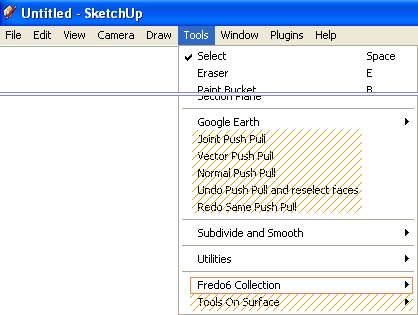
        Sans titre 1.jpgExcellent plugin, as always, sir! 😄 Thank you...

        Frenglish at its best !
        My scripts

        1 條回覆 最後回覆 回覆 引用 0
        • simon le bonS 離線
          simon le bon
          最後由 編輯

          🙂 Matt,
          --/ Hope i'm not going too far from this thread /--

          @matt666 said:

          Just construction points? You can try native Su tool! GO to Edit menu / Delete guides.

          good tip: it is something I had forgotten.. > but the construction lines and points, they are all deleted from the overall model. Something we want not to be each time.

          @matt666 said:

          You can also copy this code below () in the ruby console... It will delete all construction points in the selection.
          This is just the good code: construction lines remain and every construction point inside selection are removed. Would you please make it as a .rb dear Matt? (I'm complet ignorant upon this ). It would be so greatfull!
          :-)simon

          1 條回覆 最後回覆 回覆 引用 0
          • N 離線
            Nathryc
            最後由 編輯

            Thank you, Thank you, Thank you, Fredo!!!! (insert Happy Dance Here!)
            At last I can do what I've been trying to do since I first found SketchUp (modeling planets for exterior sci-fi scenes)

            This plug-in is MADE of 100% AWESOME!

            Nathryc

            1 條回覆 最後回覆 回覆 引用 0
            • R 離線
              Roger
              最後由 編輯

              You are the Gustave Eiffel and Pierre Bezier of SketchUp. Merci Beaucoup from the USA!

              What will you do to top this achievement?

              http://www.azcreative.com

              1 條回覆 最後回覆 回覆 引用 0
              • K 離線
                Kus
                最後由 編輯

                Hi there I would like to make some drawings on a sphere. I downloaded the plugin but when I start up SU this comes up

                no such file to load -- /Library/Application Support/Google SketchUp 7/SketchUp/Plugins/BZ_Dir_12/bezierspline_main.rbError Loading File bezierspline.rb
                no such file to load -- /Library/Application Support/Google SketchUp 7/SketchUp/Plugins/BZ_Dir_12/bezierspline_main.rb
                

                I downloaded the plugin into /Library/Application Support/Google SketchUp 7/SketchUp/Plugins; and I didn't change the name of the folder, but it is named: ToolsOnSurface_131-1

                what should I do??[/quote]

                1 條回覆 最後回覆 回覆 引用 0
                • fredo6F 離線
                  fredo6
                  最後由 編輯

                  @kus said:

                  Hi there I would like to make some drawings on a sphere. I downloaded the plugin but when I start up SU this comes up.

                  I downloaded the plugin into /Library/Application Support/Google SketchUp 7/SketchUp/Plugins; and I didn't change the name of the folder, but it is named: ToolsOnSurface_131-1

                  what should I do??

                  Kus,

                  Seems you had a problem with the unzip operation.
                  For Tools on Surface you must have only 2 elements in the Sketchup Plugins folder:

                  • a small file: ZLoader_OnSurface.rb
                  • a folder: TOS_Dir_13, with other rb files in it (and some subfolders).

                  I suggest you check your files and redo the Unzip, with a Select All and then Extract, to make sure your preserve the folder hierarchy when unzipping.

                  Fredo

                  1 條回覆 最後回覆 回覆 引用 0
                  • S 離線
                    Steelyjoe_n
                    最後由 編輯

                    Hey, I've followed the quickcards installment guide but upon opening Sketchup it isn't running Tools On Surface, I'm not given any loading error or anything, it simply doesn't run, any help?

                    1 條回覆 最後回覆 回覆 引用 0
                    • S 離線
                      Steelyjoe_n
                      最後由 編輯

                      @steelyjoe_n said:

                      Hey, I've followed the quickcards installment guide but upon opening Sketchup it isn't running Tools On Surface, I'm not given any loading error or anything, it simply doesn't run, any help?

                      Nevermind
                      I forgot to check it in preferences, thank you for the program anyway 😄)

                      1 條回覆 最後回覆 回覆 引用 0
                      • N 離線
                        niarfe
                        最後由 編輯

                        Fredo!!! I'm becoming your biggest fan!!!
                        thanks a lot!

                        1 條回覆 最後回覆 回覆 引用 0
                        • M 離線
                          monkeybss
                          最後由 編輯

                          Hi,
                          I seem to have a problem too. I can see the toolbar but the offset doesn't work (Su7,7.0.102470), the line-on surface does, but nothing else seems to work.
                          I'm not familiar with ruby, but it feels like some setting might be wrong (like a variable in Autocad).

                          Later..
                          Just being stupid, I forgot to load in "preferences". Works like a charm!

                          1 條回覆 最後回覆 回覆 引用 0
                          • A 離線
                            Arthaxx
                            最後由 編輯

                            Thanks

                            1 條回覆 最後回覆 回覆 引用 0
                            • H 離線
                              hitman47127
                              最後由 編輯

                              thanksssssssssss a lot, 😍 😍 😍

                              1 條回覆 最後回覆 回覆 引用 0
                              • E 離線
                                Efrado
                                最後由 編輯

                                Hi FREDO ,Thanks a lot for this Magnificent gift. Following the PDF I was traying to reproduce the "section pie" but I could not .How did you do? Thanks "


                                "section PIE".jpg

                                1 條回覆 最後回覆 回覆 引用 0
                                • fredo6F 離線
                                  fredo6
                                  最後由 編輯

                                  @efrado said:

                                  Hi FREDO ,Thanks a lot for this Magnificent gift. Following the PDF I was traying to reproduce the "section pie" but I could not .How did you do? Thanks "

                                  Use the 'Ring' capability of the TOS shapes. In the VCB, you type an length, posititive or negative' followed by 'x', and you get the shape contour with the specificed offset. This is explained in the doc, in the Shapes section (page 9).
                                  Hope this answers your question.

                                  1 條回覆 最後回覆 回覆 引用 0
                                  • E 離線
                                    Efrado
                                    最後由 編輯

                                    As always your Kindness is OUT OF DOUBT ----PRICELESS-----Thank You

                                    1 條回覆 最後回覆 回覆 引用 0
                                    • M 離線
                                      mrljfr1
                                      最後由 編輯

                                      Thanks,what a great work!

                                      1 條回覆 最後回覆 回覆 引用 0
                                      • L 離線
                                        lorca
                                        最後由 編輯

                                        Am I doing something wrong? I place CadFather icons in the TOS v13 folder but I still get Fredo icons. I don't mind really but I wonder what is happening.

                                        1 條回覆 最後回覆 回覆 引用 0
                                        • fredo6F 離線
                                          fredo6
                                          最後由 編輯

                                          @lorca said:

                                          Am I doing something wrong? I place CadFather icons in the TOS v13 folder but I still get Fredo icons. I don't mind really but I wonder what is happening.

                                          The folder is named TOS_Dir_13. I guess this is what you mean.
                                          I also assume that:

                                          • you unzipped correctly the CadFather icons into the folder (can you check the right files are there)
                                          • you restarted Sketchup
                                          • if you use both SU6 and SU7, you did not mix up the file copy.

                                          Otherwise, this looks strange. You can always delete all the png files in the folder and replace them by CadFather's files.

                                          Fredo

                                          1 條回覆 最後回覆 回覆 引用 0
                                          • L 離線
                                            lorca
                                            最後由 編輯

                                            @unknownuser said:

                                            @lorca said:

                                            Am I doing something wrong? I place CadFather icons in the TOS v13 folder but I still get Fredo icons. I don't mind really but I wonder what is happening.

                                            The folder is named TOS_Dir_13. I guess this is what you mean.
                                            I also assume that:

                                            • you unzipped correctly the CadFather icons into the folder (can you check the right files are there)
                                            • you restarted Sketchup
                                            • if you use both SU6 and SU7, you did not mix up the file copy.

                                            Otherwise, this looks strange. You can always delete all the png files in the folder and replace them by CadFather's files.

                                            Fredo

                                            I extracted the Cadfather icons into the TOS_Dir_13. I deleted your icons to be sure I restarted sketchup but I still get your icons.


                                            1 條回覆 最後回覆 回覆 引用 0
                                            • 1
                                            • 2
                                            • 6
                                            • 7
                                            • 8
                                            • 9
                                            • 10
                                            • 31
                                            • 32
                                            • 8 / 32
                                            • 第一個貼文
                                              最後的貼文
                                            Buy SketchPlus
                                            Buy SUbD
                                            Buy WrapR
                                            Buy eBook
                                            Buy Modelur
                                            Buy Vertex Tools
                                            Buy SketchCuisine
                                            Buy FormFonts

                                            Advertisement