[REQ] Convert ALL components to groups?
-
Does anyone know of a script which can convert components to groups? I'm working on a model much of which has been converted from Acad/Archicad and in the process is made up of components rather than groups. For the sake of good housekeeping I'd like to convert these unnecessary components to groups- either all in the model (I'll just Ctrl+X the components I need to keep and Ctrl+V them back in) or selectively.
Thanks in advance,
-
Dear Jackson,
Did you solve your co-incident component problem?
Oh, and by the way, wasn't Scotland cold enough for you?
Regards,
Bob -
haha, Scotland WAS quite cold enough thanks Bob! Believe it or not, Malmö, where I live now is actually a bit south of Edinburgh (Sweden is a taaaaall country)- summer temperatures here are more in line with the south of England and it only snows a little in the winter (and usually melts within a couple of days
 ). You have to travel a few hundred miles north before it starts feeling really "Swedish". When you're right up in the Arctic Circle in the middle of winter it feels like the end of the earth... but sooo beautiful!
Still working on the coincident components problem- I don't think there's an easy way round it.
-
indeed, a ruby would be great that does the following things:
when a component / several components are selected, the "create group" command in the right click context menue is exchanged with a "transform to group" command (the accordant shortcut changes it's function too)
and exactly the same the other way arround: with one ore more selected groups the "create component" command is exchanged with "transform to component" command, whereas only one component is created and the other groups are replaced by this component (does that make sense?
 )
)and last but not least: it would be great to be able to apply the "replace with selected" (when some components in the model are highlighted and you right click on a different one in the component window) to groups as well. this would be helpful, if you for example created a set of columns and only later discover, that they all stayed the same proportion and can therefore be a component.
such a ruby would bring a great improvement to the workflow in SketchUp (and is definitely something that would be nice to be found in SU7
 )
) -
Dear Jackson,
Do you know about the select_instances script in the Ruby section of this forum? I think this script will also select multiple components (components with different 'parent' names).
Quoting from the post:
NEW Version 2:
This new version includes a new function that is "Select Families" on right click.
A family would be a bunch of components that were created by making a parent compo unique.
Every component name that begins with the same name before the '#' will be considered as part of the family. Capisci?
So just create a component, copy it a couple of time, make one of the instance unique, select any of the created component and right click "Select families".
End quote.
Do your coincident components have the same 'parent' name. If so, you may be able to use this script to separate you coincident components.
Kind regards,
Bob -
Wow guys, thanks so much for the suggestions and the ruby script!
Bob, all the component names are unique so I'm not sure that ruby would be useful in this case. Thanks for all the thought you've been putting into this though!
Matt, I'll give your ruby a try- a friend actually emailed me a similar ruby this morning, which I've yet to try, but I'll test both of them and report the results. A 15Mb model containing 3024 components inside 783 groups is a GOOD test!
Now for the funny part- I put off checking in on SCF this morning when I arrived at work, deciding instead to spend 2 hours manually opening every building group and exploding and regrouping every single component. Then I check SCF and my email and I've been sent TWO ruby's which potentially automate the whole process!


Thanks again guys, your ingenuity and generosity is what makes this such a great community!
-
Matt,
I get an error message on opening SU after copying in your .rb
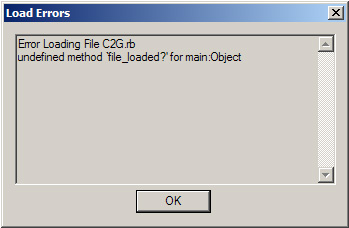
I ran the other .rb I received- it definitely works, exploding all top level comps and regrouping them, but I had to delete and purge 90% of the model as I think it would take about an hour of SU hanging before that model was fully converted. Would been a perfect task to have left running at lunchtime though!
Thanks again,
-
works perfectly fine for me (Windows XP).
thanks a lot, Matt666. this one will come in quite handy
now we only need the reverse funktion - transform to component
if more than one group is selected SU could ask, whether you want to replace all by one component or create a seperate component for each group.now I come to think of it SU could even compare the groups' shapes.
- if they are the same one they are automatically replaced by the same component.
- if they are the same shape but in different sizes, SU asks you which group shall resemble the original component scale and automatically replaces the other groups by scaled component instances
- if the groups are different in shape, seperate components will be created
sorry for drifting off into dreamland.
 I don't suspect, comparing geometry like this will be easy...
 -
Group to component is really more complicated...
Each group is different, no definition...I will try to make smt.
-
To make a component instance into a group why not make a new group containing the instance and then explode the instance. Its bits stay inside the new group. Then mine down through the new groups entities and if any are instances repeat as above... You can name the group to match the instance etc.
To make a group into a new component definition (and an instance) use the built in API function:
new_component = group.to_component
It takes the group's name...
.
-
Hello TIG !
@tig said:
why not make a new group containing the instance and then explode the instance
 Great idea !!! I have not thought about it... I have updated the script...
 @unknownuser said:
You can name the group to match the instance
Also updated !
@unknownuser said:
It takes the group's name...
Only if the group has a name...
Otherwise, we must compare all groups, see which are the same ... If so transform them into components with same definition! Quite complicated...Thank you for the advices !!
-
the new feature of renaming new groups after the original component's name is quite nice.
however, I can't transform a selection of components to groups anymore. now I have to right cklick the instances one by one, telling them to become a group, which costs a lot of time.
is there a way to change it back to how it was (ability to transform several components to groups in one operation)?
cheers,
Jakob
-
Hi plot-paris !
@unknownuser said:
however, I can't transform a selection of components to groups anymore. now I have to right cklick the instances one by one, telling them to become a group, which costs a lot of time.
 Strange... It works without problem here...
Can you open ruby console before running the tool and show the matter returned inside the console here, please ?If you want to convert all components, don't select anything, it will convert all components in the drawing.
-
here is what is displayed in the ruby console, when I apply the tool to a selection of components (if I don't select anything, it still transfers only the component, that has been right clicked):
Error; #<NoMethodError; undefined method `c2g_boucle' for #<Object;0x485a290 @model=#<Sketchup;;Model;0x56f7678>, @nb=1>> C;/Program Files/Google/Google SketchUp 6/Plugins/C2G.rb;42;in `boucle' C;/Program Files/Google/Google SketchUp 6/Plugins/C2G.rb;29;in `each' C;/Program Files/Google/Google SketchUp 6/Plugins/C2G.rb;29;in `boucle' C;/Program Files/Google/Google SketchUp 6/Plugins/C2G.rb;20;in `c2g' C;/Program Files/Google/Google SketchUp 6/Plugins/C2G.rb;69 C;/Program Files/Google/Google SketchUp 6/Plugins/C2G.rb;69;in `call' -
@unknownuser said:
a "transform to group" command
New version can transform all components in the right click selection.
@unknownuser said:
I get an error message on opening SU after copying in your .rb
!!! I have no problem here !!! Could someone test this script ???
Mac or PC ?@unknownuser said:
I ran the other .rb I received- it definitely works,
Can you show us this script, please ?
@unknownuser said:
but I had to delete and purge 90% of the model
New version asks if you want to purge.
EDIT : New version with TIG advices !
EDIT : New version with bugs fixes ! Thank you Plot Paris !
-
Excuse me....A new version has been updated in the script's post.
-
and it works... wonderful!

thanks a lot, Matt666
-
What about G2C?
 Is this still not possible at this time?
 -
well, that would be wonderful.
but I assume (having not a clue of ruby scripting), that it is very difficult to compare geometry. because that is what you had to do, if transforming several identical groups to components.
it gets even more complicated, if the instances (of the groups) are rotated or even scaled...but it would indeed be one of the most useful rubies.
-




Advertisement