sketchucation logo sketchucation
    • 登入
    Oops, your profile's looking a bit empty! To help us tailor your experience, please fill in key details like your SketchUp version, skill level, operating system, and more. Update and save your info on your profile page today!
    🔌 Smart Spline | Fluid way to handle splines for furniture design and complex structures. Download

    Silvershadow's eye candy 1: The river runs thru it

    已排程 已置頂 已鎖定 已移動 Gallery
    125 貼文 62 Posters 65.7k 瀏覽 62 Watching
    正在載入更多貼文
    • 從舊到新
    • 從新到舊
    • 最多點贊
    回覆
    • 在新貼文中回覆
    登入後回覆
    此主題已被刪除。只有擁有主題管理權限的使用者可以查看。
    • M 離線
      mateo soletic
      最後由 編輯

      Amazing work, thanks for sharing tips and the tutorials.
      Cheers,
      Mateo

      Concept Illustrations

      1 條回覆 最後回覆 回覆 引用 0
      • marked001M 離線
        marked001
        最後由 編輯

        wow..this is great.. a cartoony look out of sketchup is not easy! i'm in awe.. keep going..please 😄

        http://www.revision21vis.com

        instagram: revi21on

        1 條回覆 最後回覆 回覆 引用 0
        • P 離線
          princedragoncok
          最後由 編輯

          Really really excellent, thank you very much 👍

          1 條回覆 最後回覆 回覆 引用 0
          • G 離線
            Glenn at home
            最後由 編輯

            WOW! Truly blown away! There is a new standard to strive for with SU!

            SketchUp Pro 2025/2026 Dell XPS 8950 i9-12900K 64GB Ram RTX 3080

            1 條回覆 最後回覆 回覆 引用 0
            • P 離線
              Phil Rader AIA
              最後由 編輯

              EYE CANDY indeed....but most of us have a sweet tooth so keep giving us sweet morsels to look at.

              http://www.philrader.com

              1 條回覆 最後回覆 回覆 引用 0
              • J 離線
                JuanV.Soler
                最後由 編輯

                @silver_shadow said:

                Today i want to share the power of sketchup itself, to encourage those who thinks sketchup is just a tool that can only build block models and nothing more.

                thankyou.
                i think you have the synthetic path for some new tools for the version 7
                so I wont buy it if those mixes of rubies are not fusionated in smart tools that lead to your results.¡

                ,))),

                1 條回覆 最後回覆 回覆 引用 0
                • urgenU 離線
                  urgen
                  最後由 編輯

                  ...Fine work, fine mood... ☀ 😄 let,s continue to create the similar further ... Many thanks! 👍

                  --pupil forever...------

                  1 條回覆 最後回覆 回覆 引用 0
                  • G 離線
                    GreyHead
                    最後由 編輯

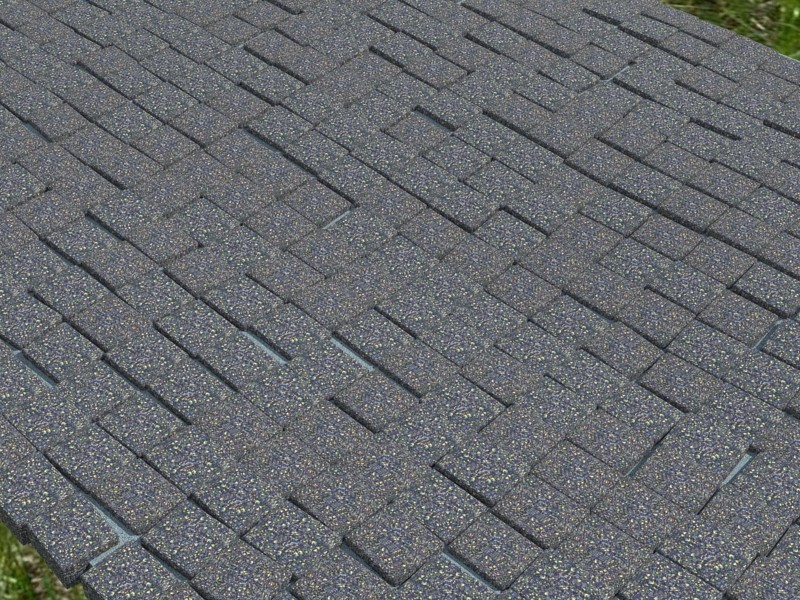
                    After I rendered the cobbles I remembered TIGs Matrix Proximity script. It allows you to create an array of components with some variation in size, placement and rotation. It adds an extra level of 'difference' if you need it.

                    Bob

                    PS For some reason about half of the cobbles turned over on dropping so I had to make both sides rounded.

                    cobbles_2a.jpg

                    1 條回覆 最後回覆 回覆 引用 0
                    • T 離線
                      tomislavm
                      最後由 編輯

                      This is one of the best I have ewer seen of sketchup,original and fascinating!

                      1 條回覆 最後回覆 回覆 引用 0
                      • D 離線
                        dylan
                        最後由 編輯

                        @greyhead said:

                        After I rendered the cobbles I remembered TIGs Matrix Proximity script. It allows you to create an array of components with some variation in size, placement and rotation. It adds an extra level of 'difference' if you need it.

                        Thanks for the info on TIGs script Bob, that is a new one to me 👍

                        http://dmdarchitecture.co.uk/

                        1 條回覆 最後回覆 回覆 引用 0
                        • soloS 離線
                          solo
                          最後由 編輯

                          I cannot seem to locate it but I once remember talk about a 'Greeble' script, my thinking was that this too could be a solution.
                          However Silver you certainly used SP in a very creative way.

                          http://www.solos-art.com

                          If you see a toilet in your dreams do not use it.

                          1 條回覆 最後回覆 回覆 引用 0
                          • L 離線
                            lapx
                            最後由 編輯

                            I think it's part of the projection.rb ruby script. 😎

                            1 條回覆 最後回覆 回覆 引用 0
                            • S 離線
                              silver_shadow
                              最後由 編輯

                              @unknownuser said:

                              GreyHead"]After I rendered the cobbles I remembered TIGs Matrix Proximity script. It allows you to create an array of components with some variation in size, placement and rotation.

                              thanx a lot, will have a look at this 😄 looks really cool

                              1 條回覆 最後回覆 回覆 引用 0
                              • T 離線
                                twharvey
                                最後由 編輯

                                @silver_shadow said:

                                :idea: ....comments are welcome... 💭

                                Hi Silver,

                                I followed your directions above and, after some fooling around, was able to duplicate your cobbles paved on a contoured surface. I did notice a couple of things to keep in mind for future projects: 1. The amplitude of the curved surface can't be very big (difference between high and low points) or the cobbles fall off. 2. The distance between the substrate and the cobbles must be minimized or the cobbles bounce when they hit and end up all over the place.

                                Thanks for the tut,
                                Tom

                                Tom

                                1 條回覆 最後回覆 回覆 引用 0
                                • S 離線
                                  silver_shadow
                                  最後由 編輯

                                  yea i know. try this too
                                  copy your site to a new drawing. rotate it to be not so steep.
                                  Maybe you can try boxing it in also so nothing gets spilled. Try to divide the areas to controll groups and if it works, just remove the dividers afterwards. (just a thought 💭 )

                                  1 條回覆 最後回覆 回覆 引用 0
                                  • J 離線
                                    Jim
                                    最後由 編輯

                                    @solo said:

                                    I cannot seem to locate it but I once remember talk about a 'Greeble' script, my thinking was that this too could be a solution.
                                    However Silver you certainly used SP in a very creative way.

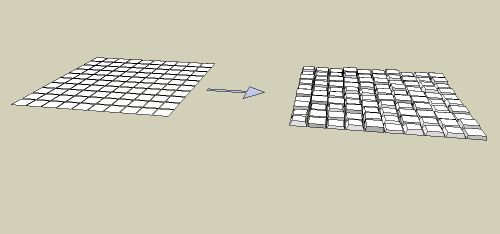
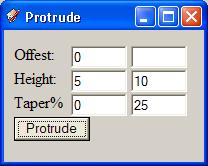
                                    It's not well documemented, but protrude can offset, protrude, and taper faces. Leave the second column blank unless you want a random number btween the range.
                                    protrude.jpg

                                    This model was produced using these inputs:
                                    Clipboard01.jpg


                                    protrude.skp

                                    Hi

                                    1 條回覆 最後回覆 回覆 引用 0
                                    • S 離線
                                      silver_shadow
                                      最後由 編輯

                                      %(#BF0000)[STAGE 2 ➡ LIGHTING

                                      Hi guys. Im moving now into stage 2 of my model.
                                      but before i start i want to know, because we are having this discussion.
                                      What is better for setting up light. Using sketchup's sun angles,or using multiple lights
                                      omnis and rectangulars. I am not sure what the professional line prefer to use,
                                      skylights stand alone, omni and rectangular lights. Im just asking in general, not specific sketchup only but in the modelling industry, what will be the best results you will get ❓]

                                      1 條回覆 最後回覆 回覆 引用 0
                                      • tinanneT 離線
                                        tinanne
                                        最後由 編輯

                                        Wow, this is amazing! Thank you silvershadow for the generosity of your time in putting these together. I can't wait to try some of these out. You are very talented!

                                        Executive Director : American Society of Architectural Illustrators
                                        AIP 30 Competition opens soon. ASAI.org

                                        Architectural Rendering

                                        1 條回覆 最後回覆 回覆 引用 0
                                        • S 離線
                                          silver_shadow
                                          最後由 編輯

                                          yea im also a big fan of only using sky alone.. but i kind of like the omni and rec light also. The thing is.. but thats just me.. ive seen most professional people uses sometimes just this, omnis and rec lights. But then again, using sky, makes the model looks more realistic and not like its sitting on a set.

                                          1 條回覆 最後回覆 回覆 引用 0
                                          • K 離線
                                            kwistenbiebel
                                            最後由 編輯

                                            @silver_shadow said:

                                            What is better for setting up light. Using sketchup's sun angles,or using multiple lights
                                            omnis and rectangulars. I am not sure what the professional line prefer to use,
                                            skylights stand alone, omni and rectangular lights. Im just asking in general, not specific sketchup only but in the modelling industry, what will be the best results you will get ❓

                                            The professional ones using the dinosaur packages (Max, Maya, etc...) would prefer a combo with additional directional/fill lights, as that would give full control over light setup.
                                            Sometimes they need exactly 'that' ray of sun light hitting that exact spot of the model.

                                            Personally I love to use Sky only and to see how far that brings me,because it would be closest to seeing reality. But that's from an architects standpoint.
                                            Ask a graphical (3D) designer, and he will want to fine tune additional light sources to obtain exactly the effect he wants.


                                            1 條回覆 最後回覆 回覆 引用 0
                                            • 1
                                            • 2
                                            • 3
                                            • 4
                                            • 5
                                            • 6
                                            • 7
                                            • 7 / 7
                                            • 第一個貼文
                                              最後的貼文
                                            Buy SketchPlus
                                            Buy SUbD
                                            Buy WrapR
                                            Buy eBook
                                            Buy Modelur
                                            Buy Vertex Tools
                                            Buy SketchCuisine
                                            Buy FormFonts

                                            Advertisement
