Printing to scale
-
What I know of the Mac is that setting printing up is totally different from PC. There is not only a print setup but also a document setup dialog and this is all I can help since I should be able to see to proceed from here. Here is what the Guide says about printing on Mac:
http://download.sketchup.com/sketchuphelp/gsu6_mac/Content/K-Input_and_Output/Printing/IO-Print.htm -
Wow! that is different than the PC print setup. That explains a few things.
So if you try to set in drawing to 10mm and in model to 1000mm, that doesn't work? Does it not allow you to change those settings?
Chris
-
@gaieus said:
What I know of the Mac is that setting printing up is totally different from PC. There is not only a print setup but also a document setup dialog and this is all I can help since I should be able to see to proceed from here. Here is what the Guide says about printing on Mac:
http://download.sketchup.com/sketchuphelp/gsu6_mac/Content/K-Input_and_Output/Printing/IO-Print.htmPrint quality setup and document setup dialogue are only available on the pro version according to this guide.
-
@pmiller said:
Print quality setup and document setup dialogue are only available on the pro version according to this guide.
That's obsolete (sorry, I should've mentioned). They forgot to change it when SU 6
 came out. It's been available in the free version, too, for more than 2 years now. If you have a look at the currnet guide for animation export, it also says that it's a

Pro only feature. But it's not.(Hopefully it will be changed soon).
-
Sorry, any chance you could use a format like .jpg or .png? .tiff is not a supported format on PC web browsers (at least not IE or firefox) so I can't see the image. Thanks!
Sorry this is being such a pain,
Chris
-
I think I should even disallow TIF's. There's no use for them anyway here and ultimately they can be zipped anyway. I can't open it either.
-
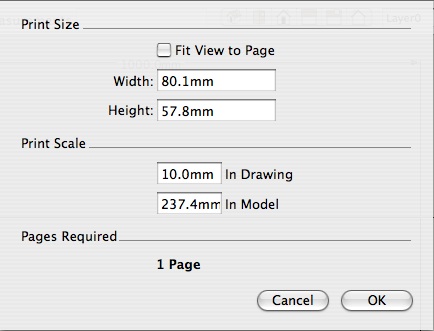
Sendingf again as a jpeg
Printing what a pain!
Perhaps its a Mac issue coupled with lack of proffessional version and operator incompetence
I've attached the Doc window with the attempt to put in 10mm to 1000mm as Chris suggests.
I had, on screen a 1000mm x 1000mm dimensioned square in front elevation, parrallel view
-
I have gone through all the posts and followed the weird instructions exactly. I still cannot print a diagram larger than a single page to an exact scale. This is not a bug; it has broken the deal. Sketchup seems to be an enjoyable toy but without a simple, reliable, high-accuracy printing mechanism it is worthless. If they think I would buy Sketchup Pro after trying for three days to get a printout, Google must be out of their mind.
-
For me no problem with the free version

in French but... -
@kaos said:
Mac
thanksi know this is 6 months too late but...
 [and man, this is one long post.. it gets into more stuff than actually necessary but hopefully someone will find it useful]
here's the drawing i want to print to scale on a piece of 13x19" paper: (the dimensions of the drawing are 65'-7 x 150')
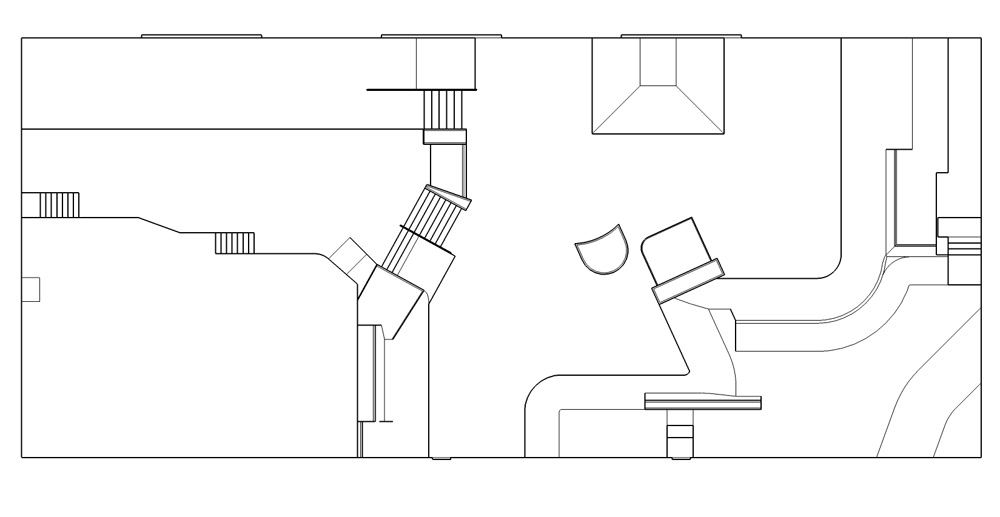
the first thing to do is set up your printer and paper size: [this is the same dialog as most other osx apps.. if you're used to printing on macs, you've seen this before]
--in SU, go File -> Page Setup: [note 'document setup' and 'print'.. we'll go there in a little bit]
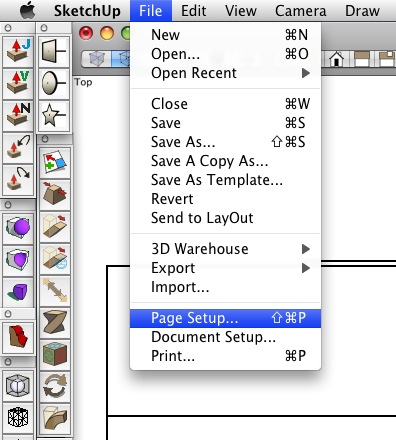
--click 'format for'.. This is where you'll pick which printer you'd like to print with (i'll go with the epson here) or you can choose 'any printer' and either setup a standard size paper or custom sized... at this stage, also choose the 'Orientation'.. this basically dictates which direction you'll view the print from.. since my drawing is wider than it is high, i'll pick the option on the right.. if it helps, think of it as portrait view vs. landscape view.
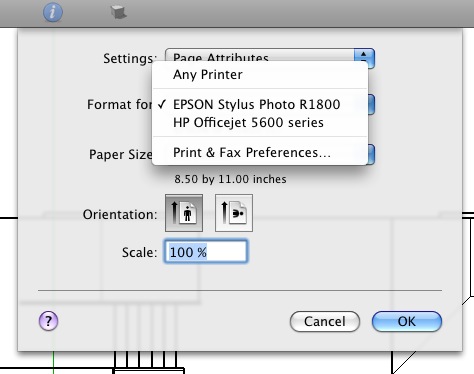
--after you've selected a printer, select your paper size. (the list will contain all of the paper sizes/types that your specific printer can deal with).. i'm going to choose 13 x 19 borderless. (this screenshot however shows me hovering above 13 x 19 regular.. the yellow pop up box shows the border settings for that selection and later on in this tut, i'll mention that again.. i'll be going with the no border choice however)
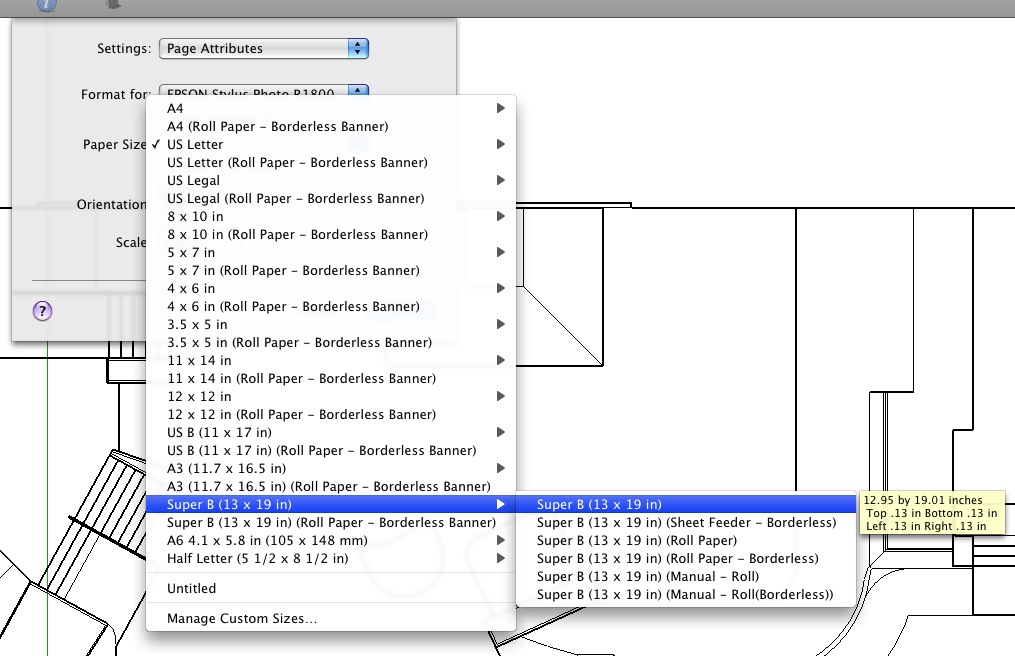
--once you've chosen a printer, selected the paper size, and an orientation click 'ok' and the page setup dialog will close.. now go File -> Document Setup.. this window is sketchup specific and you won't see it in any other apps except SU..
[my intent with the following instructions is to get the biggest print as possible at a common scale factor onto one sheet of paper.. if you're intent is different, adjust accordingly but the same basic ideas apply]
the first thing i do is click 'Fit View to Page'.. doing that will show the the maximum area i can fill up on one sheet of paper (if i would have selected the 13x19 with border that i mentioned earlier, my print size at this stage would be smaller because of the pre determined border)
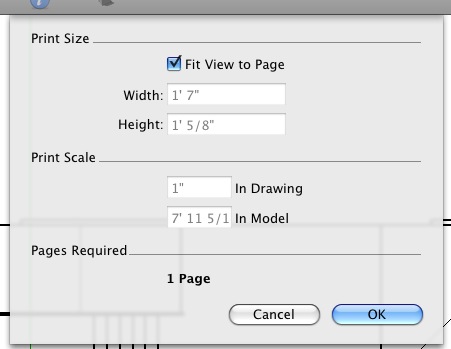
--in the above picture, you'll see that the required scale in order to maximize the amount of paper used is 1" = ~8' ... if i change 8' to 10' , you'll notice my print size changes... (first uncheck 'fit view to page')
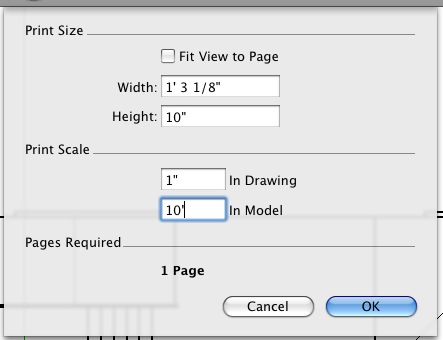
--the above picture now says my print size will be 10" x 15"... in other words, if i choose to print at 1" = 10' on a piece of 13x19 paper, the actual drawing will be a size of 10x15.. the rest of the paper will be blank border (in this case, if i centered it, i'd have 2" top/bottom border and 1.5" edge borders.. which would actually be acceptable to me)..
here's what happens if i change to a 1" = 5' (instead of the original 1" = ~8' in order to max out one sheet of paper)..
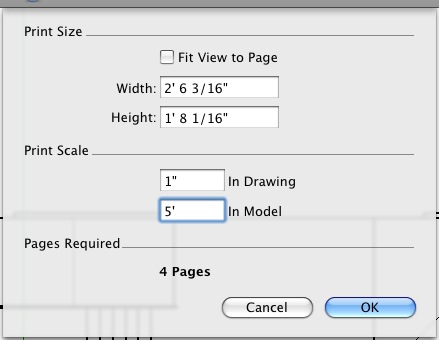
--that's telling me that if i want to print at a scale of 1" = 5' then my print size will be 20" x 30".. note the 'pages required' also changed to 4 pages.. at my current orientation and this print scale with this drawing, 4 separate pieces of paper would need to be used to accommodate the entire drawing which can be taped together etc. and still be accurate but i just don't like the multipages..
hopefully the above will help you get a grasp on how this dialog can be used as a calculator of sorts and at no point do i have to measure the actual drawing and figure out a scale manually.. i can more quickly and painlessly use trial/error with this dialog and find a suitable combination..
moving on -- i'm more of a 1/4" = 1' type of guy instead of 1" = X..
so, let me see what happens if i put 1/4" = 1' in the print scale:
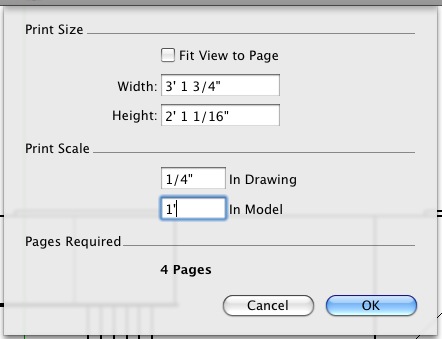
--it says that the print size will be 25 x 37 at that scale which is too big for my 13x19 sheet.. next i'll try 1/8" = 1'..
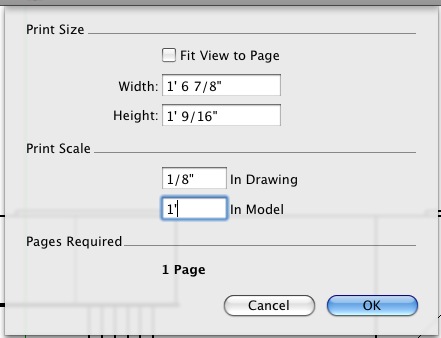
--boom!.. perfect.. i'm set to print now.. only one page required and i've seriously maximized the paper with only 1/8" to spare (and if i'd chosen a border for my paper size, i'd have to drop down to 1/16" = 1' in order to stay on one sheet and i'd be left with a big border then).. so in two tries (1/4 then 1/8.. all that other stuff was for explanation purposes), i've found which scale to print at and maximize my paper usuage.. way way faster than i could of done manually..
moving on to kaos' situation where he wants to print at scales such as 1:1 or 1:5 etc (which are pretty much no use to me
), you do the same thing as shown above except the print scale units need to be the same for both 'in drawing' and 'in model' (it doesn't matter what the units are, just as long as they're the same.. you can just type numbers if you want and SU will use the default units)..
still working with my same drawing, i'll guess a scale of 1:50.. (1' & 50')
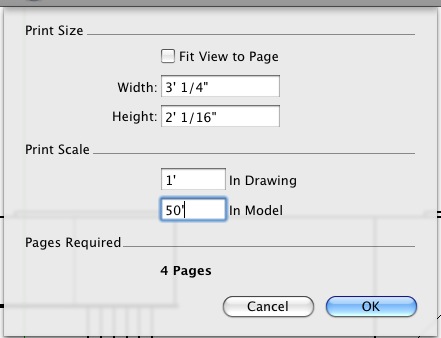
-- that's not going to work as i'll need 4 pieces of 13x19 to make it all fit.. i'll try 1:100..
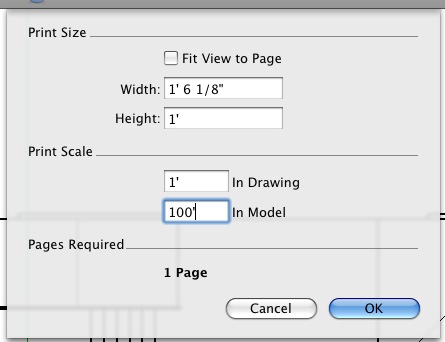
--ok, that's good.. it fits and maximizes the usage of the paper... once you've found a balance you're happy with, click ok. (and feel free to continue drawing in your model after this.. save the view you used while setting up the print settings as 'print scene' (or whatever) and then continue drawing.. if you go outside of the view however, you'll either have to redo the scale or those extra parts won't be included in the print.. these settings will also save in the .skp)
next is the File->Print dialog (again, this is standard osx.. you'll see this in most mac apps)..
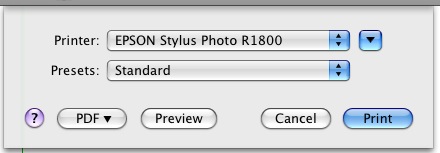
--at this stage in printing, i'll usually click 'Preview' first... here's a preview of the example drawing at a scale of 1/8" = 1' on a piece of 13x19" paper..
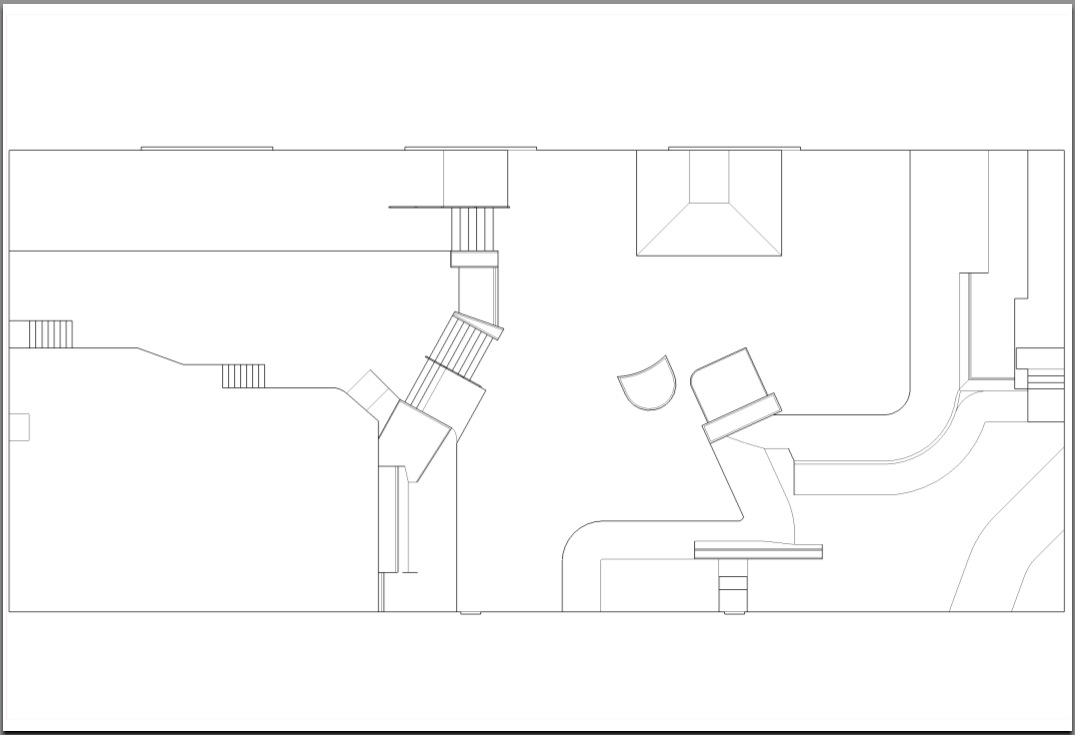
that looks good so i'd click print and go with it.. (all in about a minute from start to finish.. regardless of what this post may seem like
)another option in the 'print' dialog is 'PDF'.. i sometimes will set up my print scale using the 'any printer' option and custom paper settings (20x30 borderless etc..) with no intent of printing it myself.. i'll save it as a PDF and email that file to kinko's (or where_ever) and pick up the prints (to scale) on your way to the hotel/meeting from the airport..
also, the print to PDF is standard M.O. for many mac users.. most apps have the same print dialog so if you ever want a PDF of basically anything (pictures,text,sketchup (free version too
), etc...) just go File/Print/PDF/save as PDF..good luck!
-
@dlluce said:
I have gone through all the posts and followed the weird instructions exactly. I still cannot print a diagram larger than a single page to an exact scale. This is not a bug; it has broken the deal. Sketchup seems to be an enjoyable toy but without a simple, reliable, high-accuracy printing mechanism it is worthless. If they think I would buy Sketchup Pro after trying for three days to get a printout, Google must be out of their mind.
yeah, 3 days worth of trying to make a print would bum me out too.. (and i'm from a photo background so i've also dealt with color profiles which is way more of a headache than sizing.. stay away from that crap
...point being, i feel your pain)i dunno, the SU print dialog seems OK to me (especially if i try to think of a simpler way to do it.. i guess it's confusing at first but i think they could of made it a lot more confusing but not the other way around)..
really, there are only two factors involved.. scale and paper size..
if i draw a line in SU that's 100' long and i want to print it at a scale of 1" = 1' (1:12) then the resulting printed line will be 100inches long.. i'll need 100" worth of paper.. (or 9 sheets of A4 all lined up)maybe post the following info:
-size of your drawing
-desired scale
-desired paper size (or how many pieces of paper you'd like to span)and someone can help you with the settings..
-
@zootsuit said:
Hi
When I try to print to scale, i.e 1mm in sketchup = 1m on page, Sketchup positions the image in the corner of the page so it's spread accross 4 or more pages . My model is a simple 2d plan and the entire dimensions are 210 x297 i.e. A4.
Does anyone know how to centre the image on 1 page without losing the correct scale? If i try to type in the page dimensions (120,297) the print dialog box changes the scale as I type! Why is this happening?
Many Thanks
i'm so backtracking in this thread but whatever.. just in case you're still reading
i'm not 100% positive that PCs are the same as macs in this regard but i know the printers are... not all printers are set up to print borderless.. if you're trying to print something exactly the same size as the total dimensions of the paper, it won't happen unless your printer can handle it..
you see a piece of A4 as 210x297.. your printer sees only say 190x280 so that's why it's spreading it out over multiple sheets..
if your goal was to get the drawing on one sheet of paper without changing the scale, you did the only thing you could do which was to use a bigger sheet.. (well, you could of also tried to make a custom paper size with no border if your printer's driver doesn't include a preset option for A4 borderless but i personally can't tell you how to do that on a PC.).. you also would have had to use the zoom window to get the drawing to exactly fill the SU window.. (zoom window can get closer than zoom extents will give)
-
One note:
SU seems to have a bug when printing small objects. A 1m x 1m square will print happily on one a4 sheet to 1:10 scale, but a 10cm x 10cm, printed to 1:1, requires four to six sheets. It seems to go awry with everything smaller than about one foot across.
Anssi
-
@anssi said:
One note:
SU seems to have a bug when printing small objects. A 1m x 1m square will print happily on one a4 sheet to 1:10 scale, but a 10cm x 10cm, printed to 1:1, requires four to six sheets. It seems to go awry with everything smaller than about one foot across.
Anssi
hmm.. never noticed that.. do people actually draw things that small anyway?
[joking of course.. it's just that the smallest projects i typically do are measured at least in the thousands of sq.ft.]
-
I don't know, Anssi. Here is a 10cm x 10 cm square printed at 1:1 "virtually" in a PDF file (with PDFCreator).
I cannot really check as I don't have a physical printer but it looks like okay (on an A4 paper)
-
@gaieus said:
I don't know, Anssi. Here is a 10cm x 10 cm square printed at 1:1 "virtually" in a PDF file (with PDFCreator).
I cannot really check as I don't have a physical printer but it looks like okay (on an A4 paper)Gaieus, I might be going crazy...
 What happens when you check "Use Model extents"?
When I zoom close, I get an OK result when the "Use model extents" is UNchecked, but if I check it, the required paper size jumps up to 354 x 354 mm! With a large model, the Model Extents checkbox works as it should, cutting away all extraneous white space. I made double sure that there is nothing else in my model than the little squareI also used Adobe PDF for my tests, as I don't want to print scores of white paper with a dumb square on them
Anssi -
What I do here is to Zoom extents in the model, set parallel projection and top view (of course) and here is what I have in the print dialog:
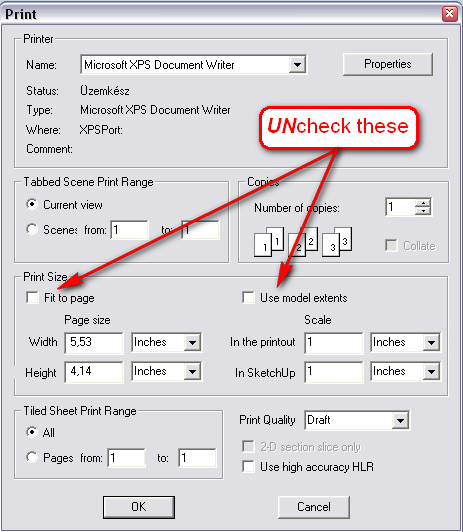
If I check "Use model extent", it will print it on 4 pages (10 cm x 10 cm rectangle) -
Gaieus,
So it is the same with you too. When I make a 1 m x 1 m square and print that to 1:10 scale with "Use model extents" selected, it works as expected - I get one page.
Anssi
-
I think I have read it several times what that setting is for but it must be some obscure thing as I can never remember. So I just do not check it.

-
Wanted to share in case someone else was experiencing this...
Environment:
SketchUp 7 (7.1.6859)
Mac OSX Snow LeopardProblem:
Despite following the directions explicitly... could not manage to print a true 1:1 scale.
Ex: I drew a 100mm x 20mm rectangle... Printed at 1:1 scale... Measured... longer side was at 104mm. Went through this over and over again. Read and re-read the directions...forum postings, everything...Nothing helped.Solution:
In the File->Page Setup (Remember this on a mac...may be different for PC) I HAD 'Format For' set to 'Canon MP620 Printer' and 'Paper Size' set to 'US Letter (borderless)'... Sounds reasonable right? Well guess not, because as a last ditch effort I decided set 'Format For' to 'Any Printer' and 'Paper Size' to a custom '8.5 x 11 Borderless' that I made via the 'Manage Custom Sizes' option in that same menu and BAM problem fixed!If I set 'Format For' back to 'Canon MP620 Printer' and the 'Paper Size' back to 'US Letter (borderless)' problem returns again! So, I'm not sure what the scoop is but obviously something screwy with the Canon supplied profile.
So moral of the story? It's definitely worth giving this fix a try if nothing else is working... definitely did it for me.
-Mike







Advertisement