sketchucation logo sketchucation
    • Login
    Oops, your profile's looking a bit empty! To help us tailor your experience, please fill in key details like your SketchUp version, skill level, operating system, and more. Update and save your info on your profile page today!
    Mac User? | Join the Rayscaper Beta for Mac Learn More

    [Plugin] Polyreducer 0.1

    Scheduled Pinned Locked Moved Plugins
    61 Posts 45 Posters 139.6k Views 45 Watching
    Loading More Posts
    • Oldest to Newest
    • Newest to Oldest
    • Most Votes
    Reply
    • Reply as topic
    Log in to reply
    This topic has been deleted. Only users with topic management privileges can see it.
    • V
      vampa
      last edited by

      This is wonderful, im a noobie and have been trying to reduce polygones to a sphere until i found this, you made my day πŸ˜„

      1 Reply Last reply
      Reply Quote 0
      • F
        farukahmet
        last edited by

        @ely862me said:

        i don t know how this should woork but for me it doesn t
        first i create a shape and when i clicked polyreduce it cuted half of the polys
        then i take a hood of a car and i clicked polyreduce and it start counting something and doing nothing it says like that : colapsed (i wait until)2 milion from 98 edges

        Same here 😐

        1 Reply Last reply
        Reply Quote 0
        • M
          mpowell1234567890
          last edited by

          Think I found a bug. Polyreducer 0.1 freezes sketchup. Whenever I try to click on the model, nothing happens..

          1 Reply Last reply
          Reply Quote 0
          • GaieusG
            Gaieus
            last edited by

            @unknownuser said:

            Not me. My comp starts choking at 1.2 million only. πŸ‘Š

            I could hardly get along with this model...
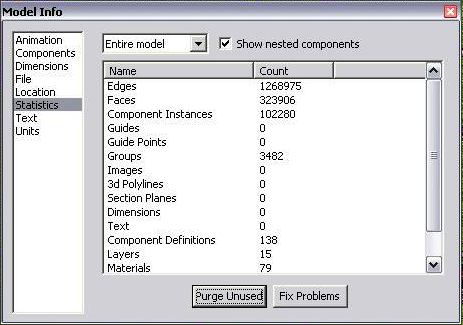
            Statistics.jpg
            πŸ˜’ πŸ˜’ πŸ˜’

            Sorry for keeping the thread OT, Dale- thanks for this gem again! πŸ‘

            Gai...

            1 Reply Last reply
            Reply Quote 0
            • R
              remus
              last edited by

              Mpowell, i think it freezes sketchup because it needs to do a lot of calculations. Its not really a bug, just a feature of the plugin.

              http://remusrendering.wordpress.com/

              1 Reply Last reply
              Reply Quote 0
              • H
                human
                last edited by

                here is the sphere before polyreduce:

                http://farm3.static.flickr.com/2230/2519275834_f0d4a92872.jpg?v=0

                After:

                http://farm3.static.flickr.com/2053/2519264374_cda07d315e.jpg?v=0

                But when i try to paint the sphere:

                http://farm4.static.flickr.com/3069/2518465569_6e66c9023b.jpg?v=0

                1 Reply Last reply
                Reply Quote 0
                • W
                  Whaat
                  last edited by

                  ok, I understand what your question is. When the plugin reduces the polygons, it creates new polygons with hard edges. If you want to be able to select all the faces with one click:

                  1)triple click to select all connected faces
                  2) go to window->soften edges
                  3) drag the slider to the right until all of the edges are softened.

                  I think you may have edge display turned off (it's in your 'styles' window). Otherwise, you probably would have noticed the hard edges and figured out the problem.

                  SketchUp Plugins for Professionals

                  1 Reply Last reply
                  Reply Quote 0
                  • I
                    ilay7k
                    last edited by

                    How do think Dale, can you make like this http://www.donyalabs.com/files/Polypen_donya_mesh_reduction.wmv ?
                    It will be nice feature - backtracking reducer

                    1 Reply Last reply
                    Reply Quote 0
                    • plot-parisP
                      plot-paris
                      last edited by

                      another great feature would be to adjust poly density throughout the model.

                      for example if you use follow me on a rather complicated curve with a varying radius, the resulting shape will have different polygon density. or if you create a difficult model in seperate pieces that are combined later, they might be different in detail.

                      now it would be very comfortable to tell the polyreducer to adjust the poly amount to a common level. πŸ˜†

                      1 Reply Last reply
                      Reply Quote 0
                      • B
                        blugarero
                        last edited by

                        awesome plug-in. very useful for building physical models of more organic forms(using the triangles as stencils)

                        1 Reply Last reply
                        Reply Quote 0
                        • L
                          linea
                          last edited by

                          thanks whaat!

                          1 Reply Last reply
                          Reply Quote 0
                          • X
                            xrok1
                            last edited by

                            this would be a great option to add to sub&smooth ruby!

                            β€œThere are three classes of people: those who see. Those who see when they are shown. Those who do not see.”

                            http://www.Twilightrender.com try it!

                            1 Reply Last reply
                            Reply Quote 0
                            • honoluludesktopH
                              honoluludesktop
                              last edited by

                              Having problems with this model. Any help?


                              Test01.skp


                              Before / After polyreducer

                              1 Reply Last reply
                              Reply Quote 0
                              • soloS
                                solo
                                last edited by

                                try these.


                                test hon1.skp


                                test hon2.skp

                                http://www.solos-art.com

                                If you see a toilet in your dreams do not use it.

                                1 Reply Last reply
                                Reply Quote 0
                                • TIGT
                                  TIG Moderator
                                  last edited by

                                  You could check the edge state of the faces before replacement. Normal, hidden, smoothed, soft etc and then for each new face make it's edges to match...

                                  TIG

                                  1 Reply Last reply
                                  Reply Quote 0
                                  • honoluludesktopH
                                    honoluludesktop
                                    last edited by

                                    I get it. I think? The first polyreduce makes the triangular faces, then the follow up polyreduce combine the faces. I was expecting to maintain the 4 sided polygons, but guess that can't be helped.

                                    Thanks.

                                    If I didn't get it, what did you do?

                                    1 Reply Last reply
                                    Reply Quote 0
                                    • david_hD
                                      david_h
                                      last edited by

                                      Is there any chance of adding a "timer" or a "ticker" to the Ruby so we can tell that something is going on rather than it just sitting there? I have tried to use it and think its great, but on large polys it seems that it just "locks up".

                                      Thanks,

                                      D

                                      If I make it look easy...It is probably easy

                                      1 Reply Last reply
                                      Reply Quote 0
                                      • Chris FullmerC
                                        Chris Fullmer
                                        last edited by

                                        Unfortunately when it locks up like that, that means it will also lock up the ticker. But genereally with the plugins, they are still working strong until there is a plat. So if it is just locked, the plugin is still doing its work.

                                        The only thing that a display could do, like Todd's progressbar does, is it at least tried to guess how long it will take. So when it does freeze, at least it shows it best guess for what time it will complete processing at. That can be fairly reliable or completely un reliable depending on how it is implemented and what type of processes are being run by the script,

                                        Chris

                                        Lately you've been tan, suspicious for the winter.
                                        All my Plugins I've written

                                        1 Reply Last reply
                                        Reply Quote 0
                                        • david_hD
                                          david_h
                                          last edited by

                                          Understood. .. but it would be nice to see that it is doing something so I don't think . ..

                                          hmmm. .. I wonder if it's locked up or not. I better shut it down and restart.

                                          Just a thought.

                                          Thanx C.

                                          D

                                          If I make it look easy...It is probably easy

                                          1 Reply Last reply
                                          Reply Quote 0
                                          • C
                                            cecilia
                                            last edited by

                                            Hi guys,
                                            thank you for the plugin! I am sure it works great...but I have not understood how to install it! πŸ˜„ I dropped the file into the plugins directory but when I right click on surfaces, no "Polyreduction" button appears in the menu. I am using Sketchup 7 on MAC. Am I missing something? Thank you for the support!


                                            1 Reply Last reply
                                            Reply Quote 0

                                            Hello! It looks like you're interested in this conversation, but you don't have an account yet.

                                            Getting fed up of having to scroll through the same posts each visit? When you register for an account, you'll always come back to exactly where you were before, and choose to be notified of new replies (either via email, or push notification). You'll also be able to save bookmarks and upvote posts to show your appreciation to other community members.

                                            With your input, this post could be even better πŸ’—

                                            Register Login
                                            • 1
                                            • 2
                                            • 3
                                            • 4
                                            • 1 / 4
                                            • First post
                                              Last post
                                            Buy SketchPlus
                                            Buy SUbD
                                            Buy WrapR
                                            Buy eBook
                                            Buy Modelur
                                            Buy Vertex Tools
                                            Buy SketchCuisine
                                            Buy FormFonts

                                            Advertisement