sketchucation logo sketchucation
    • Login
    Oops, your profile's looking a bit empty! To help us tailor your experience, please fill in key details like your SketchUp version, skill level, operating system, and more. Update and save your info on your profile page today!
    Mac User? | Join the Rayscaper Beta for Mac Learn More

    [Obsolete] Tools On Surface - v1.1

    Scheduled Pinned Locked Moved Plugins
    92 Posts 49 Posters 35.8k Views 49 Watching
    Loading More Posts
    • Oldest to Newest
    • Newest to Oldest
    • Most Votes
    Reply
    • Reply as topic
    Log in to reply
    This topic has been deleted. Only users with topic management privileges can see it.
    • ely862meE
      ely862me
      last edited by

      i start to use the offset line,it*s great!the offset tool and the offset are just what i needed!good job and thank you a lot!!

      i don t know if it can be usefull but some time i needed a follow me with a noncoplanar surfaces can this be done?

      thx

      elisei


      Untitled.jpg

      Elisei (sketchupper)


      Before no life was done on Earth it was THE LIFE ITSELF...GOD
      Come and See EliseiDesign

      1 Reply Last reply
      Reply Quote 0
      • S
        STRANGEZOND
        last edited by

        Nice tools! Thanks!!!

        1 Reply Last reply
        Reply Quote 0
        • RayOchoaR
          RayOchoa
          last edited by

          this is awsome

          CaR DeSiGnS bY mE
          http://ray-ochoa.com

          1 Reply Last reply
          Reply Quote 0
          • plot-parisP
            plot-paris
            last edited by

            dear Fredo6,

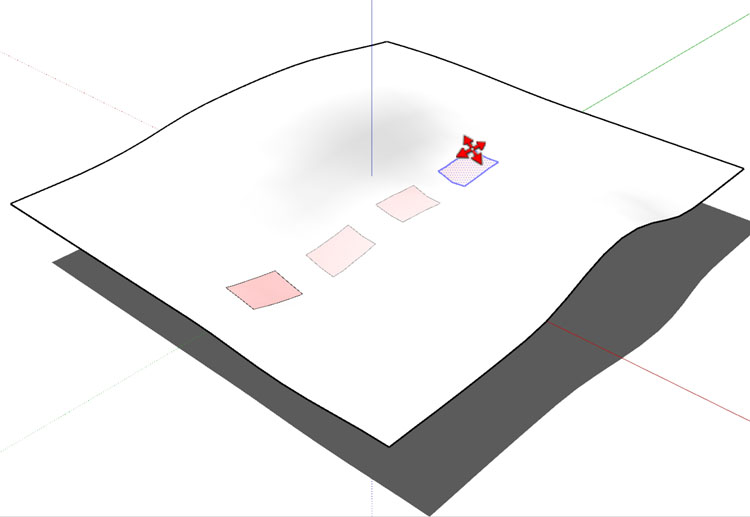
            when you succeed in adding inference functions (like infering to cordinate axes (or rather coordinate faces)), is it then possible to create a "move on surface" tool? then you could just copy a shape on a curved surface like you now do it on a planar one...move_on_surface.jpg

            then the idea of one "on surface" button that changes the use of all the standart tools to your on surface tools would become even more reasonable... ๐Ÿ˜„

            1 Reply Last reply
            Reply Quote 0
            • L
              Loewenkatze
              last edited by

              Fredo,

              thanks sooooo much for this. Everytime you bring a new tool to life, I get the feeling of using a brand new application or at least a new major release of SU. I fear that SU won't have the same progress regarding the core engine...... Anyone here to be in a position to write a multiprocessor-enabled SU-clone with all that plugins being built in...? ๐Ÿ˜’ ๐Ÿ˜‰

              Cheers,
              Franziska

              "I think play is the most important thing in the world." [Jacques-Yves Cousteau]

              1 Reply Last reply
              Reply Quote 0
              • D
                Daniel S
                last edited by

                I donยดt know if itยดs possible to make, but the "move on surface" tool is a great idea!!
                Thank you again for your plugins Fredo!!!

                Daniel S

                1 Reply Last reply
                Reply Quote 0
                • K
                  kwistenbiebel
                  last edited by

                  Cool thinking Plot-Paris, that would be handy.

                  By the way,
                  Fredo, I love this plugin. I use it often in combo with JPP/FF and Subsmooth. (damn abbreviations ๐Ÿ˜„ )

                  I can't wait for circles, rectangles and polygons to be added as it would allow us to make windows in curved surfaces easily.

                  1 Reply Last reply
                  Reply Quote 0
                  • GaieusG
                    Gaieus
                    last edited by

                    Well, then let's extend the wish list with my wishe: Rotate on surface as well ๐Ÿ˜‰

                    Gai...

                    1 Reply Last reply
                    Reply Quote 0
                    • R
                      remus
                      last edited by

                      This seems to be turning in to a sort of 'could you just upgrade the entire SU toolset?' ๐Ÿ˜› Im not complainging though!

                      http://remusrendering.wordpress.com/

                      1 Reply Last reply
                      Reply Quote 0
                      • H
                        human
                        last edited by

                        @gaieus said:

                        Well, then let's extend the wish list with my wishe: Rotate on surface as well ๐Ÿ˜‰
                        How would THAT work?
                        I think the idea of an 'ONSURFACE' button is looking better all the time. (I mean, we'd have an on surface toolbar, with the line, offset, circle, polygon, arc, drape, rotate and move!) onsurface button...please...

                        1 Reply Last reply
                        Reply Quote 0
                        • GaieusG
                          Gaieus
                          last edited by

                          @human said:

                          How would THAT work?

                          Well, if move on surface could work, this should also work! Bu that HOW, just don't ask me, please. I always wish world peace as well but how that would work, I can't imagine. ๐Ÿ˜’

                          Gai...

                          1 Reply Last reply
                          Reply Quote 0
                          • plot-parisP
                            plot-paris
                            last edited by

                            3D TEXT... ON SURFACE ๐Ÿ˜

                            1 Reply Last reply
                            Reply Quote 0
                            • D
                              Daniel S
                              last edited by

                              @plot-paris said:

                              3D TEXT... ON SURFACE ๐Ÿ˜

                              I think that 3D text on surface will be easily made with the drape on surface tool.

                              Here Fredo explains the drape on surface and uses the example of text:
                              http://www.sketchucation.com/forums/scf/viewtopic.php?f=180&t=9637&p=60520#p60520

                              Daniel S

                              1 Reply Last reply
                              Reply Quote 0
                              • TIGT
                                TIG Moderator
                                last edited by

                                @plot-paris said:

                                3D TEXT... ON SURFACE ๐Ÿ˜

                                My TextTag does that but only does 2D (3D text) on surfaces - it could easily be adjusted to give other options like extrusion thickness.

                                TIG

                                1 Reply Last reply
                                Reply Quote 0
                                • david_hD
                                  david_h
                                  last edited by

                                  This is Mucho Groovy-o. Thanks a lot. ๐Ÿ‘ ๐Ÿ‘ ๐Ÿ‘ ๐Ÿ˜

                                  Using this with JPP is awesome. I don't know how to draw anything yet, but I'll get there!

                                  If I make it look easy...It is probably easy

                                  1 Reply Last reply
                                  Reply Quote 0
                                  • T
                                    todd burch
                                    last edited by

                                    Very nice Fredo6!! Very nice.

                                    Todd

                                    1 Reply Last reply
                                    Reply Quote 0
                                    • K
                                      kwistenbiebel
                                      last edited by

                                      The future features will be awesome to have:

                                      [QUOTE Fredo6]:
                                      ** PolygonOnSurface (including Circle and ellipses)
                                      * TapeOnSurface, to mimic the Tape Measure tool
                                      * RectangleOnSurface
                                      * DrapeOnSurface*

                                      1 Reply Last reply
                                      Reply Quote 0
                                      • J
                                        Jon
                                        last edited by

                                        I'm definably all for a follow me on surface ๐Ÿ˜„

                                        Jon
                                        KT Team member

                                        1 Reply Last reply
                                        Reply Quote 0
                                        • R
                                          remus
                                          last edited by

                                          Jon, that could be...interestign. Howd you invisage it working?

                                          http://remusrendering.wordpress.com/

                                          1 Reply Last reply
                                          Reply Quote 0
                                          • T
                                            todd burch
                                            last edited by

                                            @remus said:

                                            Jon, that could be...interestign. Howd you invisage it working?

                                            I think the REAL question here is

                                            "how would you invisage" ๐Ÿคฃ

                                            1 Reply Last reply
                                            Reply Quote 0

                                            Hello! It looks like you're interested in this conversation, but you don't have an account yet.

                                            Getting fed up of having to scroll through the same posts each visit? When you register for an account, you'll always come back to exactly where you were before, and choose to be notified of new replies (either via email, or push notification). You'll also be able to save bookmarks and upvote posts to show your appreciation to other community members.

                                            With your input, this post could be even better ๐Ÿ’—

                                            Register Login
                                            • 1
                                            • 2
                                            • 3
                                            • 4
                                            • 5
                                            • 3 / 5
                                            • First post
                                              Last post
                                            Buy SketchPlus
                                            Buy SUbD
                                            Buy WrapR
                                            Buy eBook
                                            Buy Modelur
                                            Buy Vertex Tools
                                            Buy SketchCuisine
                                            Buy FormFonts

                                            Advertisement