Drape Tool for DTM Roads
-
@alpmeadow said:
Greetings
I apologize in advance for offering something that probably won't work with your sophisticated model.
However is there an option for draping using the Google Earth with a 2d map of your model, then importing that terrain into SU to work with?
Attached is a topo map(could be any 2d digital model) draped onto GE(plus). The roads, trails and markers were added separately into GE. This could be imported into SU for further modelling enhancements.
With a simple small rough scale model it works well.
Good Luck
alpmeadowalpmeadow,
No apology necessary, in fact I may have to consider something just like this as I am still cooking the Drape....now 54hrs.......
Thanks for this,great group here
Best
C -
[quote="rhankc"]Charlie,
I would like to know if you have figured out how to cut the save times down.Hank,
To be completely accurate the model[dtm only] was around 82mb after the from contours finished.
I then deleted the imported contour lines, then pasted the roads/lots/trails and the resulting file was 75 mb or so. At that point Save time was around 5-6 mins.
I too have upped the auto save interval, but 2hrs to save?
Your Save time seems really excessive, have you purged unused?
Closed & Re-opened SU. [heard this seems to speed things up on large models]As mentioned above I am in Hour 54,and still hoping the Drape completes.
It's now kinda like pulling a life support plug......when is the right time to say enough.Best,
C
FYI...I will post how all turns out....no matter the news. -
@unknownuser said:
I then deleted the imported contour lines
I deleted mine too. One thing I havent figured out, the skin version was formed with a very small triangulaed mesh, I deleted that too, and when the skin, its' border and the drape lines were the only items in the file the drape took about 30 min. Did you delete the fine triangulation after the skin was formed? along with the contour lines. I think the biggest problem is: I didn't clean up the topo sufficiently, and there are ghosts messing with SU.
One thing i am realizing, the more entities are native to SU, the better these monster "real quick" studies perform. Lots of imported cad stuff+ Slow SU. You have to delete all the cad structure (layers, line types etc) and reorganize all of it the SU way.
-
@rhankc said:
@unknownuser said:
I then deleted the imported contour lines
I deleted mine too. One thing I havent figured out, the skin version was formed with a very small triangulaed mesh, I deleted that too, and when the skin, its' border and the drape lines were the only items in the file the drape took about 30 min. Did you delete the fine triangulation after the skin was formed? along with the contour lines. I think the biggest problem is: I didn't clean up the topo sufficiently, and there are ghosts messing with SU.
One thing i am realizing, the more entities are native to SU, the better these monster "real quick" studies perform.
Hank,
Nope, did not delete the fine triangulation...........awwwwwwww....sh%*As for the more homegrown SU the better things are....that may be the quote/understatement of the year!
Thanks again,
C -
Hi guys,
Working with such large models consumes a lot of RAM because SU needs to keep all previous geometry in memory despite you delete them just to be able to perform the Undo command.
Have a look at Coen's tutorial here how to overcome this (and also it is a good technique for other issues as well).
-
Gai,
Great Tutorial. Timely too, I was just manipulating a lump of components to affect some layer manipulation. Good trick, thanks for showing it to us.
Best Regards -

Hank, after all "SketchUcation" is an "educational" site!
Just wait until those pages will boost with lots of tutorials! -
Update:
Let the Drape cook for around 96hrs.[was not home when it completed].I still have info to add to this model so I will definately try all the alternate/congruent suggestions provided thus far.
Thank you all,
Best
C
FYI Current Model is 90.8MB
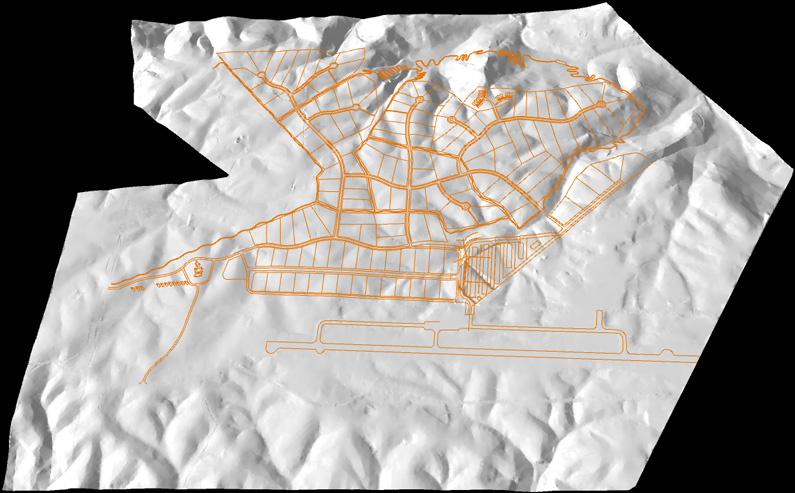
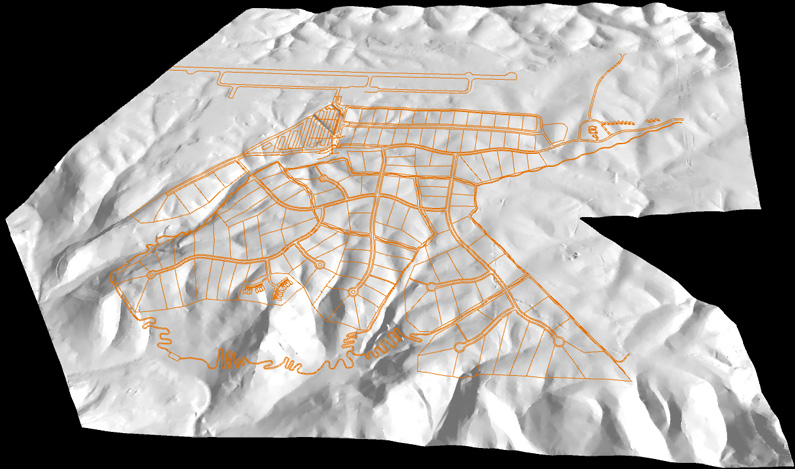
-
wow, 96 hours is a long time
 I cant help but wonder what the hell SU was doing all that time...
 -
Remus,
You and me both..........Glad I Did NOT pull the plug!
C
-
@remus said:
wow, 96 hours is a long time
I cant help but wonder what the hell SU was doing all that time...Probably dropped by the local Corner Bar for a couple of drinks in the meanwhile...
Anyway, impressive for sure. Now comes the modeling (and stamping) part!


Advertisement