sketchucation logo sketchucation
    • 登入
    Oops, your profile's looking a bit empty! To help us tailor your experience, please fill in key details like your SketchUp version, skill level, operating system, and more. Update and save your info on your profile page today!
    ⚠️ Important | Libfredo 15.6b introduces important bugfixes for Fredo's Extensions Update

    [Plugin] MatrixProximity Update v1.9 20110708

    已排程 已置頂 已鎖定 已移動 Plugins
    40 貼文 9 Posters 29.0k 瀏覽 9 Watching
    正在載入更多貼文
    • 從舊到新
    • 從新到舊
    • 最多點贊
    回覆
    • 在新貼文中回覆
    登入後回覆
    此主題已被刪除。只有擁有主題管理權限的使用者可以查看。
    • TIGT 離線
      TIG Moderator
      最後由 編輯

      Here's an updated version that fixes the 'missing menu issue'! 😳 Sorry! http://forums.sketchucation.com/viewtopic.php?p=46802#p46802

      Here's the guide MatrixProximityGuide.pdf
      All you need for 'Proximity' to run is a folder called 'Proximity Components' in the main 'Components' folder, useful IF you haven't already loaded a 'set' of three 'proximity components' [ending in +/~/-] into your model...

      TIG

      1 條回覆 最後回覆 回覆 引用 0
      • B 離線
        Bertier
        最後由 編輯

        this is GREAT !

        it's finally working !!!

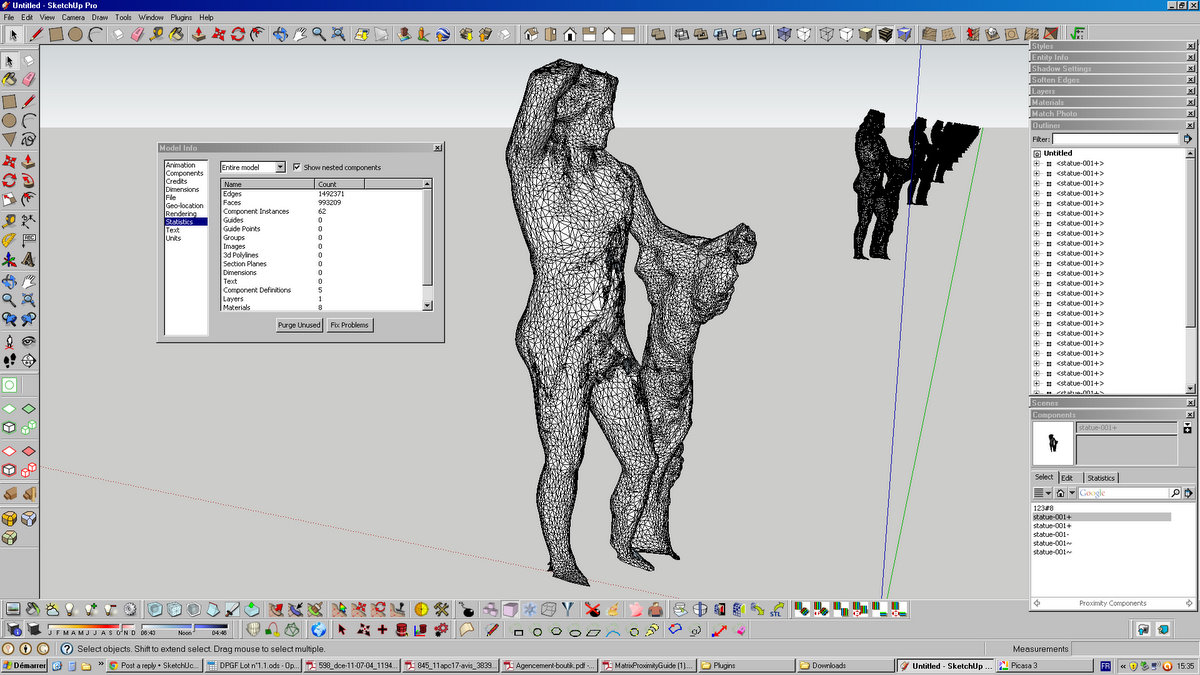
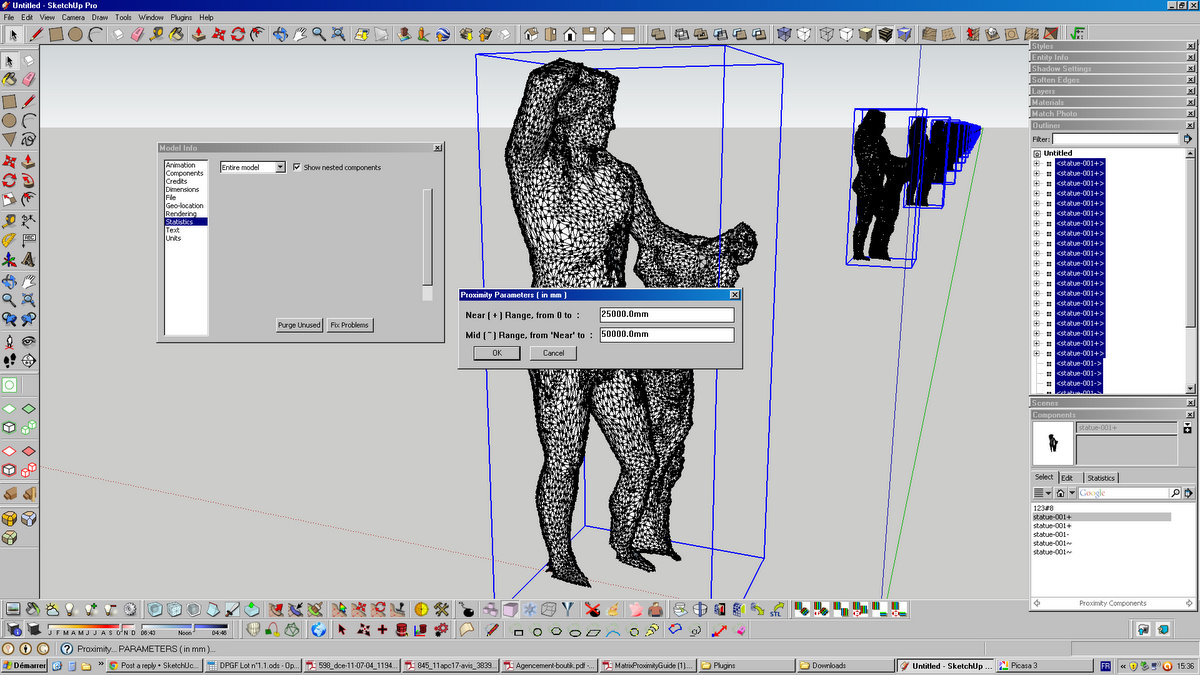
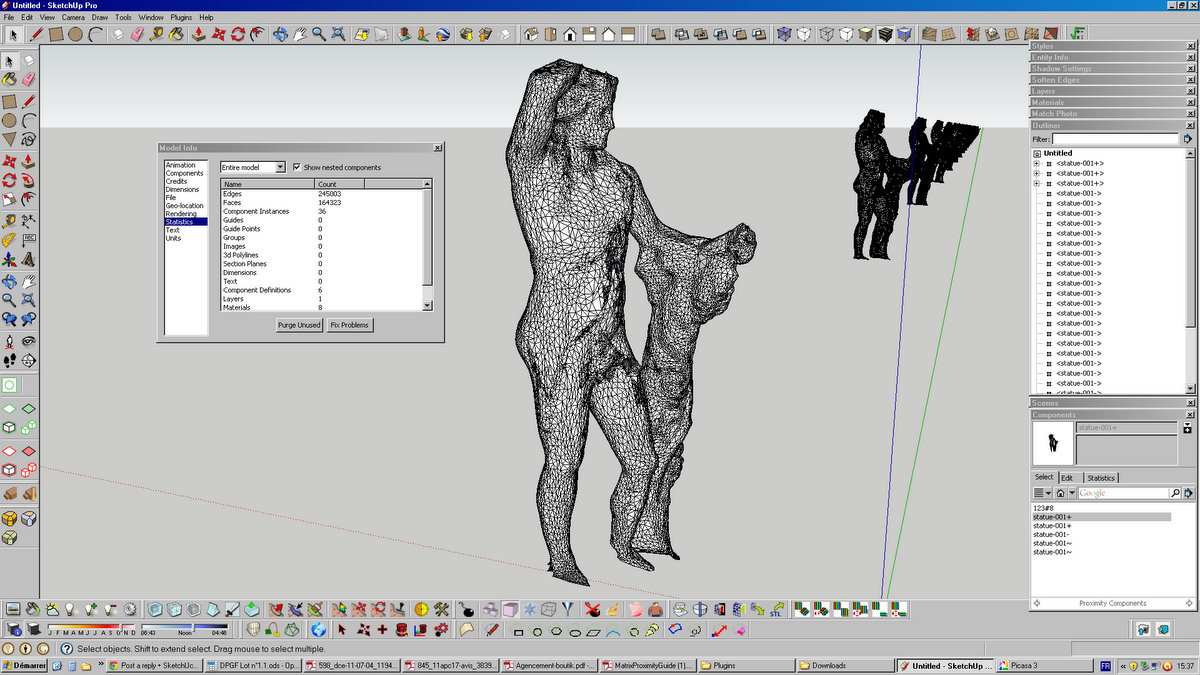
        here are some pics before / after :

        edges go from : 1,492,371 --> 245,003 !!!
        this is fantastic !

        TIG YOU ROCK !!!!


        Fullscreen capture 09072011 153559-1.jpg


        Fullscreen capture 09072011 153638-1.jpg


        Fullscreen capture 09072011 153704-1.jpg

        1 條回覆 最後回覆 回覆 引用 0
        • TIGT 離線
          TIG Moderator
          最後由 編輯

          'Proximity' was a tool that didn't develop much after I had the idea.
          It relies on you using it manually at each change of view with you having made two or three components with more/less detail for near/mid/far way from the camera locations [same origin etc but less geometry]. Each with +/~/- on the end of their name or thier SKP if external components used in the 'Proximity Components' folder inside Components folder, IF the components are not already loaded into the current SKP...
          I'd be interested in your feedback/ideas...

          TIG

          1 條回覆 最後回覆 回覆 引用 0
          • pilouP 離線
            pilou
            最後由 編輯

            Idea: Same but not from the camera but from a point x,y,z

            Frenchy Pilou
            Is beautiful that please without concept!
            My Little site :)

            1 條回覆 最後回覆 回覆 引用 0
            • B 離線
              Bertier
              最後由 編輯

              Hi TIG, thank you again for this, I believe it will be really helpfull into the projetc I am currently working on, and I imagine to other who handle large files with repeated components.

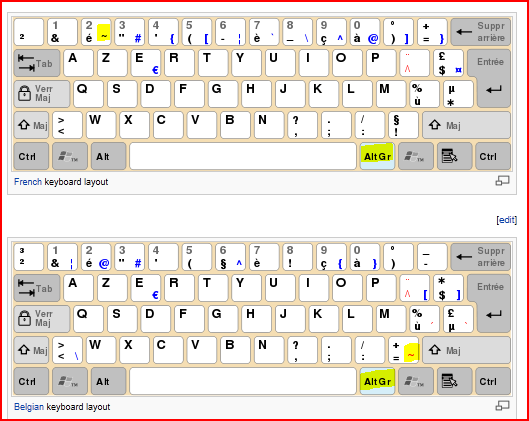
              • the : + / - extension make real sense as well as : ~, but for some reason on a French keyboard : ~ is not an easy "key"

              • when saving "statue-001+.skp" the "+" sign transforms in "statue-001_.skp", I then have to rename the file...

              • would it be possible to have script that auto-saves a component into -001+ / -001~ / -001- ? maybe combined with Polyreduce...
                a one-stop plugin from a component file --> +/~/-

              1 條回覆 最後回覆 回覆 引用 0
              • pilouP 離線
                pilou
                最後由 編輯

                @unknownuser said:

                ~ is not an easy "key"

                if so : just copy past fromt the text above 😉

                Frenchy Pilou
                Is beautiful that please without concept!
                My Little site :)

                1 條回覆 最後回覆 回覆 引用 0
                • TIGT 離線
                  TIG Moderator
                  最後由 編輯

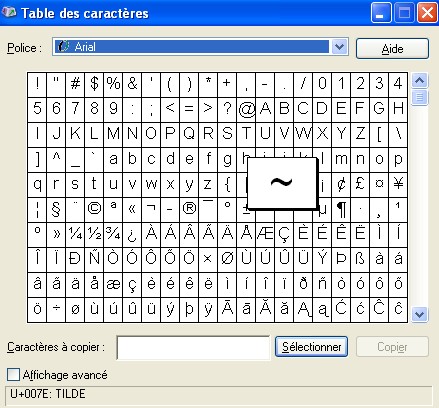
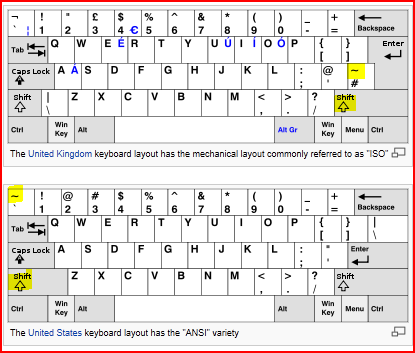
                  On an UK English keyboard a tilde ['~'] is just a shifted '#' sign? code= U007E
                  On a FR keyboard isn't it the key to the left of the top line '1' key +shift ??
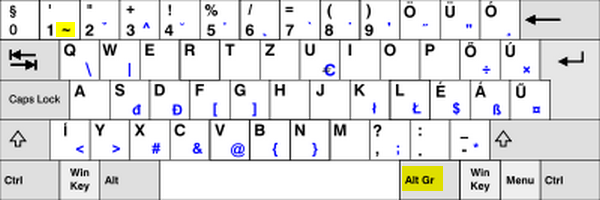
                  or you should use the French keyboard shortcut = AltGr+é then a <space> [<then backspace> to remove the space!]- if there's no space it tries to put the tilde over the last typed character if it's an 'a' or 'e' etc ?
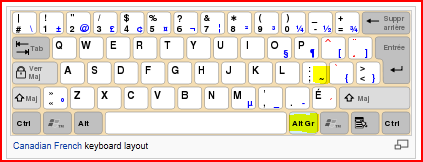
                  On a FR Canadian keyboard I think it's Ctrl+Alt+; for the ~ ??

                  TIG

                  1 條回覆 最後回覆 回覆 引用 0
                  • pilouP 離線
                    pilou
                    最後由 編輯

                    Same as TIG describe: Alt Graphic + é twice then Backspace 😉
                    Appuyer 2 fois sur é Alt Graphic étant appuyé : on obient curieusement 2 tildes (~~) puis Backspace pour en effacer un 😒

                    Frenchy Pilou
                    Is beautiful that please without concept!
                    My Little site :)

                    1 條回覆 最後回覆 回覆 引用 0
                    • B 離線
                      Bertier
                      最後由 編輯

                      salut Pilou sur mon clavier c'est : "Alt Gr + é" mais il faut le faire "é" fois et effacer une instance...

                      comment c'est sur le tien ?

                      1 條回覆 最後回覆 回覆 引用 0
                      • TIGT 離線
                        TIG Moderator
                        最後由 編輯

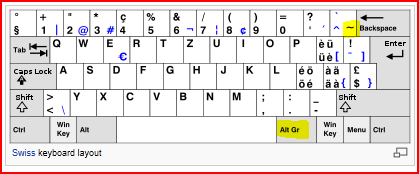
                        http://en.wikipedia.org/wiki/Keyboard_layoutCapture.PNGCapture1.PNGCapture2.PNGCapture3.PNG

                        TIG

                        1 條回覆 最後回覆 回覆 引用 0
                        • GaieusG 離線
                          Gaieus
                          最後由 編輯

                          Also mine... 😄


                          Hungary.png

                          Gai...

                          1 條回覆 最後回覆 回覆 引用 0
                          • pilouP 離線
                            pilou
                            最後由 編輯

                            or like this but I don't remember how to make the Shortcut U + 007E 😳 😳 😳
                            (alt + u + 07E don't works 😞
                            tilde.jpg

                            Frenchy Pilou
                            Is beautiful that please without concept!
                            My Little site :)

                            1 條回覆 最後回覆 回覆 引用 0
                            • TIGT 離線
                              TIG Moderator
                              最後由 編輯

                              You type the Unicode '007e' then 'Alt+X'..... BUT it only works in MicroSoft tools like Word etc, and NOT in Sketchup!

                              TIG

                              1 條回覆 最後回覆 回覆 引用 0
                              • pilouP 離線
                                pilou
                                最後由 編輯

                                yes but what is the key for start Unicode?
                                If I use Alt+.... it's finally open some shortcuts menu! 😳
                                (I just try with the NotePad and WordPad )
                                It's not vital 😉 As the more simple is copy past from the post here 😄
                                And I have it on my keyboard 😄

                                Frenchy Pilou
                                Is beautiful that please without concept!
                                My Little site :)

                                1 條回覆 最後回覆 回覆 引用 0
                                • TIGT 離線
                                  TIG Moderator
                                  最後由 編輯

                                  Alt+0126 writes a tilde [~]...
                                  Into Sketchup Text objects and any dialog text-fields etc - the symbol appears when you release the Alt key 😄

                                  Here's a useful list of all of the PC's 'Alt codes', used to get special symbols into your text... http://www.alt-codes.net/
                                  Some are more useful than others like...
                                  degrees Alt+167/248/0176 º°°
                                  half Alt+171 ½
                                  plus/minus Alt+241 ±
                                  divide Alt+246 ÷
                                  squared Alt+253 ²
                                  cubed Alt+252 ³
                                  bullets Alt+7/8/9/10 •◘○◙
                                  cent Alt+0162 ¢
                                  euro Alt+0128 €
                                  French "" Alt+174/175 « »
                                  Spanish inverted-qu'/ex'mark Alt+168/173 ¿ ¡

                                  BUT ☺♪♫☼↨‼

                                  TIG

                                  1 條回覆 最後回覆 回覆 引用 0
                                  • pilouP 離線
                                    pilou
                                    最後由 編輯

                                    Ah ok I must tranform hexa 7e in decimal! 💭 ☀ 😳
                                    so 7E = 126 😒
                                    Now all works fine 👍
                                    Seems ALT + 126 ~is sufficient~

                                    Frenchy Pilou
                                    Is beautiful that please without concept!
                                    My Little site :)

                                    1 條回覆 最後回覆 回覆 引用 0
                                    • R 離線
                                      rachmatrf
                                      最後由 編輯

                                      Thank you very much TIG..... You Rock!!

                                      1 條回覆 最後回覆 回覆 引用 0
                                      • J 離線
                                        JackB
                                        最後由 編輯

                                        What a great tool! Really intuitive and exactly what I needed. Thanks.

                                        1 條回覆 最後回覆 回覆 引用 0
                                        • K 離線
                                          kaas
                                          最後由 編輯

                                          hi TIG,

                                          Recently I did a project with lots of (high-polycount) trees and several camera positions. I really was missing some kind of LOD system. For instance, in one view some trees were very near and I wanted to use the high res version, in another view they were more in the distance and a low poly version would have speeded up the export of the views.

                                          So I looked for an LOD system for sketchup and Google turned up your 'old' plugin. I tried it in Sketchup 8 (the clients preferred version) but I can't get it to work. See attached file (all the components should be saved inside). What am I doing wrong??

                                          Regards, Max


                                          proximity.skp

                                          1 條回覆 最後回覆 回覆 引用 0
                                          • TIGT 離線
                                            TIG Moderator
                                            最後由 編輯

                                            @kaas said:

                                            hi TIG,

                                            Recently I did a project with lots of (high-polycount) trees and several camera positions. I really was missing some kind of LOD system. For instance, in one view some trees were very near and I wanted to use the high res version, in another view they were more in the distance and a low poly version would have speeded up the export of the views.

                                            So I looked for an LOD system for sketchup and Google turned up your 'old' plugin. I tried it in Sketchup 8 (the clients preferred version) but I can't get it to work. See attached file (all the components should be saved inside). What am I doing wrong??

                                            Regards, Max
                                            You example SKP only contained instances that were called 'doos'.
                                            If they had been named 'doos+' or 'doos-' or 'doos~' the Proximity WILL work.
                                            So Select all of the 'doos' and use the context-menu option in the Components-Browser to replace all selected with 'doos-' ...
                                            Run the tool and, depending on your settings and the instances distance from the camera, you'll get 'doos+' or 'doos-' or 'doos~' for each appropriate instance...

                                            TIG

                                            1 條回覆 最後回覆 回覆 引用 0
                                            • 1
                                            • 2
                                            • 2 / 2
                                            • 第一個貼文
                                              最後的貼文
                                            Buy SketchPlus
                                            Buy SUbD
                                            Buy WrapR
                                            Buy eBook
                                            Buy Modelur
                                            Buy Vertex Tools
                                            Buy SketchCuisine
                                            Buy FormFonts

                                            Advertisement