sketchucation logo sketchucation
    • 登入
    Oops, your profile's looking a bit empty! To help us tailor your experience, please fill in key details like your SketchUp version, skill level, operating system, and more. Update and save your info on your profile page today!
    🔌 Smart Spline | Fluid way to handle splines for furniture design and complex structures. Download

    Joint Push Pull Classic (Old version) - v2.2a - 26 Apr 17

    已排程 已置頂 已鎖定 已移動 Plugins
    368 貼文 150 Posters 2.0m 瀏覽 150 Watching
    正在載入更多貼文
    • 從舊到新
    • 從新到舊
    • 最多點贊
    回覆
    • 在新貼文中回覆
    登入後回覆
    此主題已被刪除。只有擁有主題管理權限的使用者可以查看。
    • thomthomT 離線
      thomthom
      最後由 編輯

      There is much to be desired in the API...

      Thomas Thomassen — SketchUp Monkey & Coding addict
      List of my plugins and link to the CookieWare fund

      1 條回覆 最後回覆 回覆 引用 0
      • L 離線
        liuwuran
        最後由 編輯

        Thanks a lot ,very useful 😍

        1 條回覆 最後回覆 回覆 引用 0
        • T 離線
          Takashi_Komuro
          最後由 編輯

          What advantages and functions of the Joint Push Pull ?

          1 條回覆 最後回覆 回覆 引用 0
          • TIGT 離線
            TIG Moderator
            最後由 編輯

            @takashi_komuro said:

            What advantages and functions of the Joint Push Pull ?
            Read the guidance notes on the first page of this thread, there is even a help-pdf file you can download...
            There are also examples throughout the thread...
            Put simply, by using JPP you can 'extrude' preselected facets that form a surface so they have a 'thickness', in ways that are not possible using the native PushPull tools...

            TIG

            1 條回覆 最後回覆 回覆 引用 0
            • pilouP 離線
              pilou
              最後由 編輯

              @unknownuser said:

              What advantages and functions of the Joint Push Pull ?

              The only automatic easy way to make thickness! 😄

              Frenchy Pilou
              Is beautiful that please without concept!
              My Little site :)

              1 條回覆 最後回覆 回覆 引用 0
              • jgbJ 離線
                jgb
                最後由 編輯

                @takashi_komuro said:

                What advantages and functions of the Joint Push Pull ?

                The major advantage of JPP over SU native Push/Pull is that where SU PP only works on individual flat faces, JPP works on combined curved surfaces made up from many flat faces.

                There are 3 versions of JPP, where the thickening occurs perpendicular to the selected surface, or you can set an angle to the direction of thickening. The third is a variation of SU's PP, which I never use so no comment on its functionality.

                A few tips to consider before using JPP.

                1. Make sure you do an "Orient Faces" before using the tool.
                  IMHO that should be a default function within JPP.

                2. Turn ON hidden lines only if you want to do a selection of faces on a surface.
                  Turn OFF hidden lines if you want to do the total surface.
                  Alternatively, turn ON hidden lines and make the perimeter of the selected faces soft/smooth lines SOFT. That will define a surface in one selection when Hidden Lines are OFF.

                3. When JPP does its thing, check the corners. Most of the lines JPP creates along the thickness are soft/smooth, and the sharp corners may not be hard, if desired. Just <Shift-CTRL-Delete> those lines to make them hard.

                4. Attempting to JPP to a thickness in relation to some object in the drawing may not give you the desired thickness when done.
                  The better way is to JPP beyond the desired thickness, INSPECT the shape for integrity (purple lines), then type to the VCB the exact thickness dimension desired, BEFORE you double click (or <Enter> twice).


                jgb

                1 條回覆 最後回覆 回覆 引用 0
                • M 離線
                  Mra
                  最後由 編輯

                  This tool crashes heaps with 2013.

                  Repro steps:

                  Create square.
                  Group it
                  Go into group
                  Extrude it
                  Exit group = crash.

                  1 條回覆 最後回覆 回覆 引用 0
                  • thomthomT 離線
                    thomthom
                    最後由 編輯

                    Do you have plugins installed? Tried disabling them temporarily to see if it might be one of them causing it?

                    Thomas Thomassen — SketchUp Monkey & Coding addict
                    List of my plugins and link to the CookieWare fund

                    1 條回覆 最後回覆 回覆 引用 0
                    • TIGT 離線
                      TIG Moderator
                      最後由 編輯

                      Sounds like some other script like Vray-beta or one of the half-baked new BIM tools is loading... and that is crashing SketchUp when this JPP does a legitimate operation.
                      It's usually from messing with native class/methods or having poorly constructed EntitiesObservers etc that kick in during other tools legit operations and cause the crash.
                      If you do find the culprit script then please let us know AND tell that scripts author about it too, so that they might then try to fix it...

                      TIG

                      1 條回覆 最後回覆 回覆 引用 0
                      • M 離線
                        Mra
                        最後由 編輯

                        @tig said:

                        Sounds like some other script like Vray-beta or one of the half-baked new BIM tools is loading... and that is crashing SketchUp when this JPP does a legitimate operation.
                        It's usually from messing with native class/methods or having poorly constructed EntitiesObservers etc that kick in during other tools legit operations and cause the crash.
                        If you do find the culprit script then please let us know AND tell that scripts author about it too, so that they might then try to fix it...

                        You're a sharp man. Yes, I am apart of the V-Ray beta. Pretty sure you're right about it too.

                        1 條回覆 最後回覆 回覆 引用 0
                        • M 離線
                          Mra
                          最後由 編輯

                          Confirmed: It is V-Ray, I'll let them know.

                          1 條回覆 最後回覆 回覆 引用 0
                          • bulbaB 離線
                            bulba
                            最後由 編輯

                            i've downloaded this plugin months ago and forgot to say thanks..
                            THANKS A LOT Fredo 😄
                            been using this regularly

                            1 條回覆 最後回覆 回覆 引用 0
                            • R 離線
                              rempeyeks
                              最後由 編輯

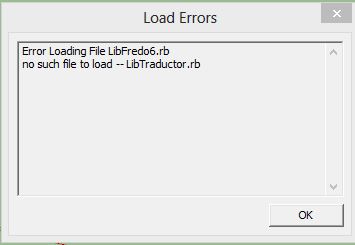
                              i've got error message here.
                              is that joint push pull dont work in sketchup 2013?

                              Capture.JPG

                              1 條回覆 最後回覆 回覆 引用 0
                              • TIGT 離線
                                TIG Moderator
                                最後由 編輯

                                Have you properly installed ALL of the latest versions of Fredo's tools AND LibFredo...
                                He upgraded his Lib and several of his tools to work with v2013...

                                TIG

                                1 條回覆 最後回覆 回覆 引用 0
                                • TIGT 離線
                                  TIG Moderator
                                  最後由 編輯

                                  A reprise of the tool's help...

                                  The footprint in the SketchUp Plugins Directory must be:

                                  • jointpushpull.rb
                                  • LibTraductor.rb
                                  • JPP_Dir_17 folder [containing other files]

                                  On Mac for v8 the SU plugin directory should be:

                                  Macintosh HD/Library/Application Support/Google SketchUp 8/SketchUp/plugins

                                  Note: once installed, you can safely delete any older JPP_Dir_xx folders

                                  CAUTION:
                                  NEVER rename or move files from their folders.
                                  If you are unsure of your unzip operation, do it in a neutral folder and check that you reconstruct the right footprint.
                                  Then transfer the folders and files to the SketchUp Plugin Directory.

                                  Have you done all of this ?
                                  Have you restarted SketchUp ?
                                  Did you look in the xxxx menu ?

                                  Since you say you have v8, then why not get the latest RBZ version from the SCF PluginStore then use the Preferences > Extensions > Install from Archive, button [v8M2 or newer] to automate it all, so you don't make mistakes...
                                  You could even get the 'SketchUcation Plugin Store' toolset which allows you tp browse and AutoInstall hundreds of plugins with just a button-click from within SketchUp itself...
                                  See the Resources menu items above...

                                  TIG

                                  1 條回覆 最後回覆 回覆 引用 0
                                  • K 離線
                                    kolya
                                    最後由 編輯

                                    i do not get it how can i download those plugins from this site!? can somebody pls help me!

                                    1 條回覆 最後回覆 回覆 引用 0
                                    • TIGT 離線
                                      TIG Moderator
                                      最後由 編輯

                                      @nikola

                                      Most Plugin's threads have download-able files in their first post - this particular tool has extensive explanations on how to install its tools.

                                      Please also note that many of Fredo's and thomthom's tools [and afew others] need a supporting Library downloading/installing - it is clearly explained in their postsm so remember to get that too...

                                      However, the simplest way to get most of the Plugins available from SCF is to use the PluginStore [accessed off the Resources menu above], or why not install the Plugin Store Toolset that let's you AutoInstall them...

                                      Please see this recent post for some more info, links etc... http://sketchucation.com/forums/viewtopic.php?p=488126#p488126

                                      TIG

                                      1 條回覆 最後回覆 回覆 引用 0
                                      • A 離線
                                        alexgava
                                        最後由 編輯

                                        thanks, my dear friend...

                                        nice tool 😄..

                                        still i dont know use it, but is a nice tool 😄

                                        1 條回覆 最後回覆 回覆 引用 0
                                        • Jean-FrancoJ 離線
                                          Jean-Franco
                                          最後由 編輯

                                          If you visit the first page of this post, you will find the links for download and also a PDF tutorial explaining how to use it.
                                          Have you seen it ?

                                          Jean-Franco

                                          1 條回覆 最後回覆 回覆 引用 0
                                          • porter159P 離線
                                            porter159
                                            最後由 編輯

                                            Is there a version of this that works for sketchup 2013? It is one of my favorite tools that used very often, but I cant find a 2013 version or switch the file over from sketchup 8. I tried the "Shell" plugin that works in the same manor, but it doesnt work quite as easily or affectively as JPP. Please help? A version for 2013 that works just like the one for sketchup 8 would be FANTASTIC!!!


                                            1 條回覆 最後回覆 回覆 引用 0
                                            • 1
                                            • 2
                                            • 3
                                            • 4
                                            • 5
                                            • 18
                                            • 19
                                            • 1 / 19
                                            • 第一個貼文
                                              最後的貼文
                                            Buy SketchPlus
                                            Buy SUbD
                                            Buy WrapR
                                            Buy eBook
                                            Buy Modelur
                                            Buy Vertex Tools
                                            Buy SketchCuisine
                                            Buy FormFonts

                                            Advertisement