sketchucation logo sketchucation
    • 登入
    Oops, your profile's looking a bit empty! To help us tailor your experience, please fill in key details like your SketchUp version, skill level, operating system, and more. Update and save your info on your profile page today!
    🔌 Smart Spline | Fluid way to handle splines for furniture design and complex structures. Download

    Useful MAC Apps and Hardware [Ongoing Updates]

    已排程 已置頂 已鎖定 已移動 Hardware, Software & Gadgets
    288 貼文 34 Posters 190.6k 瀏覽 34 Watching
    正在載入更多貼文
    • 從舊到新
    • 從新到舊
    • 最多點贊
    回覆
    • 在新貼文中回覆
    登入後回覆
    此主題已被刪除。只有擁有主題管理權限的使用者可以查看。
    • D 離線
      driven
      最後由 編輯

      @mike lucey said:

      It might be an idea to pick up a wireless Mighty Mouse on eBay etc if they come up for sale!

      Maybe I should sell mine there, the balls on both wired and wireless, 'bung' up and are a nuisance to clean...

      It became a daily chore before I retired them...

      I did really like them before they started failing.

      john

      learn from the mistakes of others, you may not live long enough to make them all yourself...

      1 條回覆 最後回覆 回覆 引用 0
      • Mike LuceyM 離線
        Mike Lucey
        最後由 編輯

        How were you cleaning them? This video show the process involved, Cleaning the Mighty Mouse Scroll Ball
        http://vimeo.com/338625

        I think he could do with a tweezers though!

        Support us so we can support you! Upgrade to Premium Membership!

        1 條回覆 最後回覆 回覆 引用 0
        • elmerE 離線
          elmer
          最後由 編輯

          Mike,

          Thank you so much for this video link!
          Altough the first part, unsealing the bottom ring, is a little tricky, all the process
          is very easy and efficient.
          I was just going to buy a new mouse (the fourth one in a few years 😢), now all I have to do is to clean my mouse stock 😆

          Thanks again.

          Patrice

          Of course, I also thanked Julian on Vimeo.

          1 條回覆 最後回覆 回覆 引用 0
          • jeff hammondJ 離線
            jeff hammond
            最後由 編輯

            (i'm not sure if this has been brought up in this thread yet or not but...)

            i'm going on 3 months now using pixelmator..

            http://www.pixelmator.com

            it's 15 dollars.. seriously, the first application i ever used on a computer for content creation was photoshop.. and i used it for years and years..

            and i'm saying, i don't miss a single feature in photoshop by using pixelmator.. (other than me being so used to photoshop's UI)..

            it has all the tonal controls i need as well as very similar layers and blending modes.. good sharpening and selection tools etc.. a solid base set of tools that function very well for me..

            but the main benefit for me at this point (besides the price point) is that it's a simple drag/drop type of instal (or via app store).. a nice&neat little app.. with photoshop, it installs all sorts of crap all over my computers and things are always launching/popping up (app managers!? or whatever)..

            might not be a good 'downgrade' for some people that are photoshop maniacs but for people like me and what i need out of an image editor, it actually feels like an upgrade..

            dotdotdot

            1 條回覆 最後回覆 回覆 引用 0
            • jeff hammondJ 離線
              jeff hammond
              最後由 編輯

              @unknownuser said:

              pixelmator

              i spent some more time today familiarizing myself with it and found a couple of really nice features.
              here's one

              http://www.pixelmator.com/#alignment-guides

              i think something like that would be nice to see in sketchup even.. (the relative spacing bit)

              dotdotdot

              1 條回覆 最後回覆 回覆 引用 0
              • Mike LuceyM 離線
                Mike Lucey
                最後由 編輯

                Just got word that Twilight Render is now available for Mac users 👍

                TwlightRender.jpg

                Check it out here, http://twilightrender.com/downloads/upgrade

                Support us so we can support you! Upgrade to Premium Membership!

                1 條回覆 最後回覆 回覆 引用 0
                • pbacotP 離線
                  pbacot
                  最後由 編輯

                  uh, I was just thinking about that again today... People saying "Twilight is great". Well not for me. Now, Maybe... thanks for the note, Mike!

                  MacOSX MojaveSketchUp Pro v19 Twilight v2 Thea v3 PowerCADD

                  1 條回覆 最後回覆 回覆 引用 0
                  • Mike LuceyM 離線
                    Mike Lucey
                    最後由 編輯

                    I haven't pit something up here for a while.
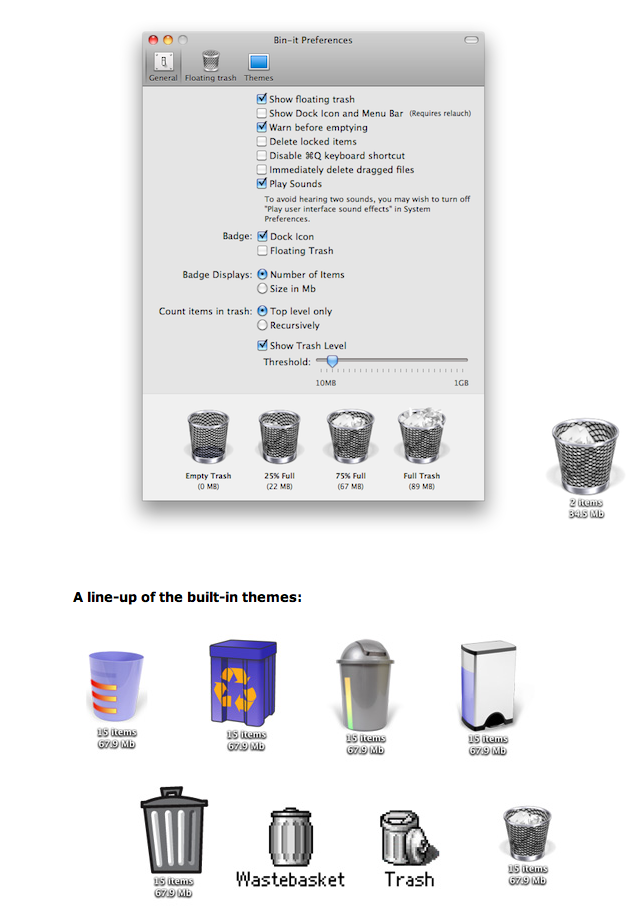
                    Bin-it.png

                    Yesterday I was cleaning up my BumpTop screen and thought it would be handy for have a floating Trash Bin! I located Bin-it http://peacockmedia.co.uk/bin-it/#download and having taken the two week trial. I like it and probably will buy at $5.

                    Support us so we can support you! Upgrade to Premium Membership!

                    1 條回覆 最後回覆 回覆 引用 0
                    • Mike LuceyM 離線
                      Mike Lucey
                      最後由 編輯

                      How to enable expanded save dialog as default

                      Most of you probably know all about this already but I thought I should mention it for those that don't.

                      Apple tend to keep things very simple and the default saving is such a case. This is what the default shows,
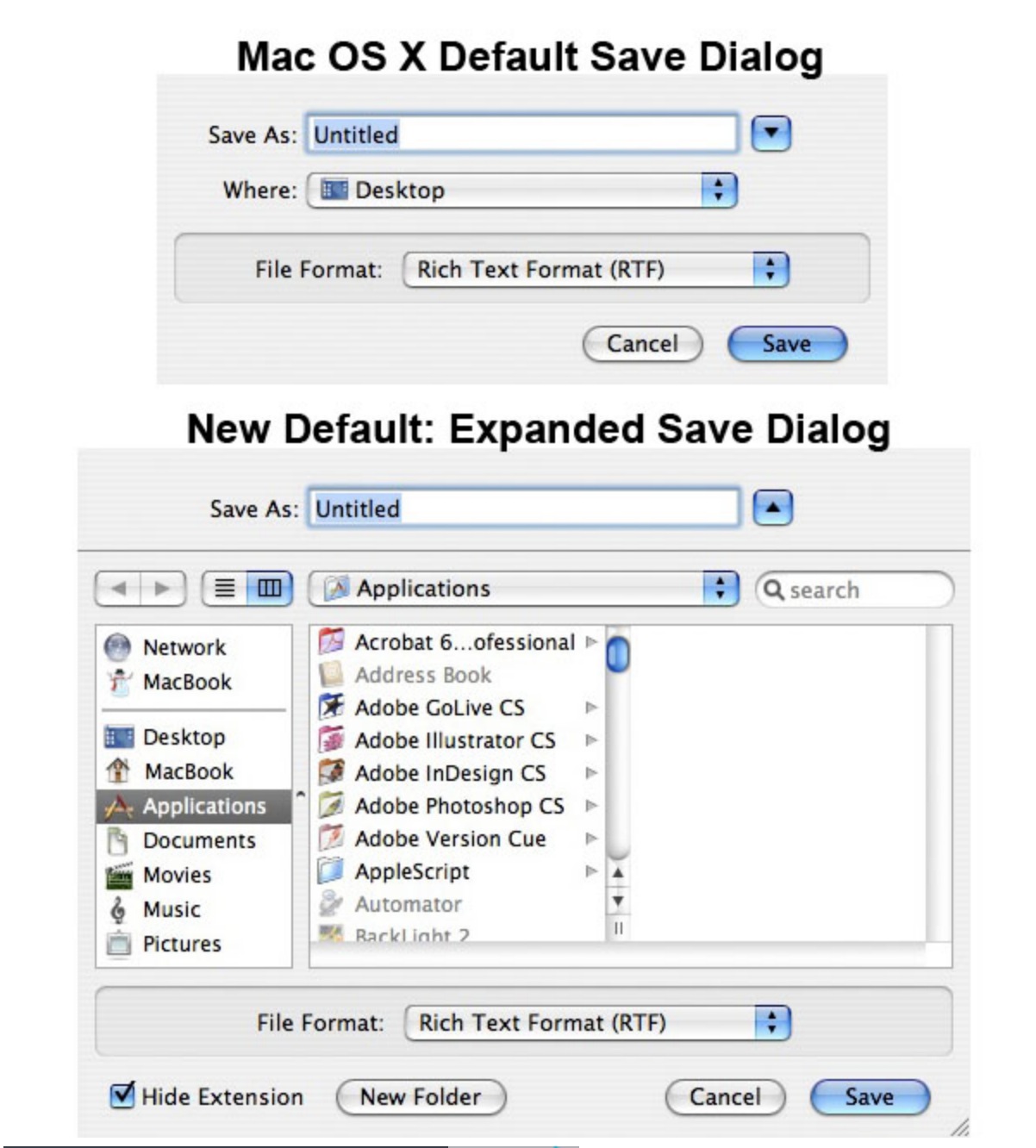
                      How to enable expanded save dialog as default.jpg

                      To achieve a more indepth setup the following needs to be down.

                      You will need to use the command line for this, so open up the Terminal and type or copy/paste the following commands.

                      Enable expanded save dialog
                      defaults write -g NSNavPanelExpandedStateForSaveMode -bool TRUE

                      Disable expanded save dialog – revert back to Mac OS X default
                      defaults write -g NSNavPanelExpandedStateForSaveMode -bool FALSE
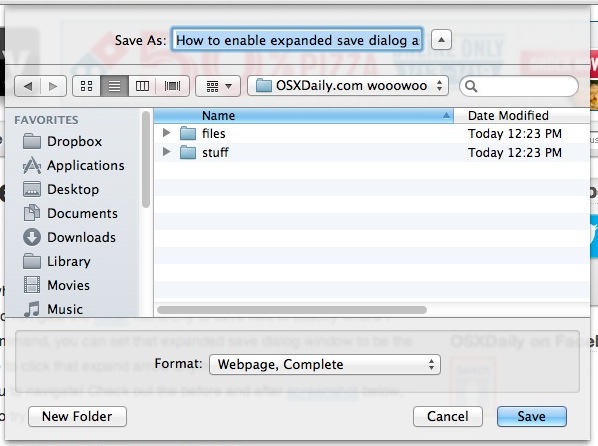
                      Link Preview Image
                      How to Enable Expanded Save Dialog as Default in Mac OS X

                      How to Enable Expanded Save Dialog as Default in Mac OS X

                      favicon

                      OS X Daily (osxdaily.com)

                      Support us so we can support you! Upgrade to Premium Membership!

                      1 條回覆 最後回覆 回覆 引用 0
                      • wind-borneW 離線
                        wind-borne
                        最後由 編輯

                        @mike lucey said:

                        How to enable expanded save dialog as default

                        Most of you probably know all about this already but I thought I should mention it for those that don't.

                        Apple tend to keep things very simple and the default saving is such a case. This is what the default shows,

                        [attachment=0:2xaj0b8r]<!-- ia0 -->How to enable expanded save dialog as default.jpg<!-- ia0 -->[/attachment:2xaj0b8r]

                        To achieve a more indepth setup the following needs to be down.

                        You will need to use the command line for this, so open up the Terminal and type or copy/paste the following commands.

                        Enable expanded save dialog
                        defaults write -g NSNavPanelExpandedStateForSaveMode -bool TRUE

                        Disable expanded save dialog – revert back to Mac OS X default
                        defaults write -g NSNavPanelExpandedStateForSaveMode -bool FALSE

                        Link Preview Image
                        How to Enable Expanded Save Dialog as Default in Mac OS X

                        How to Enable Expanded Save Dialog as Default in Mac OS X

                        favicon

                        OS X Daily (osxdaily.com)

                        for more fluidity, the shortcut ⌘=
                        does the same in a flash

                        on the other hand,
                        DefaultFolderX further expansion of open and save dialogs has been my companion for years 🤓

                        "To read between the lines was easier than to follow the text."OSX 10.11.6

                        %(#BF80BF)[SU 8 pro

                        1 條回覆 最後回覆 回覆 引用 0
                        • Mike LuceyM 離線
                          Mike Lucey
                          最後由 編輯

                          SnapHeal free until the 3rd Sept '13

                          SnapHeal.png

                          favicon

                          (www.macphun.com)

                          Support us so we can support you! Upgrade to Premium Membership!

                          1 條回覆 最後回覆 回覆 引用 0
                          • jeff hammondJ 離線
                            jeff hammond
                            最後由 編輯

                            @mike lucey said:

                            How to enable expanded save dialog as default

                            Most of you probably know all about this already but I thought I should mention it for those that don't.

                            Apple tend to keep things very simple and the default saving is such a case. This is what the default shows,

                            [attachment=0:y3wt04ez]<!-- ia0 -->How to enable expanded save dialog as default.jpg<!-- ia0 -->[/attachment:y3wt04ez]

                            To achieve a more indepth setup the following needs to be down.

                            You will need to use the command line for this, so open up the Terminal and type or copy/paste the following commands.

                            Enable expanded save dialog
                            defaults write -g NSNavPanelExpandedStateForSaveMode -bool TRUE

                            Disable expanded save dialog – revert back to Mac OS X default
                            defaults write -g NSNavPanelExpandedStateForSaveMode -bool FALSE

                            Link Preview Image
                            How to Enable Expanded Save Dialog as Default in Mac OS X

                            How to Enable Expanded Save Dialog as Default in Mac OS X

                            favicon

                            OS X Daily (osxdaily.com)

                            there's the expand button next to the 'save as' text field.. that will open the bigger window and it remembers its state.. (the osxdaily article is over 6 years old so a bit outdated 😉 )

                            dotdotdot

                            1 條回覆 最後回覆 回覆 引用 0
                            • Mike LuceyM 離線
                              Mike Lucey
                              最後由 編輯

                              Picturesque is quite a nice application which I use occasionally for photo work. Its is also a past Apple Design Award winner. http://www.acqualia.com/picturesque/

                              picturesque.png

                              Paddle is making Picturesque available for free today. Pop over and grab it before its too late. The link is here, https://www.paddle.com/freebie/490660/picturesque/

                              Mike

                              Support us so we can support you! Upgrade to Premium Membership!

                              1 條回覆 最後回覆 回覆 引用 0
                              • wind-borneW 離線
                                wind-borne
                                最後由 編輯

                                stumbled across this, free until 11/3

                                played around with a few images, powerfully simple and swift for minor tweaks...

                                DxO Perspective

                                http://a3.mzstatic.com/us/r30/Purple/v4/8a/4f/f0/8a4ff048-75ff-1769-5d5d-1ee1c3c43286/screen800x500.jpeg

                                http://a4.mzstatic.com/us/r30/Purple6/v4/4d/57/ba/4d57bab0-7ffd-c411-a17a-6e9ebfc98a60/screen800x500.jpeg

                                http://a2.mzstatic.com/us/r30/Purple6/v4/6c/19/94/6c199499-a3c2-9d9b-b9b4-91e6ff54c8a7/screen800x500.jpeg

                                http://a5.mzstatic.com/us/r30/Purple4/v4/15/48/42/154842f7-b694-623a-c172-adab6c2de13b/screen800x500.jpeg

                                "To read between the lines was easier than to follow the text."OSX 10.11.6

                                %(#BF80BF)[SU 8 pro

                                1 條回覆 最後回覆 回覆 引用 0
                                • Mike LuceyM 離線
                                  Mike Lucey
                                  最後由 編輯

                                  wind-borne, Good find and thanks for mentioning. I like apps that do one job well and DoX Perspective is one of those. I think it would be worth the $20 but better again to get it free.

                                  Mike

                                  Support us so we can support you! Upgrade to Premium Membership!

                                  1 條回覆 最後回覆 回覆 引用 0
                                  • EdsonE 離線
                                    Edson
                                    最後由 編輯

                                    speaking of pens, have a look this set of pens. the one that caught my attention is the jot script, as it works with Penultimate/Evernote, two apps I use with my iPad.
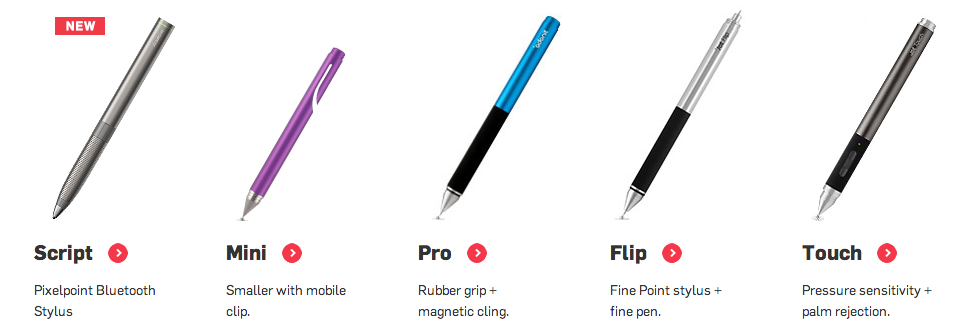

                                    Screen Shot 2013-11-08 at 5.38.13 PM.png

                                    edson mahfuz, architect| porto alegre • brasil
                                    http://www.mahfuz.arq.br

                                    1 條回覆 最後回覆 回覆 引用 0
                                    • M 離線
                                      mwm5053
                                      最後由 編輯

                                      I've been using this for awhile and love it. Quit all apps it's made with automator which I would like to learn more about but not very much out there as far as tutorials but thought I would share.
                                      http://osxdaily.com/2013/06/02/quit-all-applications-mac-os-x/

                                      2011 iMac
                                      SU 2015 Pro, 2017 Make
                                      V2 Twilight
                                      macOS Sierra 10.12.5

                                      1 條回覆 最後回覆 回覆 引用 0
                                      • S 離線
                                        slbaumgartner
                                        最後由 編輯

                                        Check out Liquid (available in the app store). If you select something and click command+@ it pops up a little dialog that lets you do things such as search the web, send to various destinations, copy in nice ways. For a small price, the full version will also look up the selection in various dictionaries, translate between languages, and convert units. Very slick!

                                        Steve

                                        1 條回覆 最後回覆 回覆 引用 0
                                        • Mike LuceyM 離線
                                          Mike Lucey
                                          最後由 編輯

                                          Thanks Steve. Liquid is sitting in my menu bar 👍

                                          Here is a heads up on Paddle's current offer.

                                          Paddle 'The 2014 Mac Pick a Bundle!'

                                          Pick any 10 out for 30 apps for just $39.99

                                          https://www.paddle.com/bundle/the-2014-mac-pick-a-bundle/?utm_source=email%26amp;utm_medium=email%26amp;utm_campaign=email#!

                                          It might be worth the price for just 'Forever Save 2' 👍

                                          Mike

                                          Support us so we can support you! Upgrade to Premium Membership!

                                          1 條回覆 最後回覆 回覆 引用 0
                                          • pbacotP 離線
                                            pbacot
                                            最後由 編輯

                                            Has anyone been using a good "tear-off menu" app / hack in OSX.

                                            I keep going nuts with one app I have that buries sheet index in a pull down menu. C'mon. I have to click between so many sheets constantly! So slow.

                                            Any ideas. Thanks!

                                            MacOSX MojaveSketchUp Pro v19 Twilight v2 Thea v3 PowerCADD

                                            1 條回覆 最後回覆 回覆 引用 0
                                            • 1
                                            • 2
                                            • 11
                                            • 12
                                            • 13
                                            • 14
                                            • 15
                                            • 14 / 15
                                            • 第一個貼文
                                              最後的貼文
                                            Buy SketchPlus
                                            Buy SUbD
                                            Buy WrapR
                                            Buy eBook
                                            Buy Modelur
                                            Buy Vertex Tools
                                            Buy SketchCuisine
                                            Buy FormFonts

                                            Advertisement