sketchucation logo sketchucation
    • Login
    Oops, your profile's looking a bit empty! To help us tailor your experience, please fill in key details like your SketchUp version, skill level, operating system, and more. Update and save your info on your profile page today!
    ⚠️ Update | Sketchucation Tools 5.0.8 released with licensing improvements and bugfixes Download

    [Plugin] SketchyFFD (Classic)

    Scheduled Pinned Locked Moved Plugins
    412 Posts 153 Posters 540.2k Views 153 Watching
    Loading More Posts
    • Oldest to Newest
    • Newest to Oldest
    • Most Votes
    Reply
    • Reply as topic
    Log in to reply
    This topic has been deleted. Only users with topic management privileges can see it.
    • D
      davecoopstl
      last edited by

      So i'm using SketchyFFD on a surface I created with SoapSkin Bubble.

      It works, however the FFD nodes are not aligned in the group that the surface is drawn. They are created next to the surface. So when I'm editing the nodes, I can't really tell which one is relative to which part of the surface.

      Why are my nodes not aligned with my group when they are created?

      Am I doing something wrong?

      Dave.


      Why are my nodes not aligned?

      1 Reply Last reply
      Reply Quote 0
      • C
        CPhillips
        last edited by

        Try exploding and regrouping the geometry. The FFD script wants the geometry positioned in a certain way inside the group.

        @davecoopstl said:

        So i'm using SketchyFFD on a surface I created with SoapSkin Bubble.

        It works, however the FFD nodes are not aligned in the group that the surface is drawn. They are created next to the surface. So when I'm editing the nodes, I can't really tell which one is relative to which part of the surface.

        Why are my nodes not aligned with my group when they are created?

        Am I doing something wrong?

        Dave.

        1 Reply Last reply
        Reply Quote 0
        • D
          davecoopstl
          last edited by

          CP - Thanks! That worked like a charm.

          I do think it would be easier to control if the nodes were directly ON the surfaces that you are trying to deform. So you knew EXACTLY what part of the surface the node controlled.

          At least they are in a relative position, now that I've exploded and re-grouped.

          Dave.

          1 Reply Last reply
          Reply Quote 0
          • C
            CPhillips
            last edited by

            @davecoopstl said:

            CP - Thanks! That worked like a charm.

            I do think it would be easier to control if the nodes were directly ON the surfaces that you are trying to deform. So you knew EXACTLY what part of the surface the node controlled.

            At least they are in a relative position, now that I've exploded and re-grouped.

            Dave.

            The math is such that the control points need to be created exactly on a 3d grid. 😞

            1 Reply Last reply
            Reply Quote 0
            • C
              CPhillips
              last edited by

              I posted a new version with a few minor changes.

              Update Mar 21.
              -Moved all FFD right click menu items to a sub menu.
              -Fixed a bug that forced you to have a least 2 control point in each direction. You can now have do 2D grids. IE. 1x4x3.
              -Added an option to create a NxN 2d patch. A grid with a control point at each intersection.

              Get it here:
              http://www.sketchucation.com/forums/scf/download/file.php?id=6745

              1 Reply Last reply
              Reply Quote 0
              • FletchF
                Fletch
                last edited by

                thank you Chris! the 2D grid ability is Key!

                Fletch
                3D Modeling addict. Former owner/developer of Twilight Render. sleepinggiantvisual.com

                1 Reply Last reply
                Reply Quote 0
                • A
                  alz
                  last edited by

                  @cphillips said:

                  -Added an option to create a NxN 2d patch. A grid with a control point at each intersection.

                  I mis-read this at first -- I thought you were saying you made it possible to encase the model in a grid box, rather than floating points (to help visualize the distances between points).

                  Great work over all! I'd love to see SU incorporate this as a scale tool (lattice) option.

                  --alz

                  1 Reply Last reply
                  Reply Quote 0
                  • G
                    GreenToaster
                    last edited by

                    @unknownuser said:

                    -Added an option to create a NxN 2d patch. A grid with a control point at each intersection.
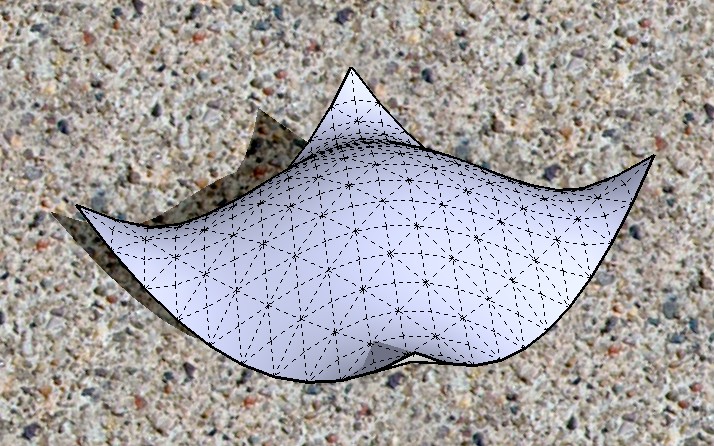
                    BEAUTIFUL!!! THANK YOU!!! 😍

                    bw_shapes_004_01.jpg

                    If you really want something you won't ever stop pursuing it.

                    1 Reply Last reply
                    Reply Quote 0
                    • K
                      kwistenbiebel
                      last edited by

                      I am having trouble with the new FFD.
                      I made a so called 'TIN', made a 4,4,4 FFD out of it and wanted to let the surface curve upwards so I selected the points of the short outer edge and moved them up.
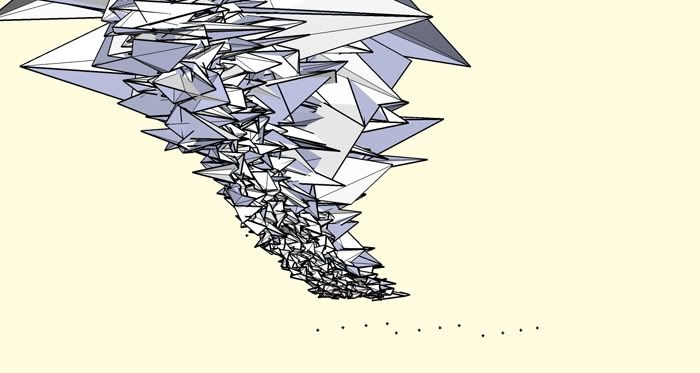
                      The FFD result however is a mesh soup.... 😞

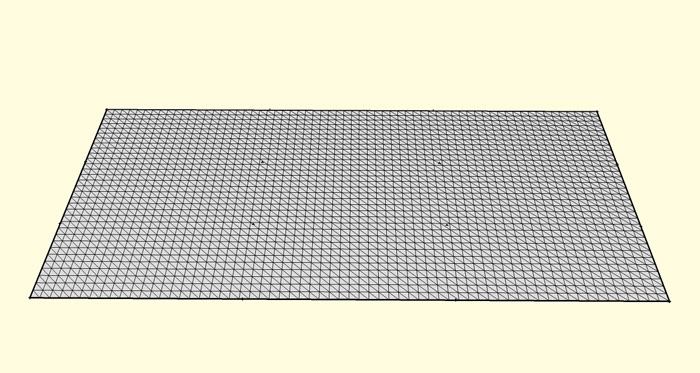
                      before:

                      http://i140.photobucket.com/albums/r3/kwistenbiebel1/ffdbefore.jpg

                      after:

                      http://i140.photobucket.com/albums/r3/kwistenbiebel1/ffd-after.jpg

                      1 Reply Last reply
                      Reply Quote 0
                      • G
                        GreenToaster
                        last edited by

                        Hey, that's very cool . . .

                        If you really want something you won't ever stop pursuing it.

                        1 Reply Last reply
                        Reply Quote 0
                        • R
                          remus
                          last edited by

                          Looks kinda like a tornado to me.not quite what you were aiming for? 😛

                          http://remusrendering.wordpress.com/

                          1 Reply Last reply
                          Reply Quote 0
                          • C
                            CPhillips
                            last edited by

                            Hrmmm. Not sure why that would fail. Could you post the model?

                            Also. Try a 4,4,1 FFD for that mesh.

                            @kwistenbiebel said:

                            I am having trouble with the new FFD.
                            I made a so called 'TIN', made a 4,4,4 FFD out of it and wanted to let the surface curve upwards so I selected the points of the short outer edge and moved them up.
                            The FFD result however is a mesh soup.... 😞

                            before:

                            http://i140.photobucket.com/albums/r3/kwistenbiebel1/ffdbefore.jpg

                            after:

                            http://i140.photobucket.com/albums/r3/kwistenbiebel1/ffd-after.jpg

                            1 Reply Last reply
                            Reply Quote 0
                            • J
                              Jorgensen
                              last edited by

                              How does the "make Patch" work ?

                              When I use the default setting a get a mesh that is 762mm x 762mm. What do I do when I want it to be 20000mm x 20000mm ?

                              sketchup pro 2016 16.1.1449 64 bit | windows 10 pro | i7-3770k @3.5 GHz | 16gb ram | gtx 780 ti / gtx 980 ti | nvidia driver 368.39

                              1 Reply Last reply
                              Reply Quote 0
                              • C
                                CPhillips
                                last edited by

                                @jorgensen said:

                                How does the "make Patch" work ?

                                When I use the default setting a get a mesh that is 762mm x 762mm. What do I do when I want it to be 20000mm x 20000mm ?

                                Its number of cells in either direction and the width and height for each cell. I figured it would use whatever units were set but it doesn't sound like that is the case. Its probably in inches.

                                1 Reply Last reply
                                Reply Quote 0
                                • J
                                  justry
                                  last edited by

                                  I just wanted to say that your script is greaaaaaaaat Chris! Really! I was actually looking for something like this.

                                  I was messing around trying to model an airplane, and I was trying to make the front end of the body wider, but I couldn't do it with the sketchup scale tool. I kept googling for "sketchup distort tool plugin" with no success, till I remembered coming across this thread before, so I looked for it, downloaded the script, and it WORKS LIKE A CHARM! Really great!

                                  They should really be adding this to the functionality of the scale tool in sketchup 7. Like with a modifier key or something. You know, something like: "Alt to distort" or something like that.

                                  1 Reply Last reply
                                  Reply Quote 0
                                  • C
                                    CPhillips
                                    last edited by

                                    @justry said:

                                    I just wanted to say that your script is greaaaaaaaat Chris! Really! I was actually looking for something like this.

                                    I was messing around trying to model an airplane, and I was trying to make the front end of the body wider, but I couldn't do it with the sketchup scale tool. I kept googling for "sketchup distort tool plugin" with no success, till I remembered coming across this thread before, so I looked for it, downloaded the script, and it WORKS LIKE A CHARM! Really great!

                                    They should really be adding this to the functionality of the scale tool in sketchup 7. Like with a modifier key or something. You know, something like: "Alt to distort" or something like that.

                                    Thanks Justry!

                                    Could you post a picture of your plane?

                                    Chris

                                    1 Reply Last reply
                                    Reply Quote 0
                                    • J
                                      justry
                                      last edited by

                                      Well, it's still not finished, but if it looks good when I'm done (hopefully!) I'll post it!

                                      1 Reply Last reply
                                      Reply Quote 0
                                      • J
                                        justry
                                        last edited by

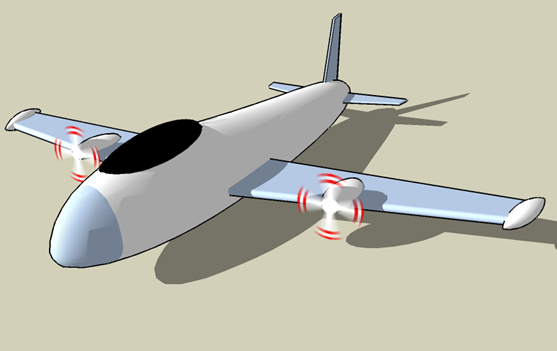
                                        Well, here it is. Nothing fancy, I'm not that great a modeler 💚 .

                                        plane.png

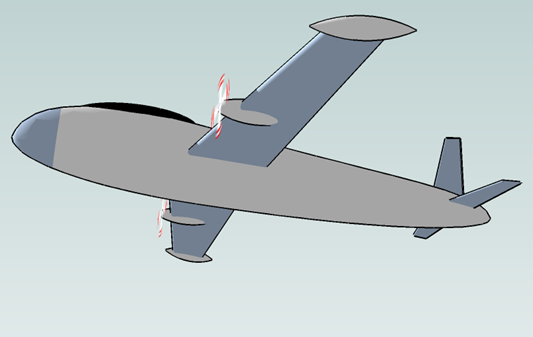
                                        Another picture:

                                        plane3.png

                                        Tweaking the body would have been a lot of work. Your script makes it a breeze!

                                        1 Reply Last reply
                                        Reply Quote 0
                                        • S
                                          svetik
                                          last edited by

                                          HI! does it work for SU 5?

                                          1 Reply Last reply
                                          Reply Quote 0
                                          • C
                                            CPhillips
                                            last edited by

                                            @svetik said:

                                            HI! does it work for SU 5?

                                            It might. I don't have SU5 so I cant test. But I don't think I use any SU6 features.

                                            1 Reply Last reply
                                            Reply Quote 0

                                            Hello! It looks like you're interested in this conversation, but you don't have an account yet.

                                            Getting fed up of having to scroll through the same posts each visit? When you register for an account, you'll always come back to exactly where you were before, and choose to be notified of new replies (either via email, or push notification). You'll also be able to save bookmarks and upvote posts to show your appreciation to other community members.

                                            With your input, this post could be even better 💗

                                            Register Login
                                            • 1
                                            • 2
                                            • 3
                                            • 4
                                            • 5
                                            • 6
                                            • 7
                                            • 20
                                            • 21
                                            • 5 / 21
                                            • First post
                                              Last post
                                            Buy SketchPlus
                                            Buy SUbD
                                            Buy WrapR
                                            Buy eBook
                                            Buy Modelur
                                            Buy Vertex Tools
                                            Buy SketchCuisine
                                            Buy FormFonts

                                            Advertisement