Reducing Sketchup file size.
-
@lapx said:
I read thru this thread pretty quickly. How big is too big when it comes to image size in SU? I know image size definitely has an impact on speed. What resolution should we try and keep as min in general terms.
As far as I know SketchUp ignores texture resolutions larger than 1024x1024 pixels.
Larger textures will simply be downsampled to that size.
It is a good rule to use textures in pixel sizes like 256x256, 512x512 or 1024x1024 since they "fit" into the computers memory more efficient. -
i made a test similar to pixeros with a sofa.
sofa made out of groups: 609 kb
sofa cut in half, two mirrored components: 608 kbsofa (built of two components) as component, copied 10 x: 612 kb
sofa (groups) copied 10 x: 624 kb -
Just thought i would say a very big thanks. I performed a test, a 7200 seat stand, which would have been 5-7MB, is now 44.2kb. Thanks a lot!
-
You guy's are great! Thanks for the answer

Oh, one more thing. If you already have a large texture(s) mapped in your su file whats the best way to reduce the size? Is there a ruby script to help facilatate this if there are many oversized images in your model?
And even before that, say you receive a model from someone else, where in sketchup does it show what resoltion the image is currently? -
SketchUp somehow reduces the image size to a maximum of 1024 pixels (bot vertically & horizontally) already. You can always export an image from the material browser (i.e. save it out of SU) and then you can see both the file size and resolution.
-
Sweet trick Mr. Fraser, thx!
-
If you have a model containing a number of large images that you have imported as textures. It is possible to reduce the size of the file very considerably by reloading them.
What you need to do is take the original image files and resample them smaller in an image editor...just resample, don't crop or in any way alter the aspect ratio.You may want to retain the original hi-res images, so all-in-all it's best to save the amended files under a new but recognisable name.
Then in SU simply select each image in turn in the material browser, open the Edit tab, uncheck the Use texture image box, then immediately check it again and navigate to your new, reduced images. You'll find that all mapping info has been retained.If...as sometimes happens...the new image seems to paint itself the wrong size, simply click on the arrows icon to the left of the dimensions input. It doesn't look like it's clickable, but it is.
-
Wonderful Alan thanx for this useful tip!
-
So, I was just ran across this thread with similar issue with large size model and a lot of 6-8mp images slapped on building facades.
I did a test with some new SU7 features. (Make Texture Unique, and Edit Texture)
Here is a simple building that was 2.6mb with single image on surface.
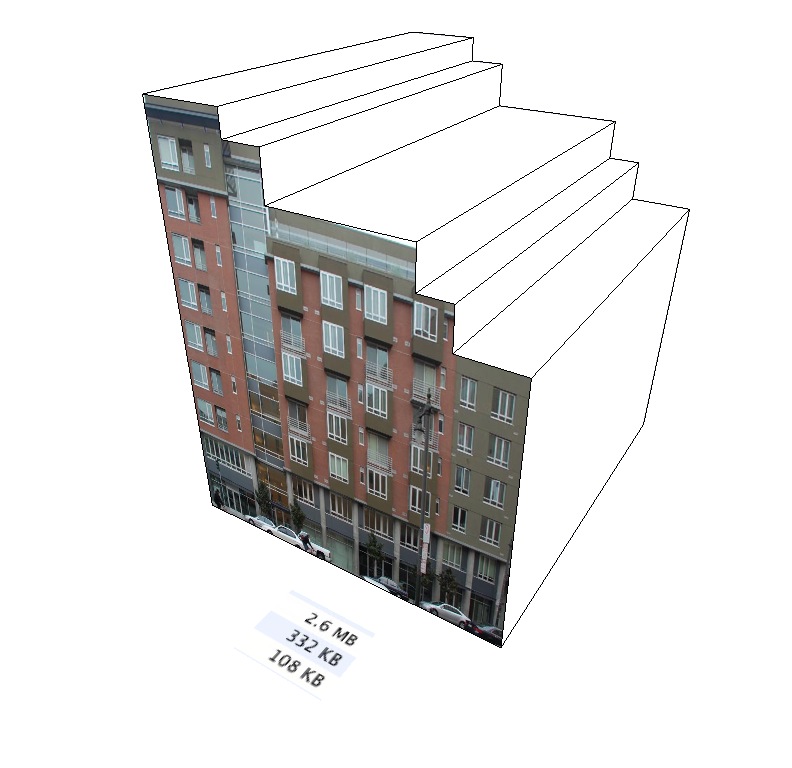
Step1. - Select texture and make unique, then purge unused. File size now down to 332k without any resolution change.
Step2 - Now I used the "Edit Texture Image" and resized in Photoshop to 512pix wide, and saved with compression of 6. Now file size went down to 108k.
All and all, this is pretty quick, in particular if I skip step 2 and only do step one. Can just jump from one image to the next, don't have to reload anything. Unfortunately it does appear I have to do this one texture at a time. I wish I could select multiple textures at once and make them unique.
Now my workflow for site like this would be to save each building (or each block, depending upon the scale and level of detail) out as a component. Then I would make sure to save a raw component that uses the high res image, that is not yet unique. This way I can still play with the pins to make more accurate later on. then I would make a small component to use in the main site plan.
-
I wonder if you can access the 'make unique texture' through ruby. Might be a very quick way to reduce file sizes if you could.
-
@remus said:
I wonder if you can access the 'make unique texture' through ruby. Might be a very quick way to reduce file sizes if you could.
awesome idea, Remus!
-
I have learned, in real-time simulation, that OpenGL can only handle texture sizes that start from 6464 with equivalent steps till 10241024.
If you don't do that than it will split the textures itself into these parts, then you end up with a much higher load of texture memory then you would normally use.I think this should be the same in SU, but I'm not a specialist with textures in SU.
-
Today, SU can use the maximum texture size supported by your graphics card. It still defaults to 1024 x 1024, but you can tick "Use maximum texture size" in the Preferences>OpenGL. The maximum supported by any hardware is, I think, 4096 x 4096.
When you duplicate a texture by selecting the "make unique texture" option, SU does not create, it seems, a duplicate, but a reduced version of your original image, hence the reduction in file size. I tried it with a 2242 px wide image, and the "unique" copy was 2048.
When looking to optimize texture size and file size, I would guess that pre-resizing the images in Photoshop before importing them to SU would generate better image quality than letting SU do the resampling.
Anssi
-
I have also found that when I import CAD lines my file size increases quite a bit. So what I do is import them into a new SU file, erase any uwanted lines and flaten to one layer. I then copy it into the SU file I need it in to model. I only use the cad lines as a reference then delete that layer when finished. Others in my office just bring in the cad lines Layers and all an model from those and it creates a huge mess along with making the file size huge.
-
I think a lot has been said already on how to reduce the poly-count of a model.
1.using a lower size eg.sides 12,sides 8 when drawing a circle or arc
2,Using components(especially for windows ,doors etc that repeat quite often if you are modelling a building.
3,Importing models with small polycount especially trees.Using trees with very high detail will slow your computer down considerably.You may want to use trees that are "face-me component instead.
4.If I have to use a texture image bigger than 1MB,I first open it up in Microsoft picture manager or paint , reduce the pixel size and save it as a Jpeg File.An Image file of 5MB can yield 602kB through this process.You can now use the Image with its reduced file size on your model thereby reducing your polycount.
5.You shouldn't also forget to purge your model of unwanted/unused materials and component










Advertisement