sketchucation logo sketchucation
    • Login
    Oops, your profile's looking a bit empty! To help us tailor your experience, please fill in key details like your SketchUp version, skill level, operating system, and more. Update and save your info on your profile page today!
    Mac User? | Join the Rayscaper Beta for Mac Learn More

    [Obsolete] Component Spray Tool

    Scheduled Pinned Locked Moved Plugins
    88 Posts 32 Posters 32.7k Views 32 Watching
    Loading More Posts
    • Oldest to Newest
    • Newest to Oldest
    • Most Votes
    Reply
    • Reply as topic
    Log in to reply
    This topic has been deleted. Only users with topic management privileges can see it.
    • Didier BurD
      Didier Bur
      last edited by

      Hi Juju,
      yes , I've understand that. Could you send me the file with the components, so I can see which one is shown and which one is'nt, because there MUST be a difference between such compos.
      Regards,

      DB

      1 Reply Last reply
      Reply Quote 0
      • jujuJ
        juju
        last edited by

        The file seem to be 10MB large already. I could try to shave some stuff off to leave you with the basics... Let me have a look. I'll send you a PM.

        Save the Earth, it's the only planet with chocolate.

        1 Reply Last reply
        Reply Quote 0
        • R
          rv1974
          last edited by

          @didier bur said:

          Hi,

          @unknownuser said:

          I have 30+ components in a model, yet the plugin only recognises 5,

          What's the difference between the 2 kinds ? (imports, DXF/DWG, own library vs SU library, etc ?)

          @unknownuser said:

          I have luck it tries to spray 809234803924789789798 components

          Check out the surface of your components. If it's a grass sprig, you're likely to get millions of them...

          @unknownuser said:

          of course may be my hands simply are growing from the @ss

          Of course.


          I'd be happy if you Didier could help me straighten my hands a little )
          Here's spray.skp
          http://www.mediafire.com/?ozzdmv9cplx
          I can't spray component#2 at all.
          With component#3 I get notice about zillion iterations.
          What do I wrong?
          P.S. After posting I finally understood πŸ˜› The plug simply doesn't work with 2d stuff (no matter linework or faces)- 3d only. Could it be fixed? 2d dummy components are good for keeping the file size light in modeling stage.

          1 Reply Last reply
          Reply Quote 0
          • plot-parisP
            plot-paris
            last edited by

            it happened to me several times too, that the script only allowed you to select some of the components in the model.

            when I made the components unique, these new comps where shown in the component spray window.

            ps: didier, have you seen this? πŸ˜‰

            1 Reply Last reply
            Reply Quote 0
            • Didier BurD
              Didier Bur
              last edited by

              Hi,

              @unknownuser said:

              I can't spray component#2 at all.

              Sure: density is based on bounds calculations, and 2D components have a depth of zero and a height of zero. This give either a floating domain error (when dividing by zero) or zillions of instances to drop.
              This can be fixed. Next release will accept 2d components.
              I'm still searching why some components don't appear in the dropdown lists. I cannot reproduce the error for now.
              And for the "too-big-list-of-50+-components-that-goes beyond-the-screen", there's no slider options for such lists. We need to ask for sliders for version 7 ( πŸ˜• ) of the API, OR use webdialogs.

              @plot-paris: interesting, this is what Majid asked for.

              DB

              1 Reply Last reply
              Reply Quote 0
              • jujuJ
                juju
                last edited by

                Hear ya' on the sliders request Didier. How abbout if we could be able to type in the name of the component if it doesn't appear on the list. Currently that functionality isn't supported, but could be another workaround... Just trying to think a little laterally.

                Save the Earth, it's the only planet with chocolate.

                1 Reply Last reply
                Reply Quote 0
                • jujuJ
                  juju
                  last edited by

                  Wow Didier, tlk about a quick turnaround time! MANY thanks, I really appreciate the trouble.

                  Save the Earth, it's the only planet with chocolate.

                  1 Reply Last reply
                  Reply Quote 0
                  • Didier BurD
                    Didier Bur
                    last edited by

                    Hi Juju,
                    Thancks for the SKP. It DID help me to find why some components didn't appear in the list and why some other did.
                    You know, when you take a look at the "In model" tab of your components browser, you see say, 38 components. But in fact there are much more components loaded in the model definitions list: groups, images, and internal components. In your file there are 184 of them ! Fortunately I discovered a ruby method to distinguish which component is shown or not in the browser. What's shown is what you must have in the list. I replaced my old buggy function with this method and (drumroll) all went well: 38 components in list.
                    So I've some good news for you: version 1.12 has been uploaded at the top of this thread.
                    I've also corrected the "zillions of comps" bug when using flat 2D components. Now the scripts supports wire components either in X,Y,orZ.
                    Webdialogs to come in version 1.13 ... And maybe proxies too.
                    Regards,

                    DB

                    1 Reply Last reply
                    Reply Quote 0
                    • plot-parisP
                      plot-paris
                      last edited by

                      Didier, this is great news! thanks a lot for the uptate! πŸ‘

                      1 Reply Last reply
                      Reply Quote 0
                      • ToboboT
                        Tobobo
                        last edited by

                        Didier,

                        You are a true legend!

                        Toby

                        Philippians 4:13

                        I can do everything through him who gives me strength.

                        1 Reply Last reply
                        Reply Quote 0
                        • GaieusG
                          Gaieus
                          last edited by

                          Just a quick workaround idea for 2D components:

                          Modify the component definition by adding a vertical line to the face on the red%green plane (to give it more than 0 depth) and use the script. Afterwards you can always delete this line (and of course it will be deleted from all instances).

                          Gai...

                          1 Reply Last reply
                          Reply Quote 0
                          • R
                            rv1974
                            last edited by


                            http://img65.imageshack.us/img65/4219/screenshot055ns0.jpg


                            http://img65.imageshack.us/img65/4219/screenshot055ns0.8ee385c8ed.jpg

                            1 Reply Last reply
                            Reply Quote 0
                            • Didier BurD
                              Didier Bur
                              last edited by

                              Hi Gaieus,
                              No need to do that now. Component with a single line in it will work, either a XY line,XZ line or YZ line, or a flat surface, whatever you like.

                              DB

                              1 Reply Last reply
                              Reply Quote 0
                              • david_hD
                                david_h
                                last edited by

                                I have a 2D flower comp (Always face camera) and I can't seem to get this to do anything. It goes thru the dialogues, etc, but then after I click okay .. .nothing. . . .I even added the little line to make it a 3D comp. Nuthin'!!!

                                help please. .. .

                                If I make it look easy...It is probably easy

                                1 Reply Last reply
                                Reply Quote 0
                                • plot-parisP
                                  plot-paris
                                  last edited by

                                  did you specify a layer? everytime I left this one blank, it did'nt work for me

                                  1 Reply Last reply
                                  Reply Quote 0
                                  • J
                                    j_forrester
                                    last edited by

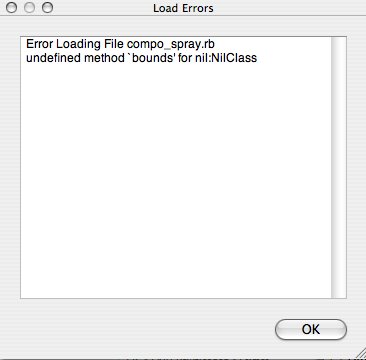
                                    Anyone seen this warning dialoge before?

                                    Cant seem to get the plugin to work.

                                    Many thanks

                                    Picture 5.png

                                    1 Reply Last reply
                                    Reply Quote 0
                                    • R
                                      rv1974
                                      last edited by

                                      Didier is it complicated to add a new spray shape-
                                      vertexes of selected surface ? There'll be lot of use for this mode.

                                      1 Reply Last reply
                                      Reply Quote 0
                                      • Didier BurD
                                        Didier Bur
                                        last edited by

                                        Hi,
                                        Not very difficult to add.
                                        Dropped it on the todo list πŸ˜‰

                                        @j_forester: is this happening on SU startup or when using the script ?

                                        DB

                                        1 Reply Last reply
                                        Reply Quote 0
                                        • J
                                          j_forrester
                                          last edited by

                                          On SU Pro startup. Running Mac 10.4.9

                                          1 Reply Last reply
                                          Reply Quote 0
                                          • david_hD
                                            david_h
                                            last edited by

                                            @plot-paris said:

                                            did you specify a layer? everytime I left this one blank, it did'nt work for me

                                            that did it. .. plus. . .always make sure there is a surface on which to spray. πŸŽ‰

                                            If I make it look easy...It is probably easy

                                            1 Reply Last reply
                                            Reply Quote 0

                                            Hello! It looks like you're interested in this conversation, but you don't have an account yet.

                                            Getting fed up of having to scroll through the same posts each visit? When you register for an account, you'll always come back to exactly where you were before, and choose to be notified of new replies (either via email, or push notification). You'll also be able to save bookmarks and upvote posts to show your appreciation to other community members.

                                            With your input, this post could be even better πŸ’—

                                            Register Login
                                            • 1
                                            • 2
                                            • 3
                                            • 4
                                            • 5
                                            • 4 / 5
                                            • First post
                                              Last post
                                            Buy SketchPlus
                                            Buy SUbD
                                            Buy WrapR
                                            Buy eBook
                                            Buy Modelur
                                            Buy Vertex Tools
                                            Buy SketchCuisine
                                            Buy FormFonts

                                            Advertisement