[Obsolete] Component Spray Tool
-
@unknownuser said:
@rv1974 said:
Hi Didier!
May be it was discussed earlier ..
1.There are 2 bugs: the plug-in limits drop-down list of components (for example 290 in model is reduced to 10 in dialog).
2.drop-down list is not stable: drop-down list of components is visible only if down arrow
is continually pressed.
Thanks for attention.For the some or other reason the grass component I want isn't showing up in the drop-down list for components to spray. I've renamed the component so the name starts with a "#" as well as with a "01" in an attempt to get it to surface to the top of the list, but it still isn't showing up.
Does anybody have any idea how to get components onto the list that isn't showing up?
Didier, I'm still having trouble with components not showing up. I have 30+ components in a model, yet the plugin only recognises 5, excluding the component I want to use to spray!
-
Workaround:
Take the host surface and cut&paste to a new blank file and complete your dirty deeds there.
There's other problem- the script is highly buggy (of course may be my hands simply are growing from the @ss)
1/In most cases I can't complete circle\rectangle input.Simply can't.
2/Even if I have luck it tries to spray 809234803924789789798 components (with lowest pressure and normal radius).
The only reason I didn't throw it away is the point mode.It's pretty predictable and stable. -
Hi,
@unknownuser said:
I have 30+ components in a model, yet the plugin only recognises 5,
What's the difference between the 2 kinds ? (imports, DXF/DWG, own library vs SU library, etc ?)
@unknownuser said:
I have luck it tries to spray 809234803924789789798 components
Check out the surface of your components. If it's a grass sprig, you're likely to get millions of them...
@unknownuser said:
of course may be my hands simply are growing from the @ss
Of course.
-
@didier bur said:
Hi,
@unknownuser said:
I have 30+ components in a model, yet the plugin only recognises 5,
What's the difference between the 2 kinds ? (imports, DXF/DWG, own library vs SU library, etc ?)
Hi Didier, maybe I didn't express myself clearly. It shows only 5 of the 30+ components, did not mean SU version 5 components. In the meantime, I'm using the workaround suggested.
-
Hi Juju,
yes , I've understand that. Could you send me the file with the components, so I can see which one is shown and which one is'nt, because there MUST be a difference between such compos.
Regards, -
The file seem to be 10MB large already. I could try to shave some stuff off to leave you with the basics... Let me have a look. I'll send you a PM.
-
@didier bur said:
Hi,
@unknownuser said:
I have 30+ components in a model, yet the plugin only recognises 5,
What's the difference between the 2 kinds ? (imports, DXF/DWG, own library vs SU library, etc ?)
@unknownuser said:
I have luck it tries to spray 809234803924789789798 components
Check out the surface of your components. If it's a grass sprig, you're likely to get millions of them...
@unknownuser said:
of course may be my hands simply are growing from the @ss
Of course.
I'd be happy if you Didier could help me straighten my hands a little )
Here's spray.skp
http://www.mediafire.com/?ozzdmv9cplx
I can't spray component#2 at all.
With component#3 I get notice about zillion iterations.
What do I wrong?
P.S. After posting I finally understood The plug simply doesn't work with 2d stuff (no matter linework or faces)- 3d only. Could it be fixed? 2d dummy components are good for keeping the file size light in modeling stage.
 -
it happened to me several times too, that the script only allowed you to select some of the components in the model.
when I made the components unique, these new comps where shown in the component spray window.
ps: didier, have you seen this?

-
Hi,
@unknownuser said:
I can't spray component#2 at all.
Sure: density is based on bounds calculations, and 2D components have a depth of zero and a height of zero. This give either a floating domain error (when dividing by zero) or zillions of instances to drop.
This can be fixed. Next release will accept 2d components.
I'm still searching why some components don't appear in the dropdown lists. I cannot reproduce the error for now.
And for the "too-big-list-of-50+-components-that-goes beyond-the-screen", there's no slider options for such lists. We need to ask for sliders for version 7 ( ) of the API, OR use webdialogs.
@plot-paris: interesting, this is what Majid asked for.
-
Hear ya' on the sliders request Didier. How abbout if we could be able to type in the name of the component if it doesn't appear on the list. Currently that functionality isn't supported, but could be another workaround... Just trying to think a little laterally.
-
Wow Didier, tlk about a quick turnaround time! MANY thanks, I really appreciate the trouble.
-
Hi Juju,
Thancks for the SKP. It DID help me to find why some components didn't appear in the list and why some other did.
You know, when you take a look at the "In model" tab of your components browser, you see say, 38 components. But in fact there are much more components loaded in the model definitions list: groups, images, and internal components. In your file there are 184 of them ! Fortunately I discovered a ruby method to distinguish which component is shown or not in the browser. What's shown is what you must have in the list. I replaced my old buggy function with this method and (drumroll) all went well: 38 components in list.
So I've some good news for you: version 1.12 has been uploaded at the top of this thread.
I've also corrected the "zillions of comps" bug when using flat 2D components. Now the scripts supports wire components either in X,Y,orZ.
Webdialogs to come in version 1.13 ... And maybe proxies too.
Regards, -
Didier, this is great news! thanks a lot for the uptate!

-
Didier,
You are a true legend!
-
Just a quick workaround idea for 2D components:
Modify the component definition by adding a vertical line to the face on the red%green plane (to give it more than 0 depth) and use the script. Afterwards you can always delete this line (and of course it will be deleted from all instances).
-


-
Hi Gaieus,
No need to do that now. Component with a single line in it will work, either a XY line,XZ line or YZ line, or a flat surface, whatever you like. -
I have a 2D flower comp (Always face camera) and I can't seem to get this to do anything. It goes thru the dialogues, etc, but then after I click okay .. .nothing. . . .I even added the little line to make it a 3D comp. Nuthin'!!!
help please. .. .
-
did you specify a layer? everytime I left this one blank, it did'nt work for me
-
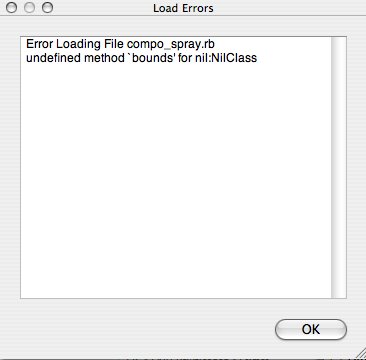
Anyone seen this warning dialoge before?
Cant seem to get the plugin to work.
Many thanks








Advertisement