OS X Thumbnails for SketchUp files
-
Hello all - I've done some searching on the forums, but I really haven't found a solution. I'm looking to see thumbnails of SketchUp files in OSX's finder. I recently moved from XP(32bit) to OSX. XP (Explorer) shows thumbnails no problem. I've heard that 64bit windows systems have had some issues. On my Mac (SU8) I've turned on "Custom Icon" when I save files and it will produce a low res thumbnail to view in the finder, but all my other SketchUp files show the default icon. I've tried XnView as some other posts have suggested, but (for me) it shows icons and not a thumbnail of the actual file. Any help or suggestions would be greatly appreciated.
-
you can use the browser feature in graphic converter:
..to see the embedded thumbnails on osx.. if you use the demo version, there's a timed delay when you launch it.. (something like-- wait 30 seconds or so)..
-
This interests me, too.
If I save a file from SU, I get a thumbnail. Otherwise I see the standard file icon. That means, for every component I download, I have to open it, save it, and then manually remove the instantly generated backup file with the ~ in the filename (filename~.skp). Considering the size of my library, this is a hassle.Jeff, you mention embedded thumbnails in SketchUp files. So are there thumbnails already in the files, but they only get displayed on PCs?
What does Graphic Converter do? Does it reveal all those embedded thumbnails, if I run my files through the converter? Does it show them in the file browser, while File Converter is running? Does it change an OS setting? I couldn't find any information on this in the online documentation, and I don't want to install a program if I don't know, what I want it to do, or have an idea, how.
I'm searching for a way to automatically generate these thumbnails, or some kind of simple script, that generates thumbnails in all SU-files that don't have one ... and removes those occasionally useful, but usually cluttersome (look, Ma, I made up a word!) backups.
Penny for your thoughts!
All the best,Sam Madwar, Vienna.
-
yeah, the thumbnails are already in there (though 128px maximum)
graphic converter can read them and display them in its browser.. here's an example of me browsing a folder containing skps with graphic converter..
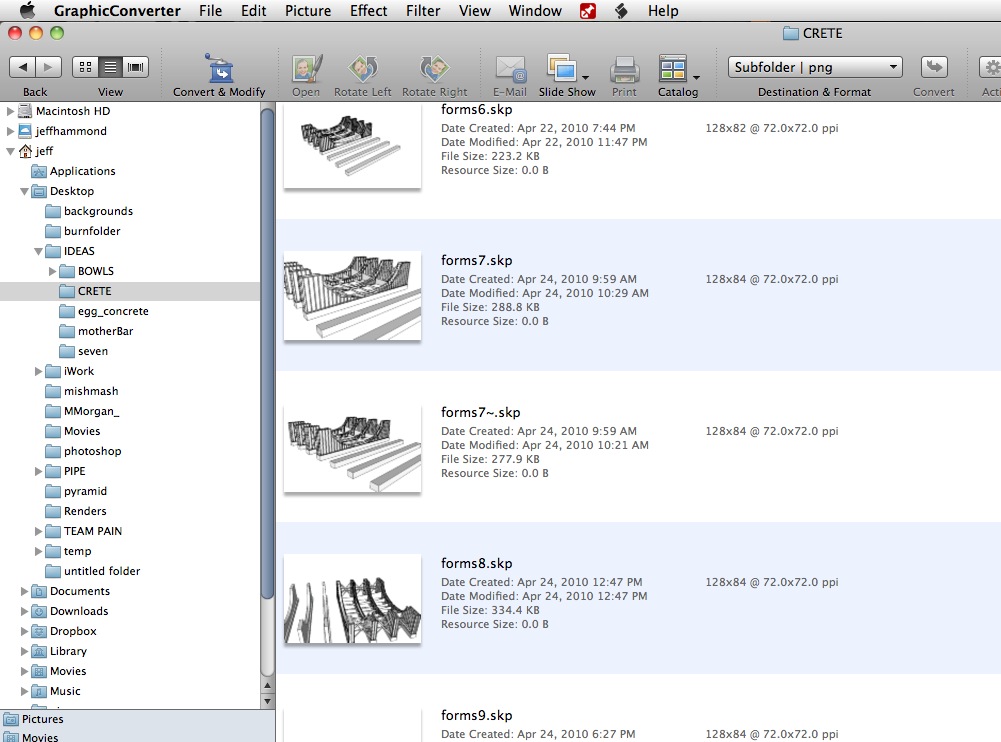
you can also have graphic converter switch all the icons for you so when you view them via finder, you'll see the thumbnails instead of the generic icon or the custom SU icon thing with the pin..
-
Thank you, Mr. Hammond!
I have huge respect for someone who responds with such detail to forum questions.Now, wouldn't it be great if OSX could access these thumbnails to begin with. Aren't there quick-view plugins for all sorts of file formats? If there is a way to render Autocad previews in finder, there must be a relatively simple pipeline to display a thumbnail that's already in the file.
I suppose, this doesn't affect all too many people.
Thanks for the workaround!Regards,
SAM from Vienna. -
Thanks so much for your advice. Graphic Converter worked.
I sure do wish Finder would just display the thumbnail properly.
Go Steelers!
Joe -
Hi Jeff,
I have followed your advice regarding using Graphic Converter but my SU files still show the SU icon rather than a file preview. Has something changed in SU that prohibits GC from changing the icon image.
Hope you can shed some light.
Cheers....Scotty
-
Version seems to be different. 7 performs as described but not 9
-
@jeff hammond said:
yeah, the thumbnails are already in there (though 128px maximum)
you can also have graphic converter switch all the icons for you so when you view them via finder, you'll see the thumbnails instead of the generic icon or the custom SU icon thing with the pin..
How do you do this? It is not clear from GC User Guide.
Cheers....Stuart
-
I'm not sure GC still works with skps, it stopped for a while at least, so I wrote a plugin...
I'll PM you this 'beta' plugin that lets you add icons to your skps that Finder/QuickLook can see, if you want?
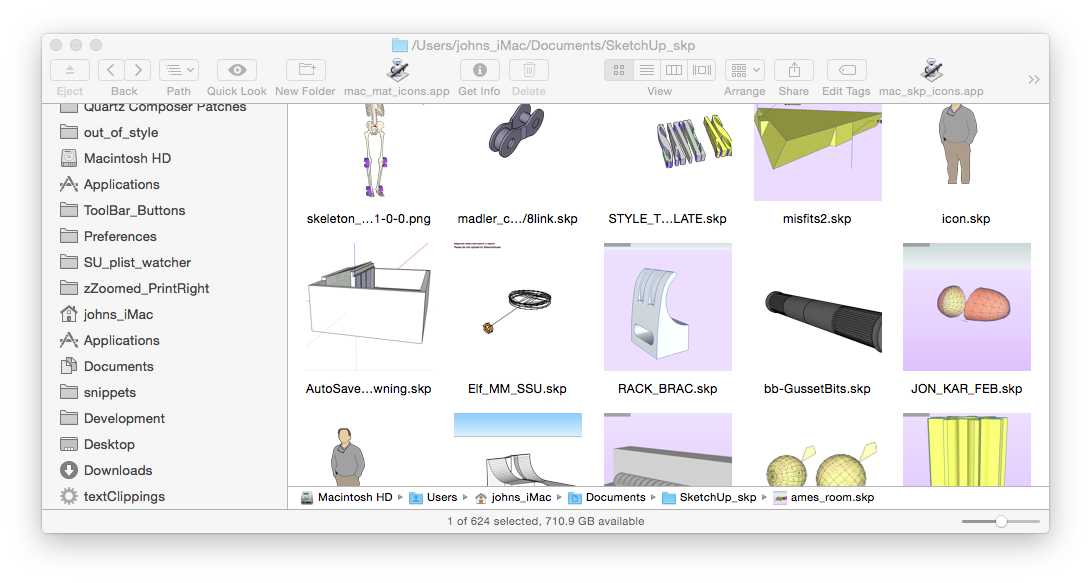
I use it to add an icon from the 'File Menu' or a tool button any time I want, i.e. not auto on close.
It does do batches as well, but I need to do a little more on that before I release it to public...
I've had no horror stories from the dozen or more users who are 'testing' it.
john -
John,
I'd be very grateful to get a copy of your OSX thumbnail/icon plugin.
Thanks,
Chris -
In OSX 10.10., having preview turned on in Finder is a nightmare if one clicks on an SKP file. After much beachball spinning a preview consisting of the Chinese alphabet repeated endlessly (or something like it) appears. For large files, I have to force quit the finder to stop the useless waiting.
Until now, I have kept Sketchup files in folders that relate to whatever project I am working on but it's too easy to accidentally click on a file this way. I am now consider moving all SP files to a separate location.
-
@chrisjk said:
a preview consisting of the Chinese alphabet repeated endlessly (or something like it) appears. For large files,
try reseting QuickLook from Terminal.appqlmanage -r && killall FinderI'll PM my plugin...
john -
John,
Many thanks for your help here and in PMs. Problem now solved by deleting a Qlgenerator that I installed recently and which I had clean forgotten all about - duh!Chris
-
@chris,
the posts from here have a massive delay, today...
glad you found the culprit,
batch_icons is in the help menu...
it's a little verbose and the instructions are on the first dialog you'll see...
do a small folder and post the results, maybe I should release it???
john -
John,
I have now tried batching with SKP, SKM and Layout files. They all seem to work OK - very well in fact with the exception of a single glitch with one layout file that retained the image from another file. I need to examine the file tomorrow to see if it is indeed a glitch with the plugin or more likely, something on my part…I'd say the plugin is definitely release worthy!

-
@chrisjk said:
...a single glitch with one layout file that retained the image from another file. I need to examine the file tomorrow ...
.skm and .layout just grab the referenced image in the file [it just a zipped folder], so have a look at why it has the wrong referenced image...
glad you like it
john -
@driven said:
I'm not sure GC still works with skps, it stopped for a while at least, so I wrote a plugin...
I'll PM you this 'beta' plugin that lets you add icons to your skps that Finder/QuickLook can see, if you want?
[attachment=0:a5t9bzkz]<!-- ia0 -->2014-11-04 07.55.41 pm.png<!-- ia0 -->[/attachment:a5t9bzkz]
I use it to add an icon from the 'File Menu' or a tool button any time I want, i.e. not auto on close.
It does do batches as well, but I need to do a little more on that before I release it to public...
I've had no horror stories from the dozen or more users who are 'testing' it.
johnHello John, I too would be very grateful to get a copy of your OSX thumbnail/icon plugin please.

 Luds
Luds -
This post is deleted!


Hello! It looks like you're interested in this conversation, but you don't have an account yet.
Getting fed up of having to scroll through the same posts each visit? When you register for an account, you'll always come back to exactly where you were before, and choose to be notified of new replies (either via email, or push notification). You'll also be able to save bookmarks and upvote posts to show your appreciation to other community members.
With your input, this post could be even better 💗
Register Login


Advertisement