[Plugin] Emboss
-
Thanks Didier Bur for making and sharing this so nice plugin

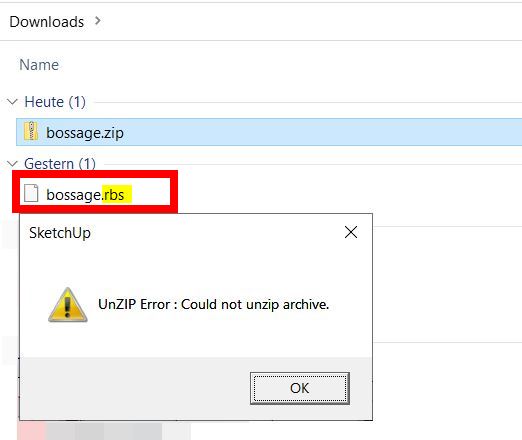
And thanks Rich for the how to install it...Only, I dont get it istalled or even to run somehow and I am seeing a rbs-file for the first time. Could someone please show me how to proceed here?
-
Thank you for adding me to the Extension Author group (I didn't know it exists
 )
)
Regards -
A RBS file is an encrypted Ruby file which behaves just like a RB file.
I use 7-Zip to compress/uncompress archives, but any other Zip will also extract the file(s).- double-click on the Zip
-drag and drop the file into your Plugins folder and that's it. - restart SU.
Regards,
Double-click below to see the video:
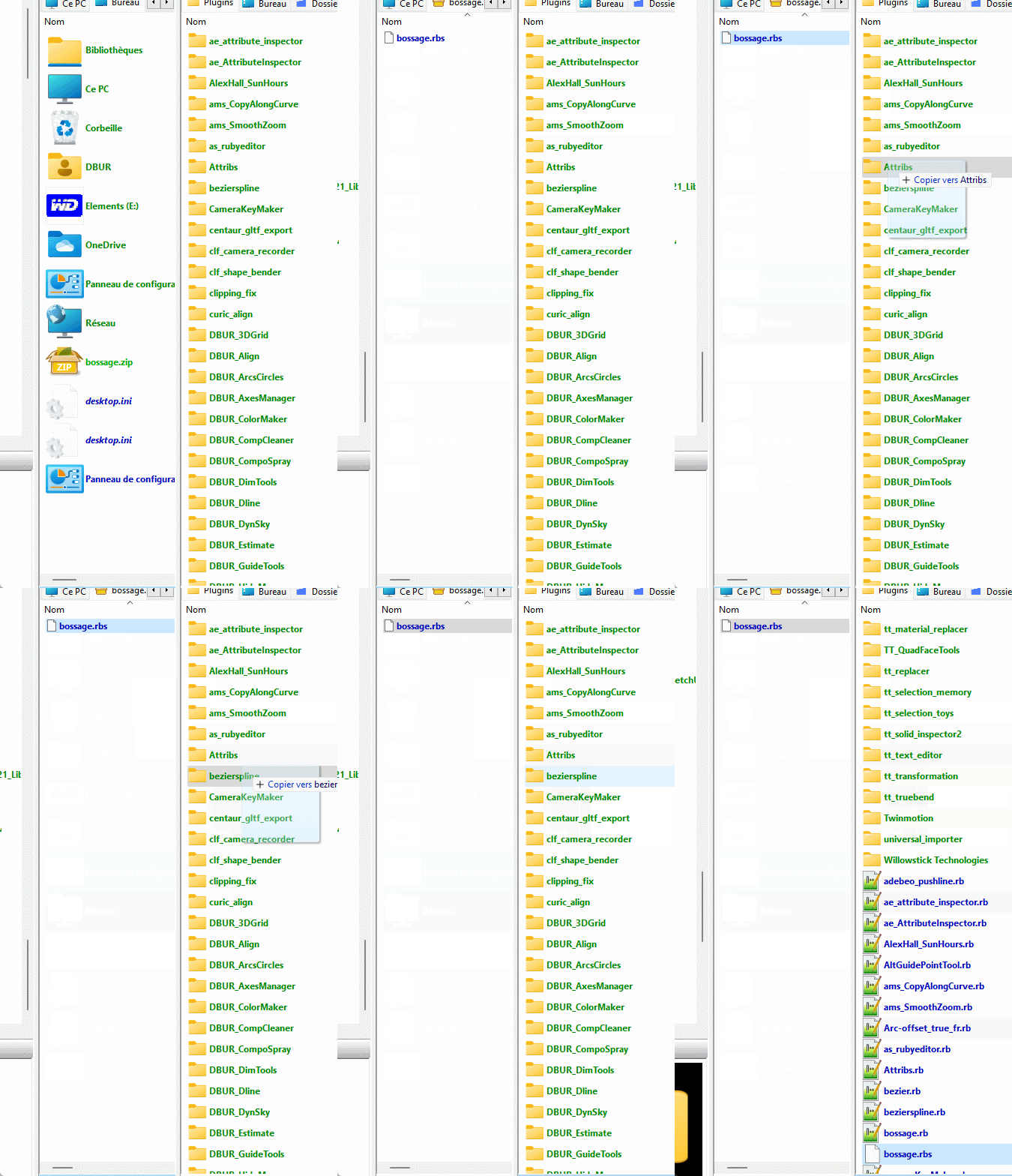
- double-click on the Zip
-
@hornoxx said:
Could someone please show me how to proceed here?
When you use the Archive installer menu option in Sketchucation Tools make sure you pick the bossage.zip file. Not the unzipped bossage.rbs file.
Our Archive installer will only work with .zip and .rbz files
-
This is a great tool to just generate quick city scape

-
That is pretty neat Rich. I’ll bet Didier Bur had not thought of that one when he developed the plugin.

-
-
@unknownuser said:
I’ll bet Didier Bur had not thought of that one when he developed the plugin.
Of course NOOOO...

-
This is a great idea, to make grooves I often had to take a few steps, but with this one... in just one step.
But, Sketchup sometimes freezes with this one installed, but when not, it certainly messes with Fredo's Lord of the Toolbars all the time... so I had to disable it (rename the extension, because it does not stay disabled.P.S.: All DBUR extensions I've tried (and use) so far do not run from a folder other than the native one (except Align_2D_3D and Align_2D).
For this thing I use TT Extension Sources, which is in fact the only true Extension Manager that Sketchup has; the native one is just a shame. -
Hi Didier,
First of all, thank you for the Emboss plugin — it is one of the very few SketchUp tools that preserves vertex topology perfectly.
I’m using it for precision modeling, and the way it keeps the original curve structure intact is extremely valuable.I’ve found one issue that only appears with concave shapes.
On convex curves the embossing works flawlessly, but on concave sections the displacement direction becomes inverted or distorted.Below are two screenshots:
This is how the emboss should look (approximately, made by hand):
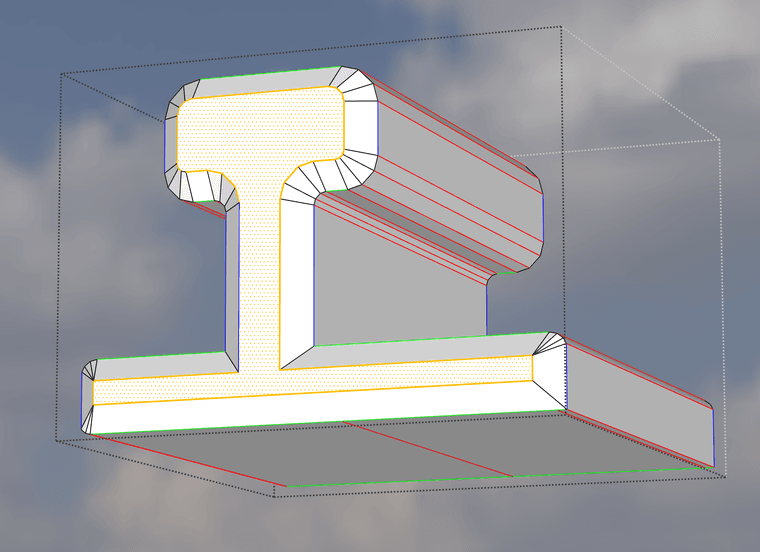
This is what Emboss actually generates on the same concave shape:
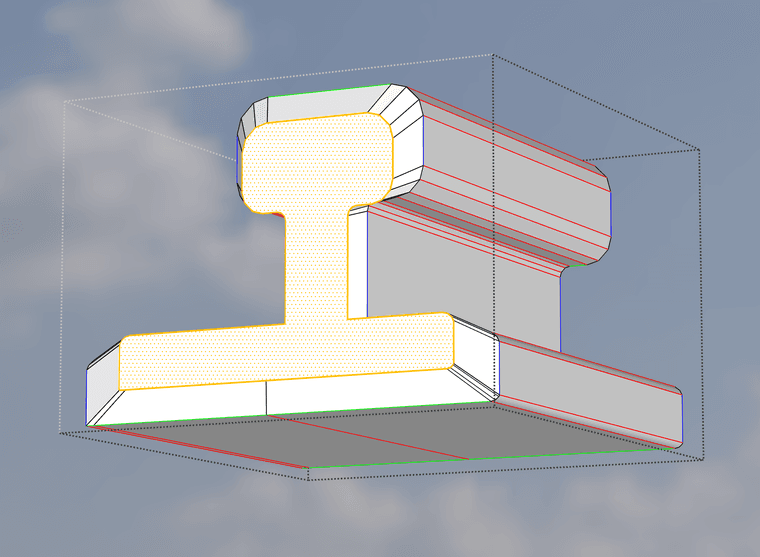
The difference is only in the normal direction handling at concave vertices.
If the algorithm could detect concave angles and flip the displacement direction accordingly, the result would be perfect.Would it be possible to adjust the normal calculation so concave vertices receive a correct inward/outward direction as well?
If you need test models or more examples, I’m happy to provide them.
Thank you again for your work — this plugin is already incredibly useful.
Best regards,
Zoltán -
@kesztio :
Hi,
Emboss was originally coded to create square or rectangular stone blocks in a medieval or renaissance fashion, for my personnal usage.
Each selected face is extruded and then the upper face is scaled, according to your parameters. So the script uses the pushpull command, then the scale command.
The scaling is done by default around the center of the face (no way to change that). Obiously it works for convex faces but not for concave faces.
In your example, the script should scale each of the three parts of the face around their center, then scale the arcs, the re-create the sides (sloped faces.
I'm afraid (sure) I can't do that, that's beyond my knowledge.
I recommend you to use 'roundcorner' by Fredo6 with the 'bevel' command(see animated gif below).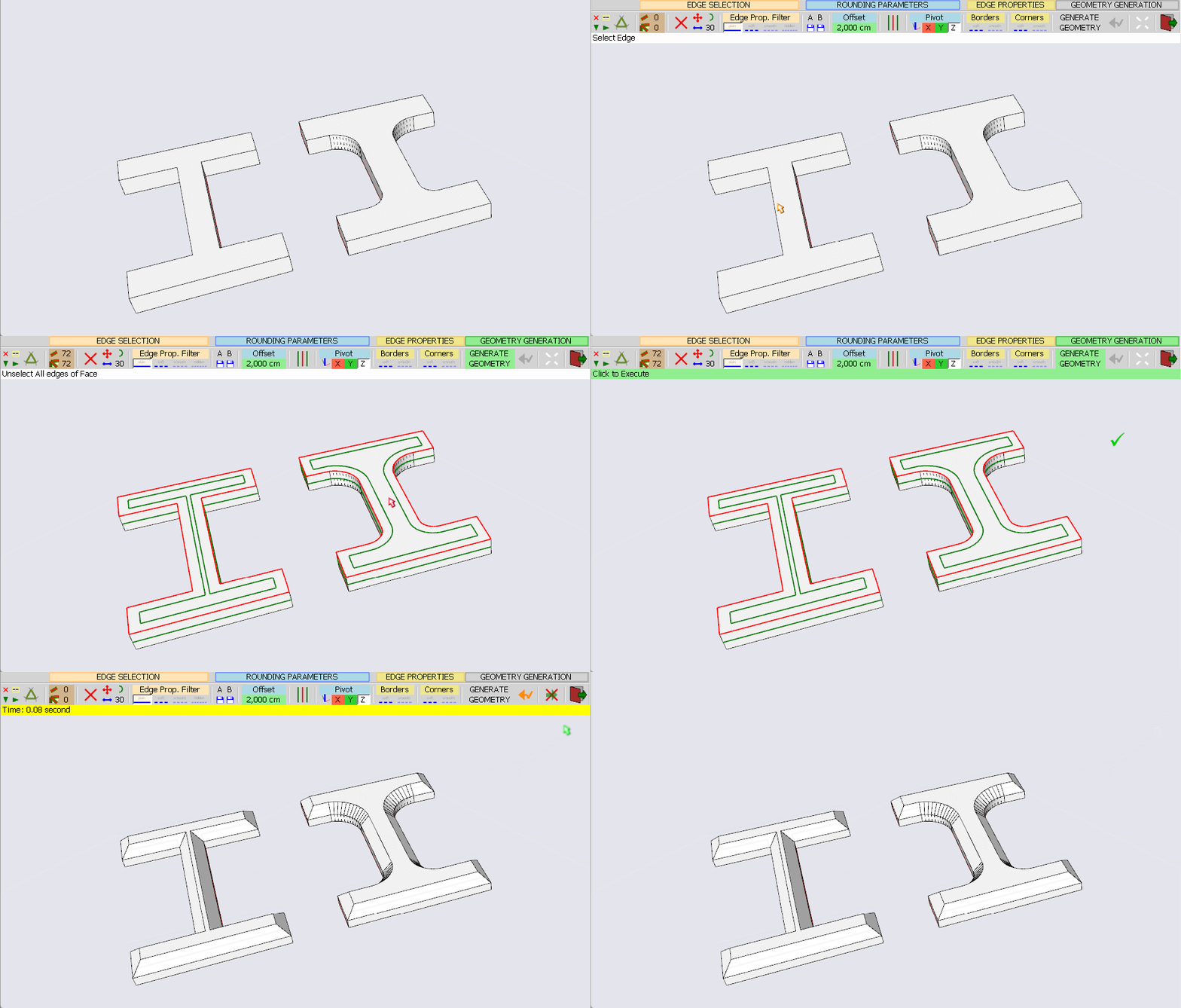
Link: https://sketchucation.com/plugin/1173-roundcorner
Regards
-
@Didier-Bur Well, obviously the Roundcorner was the first one I tried – and failed exacly like the other popular bevel plugins.
As long the bevel plugins can't do the simple and trivial trick to strictly preserve vertexes (even if they would fall back to 0-length edges) and keep the matches between the appropriate vetexes from the original and the beveled contour, it will surely fail on slightly more complex shapes as the concave one in my example.
In these circumstances I'll be tempted to develop a workable extension for myself…




 and again for your nice and well running tool
 Hello! It looks like you're interested in this conversation, but you don't have an account yet.
Getting fed up of having to scroll through the same posts each visit? When you register for an account, you'll always come back to exactly where you were before, and choose to be notified of new replies (either via email, or push notification). You'll also be able to save bookmarks and upvote posts to show your appreciation to other community members.
With your input, this post could be even better 💗
Register Login


Advertisement