sketchucation logo sketchucation
    • Login
    Oops, your profile's looking a bit empty! To help us tailor your experience, please fill in key details like your SketchUp version, skill level, operating system, and more. Update and save your info on your profile page today!
    ⚠️ Important | Libfredo 15.6b introduces important bugfixes for Fredo's Extensions Update

    Nvidia Card Causing System Freezes?

    Scheduled Pinned Locked Moved SketchUp Discussions
    19 Posts 7 Posters 536 Views 7 Watching
    Loading More Posts
    • Oldest to Newest
    • Newest to Oldest
    • Most Votes
    Reply
    • Reply as topic
    Log in to reply
    This topic has been deleted. Only users with topic management privileges can see it.
    • Rich O BrienR Offline
      Rich O Brien Moderator
      last edited by

      If you have GeForce Experience installed check for driver updates. Its usually in your system tray...

      https://i.imgur.com/4lYeMTR.png

      Update drivers as needed.

      If problem persists I'd ask for a GPU change to rule out stuttering.

      Its not something you can diagnose on the internet. If the computer tech is blowing smoke try a different tech shop and get a different opinion. Removing a GPU is not a solution to a problem its a side step around it.

      Download the free D'oh Book for SketchUp πŸ“–

      1 Reply Last reply Reply Quote 0
      • Joe WoodJ Offline
        Joe Wood
        last edited by

        Yeah it's updated. Maybe I should update the intergrated card.

        which of these would I update?

        Acer ET322QU (2560x1440@59Hz)
        Acer H236HL (1920x1080@60Hz)
        Intel UHD Graphics 750 (Dell)

        Joe Wood
        woodsshop.com/

        1 Reply Last reply Reply Quote 0
        • Joe WoodJ Offline
          Joe Wood
          last edited by

          OK the only two acer drivers I can find are for-

          Monitor Drivers and
          Energy Efficiency Label

          neither sound like a graphic card update?

          Joe Wood
          woodsshop.com/

          1 Reply Last reply Reply Quote 0
          • Rich O BrienR Offline
            Rich O Brien Moderator
            last edited by

            Your GPU driver should be v 546.65

            Those other drivers won't affect GPU so I can't say whether or not they'll address the stuttering issue.

            To be honest it sounds systemic and the fact the techie says a GPU is not needed does raise an alarm.

            Download the free D'oh Book for SketchUp πŸ“–

            1 Reply Last reply Reply Quote 0
            • Gus RG Offline
              Gus R
              last edited by

              What's the wattage on your power supply?

              www.instagram.com/gusrobatto/

              www.facebook.com/gusrobatto

              www.flickr.com/photos/gusrobatto

              1 Reply Last reply Reply Quote 0
              • Joe WoodJ Offline
                Joe Wood
                last edited by

                No idea Gus, how do I find that?

                Dell sent a tech out 2 weeks ago and they replaced that and the motherboard.

                I did a dell scan and it shows a Warning for the card ..

                what a damn hassle, I get a nice new computer, and have nothing but problems.
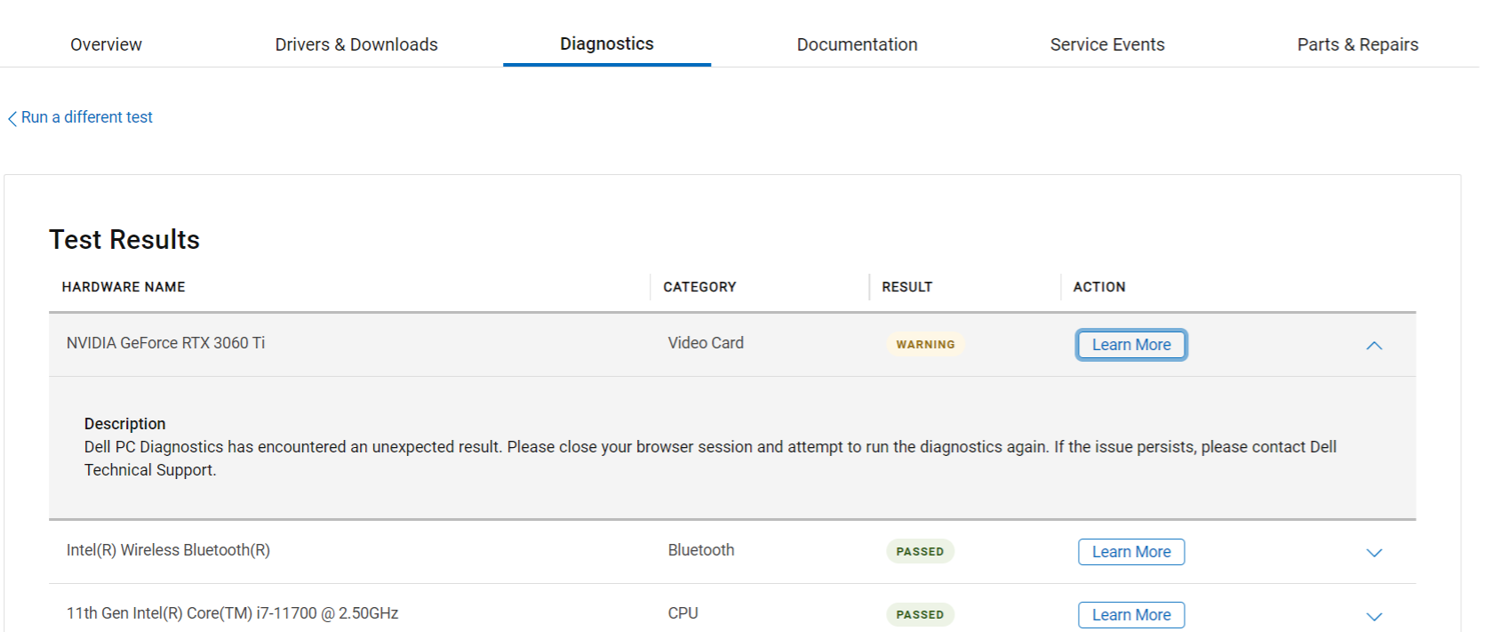

                1 Nvid Scan.png

                Joe Wood
                woodsshop.com/

                1 Reply Last reply Reply Quote 0
                • Joe WoodJ Offline
                  Joe Wood
                  last edited by

                  Yeah thanmks Gus but I'm afraid of doing these things myself, I'm pretty good at swinging a hammer, but not fixing computers!

                  I might just uninstall that NVid card, it was working very well without it.

                  Joe Wood
                  woodsshop.com/

                  1 Reply Last reply Reply Quote 0
                  • Gus RG Offline
                    Gus R
                    last edited by

                    Joe, OK, but make sure and get it replaced since you paid for it.

                    www.instagram.com/gusrobatto/

                    www.facebook.com/gusrobatto

                    www.flickr.com/photos/gusrobatto

                    1 Reply Last reply Reply Quote 0
                    • A Offline
                      anto76ny
                      last edited by

                      @joe wood said:

                      Yeah thanmks Gus but I'm afraid of doing these things myself, I'm pretty good at swinging a hammer, but not fixing computers!

                      I might just uninstall that NVid card, it was working very well without it here.

                      Most likely, both video cards tried to simultaneously control the display, which is why it froze.

                      1 Reply Last reply Reply Quote 0
                      • D Offline
                        deanbuckeridge
                        last edited by

                        Did you ever sort this issue? I have recently bought a new high spec i9 computer with a GeForce 4090 GPU. I took it back after a few days because it was constantly crashing and they haven't been able to isolate the issue after replacing cpu, gpu, motherboard and ram.

                        They've just had another similar build come back from a company working in geo engineering with similar issues, and they are now asking the question whether there might be an issue with SketchUp and DDR5 ram.

                        Is that something you looked at?

                        Joe WoodJ 1 Reply Last reply Reply Quote 0
                        • Joe WoodJ Offline
                          Joe Wood @deanbuckeridge
                          last edited by

                          @deanbuckeridge we just took out the nvidia card and it runs OK but still issues so I'm getting a new computer in about a week, no idea what was wrong but it is a refurbished machine.

                          Joe Wood
                          woodsshop.com/

                          D 1 Reply Last reply Reply Quote 0
                          • D Offline
                            deanbuckeridge @Joe Wood
                            last edited by

                            @Joe-Wood The shop solved my problem, changed the motherboard to a different type. Exactly what that fixed they could not say, just that there must have been an incompatibility somewhere.

                            Bryan KB 1 Reply Last reply Reply Quote 0
                            • Bryan KB Offline
                              Bryan K @deanbuckeridge
                              last edited by Bryan K

                              @deanbuckeridge said in Nvidia Card Causing System Freezes?:

                              @Joe-Wood The shop solved my problem, changed the motherboard to a different type. Exactly what that fixed they could not say, just that there must have been an incompatibility somewhere.

                              Component compatibility issues are a rabbit hole.

                              Often, two GPUs from different makers do not play nice together. In your case, it sounded like the motherboard was causing the issue. If that did solve it long term, than the issue with the motherboard could been many things. Bad from factory, not compatibile for those two GPUs running at the same time, bad bus I/O handling and so on.

                              Glad to hear it was fixed.

                              See my portfolio at https://delphiscousin.blogspot.com/

                              Joe WoodJ 1 Reply Last reply Reply Quote 0
                              • Joe WoodJ Offline
                                Joe Wood @Bryan K
                                last edited by

                                @Bryan-K well not completely fixed so I'm just getting a new puter, this time from the factory and not refurbished!

                                Joe Wood
                                woodsshop.com/

                                G 1 Reply Last reply Reply Quote 1
                                • G Offline
                                  Glenn at home @Joe Wood
                                  last edited by

                                  @Joe-Wood Sorry to hear about your troubles Joe. I only advise for people who are pretty good with technology in getting refurb systems. 8 out of 10 times they are usually good deals but issues can come up. My last home box was a Dell refurb from NewEgg.com and it was rock solid for 6 years. It was a base unit and I added in ssd and graphics card but I am confident in my abilities to do so. I hope your new system works better for you. Thanks for sharing your designs as well.

                                  SketchUp Pro 2025/2026 Dell XPS 8950 i9-12900K 64GB Ram RTX 3080

                                  Joe WoodJ 1 Reply Last reply Reply Quote 0
                                  • Joe WoodJ Offline
                                    Joe Wood @Glenn at home
                                    last edited by

                                    @Glenn-at-home was it Yor who recommended it?!

                                    yeah what a hassle, kept throwing money at it with a local tech,

                                    but don't feel too bad about it! πŸ™‚ Just joking ..

                                    Joe Wood
                                    woodsshop.com/

                                    G 1 Reply Last reply Reply Quote 1
                                    • G Offline
                                      Glenn at home @Joe Wood
                                      last edited by

                                      @Joe-Wood Oops, I might have and if I did I'm sorry. πŸ˜‰

                                      SketchUp Pro 2025/2026 Dell XPS 8950 i9-12900K 64GB Ram RTX 3080

                                      1 Reply Last reply Reply Quote 0
                                      • 1 / 1
                                      • First post
                                        Last post
                                      Buy SketchPlus
                                      Buy SUbD
                                      Buy WrapR
                                      Buy eBook
                                      Buy Modelur
                                      Buy Vertex Tools
                                      Buy SketchCuisine
                                      Buy FormFonts

                                      Advertisement



