sketchucation logo sketchucation
    • Login
    Oops, your profile's looking a bit empty! To help us tailor your experience, please fill in key details like your SketchUp version, skill level, operating system, and more. Update and save your info on your profile page today!
    Mac User? | Join the Rayscaper Beta for Mac Learn More

    Trying to draw an elliptical cone

    Scheduled Pinned Locked Moved SketchUp Discussions
    28 Posts 8 Posters 3.5k Views 8 Watching
    Loading More Posts
    • Oldest to Newest
    • Newest to Oldest
    • Most Votes
    Reply
    • Reply as topic
    Log in to reply
    This topic has been deleted. Only users with topic management privileges can see it.
    • frascatiF
      frascati
      last edited by frascati

      Trying to draw an elliptical cone

      J 1 Reply Last reply
      Reply Quote 0
      • Dave RD
        Dave R
        last edited by

        @frascati said:

        Is there an elegant workaround without using a plugin?

        It depends on what version of SketchUp are you using. Please complete your forum profile with that information.

        Etaoin Shrdlu

        %

        (THERE'S NO PLACE LIKE)

        G28 X0.0 Y0.0 Z0.0

        M30

        %

        1 Reply Last reply
        Reply Quote 0
        • Rich O BrienR
          Rich O Brien Moderator
          last edited by

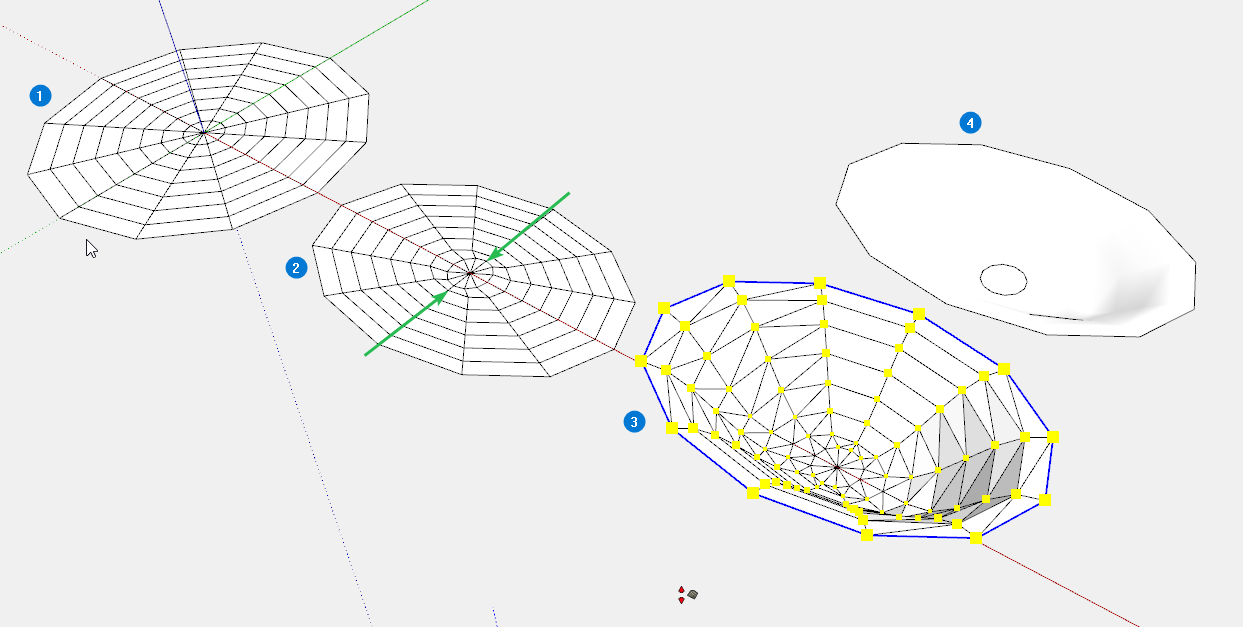
          Smoove has a falloff that could achieve such a result...
          https://i.imgur.com/6YPAfkb.png

          Here's a very basic example.

          Download the free D'oh Book for SketchUp πŸ“–

          1 Reply Last reply
          Reply Quote 0
          • frascatiF
            frascati
            last edited by frascati

            Ok

            1 Reply Last reply
            Reply Quote 0
            • Dave RD
              Dave R
              last edited by Dave R

              @frascati said:

              Really no way to do this natively in Sketchup?

              Rich showed you a native way to do it.

              Another non-extension way to do it would be to stitch the vertices together with the 2-point Arc and Line tools.

              The method I showed in that thread of using Follow Me and then scaling the large end to make an ellipse doesn't require any extensions.

              Etaoin Shrdlu

              %

              (THERE'S NO PLACE LIKE)

              G28 X0.0 Y0.0 Z0.0

              M30

              %

              1 Reply Last reply
              Reply Quote 0
              • frascatiF
                frascati
                last edited by frascati

                Ok

                1 Reply Last reply
                Reply Quote 0
                • Rich O BrienR
                  Rich O Brien Moderator
                  last edited by

                  Smoove is a tool under Sandbox

                  Falloff is a linear decline in influence over distance

                  Potatoes are not vegetables.

                  Download the free D'oh Book for SketchUp πŸ“–

                  1 Reply Last reply
                  Reply Quote 0
                  • frascatiF
                    frascati
                    last edited by

                    ...but crabs sometimes repurpose shells

                    1 Reply Last reply
                    Reply Quote 0
                    • frascatiF
                      frascati
                      last edited by

                      @frascati said:

                      ...but crabs sometimes swap shells

                      1 Reply Last reply
                      Reply Quote 0
                      • frascatiF
                        frascati
                        last edited by frascati

                        Ok

                        1 Reply Last reply
                        Reply Quote 0
                        • frascatiF
                          frascati
                          last edited by frascati

                          I see

                          1 Reply Last reply
                          Reply Quote 0
                          • frascatiF
                            frascati
                            last edited by frascati

                            Thank you

                            1 Reply Last reply
                            Reply Quote 0
                            • Rich O BrienR
                              Rich O Brien Moderator
                              last edited by

                              https://i.imgur.com/2qStuJz.png

                              1. Draw the primitive divided circle
                              2. Scale from centre along an axis
                              3. Select the boundary edges and active Smoove. Set a value for your falloff
                              4. Position geometry and shade smooth

                              I can't give you precise values as I didn't do it to any particular size. So you may have experiment with your falloff values using Smoove.

                              Download the free D'oh Book for SketchUp πŸ“–

                              1 Reply Last reply
                              Reply Quote 0
                              • frascatiF
                                frascati
                                last edited by frascati

                                Ok

                                1 Reply Last reply
                                Reply Quote 0
                                • BoxB
                                  Box
                                  last edited by Box

                                  Too many straws.

                                  1 Reply Last reply
                                  Reply Quote 0
                                  • frascatiF
                                    frascati
                                    last edited by frascati

                                    Ok

                                    1 Reply Last reply
                                    Reply Quote 0
                                    • gullfoG
                                      gullfo
                                      last edited by

                                      it's a profile using an elliptical shape with follow me. all native tools.

                                      if you're trying to duplicate the HF drive on the speaker in your first post - Genelec uses a mathematical model to generate it, not drawing tools. when i model their speakers for recording studio designs, i use the profile and elliptical curve or the scaling method - which ever one looks "close enough" since i'm not actually making the speaker, just need it for size and rendering purposes.

                                      Glenn

                                      http://www.runnel.com

                                      1 Reply Last reply
                                      Reply Quote 0
                                      • frascatiF
                                        frascati
                                        last edited by frascati

                                        Ok

                                        1 Reply Last reply
                                        Reply Quote 0
                                        • BoxB
                                          Box
                                          last edited by

                                          Follow me on an ellipse will not produce the shape you want.

                                          1 Reply Last reply
                                          Reply Quote 0
                                          • frascatiF
                                            frascati
                                            last edited by frascati

                                            Ok

                                            1 Reply Last reply
                                            Reply Quote 0

                                            Hello! It looks like you're interested in this conversation, but you don't have an account yet.

                                            Getting fed up of having to scroll through the same posts each visit? When you register for an account, you'll always come back to exactly where you were before, and choose to be notified of new replies (either via email, or push notification). You'll also be able to save bookmarks and upvote posts to show your appreciation to other community members.

                                            With your input, this post could be even better πŸ’—

                                            Register Login
                                            • 1
                                            • 2
                                            • 1 / 2
                                            • First post
                                              Last post
                                            Buy SketchPlus
                                            Buy SUbD
                                            Buy WrapR
                                            Buy eBook
                                            Buy Modelur
                                            Buy Vertex Tools
                                            Buy SketchCuisine
                                            Buy FormFonts

                                            Advertisement