Searching for Plugin "Add Bitmap to Materials (Mats)"
-
Hi Dave - it's so weird, I've been using this good plugin for a long time and last week it ran flawlessly. Suddenly it refuses the work and I wasn´t able to reconstruct or find it entirely, neither in my plugin directory nor in the web ...
So thanks for asking me where it might have been mentioned !!!

Forum Member JQL mentioned it for me first in this thread
https://sketchucation.com/forums/viewtopic.php?f=15&t=67172&hilit=+bitmapand here it is:
http://sketchucation.com/forums/viewtopic.php?t=48714
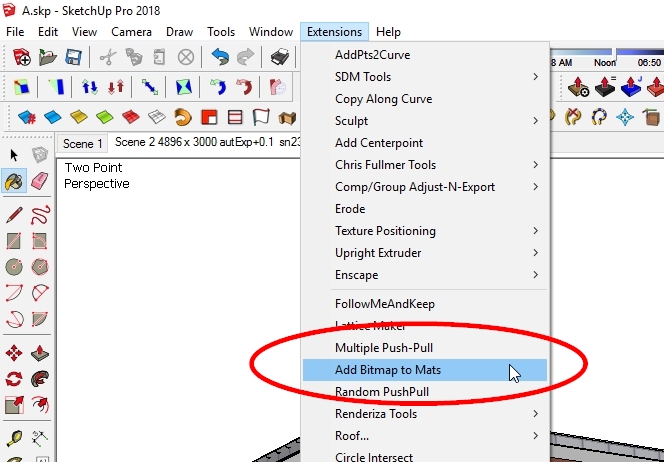
-
So now it's found! Any idea why it suddenly quit working? Have you tried running it with the Ruby Console open?
-
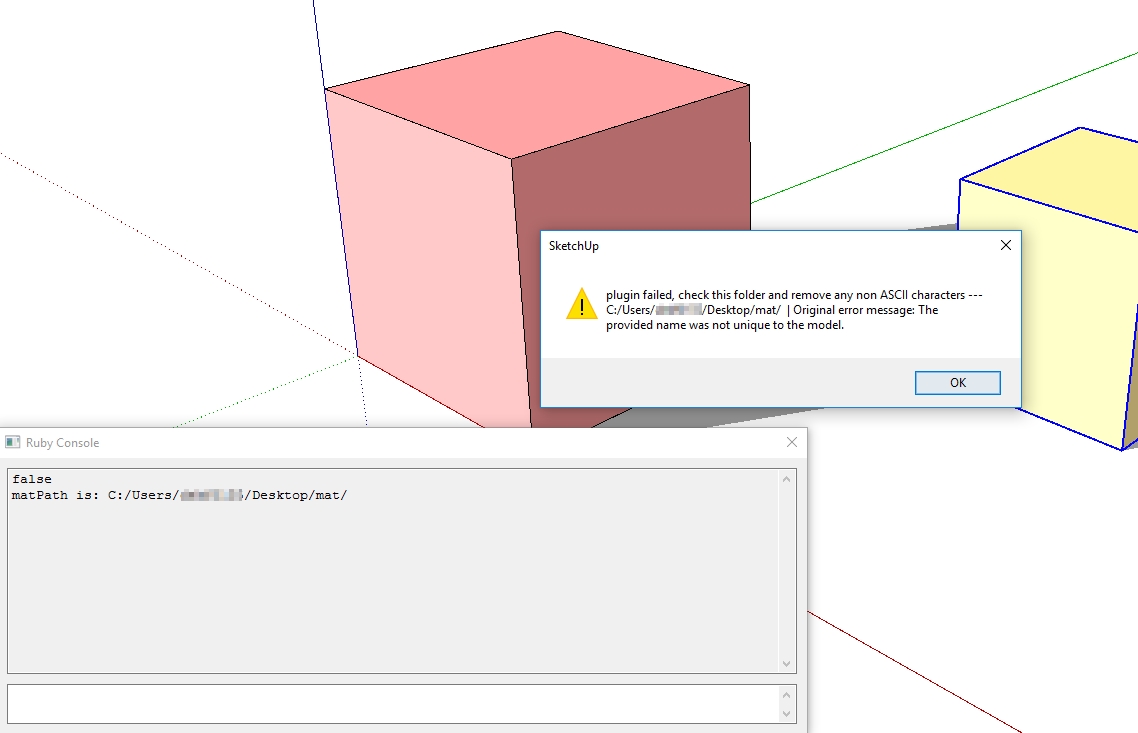
... that´s what I get of information only
-
Username characters with accents or anything?
It might be that the author needs to revise the extension to accept the characters. Other authors have had to do that.
-
@dave r said:
Username characters with accents or anything?
It might be that the author needs to revise the extension to accept the characters. Other authors have had to do that.
Thanks! No, special characters in my user name are not given - So i'm trying to research about the plugin author himself, and will report here if i learn anything new
-
I took a quick look at the extension code. There is a single error handler (rescue clause) for the entire sequence of processing. The message box you showed is posted by this handler. The text up to "Original error message:" is hard-coded, evidently on the assumption that a bad folder path is the only thing that can possibly go wrong (!). The text after that is the actual message from the exception that occurred. In your example it is saying that some (unstated) material name was a duplicate, which is not allowed. I would guess that there is a bug in the processing that attempts to create "safe" names to assign to the materials, causing it to create a duplicate.
If you manage to contact the original author, he should be able to diagnose the issue. But if you can't find him, let me know and I'll help.
-
@slbaumgartner said:
.... let me know and I'll help.
Please give a temporary solution. May be a replacement strings inside code until the author makes changes.
-
@slbaumgartner said:
I took a quick look at the extension code... ...But if you can't find him, let me know and I'll help.
 thank you slbaumgartner for your investigations and the so possible conclusions. Yes, I will try to find contact to the author and report of course here. Thanks for your offer to help here and I will not hesitate to ask you then
 -
I prefer to let authors fix their own plugins rather than usurp their ownership, so I'll wait until you cannot find him before posting any code here. I will just say that I can't reproduce the error @HornOxx saw on my computer, but I can see some dubious aspects of the plugin that might be responsible.
-
In the PluginStore is a version RamTools_BmpMats_v0.3 from 2017 - don't know if it is improved compared to the version in the original post of Rami_Ipm.
-
Thanks @faust07, I hadn't bothered to check for an update! @HornOxx, you can try the newer version to see whether it helps. If my theory is correct about what is happening, it will still fail the same way. I noticed in the comments on the new version the author says he created it for use when importing into Lumion, but as of Lumion 3 it isn't needed any more.


Hello! It looks like you're interested in this conversation, but you don't have an account yet.
Getting fed up of having to scroll through the same posts each visit? When you register for an account, you'll always come back to exactly where you were before, and choose to be notified of new replies (either via email, or push notification). You'll also be able to save bookmarks and upvote posts to show your appreciation to other community members.
With your input, this post could be even better 💗
Register Login


Advertisement