Categories above tool bar missing
-
Hi
Just switched to Mac and my categories above the toolbar , such as view, window and help are missing
Any ideas to get them back?
Thanks Dean -
Sounds like a Mac OS feature to auto hide the menu bar.
I don't have a Mac but it certainly isn't something SketchUp would do
-
The menus show up in the very top of the screen and not attached to the model window like the toolbar which is one the drawing window.
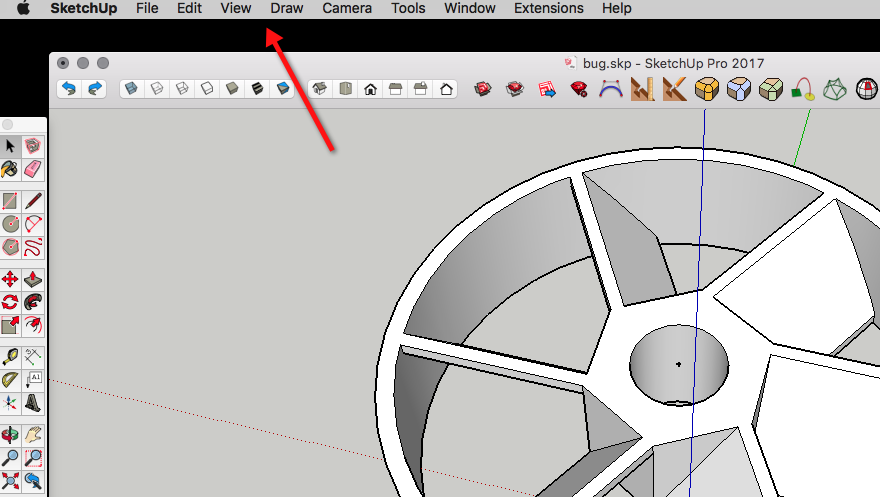
-
Leggy, the latest versions of mac's OS allows the option of hiding the menu bar at the top of your screen. Go to Systems Preferences > General , should be a line "Auto Hide and Show Menu Bar" , uncheck the box and you should get the menu bar back.
-
I found the problem
My old pc worked well with my 2 5 year old 32" screens
So I hooked the Mac mini up to my 65" in the living room and I could change the resolution to fit
When I tried it with the smaller screen the resolution I needed wasn't there
Put it back on the big one.... no problem
Thanks for all your help



Hello! It looks like you're interested in this conversation, but you don't have an account yet.
Getting fed up of having to scroll through the same posts each visit? When you register for an account, you'll always come back to exactly where you were before, and choose to be notified of new replies (either via email, or push notification). You'll also be able to save bookmarks and upvote posts to show your appreciation to other community members.
With your input, this post could be even better 💗
Register Login


Advertisement