Engineering Template in SU Make 2016
-
Can anyone tell me if SU Make 2016 should have the Engineering template? I downloaded and installed SU 2016 and do not see that template in he list of styles. Thanks
-
Which template are you referring to specifically? There isn't one that is explicitly called Engineering Template. There isn't one with that name in SU2016 Pro either. What are you looking for that you would expect from this template? You can make your own template and call it "Engineering Template" if you wish.
-
@dave r said:
Which template are you referring to specifically? There isn't one that is explicitly called Engineering Template. There isn't one with that name in SU2016 Pro either. What are you looking for that you would expect from this template? You can make your own template and call it "Engineering Template" if you wish.
I was looking through tutorials and came across one in which the author stated to use Engineering Style. He was using SU 8 however. Here is a video stating to change to Engineering style. It 26 seconds into the video...Thanks https://www.youtube.com/watch?v=JC8sYjN1vtY
-
There's only the Model Unit > Engineering in the Model Info dialog....
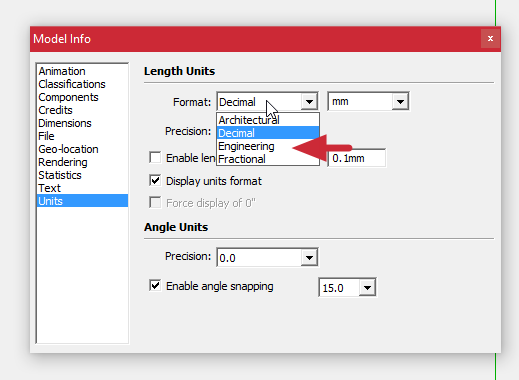
But that limits you to imperial measurements.
SketchUp 8 and prior version had an Engineering template. This was before 3D Printing got popular. Under Google the Construction Templates weren't available.
-
You'll notice Matthias said "Style" not Template. They are different things. The Engineering style is no longer included in the default styles but you can edit the style you are using under the edit tab. Set Profiles to 1, turn off the endpoints and extensions. Then set the Background color to white.
Matthias made those changes because he chose an Architecture template when SketchUp started.
-
True dat.
I just remembered the Engineering Template and felt compelled to confse things further....

-



Hello! It looks like you're interested in this conversation, but you don't have an account yet.
Getting fed up of having to scroll through the same posts each visit? When you register for an account, you'll always come back to exactly where you were before, and choose to be notified of new replies (either via email, or push notification). You'll also be able to save bookmarks and upvote posts to show your appreciation to other community members.
With your input, this post could be even better 💗
Register Login


Advertisement