Help! Interior scenes - lights too bright or room too dark
-
I've been having some issues for a long time with interior scenes and finally thought it was time to ask on here for your advice on interior lighting. I find it impossible to achieve good overall lighting without having VRAY lights burning out.
See these two attached examples.
Lights in Scene:Strip light: VRay Rectangle Light (intensity 20 (scalar))
Pool Lights: 2 X IES (power 50,000)The first is rendered with the following:
Shutter Speed: 20
F Number: 8
Film ISO: 100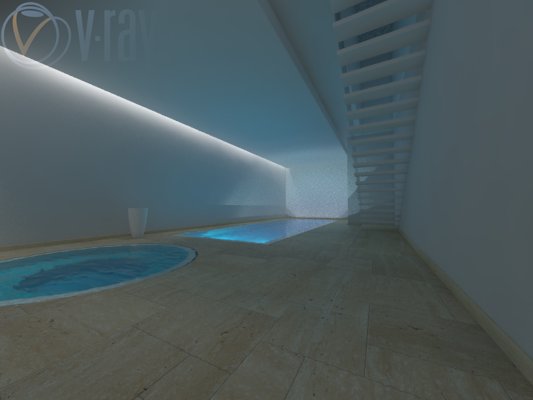
This image has nice lighting, but the overall image is too dark.
The second is rendered with the following:
Shutter Speed: 20
F Number: 8
Film ISO: 400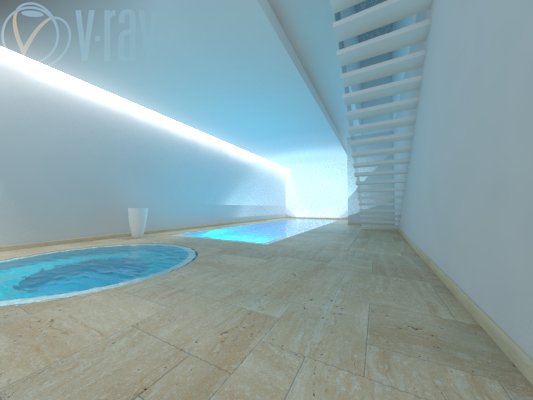
The overall lighting is much better but the lights are burnt out.
How do I achieve balance! Look forward to advice from you guys!
Thanks,
Dingo Bruce.
-
There is no magic button. You have to light a scene the way you would in real life. Fixtures with IES lights, windows letting in sunlight, maybe you even setup a few rectangular lights behind your camera as additional lighting, the same way a photographer would.
http://www.popphoto.com/how-to/2013/03/how-to-mix-light-sources-to-warm-interior-photo
Site not found · DreamHost
The owner of this domain has not yet uploaded their website.
(www.cg-blog.com)
-
I think if you go to Color mapping, choose HSV Exponential, you can play a little bit with dark and bright multiplier to get a better result. And there is always Photoshop to assist you further.
-
@valerostudio said:
There is no magic button. You have to light a scene the way you would in real life. Fixtures with IES lights, windows letting in sunlight, maybe you even setup a few rectangular lights behind your camera as additional lighting, the same way a photographer would.
http://www.popphoto.com/how-to/2013/03/how-to-mix-light-sources-to-warm-interior-photo
Site not found · DreamHost
The owner of this domain has not yet uploaded their website.
(www.cg-blog.com)

I like the clear and simple way how you have expressed this.
Your three sentences should be the introduction for each lighting chapter of any Render Tool.However, I would like such a "magic button"


Hello! It looks like you're interested in this conversation, but you don't have an account yet.
Getting fed up of having to scroll through the same posts each visit? When you register for an account, you'll always come back to exactly where you were before, and choose to be notified of new replies (either via email, or push notification). You'll also be able to save bookmarks and upvote posts to show your appreciation to other community members.
With your input, this post could be even better 💗
Register Login


Advertisement