FBX Export doesnt export textures
-
Exporting as a FBX with the Export Textures switch ticked on does not export the texture maps? Anyone ever have this issue?
-
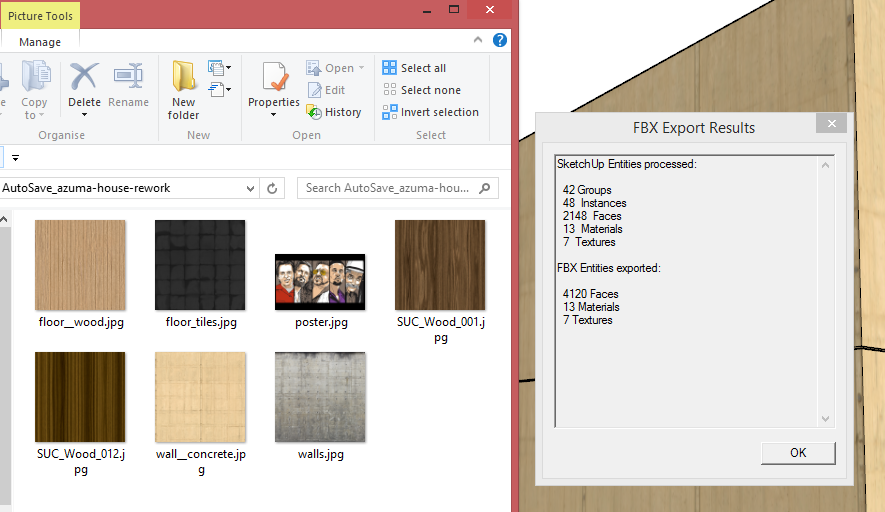
it works for me
-
works for me too. Did you apply them on the faces or on the groups? (don't know if that would make a difference though).
-
Nope. It says it exports them in the results box, but nothing. I wonder if it has anything to do with how V-Ray now makes the textures in SU some weird name located in a temp folder? Tried Simlab's plugin and it works fine exporting the FBX file.
-
Seems to be a saving to network thing. Exporting to my desktop worked. Hmmm. Simlab worked because it saves the maps to a location in your plugins folder. The other nice thing about Simlab is that when you import the FBX, each object is its own in MAX and not a single group with a multisub material applied. Not sure of the advantage/disadvantage though. Just testing a SU to Max workflow that would allow for a linked file.

Hello! It looks like you're interested in this conversation, but you don't have an account yet.
Getting fed up of having to scroll through the same posts each visit? When you register for an account, you'll always come back to exactly where you were before, and choose to be notified of new replies (either via email, or push notification). You'll also be able to save bookmarks and upvote posts to show your appreciation to other community members.
With your input, this post could be even better 💗
Register Login


Advertisement