sketchucation logo sketchucation
    • Login
    Oops, your profile's looking a bit empty! To help us tailor your experience, please fill in key details like your SketchUp version, skill level, operating system, and more. Update and save your info on your profile page today!
    Mac User? | Join the Rayscaper Beta for Mac Learn More

    [Plugin] Component Dropper

    Scheduled Pinned Locked Moved Plugins
    49 Posts 21 Posters 57.5k Views 21 Watching
    Loading More Posts
    • Oldest to Newest
    • Newest to Oldest
    • Most Votes
    Reply
    • Reply as topic
    Log in to reply
    This topic has been deleted. Only users with topic management privileges can see it.
    • Y
      Yucon
      last edited by

      Hi Tom,
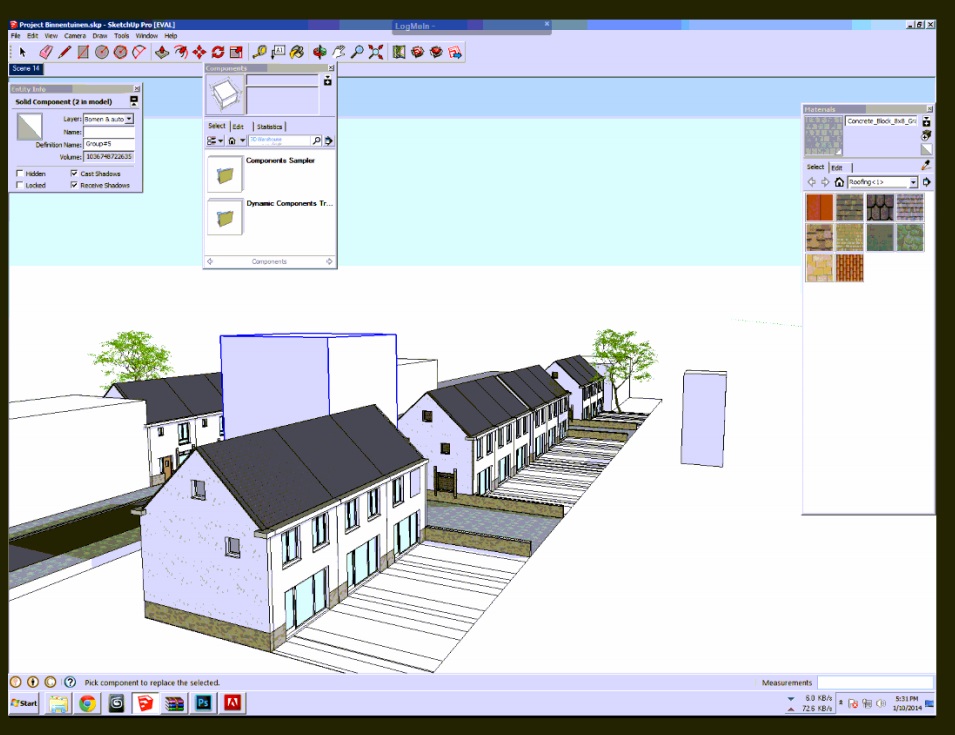
      I am trying to use your plugin and it almost works great but the boxes are jumping away from the original position. Is that a problem for sketchup 2013 maybe?

      See here some screenshots http://puu.sh/6g5M2.jpg and http://puu.sh/6g5Nx.jpg. I tried it on several models.
      Hope you can help me.
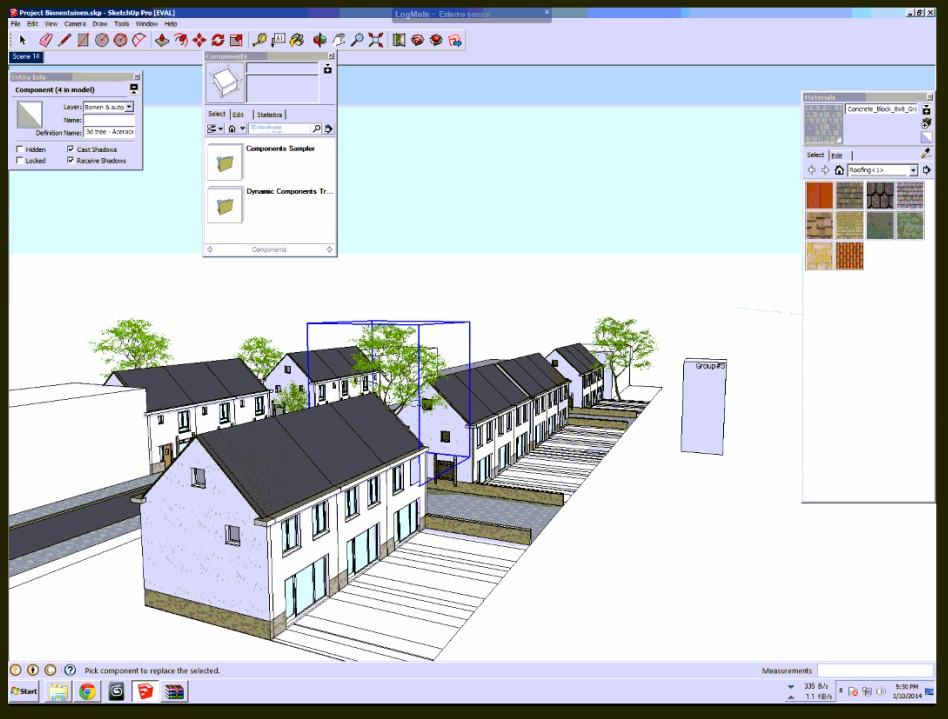
      ss (2014-01-10 at 05.36.47).jpg
      ss (2014-01-10 at 05.37.17).jpg

      1 Reply Last reply
      Reply Quote 0
      • tt_suT
        tt_su
        last edited by

        Can you share a test model?

        1 Reply Last reply
        Reply Quote 0
        • Y
          Yucon
          last edited by

          Yes ofcourse, here http://www.yucon.nl/projecten/testfile.zip you can download the file. If I want to replace the trees for a simpel box you can see that the boxes will be placed on a different location.

          Thanks
          Daan

          1 Reply Last reply
          Reply Quote 0
          • Y
            Yucon
            last edited by

            @tt_su said:

            Can you share a test model?

            Hi Tom,
            Did you download the test file? Do you understand the problem?

            Daan

            1 Reply Last reply
            Reply Quote 0
            • tt_suT
              tt_su
              last edited by

              You tried to replace the trees with what? With component?

              (Btw - your SKP file that you shared wsa 40MB - but when I purged it (Model Info > Statistics > Purge Unused it became only 18MB.)

              Also, what version do you have? I'm not sure if I've published the latest on SketchUcation yet. The latest version is 1.1.0.

              1 Reply Last reply
              Reply Quote 0
              • TIGT
                TIG Moderator
                last edited by

                The PluginStore version is v1.0.0 - as it is the title to this thread... 😕

                TIG

                1 Reply Last reply
                Reply Quote 0
                • tt_suT
                  tt_su
                  last edited by

                  Ackh! Then it's one of the about 20 I need to update on SCF... 😞

                  1 Reply Last reply
                  Reply Quote 0
                  • Y
                    Yucon
                    last edited by

                    I am trying to replace the tree for a simple box component. I think the problem will besolved if you upload the latest version.
                    Many tx

                    1 Reply Last reply
                    Reply Quote 0
                    • tt_suT
                      tt_su
                      last edited by

                      The latest is available on Extension Warehouse at the moment. I'm currently too overloaded to update my plugins on SCF. Probably won't happen until February.

                      1 Reply Last reply
                      Reply Quote 0
                      • Y
                        Yucon
                        last edited by

                        Works great now. Thanks for your help and your great plugin of course!

                        1 Reply Last reply
                        Reply Quote 0
                        • romboutR
                          rombout
                          last edited by

                          i there, this is used to work in SU2015 free. I doesnt do anything now, the ruby console is empty (no feedback). Even the simplest scene with SU start file and cube doesnt work

                          1 Reply Last reply
                          Reply Quote 0
                          • thomthomT
                            thomthom
                            last edited by

                            @rombout said:

                            i there, this is used to work in SU2015 free. I doesnt do anything now, the ruby console is empty (no feedback). Even the simplest scene with SU start file and cube doesnt work

                            I'm not able to reproduce this. When I select a component in SU2015 and pick another component it replaces the selected instances.
                            Do you perhaps have a video capture?

                            Thomas Thomassen — SketchUp Monkey & Coding addict
                            List of my plugins and link to the CookieWare fund

                            1 Reply Last reply
                            Reply Quote 0
                            • jojo9J
                              jojo9
                              last edited by

                              Thomthom, your plugin looks quite useful, so i tried to add a toolbar button because digging in menus isnt my thing.
                              i wanted to ask you some help embedding that button in the right place…with all the loaders of the last time, its confusing to get where to insert other code. (id prefer not, but…its the magic toolbar button… and solely that)

                              anyway, when i try to add a toolbar button code block after the extension code block in tt_replacer, i get:

                              Error Loading File tt_replacer.rb
                              wrong number of arguments (2 for 1)

                              heres the code:

                              #=begin     
                                  cmd = UI;;Command.new( PLUGIN_NAME, loader )
                              #    cmd.small_icon =  "Images/icon_16.png"
                                  cmd.tooltip = "Component Replacer"
                                  tb= UI.toolbar "ThomThom"
                                  tb.add_item(cmd)
                              #=end
                              
                              1 Reply Last reply
                              Reply Quote 0
                              • sdmitchS
                                sdmitch
                                last edited by

                                @jojo9 said:

                                Thomthom, your plugin looks quite useful, so i tried to add a toolbar button because digging in menus isnt my thing.
                                i wanted to ask you some help embedding that button in the right place…with all the loaders of the last time, its confusing to get where to insert other code. (id prefer not, but…its the magic toolbar button… and solely that)

                                anyway, when i try to add a toolbar button code block after the extension code block in tt_replacer, i get:

                                Error Loading File tt_replacer.rb
                                wrong number of arguments (2 for 1)

                                heres the code:

                                #=begin     
                                >     cmd = UI;;Command.new( PLUGIN_NAME, loader )
                                > #    cmd.small_icon =  "Images/icon_16.png"
                                >     cmd.tooltip = "Component Replacer"
                                >     tb= UI.toolbar "ThomThom"
                                >     tb.add_item(cmd)
                                > #=end
                                

                                I think it should be

                                #=begin     
                                    cmd = UI;;Command.new( PLUGIN_NAME ) { loader }
                                #    cmd.small_icon =  "Images/icon_16.png"
                                    cmd.tooltip = "Component Replacer"
                                    tb= UI.toolbar "ThomThom"
                                    tb.add_item(cmd)
                                #=end
                                

                                Nothing is worthless, it can always be used as a bad example.

                                http://sdmitch.blogspot.com/

                                1 Reply Last reply
                                Reply Quote 0
                                • jojo9J
                                  jojo9
                                  last edited by

                                  oh, yeah! thats true, i forgot the parenthesis, and it was the core file. Thanks sdmitch!

                                  Now i got it working, yay!

                                  1 Reply Last reply
                                  Reply Quote 0
                                  • shake1S
                                    shake1
                                    last edited by

                                    Not working in SU 2020 20.2.172
                                    Pleace chek this.

                                    correction - 2D objects i mean

                                    1 Reply Last reply
                                    Reply Quote 0
                                    • G
                                      Grey24601
                                      last edited by

                                      HI ThomThom

                                      Does Component replacer work with 2021? It appears to have stopped working.

                                      I select the components to replace, invoke the tool and then it prompts me to select the component to replace with but nothing happens.

                                      1 Reply Last reply
                                      Reply Quote 0
                                      • B
                                        Bg1137
                                        last edited by

                                        It also doesn't work for me in 2021. I loved this extension 😞

                                        1 Reply Last reply
                                        Reply Quote 0

                                        Hello! It looks like you're interested in this conversation, but you don't have an account yet.

                                        Getting fed up of having to scroll through the same posts each visit? When you register for an account, you'll always come back to exactly where you were before, and choose to be notified of new replies (either via email, or push notification). You'll also be able to save bookmarks and upvote posts to show your appreciation to other community members.

                                        With your input, this post could be even better 💗

                                        Register Login
                                        • 1
                                        • 2
                                        • 3
                                        • 3 / 3
                                        • First post
                                          Last post
                                        Buy SketchPlus
                                        Buy SUbD
                                        Buy WrapR
                                        Buy eBook
                                        Buy Modelur
                                        Buy Vertex Tools
                                        Buy SketchCuisine
                                        Buy FormFonts

                                        Advertisement