[Plugin] Layers Panel 1.2.1
-
JBB,
Thank you for designing the Layers panel, it is great to be able to nest layers.

But when I tried to remove a layer and delete the contents Sketchup throws a Bug Splat.

This happened first with 0.2 but again with 0.3.1. I am using Sketchup 2013. The layer that I tried to delete had no components assigned to it. I had the Outliner window open and just before the bug splat was thrown I noticed a bundle of groups appear on the bottom of the Outline tree. The model statistics are 201 components definitions, 35 layers, 31 materials all created before installing Layers panel. Some of the layers were hidden at the time of the bug splat. I submitted the bug splat #43650, if it is any help I still have a copy of the splat files Undo.log, Sketchup.dmp and .xml.Regards,
Arie. -
Bimbalas > I'll look at non-ASCII characters.
Breezy > That's a known bug and Dan helped me fix it : http://sketchucation.com/forums/viewtopic.php?f=180&t=54161
It will be fixed in the next release (out in a few days) -
@jiminy-billy-bob said:
Breezy > That's a known bug and Dan helped me fix it :
It will be fixed in the next release (out in a few days)jiminy-billy-bob,
Thank you. I refrain from using your delete button!
A possible future feature is the ability to colour the layers as in Sketchup's layers window. Also to rollup the window by clicking on the title bar.
Thanks again for what you have produced, I have found it easier to control the layers in my projects.
Regards,
Arie. -
Ive got some problems with the layer panel.
- It is asking for me to update the current ie explorer. But i already installed version 10 although it is not my standard browser, which is firefox.
- When I use the features as explained s. a . creatíng groups and layers and sort the whole structure, then i will not be able to open this very drawing again after saving and closing it properly. The comment is: ²wrong file format!² , the file is actally lost.
I am glad i did not blindly change any important file and put too much time in doing so.
Glad there is a thing called .skb! I think this is a rather serious issue.
I wonder if i am the only one with this experience!
Michael
-
@breezy said:
A possible future feature is the ability to colour the layers as in Sketchup's layers window. Also to rollup the window by clicking on the title bar.
Unfortunatly, the API doesn't allow me to do that...
@michaelneyses said:
Ive got some problems with the layer panel.
- It is asking for me to update the current ie explorer. But i already installed version 10 although it is not my standard browser, which is firefox.
Can you go to http://whatsmyua.com/ with Internet Explorer, and tell me what it says ?
@michaelneyses said:
- When I use the features as explained s. a . creatíng groups and layers and sort the whole structure, then i will not be able to open this very drawing again after saving and closing it properly. The comment is: ²wrong file format!² , the file is actally lost.
Did you create these groups with a version of Layers Panel older than 0.3.1 ? Like 0.2, 0.3, etc
Thanks
-
I'm having issues with renaming layers - only some though others work fine.
deleting layer and starting again this dosen't happen - I can rename again
(i didn't have to make a video for this but I've never done it, so there you go....)
-
Is it renamed in SU's layer window ?
-
I didn't see but this isn't the fist time this has happened so will keep a better note next time.
-
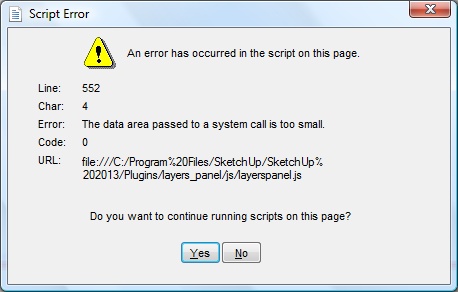
i've found an issue? i added layers after placing a bunch into groups and when i drag the unassigned layer into a group i get a javascript error. attached is the file and the screenshot. i'm using SU 2013 pro 13.0.4812 on Windows Vista SP2. i have full permission in SU prog dir.
-
@cmeed said:
I didn't see but this isn't the fist time this has happened so will keep a better note next time.
Ok, thanks.
I think it's related to Observers watching layers change. I had these kind of issue in the past and resolved a lot of them, but it's possible that some remain. If it's indeed related to observers, it should occur only with old layers created before Layers Panel was installed.gullfo > I'll look at your file.
-
Ok Glenn, I found the issue. You simply have too many layers. It's related to the max length a url can pass between the dialog and SU. I forgot about this... I'll need to rewrite some code.
-
Thats it- it was an old layer. The reason i was changing it was to give it a capital letter, I started out with non-capitalised layer names......
-
@jiminy-billy-bob said:
Ok Glenn, I found the issue. You simply have too many layers. It's related to the max length a url can pass between the dialog and SU. I forgot about this... I'll need to rewrite some code.
does that mean theres a limit on layers?
c -
For now, yes. I had this planned, but completely forgot about it. So I don't know the current limit. But in next version, it should be fixed.
-
no problem! that's what beta-testing is all about

-
@jiminy-billy-bob said:
You simply have too many layers.
that's the short list
once you start to use ACAD standard architecture layer sets it gets "big" -
@bimbalas said:
On renamaming layers or groups directly on Layers Panel with letters from non ASCII character set (e.g. ąžįėš) this letters was changed to unicode codes.
I just tested, and it works for me when I rename a layer to "ąžįėš". Which versions of Sketchup, windows, and internet explorer are you using ?
-
New version 0.3.2 beta !
Changelog :
- Fix bugsplat when deleteing/purging layers with Outliner opened
- New naming conventions (For the Extension Warehouse)
Download in the plugin store !
At startup, you should get once "Error Loading File layers_panel.rb no such file to load -- layers_panel.rb". This is normal, it's just the plugin deleting the old files.
-
this is with release 0.3.2
same naming issue with names not changing in the LayersPanel - they are changing in the Layers Window thoughI updated the plugin this morning. The layers were made yesterday. I closed down SU. restarted SU. captured film so its not happening with the layers or folders before the plugin was installed, as all were made yesterday
CEDIT: in the time its taken me to write the above the layer has now changed to 'hello' in LayersPanel. just so you know...
-
@jiminy-billy-bob said:
- Fix bugsplat when deleteing/purging layers with Outliner opened
Doh! I was just about to look at this.
Can you PM me the old version that crashed? I'd like to have a look at it.
(Also, what did you do to avoid the crash?)





Hello! It looks like you're interested in this conversation, but you don't have an account yet.
Getting fed up of having to scroll through the same posts each visit? When you register for an account, you'll always come back to exactly where you were before, and choose to be notified of new replies (either via email, or push notification). You'll also be able to save bookmarks and upvote posts to show your appreciation to other community members.
With your input, this post could be even better 💗
Register Login


Advertisement