No install button in extensions window
-
Hi everybody
I'm pretty new to Sketchup. I couldn't install plugins. Everybody is talking about an install button in Extensions. But I couldn't find it. This is what i get when i opened that
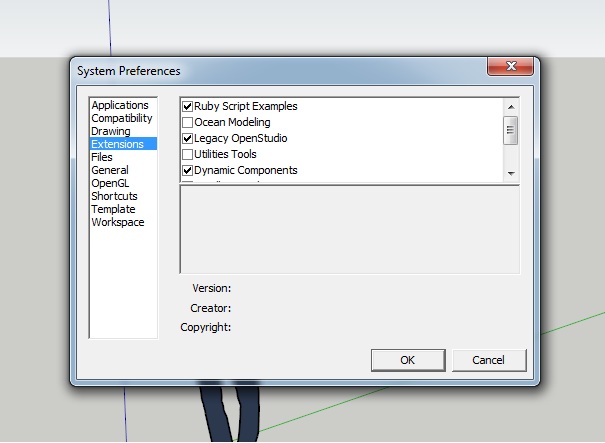
-
And this is my window:
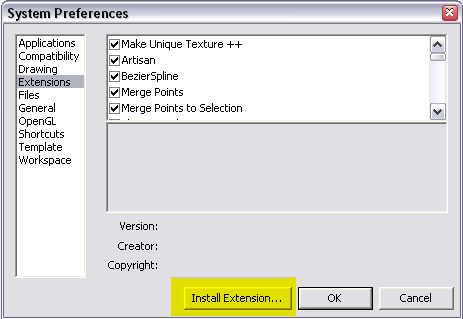
I really have no clue why it is missing. Can you try to re-download the latest version of SU and reinstall it on your system? (Any plugins, materials and such that you have added will remain intact) -
I am sure, as Gaieus said, it will be there after redownloading the latest version of SketchUp 8. I think the clue is that it has been added in Maintenance release 2 and not everyone has yet kept pace with SketchUp's fast development.
-
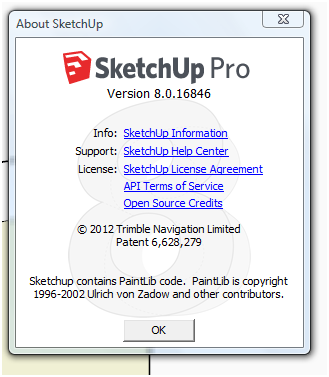
Sketchup > Help > About Sketchup...
Will show your version.
The Installer button was introduced with v8M2 so if you haven't updated you won't see it !
This is my current installation...
-
Yes, I also remembered that it was not there in the first SU 8 release however OT also wrote he's new to SU (which would suggest a pretty recent download).
Anyway, this should be the first think to check.
-
Thanks for replies.
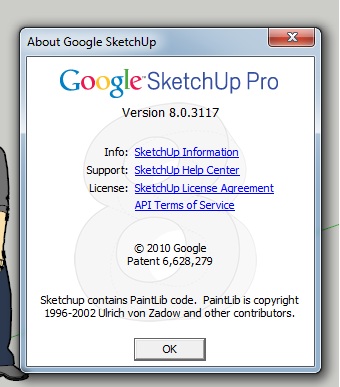
But I think there is no problem about the version.
-
The version number sure is the problem. Update to the latest version.
It hasn't been "Google" SketchUp since the middle of last year. And your version has a copyright date two years before the current version.
-
@gufegineme said:
Thanks for replies.
But I think there is no problem about the version.Yes there is - you have an older version. Not only is the version number lower, but it's says "Google SketchUp" instead of "Trimble SketchUp".
Update SketchUp and you will get your button.
-
Also, haven't you gotten update notifications from SketchUp?




Hello! It looks like you're interested in this conversation, but you don't have an account yet.
Getting fed up of having to scroll through the same posts each visit? When you register for an account, you'll always come back to exactly where you were before, and choose to be notified of new replies (either via email, or push notification). You'll also be able to save bookmarks and upvote posts to show your appreciation to other community members.
With your input, this post could be even better 💗
Register Login


Advertisement