Help with recursive component?
-
@al hart said:
Is this "expand" thing new, or have I just missed it for the past few years.
Been in SketchUp as far as I've used it ... 5/6.
You can also access the property via the API: http://www.thomthom.net/thoughts/2012/02/definitions-and-instances-in-sketchup/#8220internal8221-components
-
The Outliner is a far more efficient way of finding nested components/groups, right clicking over the selected item in the Outliner offers all of the usual context-menu items.
Using View > Component Edit > Hide rest of model etc lets you see what's what too...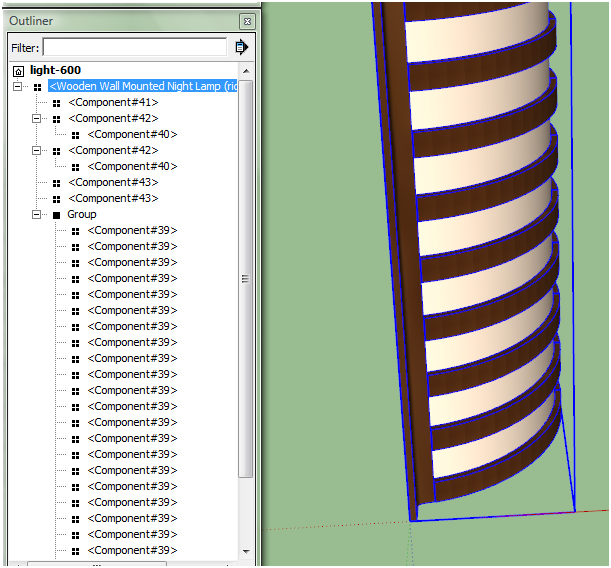 A little better component naming would be helpful too
-
@tig said:
The Outliner is a far more efficient way of finding nested components/groups, right clicking over the selected item in the Outliner offers all of the usual context-menu items.
Using View > Component Edit > Hide rest of model etc lets you see what's what too...
A little better component naming would be helpful tooThanks TIG - A client grabbed this from the 3D warehouse and marked the whole thing as a light - which was making way too many individual light sources. (Not just the rice paper, but also all of the hardware in the light)
I told him he should re-insert the rice paper as a single surface, (it is 26 separate surfaces in the 3D Warehouse model), and then make it into a single light for faster processing. But without the outliner, (which I did not think to use), or the expand function, it was hard to see just what was going on.
Al Hart

IRender nXt from Render Plus -
It could certainly be made from far less geometry and sub-parts - it's a light-fitting, who's ever going to be so close to see it's inner workings - a prime example of over-detailing an object
-
@unknownuser said:
When you import a model, all it's sub-components are marked as "internal" and hidden by default in SU.
I see there is an internal? to check for an internal component in Ruby.
Is there any way to mark a component being used as a sub-component as internal when I am creating a component with ruby?
Al Hart
IRender nXt from Render Plus -
@al hart said:
Is there any way to mark a component being used as a sub-component as internal when I am creating a component with ruby?
Unfortunatly no. I've requested this, as it'd be very useful for organizing a model.
-
...

BUT provided the sub-components are only used inside a main-component [i.e. they have no instances in their own right] you could try this way...
Save the main-component externally [use the 'TEMP' folder etc], rename the original and any sub-components as 'scrap'.
https://developers.google.com/sketchup/docs/ourdoc/componentdefinition#save_as
Keep track of any instances of the main-component's definition.
Reload the TEMP skp back into the model - it should take it's 'original name' [rename it otherwise].
https://developers.google.com/sketchup/docs/ourdoc/definitionlist#load
Erase the TEMP SKP to tidy up [File.delete(tempskp)].
Set every original main-componentinstance.definition=newdefnto use this newly imported replacement.
The newly imported component now has its own 'internal' sub-components.
At the close of play do a '.clear!' on each of the unused ['scrap'] main-component and sub-componnetdefinition.entitiesin turn - when themodel.start...commit_operationblock closes they then are auto-deleted as empty definitions.
Now any 'internal' wholly sub-components are no longer listed in the unExpanded Component Browser > Model panel.
They will appear in the Outliner as before... -
The other day I put together a little tutorial about internal and external components: http://www.sketchucation.com/resources/tutorials/36-intermediate/115-internal-external-components
-
@gaieus said:
The other day I put together a little tutorial about internal and external components: http://www.sketchucation.com/resources/tutorials/36-intermediate/115-internal-external-components

-
This "recursively defined model or component" is not in that tut but from the "preamble" What is a component, it is obvious that you cannot place a file into itself.
-
Only thing about the article - at the end, about scaling - it seem to suggest that you scale a model to a match the incorrect scale of an imported component? Or did I misinterpret that?
-
I did not mean to say that there. I'll revisit and see if there is anything to misunderstand, thanks.




Hello! It looks like you're interested in this conversation, but you don't have an account yet.
Getting fed up of having to scroll through the same posts each visit? When you register for an account, you'll always come back to exactly where you were before, and choose to be notified of new replies (either via email, or push notification). You'll also be able to save bookmarks and upvote posts to show your appreciation to other community members.
With your input, this post could be even better 💗
Register Login


Advertisement