[Plugin] FullScreen v5.1.3 (25 April 2024)
-
@newrui said:
Hi Anton, is it possible to make this work with Macs? Perhaps use Lion's full screen feature? SU is desperately in need of window/toolbar management under Macs... Thanks!
Hello Newrui,
Mac is a tottaly different library. Its way of using and its features are tottaly different from Windows API. Truly, I, myself never experienced Mac OS, nor its library, and I don't have it. I'm sorry, I can't write one for Macs, though, there are a bunch of users outhere that are
 and I think these could get their hands or heads on keyboard and write one for Mac.
-
@anton_s said:
@newrui said:
Hi Anton, is it possible to make this work with Macs? Perhaps use Lion's full screen feature? SU is desperately in need of window/toolbar management under Macs... Thanks!
Hello Newrui,
Mac is a tottaly different library. Its way of using and its features are tottaly different from Windows API. Truly, I, myself never experienced Mac OS, nor its library, and I don't have it. I'm sorry, I can't write one for Macs, though, there are a bunch of users outhere that are
and I think these could get their hands or heads on keyboard and write one for Mac. Thanks Anton, I hope so too, fingers crossed!
-
-
pc =


-
Finally Kiosk Mode for Sketchup!

Lovely!
Works great on Sketchup 8 pro Win7 x64... -
You can render with Vray in full screen now!
Just have to bind a keyboard shortcut for the now hidden render button... or detach the vray toolbar.Nice Work Anton!
-
@unknownuser said:
You can render with Vray in full screen now!
Just have to bind a keyboard shortcut for the now hidden render button... or detach the vray toolbar.Nice Work Anton!
Thankyou, didn't thought that this plugin would be that useful.. Yesssss!!!

-
Thank you for this. At last I can use 8.5 x 14 legal size paper in printer and get an aspect ratio that comes closer to filling that paper size. Just turn off 4 total control bars + scene bar + status bar.
-
Updated Monday June 18, 2012
See First Post
-
Thanks Anton. I love this plugin
-
-
Well, this is my most used part of SketchUp. Now the ability to have my default layout under one shortcut is insane.
Kudos
-
thanks for sharing! working on my windows 7 64 bit.
-
Hello,
it seems to be a very nice plugin!!!
Is it possible to get an step by step installation manual of this plugin for Win7 x 64; SU Pro 8.0.3117???
I try to install, but without success, please help!
Thanks a lot! -
@davinchi said:
Is it possible to get an step by step installation manual of this plugin for Win7 x 64; SU Pro 8.0.3117???
I try to install, but without success, please help!
Thanks a lot!Download it and extract it to plugins
It should look like this:
.../Google Sketchup [n/plugins/]
%(#008040)[win32
windows
forwardable.rb
Window Settings.rb] -
Thanks Anton for this, good useful tool. I've always been waiting for such a tool. I have no problem in Win 64-bit and Sketchup 8
One reminder: The change in full-screen mode to another application is done with the Windows and Tab key.
-
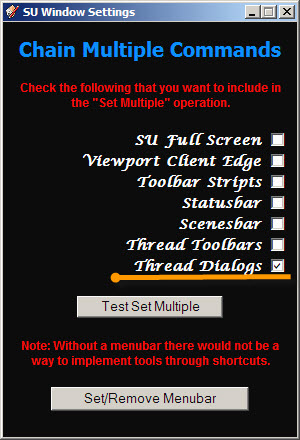
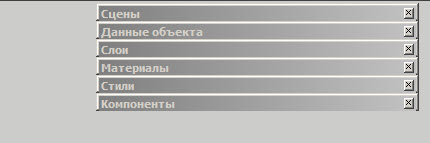
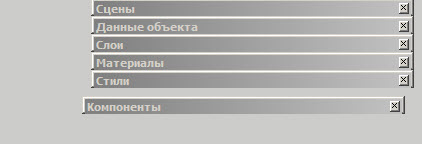
After assigning a hotkey for the menu item "Thread Dialogs" problem. Menu crumbles
-
@feodos said:
After assigning a hotkey for the menu item "Thread Dialogs" problem. Menu crumbles
Thanks for report, I'll try to fix that.
-
tha thank you
-
@unknownuser said:
Not sure about earlier versions, nor windows 8
Seems no problem with SU 8 with Windows 8 (Integral x64)
(not tested by me but by an another French user






Hello! It looks like you're interested in this conversation, but you don't have an account yet.
Getting fed up of having to scroll through the same posts each visit? When you register for an account, you'll always come back to exactly where you were before, and choose to be notified of new replies (either via email, or push notification). You'll also be able to save bookmarks and upvote posts to show your appreciation to other community members.
With your input, this post could be even better 💗
Register Login


Advertisement