sketchucation logo sketchucation
    • Login
    Oops, your profile's looking a bit empty! To help us tailor your experience, please fill in key details like your SketchUp version, skill level, operating system, and more. Update and save your info on your profile page today!
    Mac User? | Join the Rayscaper Beta for Mac Learn More

    Delete all faces in one step

    Scheduled Pinned Locked Moved Newbie Forum
    sketchup
    18 Posts 7 Posters 1.2k Views 7 Watching
    Loading More Posts
    • Oldest to Newest
    • Newest to Oldest
    • Most Votes
    Reply
    • Reply as topic
    Log in to reply
    This topic has been deleted. Only users with topic management privileges can see it.
    • A
      ArCAD-UK
      last edited by

      Again for ungrouped entities...

      Select all (Ctrl-A)
      Hovver over a selected face Right Click and choose "Select Only" > "Faces"
      Hit Delete
      Job done.

      1 Reply Last reply
      Reply Quote 0
      • massimoM
        massimo Moderator
        last edited by

        @unknownuser said:

        Hovver over a selected face Right Click and choose "Select Only" > "Faces"

        Uh? That's a plugin's feature I suppose.

        1 Reply Last reply
        Reply Quote 0
        • gillesG
          gilles
          last edited by

          I think it goes with Selection Toys.

          " c'est curieux chez les marins ce besoin de faire des phrases "

          1 Reply Last reply
          Reply Quote 0
          • massimoM
            massimo Moderator
            last edited by

            Ah! Thank you. πŸ˜„

            1 Reply Last reply
            Reply Quote 0
            • A
              ArCAD-UK
              last edited by

              Huh, I don't recall ever installing a selection tools PI. This is what I get in SU8...
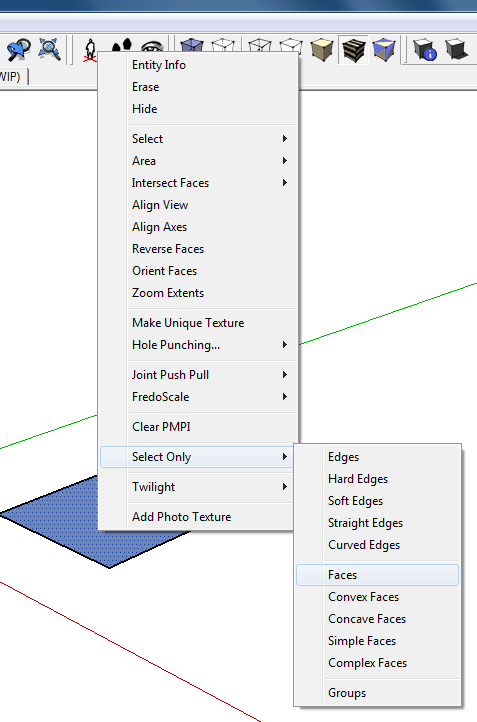

              SelectOnly.png

              1 Reply Last reply
              Reply Quote 0
              • jeff hammondJ
                jeff hammond
                last edited by

                @arcad-uk said:

                Huh, I don't recall ever installing a selection tools PI. This is what I get in SU8...

                that's recurve.rb

                dotdotdot

                1 Reply Last reply
                Reply Quote 0
                • jeff hammondJ
                  jeff hammond
                  last edited by

                  @gaieus said:

                  Without grouping:

                  1. Go wireframe
                  1. Select all (Ctrl+A)
                  2. Copy the selection (Ctrl+C)
                  3. Triple click to select all visible edges + invisible faces and Delete
                  4. Under Edit menu, select "Paste in place" (I also have a custom shortcut: Shift+Ctrl+V for this)

                  hey csaba..
                  you can skip the triple-click step.. if you delete all the edges which are already selected via your previous steps, the faces will delete as well.. but this is the method i'd recommend as well

                  wireframe --- cmmdA --- cmmdC --- delete --- shift_cmmd V

                  dotdotdot

                  1 Reply Last reply
                  Reply Quote 0
                  • gillesG
                    gilles
                    last edited by

                    I have two select only, I'm the winner.

                    Sometimes I don't remember what is native and what is plugins and what plugin it is. 😲


                    select-only.png

                    " c'est curieux chez les marins ce besoin de faire des phrases "

                    1 Reply Last reply
                    Reply Quote 0
                    • jeff hammondJ
                      jeff hammond
                      last edited by

                      @gilles said:

                      I have two select only, I'm the winner.

                      Sometimes I don't remember what is native and what is plugins and what plugin it is. 😲
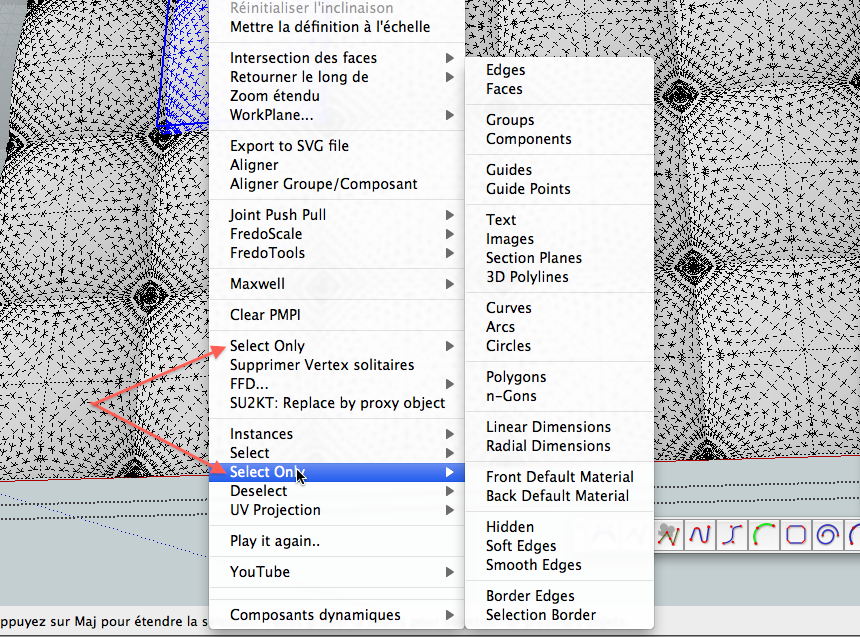
                      there's also the native select option at the top of the context menu (cropped out of your screenshot) though it doesn't have 'all faces' in there..

                      but yeah, i have selection toys and recurve installed as well.. not sure why the selection options are included in recurve.rb? maybe diggsey just liked the feature but didn't want to make a separate plugin for it? i already hounded him about making a few changes in recurve, which he did (and seriously, it's probably my most used plugin.. it's great) so i'm all out of request opportunities on that one πŸ˜‰

                      dotdotdot

                      1 Reply Last reply
                      Reply Quote 0
                      • TIGT
                        TIG Moderator
                        last edited by

                        Without any 'scripting'... here's a one-liner that adjusts any existing selection so that it then only includes faces.
                        Copy/paste this code into the Ruby Console + <enter>

                        s=Sketchup.active_model.selection;s.each{|e|s.remove(e)unless e.is_a?(Sketchup;;Face)}
                        

                        Then... to erase the selected faces click the top-bar to regain focus on the main-window and press the 'delete' key.
                        You can adjust this to include/exclude any type of entity in a selection...

                        TIG

                        1 Reply Last reply
                        Reply Quote 0
                        • GaieusG
                          Gaieus
                          last edited by

                          @unknownuser said:

                          ...you can skip the triple-click step.. if you delete all the edges which are already selected via your previous steps, the faces will delete as well...

                          True... 😳 πŸ˜’

                          Gai...

                          1 Reply Last reply
                          Reply Quote 0
                          • A
                            ArCAD-UK
                            last edited by

                            @unknownuser said:

                            Without grouping:
                            wireframe --- cmmdA --- cmmdC --- delete --- shift_cmmd V

                            Or...

                            wireframe --- cmmdA --- cmmdX --- shift_cmmd V aka "Paste in place" (mine is shift_I)

                            That's one step less. What a great thread for showing how powerful SU is in it's native form; an apparently tedious issue solved in four simple steps. β˜€

                            1 Reply Last reply
                            Reply Quote 0
                            • ipsketchpiI
                              ipsketchpi
                              last edited by

                              Thank you, very useful as always.

                              /IP

                              1 Reply Last reply
                              Reply Quote 0

                              Hello! It looks like you're interested in this conversation, but you don't have an account yet.

                              Getting fed up of having to scroll through the same posts each visit? When you register for an account, you'll always come back to exactly where you were before, and choose to be notified of new replies (either via email, or push notification). You'll also be able to save bookmarks and upvote posts to show your appreciation to other community members.

                              With your input, this post could be even better πŸ’—

                              Register Login
                              • 1 / 1
                              • First post
                                Last post
                              Buy SketchPlus
                              Buy SUbD
                              Buy WrapR
                              Buy eBook
                              Buy Modelur
                              Buy Vertex Tools
                              Buy SketchCuisine
                              Buy FormFonts

                              Advertisement



