Keyboard - 58 User-reprogrammable keys for SketchUP
-
Dear All,
Something interesting.
Keyboard - 58 User-reprogrammable keys for SketchUP...
http://piengineering.com/utilization/sketchup.phpbut the pricing is completely wrong ($189.95 !).
Regards -
What do you mean the pricing is "completely wrong"?
-
To expensive in comparison to standard keyboard, which is twice bigger and cost £6.
Regards -
If the UK price wasn't identical to the price in dollars, I would say that it was reasonably well priced and something I might consider buying in the future.
Whilst not exactly cheap (who would pay only £6 for a keyboard?) it's certainly more affordable than the $1,500 Optimus Maximus - which features mini oled screens in place of keys.
Thinking about it, wouldn't an ipad app be a much better way of doing this?
-
Considering the difference in scales of production, the price for the programmable key pad isn't really all that bad. If they were cranking out hunderds of thousands of these things I'm sure the price would be lower.
I looked at the Optimus Maximus keyboard a while ago and thought it would be really the cat's meow for programs like SketchUp but I haven't got that kind of change burning a hole in my pocket.
I could see an iPad being used this way if it could be linked to a computer but I would miss the tactile feeling of pressing keys.
-
@hieru said:
Whilst not exactly cheap (who would pay only £6 for a keyboard?)...
...Thinking about it, wouldn't an ipad app be a much better way of doing this?
Hi Hieru, I wanted to highlight the price gap between the keyboards (personally, I have approx. £75 keyboard with mouse), but I like your idea about the ipad app.
Regards -
Looks like there already is something for the ipad using Keypad+:
keypadplus.dopplerthepom.com/KeyPad_for_sketchup.html
@unknownuser said:
I would miss the tactile feeling of pressing keys.
A programmable touch screen with haptic feedback would be an ideal interface.
-
Darn! I might have to buy an iPad.

Oh, wait! That keypad thing would be a whole lot less money.
-
I notice on their site they say...
@unknownuser said:
Sketchup does this when you have the Pain Bucket tool selected and press the Alt key (but who can remember that?).
Pain bucket? Who can remember to press Alt key?

-
I've never found the Alt key to bring up any pain. Certainly not enough pain to put in a pain bucket.
-
Taking a second look I've already got memorable shortcuts for many of the featured functions and most of the rest are no quicker to select with a keypad than a mouse. To be any use I'd need a whole new set of commands for frequently used plug-ins.
-
Commands for plugins--I think that's where an extra keyboard would be good.
-
and I use one of these -
comfy and reliable..
tho I want the updated version
-
@Khai
Just curious: Of what use is a gaming keyboard in SU? Is it the programmable keys? -
@bob james said:
@Khai
Just curious: Of what use is a gaming keyboard in SU? Is it the programmable keys?yup in one. it's marketed as a gaming addon.. but when you consider, it's a 16 key fully programmable keyboard.. it's far more than just gaming.
mines set to all the major SU shortcuts on the keys with the thumbpad set to change to pan, rotate, etc
-
@dave r said:
Commands for plugins--I think that's where an extra keyboard would be good.
Would the programmable keys be able to activate ruby plugins in general (i.e., not just the built-in shortcuts)?
I watched a PhotoShop tutorial the other day and the guy was using a tablet and an auxilliary keypad. It sure looked like the keypad was making his job a lot more efficient/quick. -
Bob, I don't know why they wouldn't. You can set keyboard shortcuts for any plugins now.
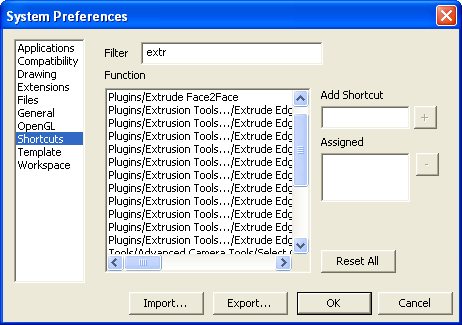
-
Thanks, Dave.
I've decided to try the tablet/keypad approach to my modeling/photoshop workflow. I've bought a Wacom INTUOS4 Medium Pen Tablet with Mouse and am thinking about the keypad that was/is the original subject of this thread. -
I'll be interested to know how you get on with it, Bob. it's too bad you bought that tablet. I have one sitting here that I should sell. I used it a couple of times and don't like it. Nothing wrong with it but I'm left handed with a pen but use the mouse with my right hand. I am just too clumsy with my left hand to be able to work the tablet efficiently and know where I'm working in SketchUp. I tried it a few times but I decided I have too much work that has to get done to be able to spend the time getting proficient with it. I wouldn't try to switch the mouse to my left hand now, either, for the same reason.
I am interested in that keyboard, though. Let us know how that works for you.





Hello! It looks like you're interested in this conversation, but you don't have an account yet.
Getting fed up of having to scroll through the same posts each visit? When you register for an account, you'll always come back to exactly where you were before, and choose to be notified of new replies (either via email, or push notification). You'll also be able to save bookmarks and upvote posts to show your appreciation to other community members.
With your input, this post could be even better 💗
Register Login


Advertisement