sketchucation logo sketchucation
    • Login
    Oops, your profile's looking a bit empty! To help us tailor your experience, please fill in key details like your SketchUp version, skill level, operating system, and more. Update and save your info on your profile page today!
    Mac User? | Join the Rayscaper Beta for Mac Learn More

    [Tutorial] Tufted Ottoman

    Scheduled Pinned Locked Moved Organic Modelling
    19 Posts 12 Posters 16.6k Views 12 Watching
    Loading More Posts
    • Oldest to Newest
    • Newest to Oldest
    • Most Votes
    Reply
    • Reply as topic
    Log in to reply
    This topic has been deleted. Only users with topic management privileges can see it.
    • Rich O BrienR
      Rich O Brien Moderator
      last edited by

      Csaba?

      Download the free D'oh Book for SketchUp 📖

      1 Reply Last reply
      Reply Quote 0
      • S
        stereofidelic
        last edited by

        Bookmarked this page, and I will try to follow it this weekend.

        1 Reply Last reply
        Reply Quote 0
        • ely862meE
          ely862me
          last edited by

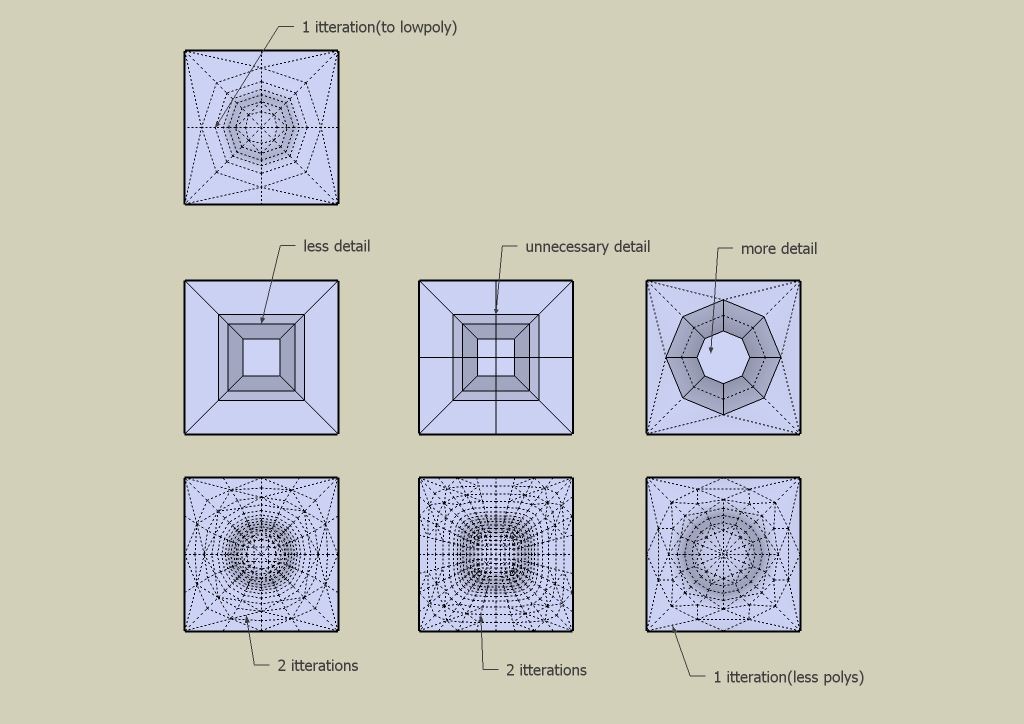
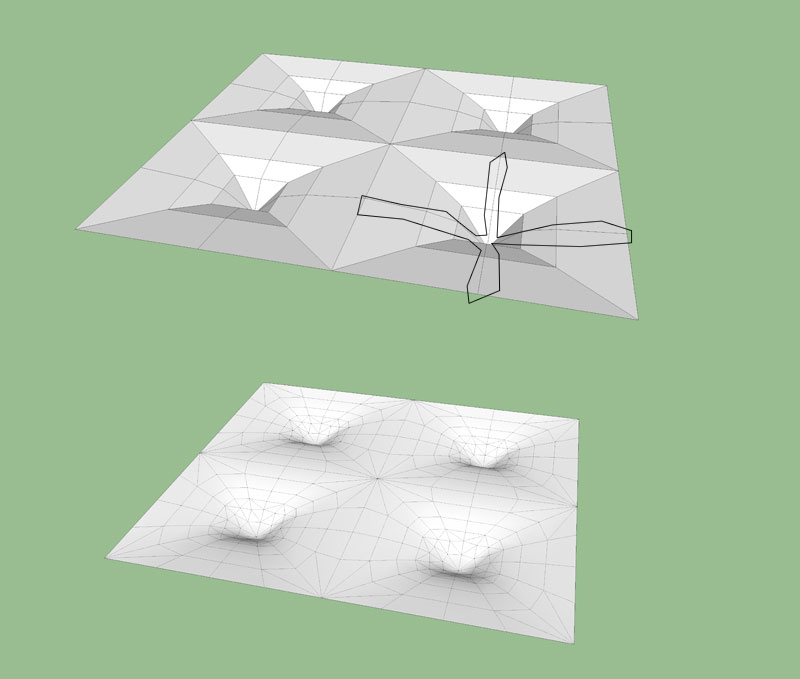
          Take those lines out because they give a square result when subsmoothing .
          Untitled-1.jpg

          See what i mean.


          poufysds1 by EliseiDesign.jpg

          Elisei (sketchupper)


          Before no life was done on Earth it was THE LIFE ITSELF...GOD
          Come and See EliseiDesign

          1 Reply Last reply
          Reply Quote 0
          • J
            john.warburton
            last edited by

            Excellent tutorial - really useful, thank you.

            Life's a reach, and then you gybe.

            1 Reply Last reply
            Reply Quote 0
            • GaieusG
              Gaieus
              last edited by

              @unknownuser said:

              True. I will add it.

              Something I was wondering. Now that we have the organic modeling sub-forum, how do we decide where the tutorials actually go? If it is an Organic tutorial should it go here or in the SketchUp tutorial section. Hmmm

              @unknownuser said:

              Csaba?

              I dunno guys. Think about it - we can move these any time. Or if we move it (and make more), we can keep a list with links here. Maybe tag like [Tutorial organic] (we used to gad tuts with special names, too). Then we can somehow generate a search result page like the Plugin Index.


              Ah and before I forget; great tut! 👍

              Gai...

              1 Reply Last reply
              Reply Quote 0
              • V
                Vicspa
                last edited by

                (Bookmarked) Thanks guys, I hope there are more tuts like this once SDS2 comes out.

                1 Reply Last reply
                Reply Quote 0
                • boofredlayB
                  boofredlay
                  last edited by

                  @ely862me said:

                  Take those lines out because they give a square result when subsmoothing.

                  Thanks for improving my knowledge. 👍

                  http://www.coroflot.com/boofredlay

                  1 Reply Last reply
                  Reply Quote 0
                  • Bryan KB
                    Bryan K
                    last edited by

                    Excellent tutorial(s).

                    I've also learned something new.

                    See my portfolio at https://delphiscousin.blogspot.com/

                    1 Reply Last reply
                    Reply Quote 0
                    • D
                      danielschultz
                      last edited by

                      I've followed your tutorial, starting with a square. My result after subdivide and smooth "facets" the corners of the square as shown in the attached photo. Help please.example_small.jpg

                      1 Reply Last reply
                      Reply Quote 0
                      • GaieusG
                        Gaieus
                        last edited by

                        You need to use the crease tool on those edges before subdividing so that they remain intact after subdivision.

                        Gai...

                        1 Reply Last reply
                        Reply Quote 0
                        • boofredlayB
                          boofredlay
                          last edited by

                          Well yes and no. In the original example I had that piece connected to many others to make the full ottoman cushion. Therefore you do not need to use the crease tool as it is all together. But if you are only doing one segment as you have shown Daniel then you need to crease the corners, not the edges.

                          http://www.coroflot.com/boofredlay

                          1 Reply Last reply
                          Reply Quote 0
                          • GaieusG
                            Gaieus
                            last edited by

                            well, corners then, thanks Eric. point is that it keeps the thing.

                            Gai...

                            1 Reply Last reply
                            Reply Quote 0
                            • gudio83G
                              gudio83
                              last edited by

                              i'm following the tutorial , but after 2 iterations my square is always in 2D. there is no a hole. What i get wrong?

                              1 Reply Last reply
                              Reply Quote 0
                              • ely862meE
                                ely862me
                                last edited by

                                Probably you don't have any "hole" in it .First you must create the "hole" then subdivide.

                                See what I mean .

                                1.jpg


                                2.jpg


                                2 by EliseiDesign.skp

                                Elisei (sketchupper)


                                Before no life was done on Earth it was THE LIFE ITSELF...GOD
                                Come and See EliseiDesign

                                1 Reply Last reply
                                Reply Quote 0
                                • M
                                  mwm5053
                                  last edited by

                                  Been having a HELL of a time with that crease tool till I saw this.

                                  Thanks Eric

                                  So what does creasing edges or quads do for it I don't see much difference when doing it that way.

                                  2011 iMac
                                  SU 2015 Pro, 2017 Make
                                  V2 Twilight
                                  macOS Sierra 10.12.5

                                  1 Reply Last reply
                                  Reply Quote 0
                                  • panixiaP
                                    panixia
                                    last edited by

                                    i did a slight variation to the proxy to obtain a quad-mesh most confortable for texture mapping, faster selections and further editing and it works fine for me.. hope it can help someone else for mapping leather, fabrics, etc. on it.
                                    quadface tools rocks!

                                    http://img337.imageshack.us/img337/8876/proxyquadrettoimbottito.jpg

                                    [xxl-img:2cc3ed4y]http://img705.imageshack.us/img705/4575/02cubettiimbottititest.jpg[/xxl-img:2cc3ed4y]


                                    1 Reply Last reply
                                    Reply Quote 0

                                    Hello! It looks like you're interested in this conversation, but you don't have an account yet.

                                    Getting fed up of having to scroll through the same posts each visit? When you register for an account, you'll always come back to exactly where you were before, and choose to be notified of new replies (either via email, or push notification). You'll also be able to save bookmarks and upvote posts to show your appreciation to other community members.

                                    With your input, this post could be even better 💗

                                    Register Login
                                    • 1 / 1
                                    • First post
                                      Last post
                                    Buy SketchPlus
                                    Buy SUbD
                                    Buy WrapR
                                    Buy eBook
                                    Buy Modelur
                                    Buy Vertex Tools
                                    Buy SketchCuisine
                                    Buy FormFonts

                                    Advertisement