Rendering issue
-
I downloaded a tutorial re: chairs_original.skp (was created under sketchup 6 - available for downlaod via 4shared or alternative).
I opened the file under sketchup pro 7. In the tutorial, when they show the render before they show instructions, it looks like *vray tutorial image
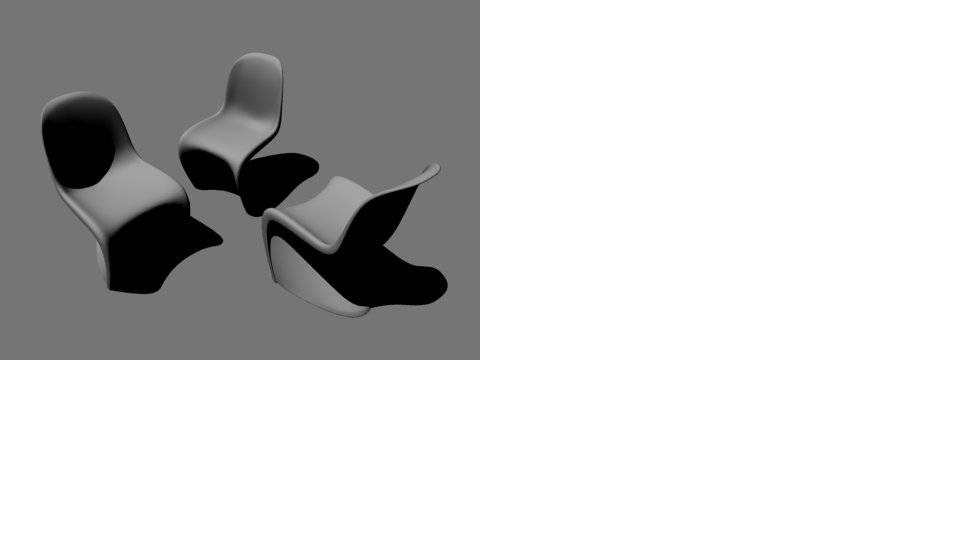 .
.However, when i render it, it looks like *actual vray render
 .
.Can anybody assist me with this matter please?


-
This has got to do with the render output, in de options. Turn the overide viewport off. And then should the result the same as in the tutorial
-
@unknownuser said:
This has got to do with the render output, in de options. Turn the overide viewport off. And then should the result the same as in the tutorial
That didn't work. Still got the same "balck & white" result.
Any other suggestions?
-
Tried that procedure, but it didn't work. Got the same result.
-
Enable physical camera.
-
-
@stefanq said:
Enable physical camera.
OK, "CameraPhysical" has been checked, & the render has come out TOTALLY BLACK!!!
-
Your opening an tutorial file meant for a much older version of Vray. I believe those files have been kicking around from the old 1.05 version. Try to open your Options and click Load Defaults. This will at least get you a image rendered with the Sky GI. If you are using the latest 1.49.01 plugin I would not use these files.
-
@valerostudio said:
Your opening an tutorial file meant for a much older version of Vray. I believe those files have been kicking around from the old 1.05 version.
Might even be older, from the very first version...
 I imagine I saw the same scene in the manual for the first release.
 -
BLECH!!! well, that sucks. I only downloaded the file tyo learn from it.
I'm a "fresh meat" to vray u see.
I created a normal cube with a corner of it chipped away, and rendered it. Got the shadow shade, but the background was still white. Is that normal for all Vray renders @ the start?
Also, can anybody recommend any good sites so I learn more about Vray properties?
ps: thanks for all the help so far u guys!!!
-
Go to the Chaos page on YouTube and watch all the Vray for SketchUp videos and you will be well on your way.
-
The online V-Ray manual has good explanations - especially the examples section: http://www.spot3d.com/vray/help/150SP1/
-
@thomthom said:
The online V-Ray manual has good explanations - especially the examples section: http://www.spot3d.com/vray/help/150SP1/
This is more for 3ds max i see. Should I be worried?


Hello! It looks like you're interested in this conversation, but you don't have an account yet.
Getting fed up of having to scroll through the same posts each visit? When you register for an account, you'll always come back to exactly where you were before, and choose to be notified of new replies (either via email, or push notification). You'll also be able to save bookmarks and upvote posts to show your appreciation to other community members.
With your input, this post could be even better 💗
Register Login


Advertisement