Edges disappearing in model
-
Hi, I'm having the black edges intermittently disappear in SKP model, not all edges just some, although the connected faces are still present & showing. Have tried "save" & re-open but the models remains the same. Using SKP pro 8 (latest update) on Mac Pro 3,1 OSX 10.6.8. Does anyone have any suggested fixes or ideas regarding this. "Snapping" to corners etc becomes quite tedious. Cheers
-
It would be easier to see what's going on if you could post the model.
-
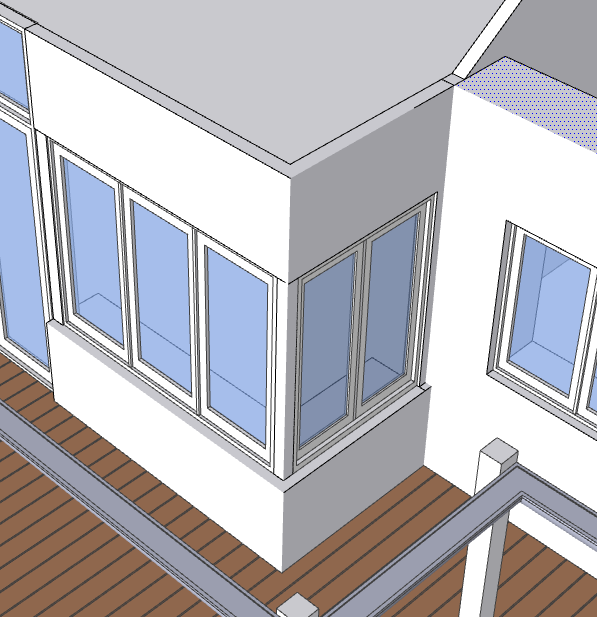
Hi, This screen shot has edges, edges missing & a selected face, Thanks
-
Looks like they are hidden. What is you turn on Hidden Geometry?
Sample model?
-
Turning On & Off Hidden Geometry has no effect, but have noticed turning On & Off certain Groups does make a difference - in the attachment a Roof Group was turned off. There seems to be no link between the groups that I can find & have tried exploding a group & re-grouping but it remains the same, it still will effect another group when turned off (ie:some edges in another group will disappear).Thanks
-
Can you post a sample model? It'd make it a lot easier to debug this.
-
It looks like you have put some of your geometry, like 'edges' on a layer that's 'OFF'.
You can't then see it BUT it is still linked to other geometry on 'ON' layers.
Ensure all 'raw' edges/faces are on Layer0.
Edit the container and select all and use Entity Info to revert the layers to Layer0...
[There is a Plugin to do this if you have loads of them to fix...]
Always have Layer0 as the current layer, and have it 'ON'.
Only place Groups/Component-Instances on other layers and then use ON/OFF for those to control the visibility of the now well layered objects.
Layering your raw geometry is a guaranteed path to madness... as you have found! -
Thanks for the input - Have solved the issue by eg: Walls - edit>select all & placing them back on their original Layer via Entity Info which has worked! Layer0 had remained On all the time as I always group & create separate Layers via Entity Info as I work, so not sure what happened but the wheels are back on!!!!



Hello! It looks like you're interested in this conversation, but you don't have an account yet.
Getting fed up of having to scroll through the same posts each visit? When you register for an account, you'll always come back to exactly where you were before, and choose to be notified of new replies (either via email, or push notification). You'll also be able to save bookmarks and upvote posts to show your appreciation to other community members.
With your input, this post could be even better 💗
Register Login


Advertisement