sketchucation logo sketchucation
    • Login
    Oops, your profile's looking a bit empty! To help us tailor your experience, please fill in key details like your SketchUp version, skill level, operating system, and more. Update and save your info on your profile page today!
    Urasik Extensions | Lots of new extensions to check out Learn More

    Question: How to convert soft edges to hard edges?

    Scheduled Pinned Locked Moved SketchUp Discussions
    sketchup
    5 Posts 4 Posters 3.8k Views 4 Watching
    Loading More Posts
    • Oldest to Newest
    • Newest to Oldest
    • Most Votes
    Reply
    • Reply as topic
    Log in to reply
    This topic has been deleted. Only users with topic management privileges can see it.
    • charly2008C Offline
      charly2008
      last edited by

      Hi to All,

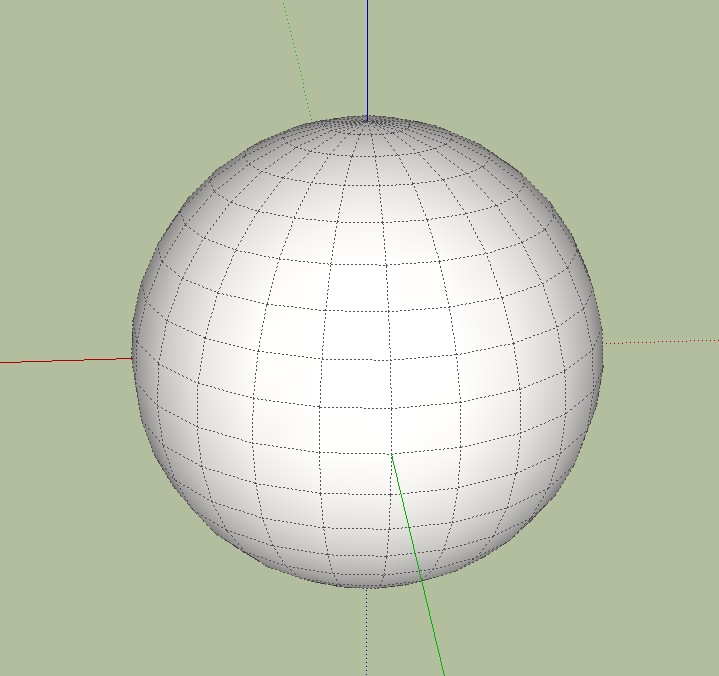
      yesterday, when I read a thread, the idea came to me how can i convert soft edges into hard edges. Any help is welcome.

      Charly

      2011-02-16_002737.jpg

      He who makes no mistakes, makes nothing

      1 Reply Last reply Reply Quote 0
      • GaieusG Offline
        Gaieus
        last edited by

        Individually: with the Shift+Ctrl+Eraser tool.

        Altogether: select all then go to the soften/smooth edges dialog and pull the slider to the left until all turns into hard edges.

        Gai...

        1 Reply Last reply Reply Quote 0
        • Rich O BrienR Offline
          Rich O Brien Moderator
          last edited by

          There's also a plugin...,

          http://forums.sketchucation.com/viewtopic.php?t=13645

          That speeds this action up

          Download the free D'oh Book for SketchUp 📖

          1 Reply Last reply Reply Quote 0
          • TIGT Offline
            TIG Moderator
            last edited by

            @charly2008 said:

            Hi to All,
            yesterday, when I read a thread, the idea came to me how can i convert soft edges into hard edges. Any help is welcome.
            Charly

            Erase >> Edge[s] are Deleted
            Erase+Shift >> Hard Edges > Hidden Edges
            Erase+Ctrl >> Hard Edges > Soft Edges
            Erase+Shift+Ctrl >> Soft Edges > Hard Edges

            To turn Hidden Edges > Hard Edges do this: View > Hidden Geometry > 'on' - Select just Edges and in 'Entity Info' un-tick 'Hidden' box.

            You can also remove a selection's 'Soft' and/or 'Smooth' edge settings by un-ticking those boxes in 'Entity Info' too [this is an alternative to using the Erase tool with modifier-keys]

            Also you can pick the 'Smooth/Soften' dialog and set values to 0% then all of the selected edges >> Hard Edges.
            ☀

            TIG

            1 Reply Last reply Reply Quote 0
            • charly2008C Offline
              charly2008
              last edited by

              Hi Csaba, Rich and TIG,

              I thank you all for the quick reply. Sometimes you do not see the forest because the trees. I feel like a beginner.

              Charly

              He who makes no mistakes, makes nothing

              1 Reply Last reply Reply Quote 0

              Hello! It looks like you're interested in this conversation, but you don't have an account yet.

              Getting fed up of having to scroll through the same posts each visit? When you register for an account, you'll always come back to exactly where you were before, and choose to be notified of new replies (either via email, or push notification). You'll also be able to save bookmarks and upvote posts to show your appreciation to other community members.

              With your input, this post could be even better 💗

              Register Login
              • 1 / 1
              • First post
                Last post
              Buy SketchPlus
              Buy SUbD
              Buy WrapR
              Buy eBook
              Buy Modelur
              Buy Vertex Tools
              Buy SketchCuisine
              Buy FormFonts

              Advertisement

