sketchucation logo sketchucation
    • Login
    Oops, your profile's looking a bit empty! To help us tailor your experience, please fill in key details like your SketchUp version, skill level, operating system, and more. Update and save your info on your profile page today!
    Mac User? | Join the Rayscaper Beta for Mac Learn More

    Roundcorner toolbar

    Scheduled Pinned Locked Moved Plugins
    18 Posts 6 Posters 1.8k Views 6 Watching
    Loading More Posts
    • Oldest to Newest
    • Newest to Oldest
    • Most Votes
    Reply
    • Reply as topic
    Log in to reply
    This topic has been deleted. Only users with topic management privileges can see it.
    • R
      rhots
      last edited by

      Hi, is there a way to keep the roundcorner toolbar active when selecting another tool such as line or circle? Going back to the pulldown every time is kind of a drag.
      Thanks,
      Rick

      1 Reply Last reply
      Reply Quote 0
      • J
        Jim
        last edited by

        Hi Rick,

        That's not how SketchUp works. There can be only one active Tool at a time.

        But, the Round Corner plugin has a Toolbar (in the menu: Views > Toolbars > Round Corner.) Then, at least, you can activate the tool quicker than using the plugins menu.

        Hi

        1 Reply Last reply
        Reply Quote 0
        • R
          rhots
          last edited by

          Thanks for the reply Jim, the fact is there is no roundcorner toolbar. That's why I was asking. Any ides why mine is not there?
          Thanks,
          Rick

          1 Reply Last reply
          Reply Quote 0
          • GaieusG
            Gaieus
            last edited by

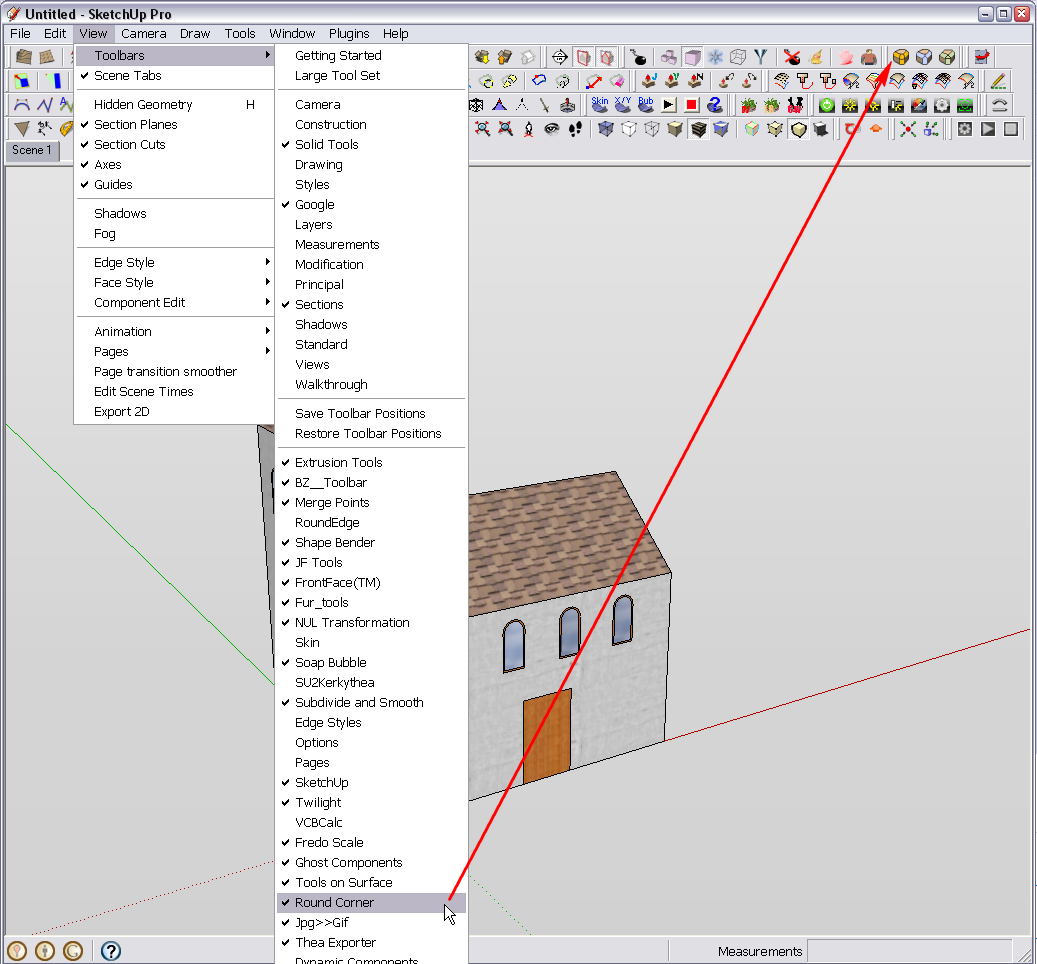
            It should be there:


            Roundcorner.png

            Gai...

            1 Reply Last reply
            Reply Quote 0
            • R
              rhots
              last edited by

              I do not have "pro", does it matter?
              Thanks,
              Rick

              1 Reply Last reply
              Reply Quote 0
              • thomthomT
                thomthom
                last edited by

                That should not matter.

                Thomas Thomassen β€” SketchUp Monkey & Coding addict
                List of my plugins and link to the CookieWare fund

                1 Reply Last reply
                Reply Quote 0
                • jeff hammondJ
                  jeff hammond
                  last edited by

                  have you tried to turn the toolbar on as shown in gaieus' screenshot?

                  View -> Tool Palettes -> Round Corner

                  [edit] oops.. on windows, i guess it says Toolbars instead of tool palettes.

                  dotdotdot

                  1 Reply Last reply
                  Reply Quote 0
                  • R
                    rhots
                    last edited by

                    Thanks for the reply Jeff, but it's not on the toolbar list. If I knew how to post a screen shot I would show you.
                    Thanks,
                    Rick

                    1 Reply Last reply
                    Reply Quote 0
                    • Dave RD
                      Dave R
                      last edited by

                      It sounds to me as if there's an installation error. You should have a folder in the Plugins folder called RoundCorner... And some files inside that. Just a stab in the dark but I wonder if at least one of those files is missing or is wandering around loose in the Plugins folder.
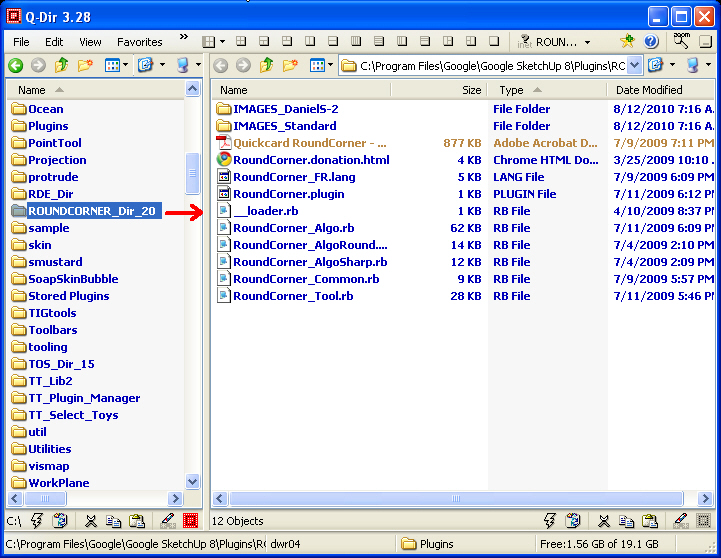
                      snap003.jpg

                      Etaoin Shrdlu

                      %

                      (THERE'S NO PLACE LIKE)

                      G28 X0.0 Y0.0 Z0.0

                      M30

                      %

                      1 Reply Last reply
                      Reply Quote 0
                      • R
                        rhots
                        last edited by

                        These are my folders, thanks

                        http://i596.photobucket.com/albums/tt43/Rhots/junk/roundcornerfolder.jpg

                        http://i596.photobucket.com/albums/tt43/Rhots/junk/pluginfolder.jpg

                        http://i596.photobucket.com/albums/tt43/Rhots/junk/fredo6folder.jpg

                        1 Reply Last reply
                        Reply Quote 0
                        • J
                          Jim
                          last edited by

                          Oops, good catch Jeff.

                          Hi

                          1 Reply Last reply
                          Reply Quote 0
                          • J
                            Jim
                            last edited by

                            I am not sure if this is the problem, but there is a newer version of LibFred6 - the latest is version 3.4c

                            @Dave, you're RoundCorner is out of date also.

                            Hi

                            1 Reply Last reply
                            Reply Quote 0
                            • jeff hammondJ
                              jeff hammond
                              last edited by

                              those png files are supposed to be inside a folder called IMAGES_Standard
                              (same thing with the libfredo folder.. the icons should be in a subfolder)

                              you might want to redownload and reinstall or just fix it manually..
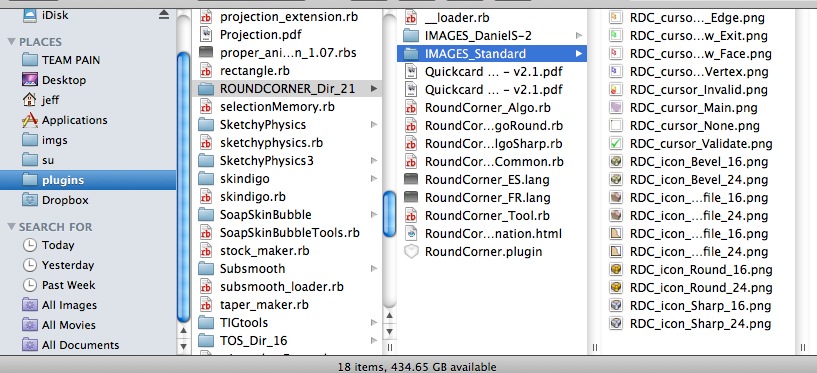
                              screen 2010-12-10 at 9.39.12 AM.jpg

                              [of course, this is on a mac but i don't see why it would be different on windows.. it's the same download for both]

                              dotdotdot

                              1 Reply Last reply
                              Reply Quote 0
                              • R
                                rhots
                                last edited by

                                Okay I created the Images folder in the MAIN plugin folder, and moved ALL image files from BOTH fredo6 and roundcorner to it. Still nothing. Should I have made separate SUB folders for EACH of the fredo6 and roundcorner folders?
                                Thanks for all of your help and patients.
                                Rick

                                1 Reply Last reply
                                Reply Quote 0
                                • Dave RD
                                  Dave R
                                  last edited by

                                  Thanks Jim, I'll update. It's my work computer and I rarely use that plugin here.

                                  Rhots, I think instead of mucking around with trying to fix the locations of the the files for the plugins in question, I would just delete them from the Plugins folder and reinstall them properly.

                                  Etaoin Shrdlu

                                  %

                                  (THERE'S NO PLACE LIKE)

                                  G28 X0.0 Y0.0 Z0.0

                                  M30

                                  %

                                  1 Reply Last reply
                                  Reply Quote 0
                                  • R
                                    rhots
                                    last edited by

                                    Well, when I downloaded the zip files and opened them to extract the files there was only all the random files. No install or setup files, no instructions other than Fredo's at the download site for the folder hierarchy. So all I could do was create the folders, and extract the files manually.
                                    I would LOVE to do a "normal" install or setup.
                                    If anyone can point me in the right direction that would be marvy.
                                    Thanks again,
                                    Rick

                                    1 Reply Last reply
                                    Reply Quote 0
                                    • Dave RD
                                      Dave R
                                      last edited by

                                      Perhaps you should reread the original post in the thread. It seems to me there are instructions right there.

                                      And when I open the ZIP file, it is all nicely organized.
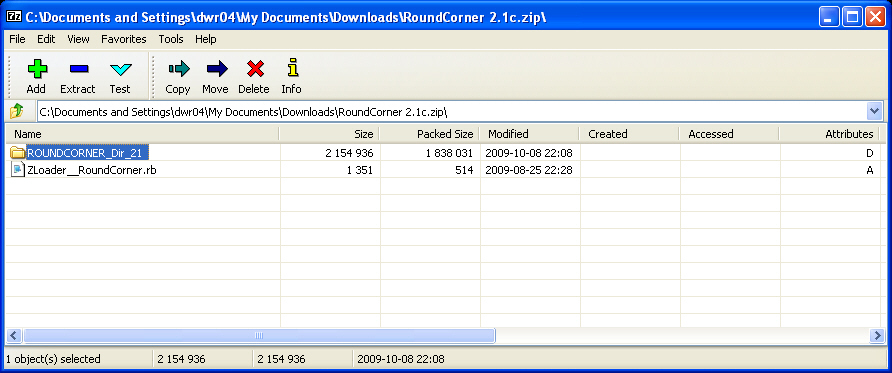
                                      snap006.jpg

                                      It should have the same organization in the Plugins folder.

                                      What are you using to open the ZIP file in the first place?

                                      Etaoin Shrdlu

                                      %

                                      (THERE'S NO PLACE LIKE)

                                      G28 X0.0 Y0.0 Z0.0

                                      M30

                                      %

                                      1 Reply Last reply
                                      Reply Quote 0
                                      • R
                                        rhots
                                        last edited by

                                        As my Father inlaw would say "I got 'er boys". I went back to winzip and noticed the check boxes for "use folder names" and overwrite older files. There were no folders showing so I didn't have them checked. Well that's what I get for NOT thinking...It works perfectly now.

                                        THANK YOU FOR ALL OF YOUR HELP!!!!!!!!!
                                        I'm sure you will hear from me again as I just started using Sketchup a few days ago.

                                        MERRY CHRISTMAS FOLKS!!

                                        Rick

                                        1 Reply Last reply
                                        Reply Quote 0

                                        Hello! It looks like you're interested in this conversation, but you don't have an account yet.

                                        Getting fed up of having to scroll through the same posts each visit? When you register for an account, you'll always come back to exactly where you were before, and choose to be notified of new replies (either via email, or push notification). You'll also be able to save bookmarks and upvote posts to show your appreciation to other community members.

                                        With your input, this post could be even better πŸ’—

                                        Register Login
                                        • 1 / 1
                                        • First post
                                          Last post
                                        Buy SketchPlus
                                        Buy SUbD
                                        Buy WrapR
                                        Buy eBook
                                        Buy Modelur
                                        Buy Vertex Tools
                                        Buy SketchCuisine
                                        Buy FormFonts

                                        Advertisement