Method for drawing an antiprism with equilateral sides
-
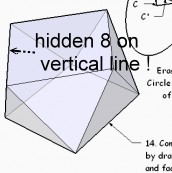
Ahhhh! I was victim of the perspective's law


-
Thx to Jeff for the "SU6 work"

(you use unity of the old 20 century
And Chris Fullmer for his Component onto face
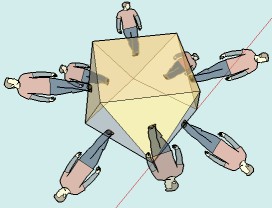
Now I can see all 8 triangles!
The TIG's View was not good oriented!
-
To simplify things I have made a 'quick' Plugin - it's here http://forums.sketchucation.com/viewtopic.php?p=287140#p287140
You just type into the Ruby Console:
antiprism 7,1200.mm
and it'll makes a 7 sided antiprism with sides 1200mm long, centered on the origin and grouped, named 'Antiprism[7x1200]'...
You have to have at least 3 sides and a side-length > 0; the length is taken as inches if you haven't given a units suffix like 1.m or 100.cm or 1000.mm etc.
The distance between faces changes with the number of sides as the maximum 'rake' on the side-triangle occurs at with 3 sides, and it proportionately decreases as the number of sides increases, until you approximate to a circle with a multi-sided polygon, and by then the side-triangles are almost vertical... -
Else a very speedy method
Draw Square A 1m * 1m (on the plan)
Copy rotate Square A 45° = Square B (on the plan)
Move Up Square B 1m on Z
Draw the 8 segments between 8 vertices
Select these 8 segments (method as you want)
Scale on Z (Blue Scale oposite point) 0.840892091m (magical number)
Move down Square B vertical snaped a triangle vertice
That's allAnd then you can resize at any size for any cubic antiprism with the Tape Mesure tool
And all that without plugin, that is a real performance for me -
@tig said:
To simplify things I have made a 'quick' Plugin - it's here http://forums.sketchucation.com/viewtopic.php?p=287140#p287140
-
@unknownuser said:
Else a very speedy method .............And all that without plugin, that is a real performance for me :lol:
Genius:-) -
@unknownuser said:
Else a very speedy method
Scale on Z (Blue Scale oposite point) 0.840892091m (magical number)
frenchy, i think the challenge is to figure out a way to do it using only geometry/tricks available in sketchup. (ie- doing this in rhino for instance would be very easy)
that said, i think my method exposes a tolerance error in sketchup.. it shouldn't work but it does..
[edit, nevermind.. i just tried it with engineering/feet/.000001 precision and it does infact show the error..]
i couldn't figure out why i wasn't getting a ~ in front of my measurements because in my head, it should of been there..
-reason why there's an error: once you copy move the line up, make it perp to the hypotenuse, then rotate it /snap to the vert line, it doesn't end up being horizontal.. it's ever so slightly angled down.. i knew it was doing it but thought SU was thinking 'meh, close enough'..but, after doing this exercise, i realize sketchup actually will say 'meh, close enough' when it comes to adding a ~ in front of certain measurements..
[edit]
the method i showed will give an equilateral triangle on one side but you'll see that it ever so slightly shifts the top square off center.. -
Hi Jeff, hi folks.
I noticed very small errors in the sides of the equilateral triangles. They are not all absolutely equal to 10 feet.
See you file with added dimensions.
-
hi Jean.
yeah, that's what i was talking about in the post just before yours.
i found the error too (and at first thought it was ok because sketchup wasn't giving me an approximate ~ measurement)i came up with a way to do it in su only with no calculator but it's a bit drawn out and confusing.. i'll try another method when i get more time. (different than the hyper-segmented arc that tig showed -- which is probably the fastest/easiest)
but, i'm thinking you could come up with a clever method to accomplish it
-





Hello! It looks like you're interested in this conversation, but you don't have an account yet.
Getting fed up of having to scroll through the same posts each visit? When you register for an account, you'll always come back to exactly where you were before, and choose to be notified of new replies (either via email, or push notification). You'll also be able to save bookmarks and upvote posts to show your appreciation to other community members.
With your input, this post could be even better 💗
Register Login


Advertisement