sketchucation logo sketchucation
    • Login
    Oops, your profile's looking a bit empty! To help us tailor your experience, please fill in key details like your SketchUp version, skill level, operating system, and more. Update and save your info on your profile page today!
    Mac User? | Join the Rayscaper Beta for Mac Learn More

    [Plugin] Radial Lines

    Scheduled Pinned Locked Moved Plugins
    24 Posts 8 Posters 16.1k Views 8 Watching
    Loading More Posts
    • Oldest to Newest
    • Newest to Oldest
    • Most Votes
    Reply
    • Reply as topic
    Log in to reply
    This topic has been deleted. Only users with topic management privileges can see it.
    • pilouP
      pilou
      last edited by

      I wish the red lines ๐Ÿ˜‰
      They will have all the same length!(2.23 m)

      http://forums.sketchucation.com/download/file.php?id=55001

      Frenchy Pilou
      Is beautiful that please without concept!
      My Little site :)

      1 Reply Last reply
      Reply Quote 0
      • TIGT
        TIG Moderator
        last edited by

        Here's v1.1 http://forums.sketchucation.com/viewtopic.php?p=273614#p273614
        It now has an additional option 'Lines [layered]' - with this the Lines are put on their own layer rather than Layer0...

        TIG

        1 Reply Last reply
        Reply Quote 0
        • TIGT
          TIG Moderator
          last edited by

          @unknownuser said:

          I wish the red lines ๐Ÿ˜‰
          They will have all the same length!(2.23 m)

          http://forums.sketchucation.com/download/file.php?id=55001

          I think I see...
          So if you used the 'Line' option the line would stop at a set length...
          I'll think about it... ๐Ÿค“

          TIG

          1 Reply Last reply
          Reply Quote 0
          • pilouP
            pilou
            last edited by

            Many thx by advance โ˜€ ๐Ÿ‘
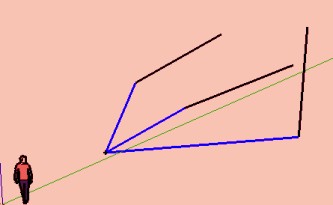
            Ps It's not possible to select also extremity points (like faces and segments)extremity.jpg
            Frenchy Pilou
            Is beautiful that please without concept!
            My Little site :)

            1 Reply Last reply
            Reply Quote 0
            • TIGT
              TIG Moderator
              last edited by

              It will draw lines to both ends of any selected edges - you'll need to erase the unwanted lines...

              TIG

              1 Reply Last reply
              Reply Quote 0
              • TIGT
                TIG Moderator
                last edited by

                There's now a separate script for drawing fixed length radial lines http://forums.sketchucation.com/viewtopic.php?p=273654#p273654

                TIG

                1 Reply Last reply
                Reply Quote 0
                • pilouP
                  pilou
                  last edited by

                  Damned you have a speedy coding method ! ๐Ÿ˜Ž

                  (I will use for the extremities not wanted if not too numerous ๐Ÿ’š

                  Frenchy Pilou
                  Is beautiful that please without concept!
                  My Little site :)

                  1 Reply Last reply
                  Reply Quote 0
                  • mitcorbM
                    mitcorb
                    last edited by

                    How do you place the cpoint or guide point?
                    Error message keeps asking for this.
                    I thought by using measuring tape you could get a guide point.
                    Something I am not doing? Can't get this script to acknowledge the guide point, because it then wants a vertex?

                    I take the slow, deliberate approach in my aimless wandering.

                    1 Reply Last reply
                    Reply Quote 0
                    • pilouP
                      pilou
                      last edited by

                      @unknownuser said:

                      How do you place the cpoint or guide point?

                      Use the tools bar Projection by Didier Bur
                      There is a CPoint inside and some very useful tools!

                      Frenchy Pilou
                      Is beautiful that please without concept!
                      My Little site :)

                      1 Reply Last reply
                      Reply Quote 0
                      • mitcorbM
                        mitcorb
                        last edited by

                        Thanks, Dave.
                        But I do not understand the conditions for guidepoint only. I usually get guidelines.

                        Thanks Pilou, I forgot about Didier's Projections. I have it on my home computer, but not here.

                        I take the slow, deliberate approach in my aimless wandering.

                        1 Reply Last reply
                        Reply Quote 0
                        • pilouP
                          pilou
                          last edited by

                          @unknownuser said:

                          then a vertex

                          How dow you select one vertex from a single segment in the space? (extremity)

                          Frenchy Pilou
                          Is beautiful that please without concept!
                          My Little site :)

                          1 Reply Last reply
                          Reply Quote 0
                          • Dave RD
                            Dave R
                            last edited by

                            A guide point is created when you measure off a point, vertex, intersection, etc. A guideline is created when you click on a line, edge or axis first.

                            There are also some plugins like Point at Center and the Point cloud plugin that create guidepoints.

                            Etaoin Shrdlu

                            %

                            (THERE'S NO PLACE LIKE)

                            G28 X0.0 Y0.0 Z0.0

                            M30

                            %

                            1 Reply Last reply
                            Reply Quote 0
                            • B
                              Ben Ritter
                              last edited by

                              @dave r said:

                              I'm not sure where I'll use it but I wouldn't be surprised if it comes in handy one day.

                              Dave, you hit the nail on the head. Remembering that when the time comes, you have such a helpful tool available.

                              How do you all keep track of all the tools available in your SU arsenal, if they're not used on a regular basis?

                              Ben

                              1 Reply Last reply
                              Reply Quote 0
                              • B
                                Ben Ritter
                                last edited by

                                TIG, thank you very much. Again.

                                1 Reply Last reply
                                Reply Quote 0
                                • Dave RD
                                  Dave R
                                  last edited by

                                  @ben ritter said:

                                  How do you all keep track of all the tools available in your SU arsenal, if they're not used on a regular basis?

                                  Ben

                                  I gave up a long time ago, Ben. Periodically I look through my Plugins folder to see what treasures I've forgotten about. ๐Ÿ˜’ ๐Ÿ˜†

                                  Etaoin Shrdlu

                                  %

                                  (THERE'S NO PLACE LIKE)

                                  G28 X0.0 Y0.0 Z0.0

                                  M30

                                  %

                                  1 Reply Last reply
                                  Reply Quote 0
                                  • pilouP
                                    pilou
                                    last edited by

                                    @unknownuser said:

                                    i use projections and keep only the CPoint icon

                                    You have no keep The icone Extrude lines along a vector? โ˜€

                                    Frenchy Pilou
                                    Is beautiful that please without concept!
                                    My Little site :)

                                    1 Reply Last reply
                                    Reply Quote 0
                                    • jeff hammondJ
                                      jeff hammond
                                      last edited by

                                      re: construction point

                                      pay four bucks for the privilege of placing one
                                      http://www.smustard.com/script/AddConstructionPoint
                                      ๐Ÿคฃ

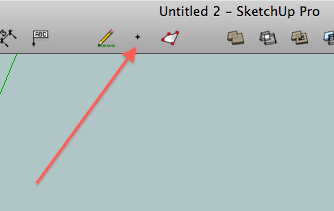
                                      personally, i use projections and keep only the CPoint icon in my toolbar (next to draw construction lines which is another way to get a cpoint)
                                      screen1.png

                                      with , start the measurement on an entity then click in blank space and you'll get a cpoint as well.

                                      [edit]- another way to get one without adding any rubies is to turn on 'ruby script examples' in the extensions preferences.. draw an arc the right-click on it and you'll have the option "Point at Center" in the context menu.. that will give a cpoint that can be moved around.

                                      dotdotdot

                                      1 Reply Last reply
                                      Reply Quote 0
                                      • KrisidiousK
                                        Krisidious
                                        last edited by

                                        do you ever sleep?

                                        By: Kristoff Rand
                                        Home DesignerUnique House Plans

                                        1 Reply Last reply
                                        Reply Quote 0
                                        • jeff hammondJ
                                          jeff hammond
                                          last edited by

                                          @unknownuser said:

                                          @unknownuser said:

                                          i use projections and keep only the CPoint icon

                                          You have no keep Extrude lines along a vector?

                                          i use TIG's version in the extrude edges suite.. i keep that entire toolbar turned on.

                                          dotdotdot

                                          1 Reply Last reply
                                          Reply Quote 0
                                          • Dave RD
                                            Dave R
                                            last edited by

                                            mitcorb, the Tape Measure tool is the way to set a guidepoint or at least one way. After setting the guidepoint, select it and edges with vertices or ends and run the tool.

                                            TIG, thank you for this. I'm not sure where I'll use it but I wouldn't be surprised if it comes in handy one day.


                                            Etaoin Shrdlu

                                            %

                                            (THERE'S NO PLACE LIKE)

                                            G28 X0.0 Y0.0 Z0.0

                                            M30

                                            %

                                            1 Reply Last reply
                                            Reply Quote 0

                                            Hello! It looks like you're interested in this conversation, but you don't have an account yet.

                                            Getting fed up of having to scroll through the same posts each visit? When you register for an account, you'll always come back to exactly where you were before, and choose to be notified of new replies (either via email, or push notification). You'll also be able to save bookmarks and upvote posts to show your appreciation to other community members.

                                            With your input, this post could be even better ๐Ÿ’—

                                            Register Login
                                            • 1
                                            • 2
                                            • 1 / 2
                                            • First post
                                              Last post
                                            Buy SketchPlus
                                            Buy SUbD
                                            Buy WrapR
                                            Buy eBook
                                            Buy Modelur
                                            Buy Vertex Tools
                                            Buy SketchCuisine
                                            Buy FormFonts

                                            Advertisement



