[Plugin] Radial Lines
-
How do you place the cpoint or guide point?
Error message keeps asking for this.
I thought by using measuring tape you could get a guide point.
Something I am not doing? Can't get this script to acknowledge the guide point, because it then wants a vertex? -
@unknownuser said:
How do you place the cpoint or guide point?
Use the tools bar Projection by Didier Bur
There is a CPoint inside and some very useful tools! -
Thanks, Dave.
But I do not understand the conditions for guidepoint only. I usually get guidelines.Thanks Pilou, I forgot about Didier's Projections. I have it on my home computer, but not here.
-
@unknownuser said:
then a vertex
How dow you select one vertex from a single segment in the space? (extremity)
-
A guide point is created when you measure off a point, vertex, intersection, etc. A guideline is created when you click on a line, edge or axis first.
There are also some plugins like Point at Center and the Point cloud plugin that create guidepoints.
-
@dave r said:
I'm not sure where I'll use it but I wouldn't be surprised if it comes in handy one day.
Dave, you hit the nail on the head. Remembering that when the time comes, you have such a helpful tool available.
How do you all keep track of all the tools available in your SU arsenal, if they're not used on a regular basis?
Ben
-
TIG, thank you very much. Again.
-
@ben ritter said:
How do you all keep track of all the tools available in your SU arsenal, if they're not used on a regular basis?
Ben
I gave up a long time ago, Ben. Periodically I look through my Plugins folder to see what treasures I've forgotten about.


-
@unknownuser said:
i use projections and keep only the CPoint icon
You have no keep The icone Extrude lines along a vector?

-
re: construction point
pay four bucks for the privilege of placing one
http://www.smustard.com/script/AddConstructionPoint

personally, i use projections and keep only the CPoint icon in my toolbar (next to draw construction lines which is another way to get a cpoint)
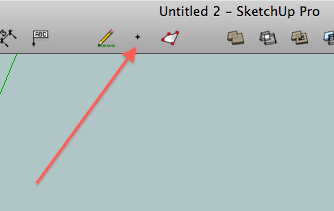
with , start the measurement on an entity then click in blank space and you'll get a cpoint as well.
[edit]- another way to get one without adding any rubies is to turn on 'ruby script examples' in the extensions preferences.. draw an arc the right-click on it and you'll have the option "Point at Center" in the context menu.. that will give a cpoint that can be moved around.
-
do you ever sleep?
-
@unknownuser said:
@unknownuser said:
i use projections and keep only the CPoint icon
You have no keep Extrude lines along a vector?
i use TIG's version in the extrude edges suite.. i keep that entire toolbar turned on.
-
mitcorb, the Tape Measure tool is the way to set a guidepoint or at least one way. After setting the guidepoint, select it and edges with vertices or ends and run the tool.
TIG, thank you for this. I'm not sure where I'll use it but I wouldn't be surprised if it comes in handy one day.





Hello! It looks like you're interested in this conversation, but you don't have an account yet.
Getting fed up of having to scroll through the same posts each visit? When you register for an account, you'll always come back to exactly where you were before, and choose to be notified of new replies (either via email, or push notification). You'll also be able to save bookmarks and upvote posts to show your appreciation to other community members.
With your input, this post could be even better 💗
Register Login


Advertisement