sketchucation logo sketchucation
    • Anmelden
    Oops, your profile's looking a bit empty! To help us tailor your experience, please fill in key details like your SketchUp version, skill level, operating system, and more. Update and save your info on your profile page today!
    🔌 Smart Spline | Fluid way to handle splines for furniture design and complex structures. Download

    [Plugin] Simple Loft alpha 0.1b -- UPDATED May-15-09

    Geplant Angeheftet Gesperrt Verschoben Plugins
    251 Beiträge 88 Kommentatoren 163.4k Aufrufe 88 Watching
    Lade mehr Beiträge
    • Älteste zuerst
    • Neuste zuerst
    • Meiste Stimmen
    Antworten
    • In einem neuen Thema antworten
    Anmelden zum Antworten
    Dieses Thema wurde gelöscht. Nur Nutzer mit entsprechenden Rechten können es sehen.
    • T Offline
      tald311
      zuletzt editiert von

      This Ruby is brilliant.

      1 Antwort Letzte Antwort Antworten Zitieren 0
      • H Offline
        hsjzyangbin
        zuletzt editiert von

        Hi Chris
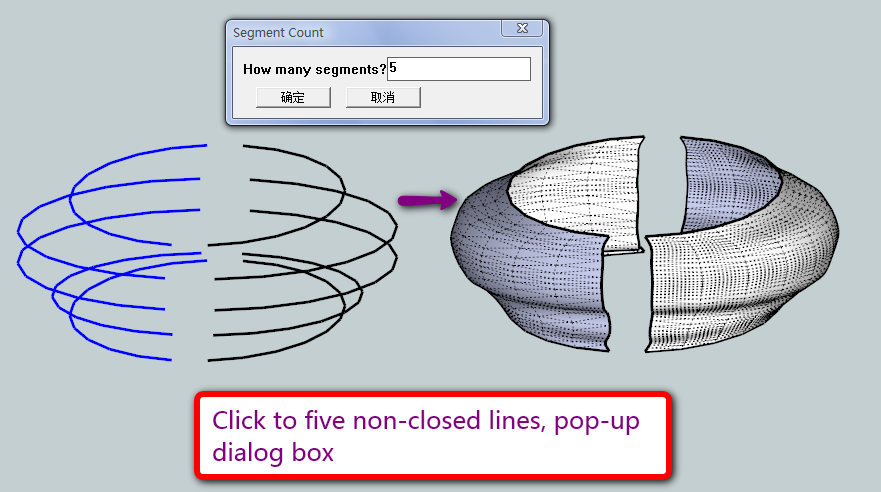
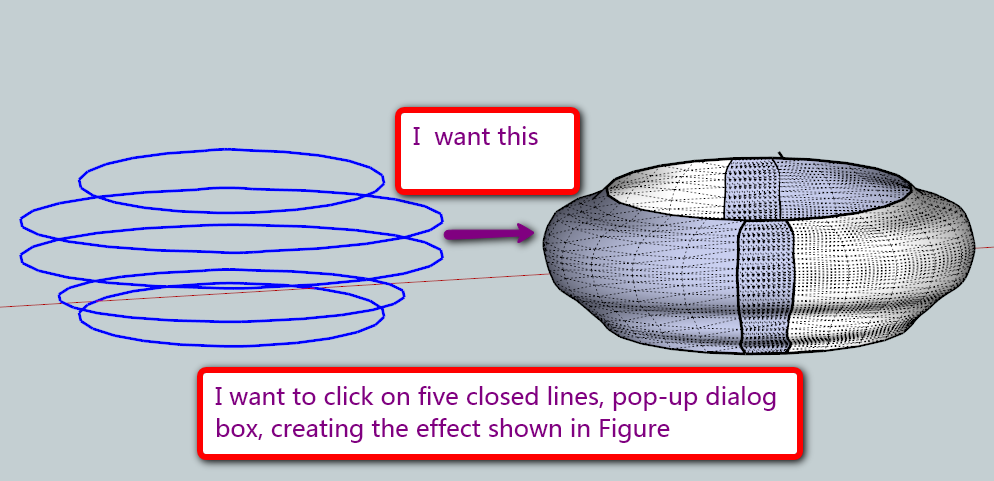
        I found a problem. LOFT is to implement an order to choose the non-closed line, the feasibility of improving the closed line, I want to click on five closed lines, pop-up dialog box, creating the effect shown in Figure
        l1.png


        l2.png

        1 Antwort Letzte Antwort Antworten Zitieren 0
        • EscapeArtistE Offline
          EscapeArtist
          zuletzt editiert von

          Issue trying to loft 3 curves:

          onSelectionBulkChange46
          onSelectionBulkChange96
          onSelectionBulkChange142
          onSelectionCleared
          Error; #<ArgumentError; Cannot convert argument to Sketchup;;Point3d>
          L;/Modeling/Sketchup Google/Plugins/clf_simple_loft/clf_simple_loft.rb;142;in `vector_to'
          L;/Modeling/Sketchup Google/Plugins/clf_simple_loft/clf_simple_loft.rb;142;in `middle_handles'
          L;/Modeling/Sketchup Google/Plugins/clf_simple_loft/clf_simple_loft.rb;137;in `each_index'
          L;/Modeling/Sketchup Google/Plugins/clf_simple_loft/clf_simple_loft.rb;137;in `middle_handles'
          L;/Modeling/Sketchup Google/Plugins/clf_simple_loft/clf_simple_loft.rb;87;in `onReturn'
          L;/Modeling/Sketchup Google/Plugins/clf_simple_loft/clf_simple_loft.rb;86;in `times'
          L;/Modeling/Sketchup Google/Plugins/clf_simple_loft/clf_simple_loft.rb;86;in `onReturn'
          L;/Modeling/Sketchup Google/Plugins/clf_simple_loft/clf_simple_loft.rb;86


          In a nutshell, I select 3 unattached curves and apply loft - nothing happens.

          1 Antwort Letzte Antwort Antworten Zitieren 0
          • M Offline
            mspisz
            zuletzt editiert von

            Hey Chris!

            Great plugin!, does exactly what I need it for in school!

            Your the man!

            Milo

            1 Antwort Letzte Antwort Antworten Zitieren 0
            • Chris FullmerC Offline
              Chris Fullmer
              zuletzt editiert von

              Great, glad it helped. It is admitedly outdated now though. Check out TIG's extrude scripts. Those are considerably more powerful!

              Chris

              Lately you've been tan, suspicious for the winter.
              All my Plugins I've written

              1 Antwort Letzte Antwort Antworten Zitieren 0
              • O Offline
                ovandenbroek
                zuletzt editiert von

                Hi Chris and all others,

                I like the concept of loft very much. In fact, it is one of the tools IMO that are making sketchup becoming a 'really' professional tool...

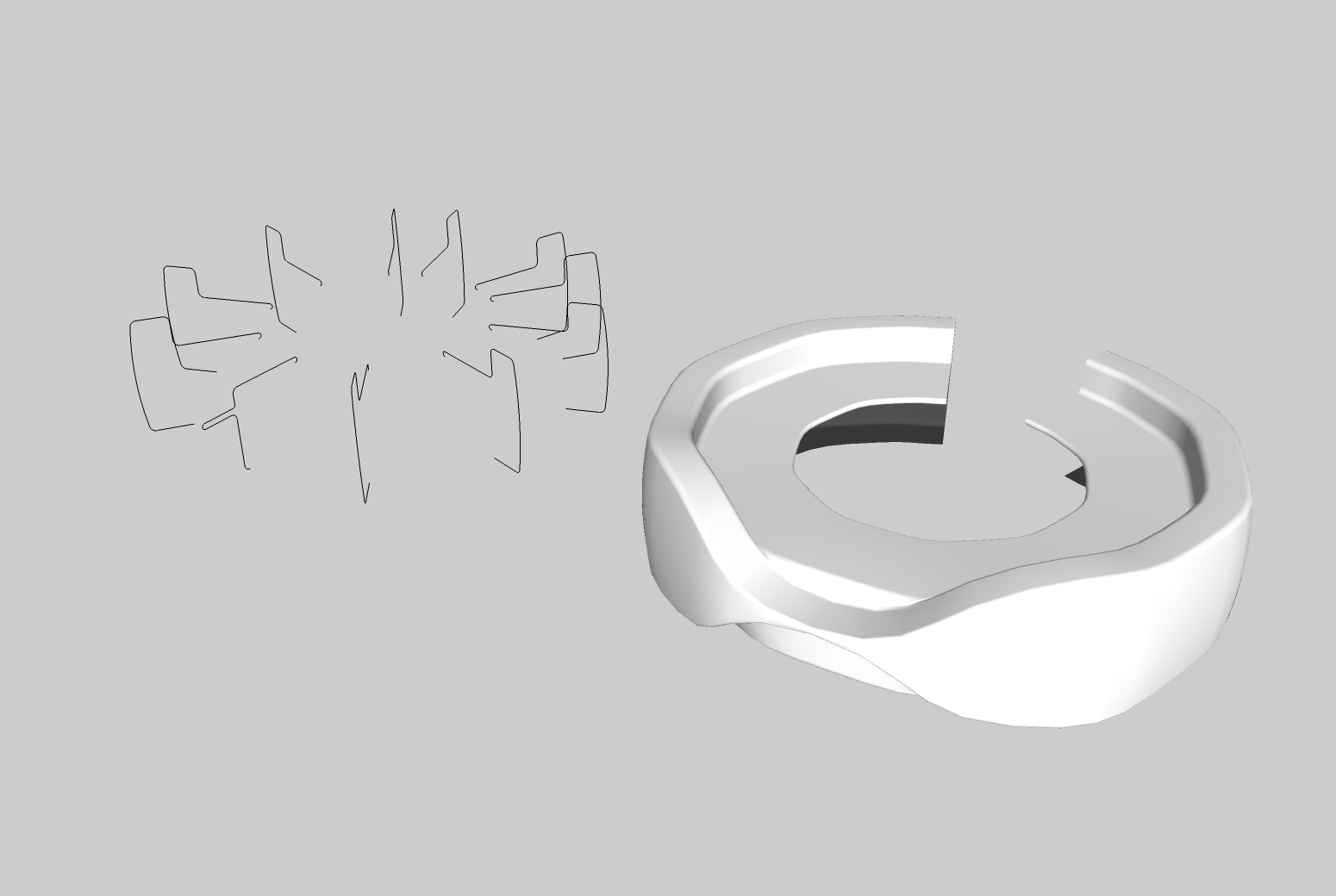
                see the attachment of a particular shape (based on a design made earlier in 3DMAX, it's a counter).

                I think you can make this only with 'loft' and not with TIG extrude tools. (?)

                Okke

                (PS For this kind of work I would love to have some more control over the 'bending' spline. In planview it's supposed to be a round counter, but as you can see the bending is not totaly 'circular')

                Loftshape-ovdb

                1 Antwort Letzte Antwort Antworten Zitieren 0
                • TIGT Offline
                  TIG Moderator
                  zuletzt editiert von

                  EEbyRails requires some 'rails' to follow - CF's Loft doesn't - it always joins the two profiles by a bezier [?] curve [and you must have equal numbers of segments in each profile and no 'loops' allowed].

                  To use the profiles you have shown with EEbyRails simply add some curves between them to be used as rails... then do a pair of profiles in turn with their 'rails[s]', using the second profile as the first profile in the next pair etc...

                  This means the railed path can be any form you like...Untitled.png

                  TIG

                  1 Antwort Letzte Antwort Antworten Zitieren 0
                  • A Offline
                    arch.sani
                    zuletzt editiert von

                    just found it out, installed and tried: Chris, this is simply fantastico!

                    1 Antwort Letzte Antwort Antworten Zitieren 0
                    • A Offline
                      anient
                      zuletzt editiert von

                      Had to join the forum simply to get a hold of this pluggin thanks sooo much 👍

                      1 Antwort Letzte Antwort Antworten Zitieren 0
                      • G Offline
                        guillermorage
                        zuletzt editiert von

                        how do i install it

                        1 Antwort Letzte Antwort Antworten Zitieren 0
                        • Rich O BrienR Offline
                          Rich O Brien Moderator
                          zuletzt editiert von

                          The first post in this thread has the instructions. It's the same for most plugins here. Some are zipped so they need extracting. Others are just .rb files which need to go in your plugins folder. And some are .rb with folders containing files.

                          All plugins go in your plugin folder.

                          Download the free D'oh Book for SketchUp 📖

                          1 Antwort Letzte Antwort Antworten Zitieren 0
                          • G Offline
                            guillermorage
                            zuletzt editiert von

                            Sorry, i am new in this forum, im using mac, i downloaded and its a ziped file, so i extracted and it appears a folder wich contains an rb file called:clf_simple_loft_loader.rb and another folder which contains; clf_simple_loft_small.png, clf_simple_loft.png, clf_simple_loft.rb.
                            I tried to move them to the plugins and then open sketchup, but nothing.

                            1 Antwort Letzte Antwort Antworten Zitieren 0
                            • Rich O BrienR Offline
                              Rich O Brien Moderator
                              zuletzt editiert von

                              Hi,

                              When you extract you get this...
                              Simple Loft.jpg
                              Place both the .rb and the folder in your plugins folder. Do not take the files out of the folder as this will prevent it working.

                              I'm not familiar with Mac so where your plugin folder is located is a mytery 😲

                              Download the free D'oh Book for SketchUp 📖

                              1 Antwort Letzte Antwort Antworten Zitieren 0
                              • TIGT Offline
                                TIG Moderator
                                zuletzt editiert von

                                If you are unclear about where your ‘Plugins’ folder might be then type [or copy+paste] this line into the
                                Window > Ruby Console:

                                Sketchup.find_support_file("Plugins")

                                • press <enter>

                                Typically the PC path that is returned is:

                                C:/Program Files/Google/Google SketchUp 7/Plugins

                                Whilst typically the Mac path that is returned is:

                                Macintosh HD/Library/Application Support/Google Sketchup 7/SketchUp/Plugins

                                Test to see where yours is... 🤓

                                TIG

                                1 Antwort Letzte Antwort Antworten Zitieren 0
                                • M Offline
                                  microracer9
                                  zuletzt editiert von

                                  I installed it.... 1st time it worked perfectly....now...dont work.

                                  Any idea why?

                                  1 Antwort Letzte Antwort Antworten Zitieren 0
                                  • thomthomT Offline
                                    thomthom
                                    zuletzt editiert von

                                    @microracer9 said:

                                    I installed it.... 1st time it worked perfectly....now...dont work.

                                    When reporting software problems please be more specific to what doesn't work. Is it a particular operation that fails? Or does it appear to not be loading at all? (No menus/toolbars) Any error messages (open the Ruby Console as see if any messages appear when you try to use the plugin) ?

                                    That's the only way for the developer, or any other, to have an idea of what "doesn't work" and why.

                                    Thomas Thomassen — SketchUp Monkey & Coding addict
                                    List of my plugins and link to the CookieWare fund

                                    1 Antwort Letzte Antwort Antworten Zitieren 0
                                    • N Offline
                                      nektares
                                      zuletzt editiert von

                                      This is amazing! you are a very creative coder, thanks for this!

                                      1 Antwort Letzte Antwort Antworten Zitieren 0
                                      • Chris FullmerC Offline
                                        Chris Fullmer
                                        zuletzt editiert von

                                        Thanks!

                                        Lately you've been tan, suspicious for the winter.
                                        All my Plugins I've written

                                        1 Antwort Letzte Antwort Antworten Zitieren 0
                                        • G Offline
                                          Gromit
                                          zuletzt editiert von

                                          Chris, You are A GENIUS!!!

                                          1 Antwort Letzte Antwort Antworten Zitieren 0
                                          • J Offline
                                            jeh397
                                            zuletzt editiert von

                                            I just downloaded the loft plugin and I'm finding that once I select the loft tool
                                            I can't select any of the curves in my model. Any suggestions?

                                            1 Antwort Letzte Antwort Antworten Zitieren 0
                                            • 1
                                            • 2
                                            • 9
                                            • 10
                                            • 11
                                            • 12
                                            • 13
                                            • 13 / 13
                                            • Erster Beitrag
                                              Letzter Beitrag
                                            Buy SketchPlus
                                            Buy SUbD
                                            Buy WrapR
                                            Buy eBook
                                            Buy Modelur
                                            Buy Vertex Tools
                                            Buy SketchCuisine
                                            Buy FormFonts

                                            Advertisement