Merging Fretwork with curved face
-
I'm not a complete noob to Sketchup, but some things like dealing with curved surfaces, I have yet to master.
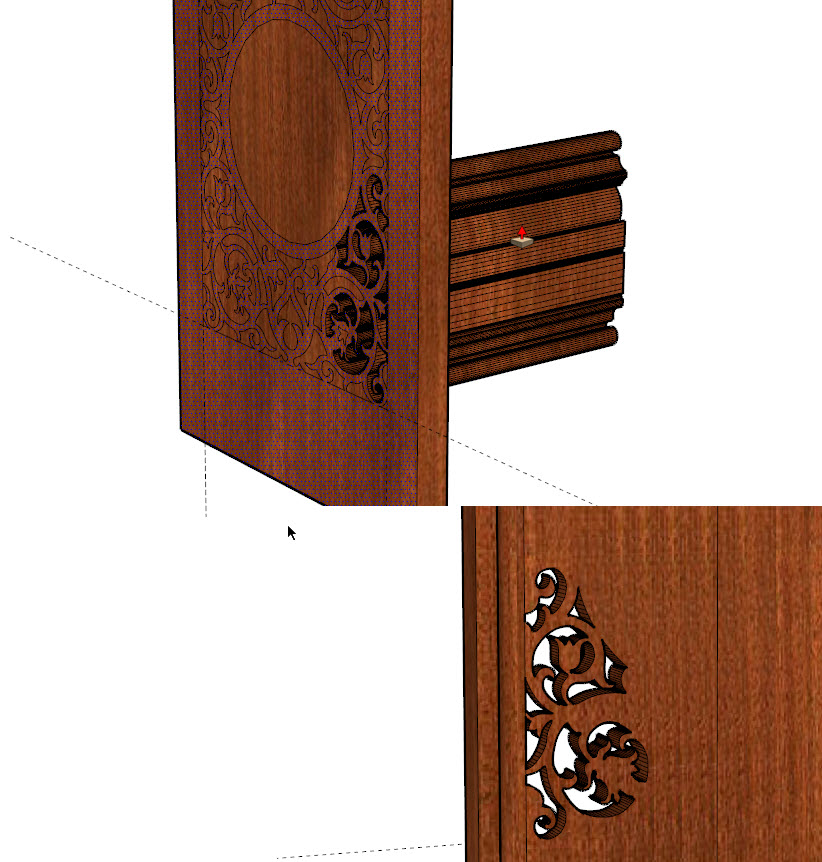
I've got a fretwork pattern that I want to cut out of a curved piece of wood that I'm trying to model. I cannot however figure out how to get the fretwork pattern onto the curved piece and pushed through the piece.
I want to take the fretwork pattern on the left and put it onto the curved piece in the middle so that I would have it pushed through like the piece on the right.


How do I get the fretwork on there and pushed through to match the curved face?
Thank you for your help.
-
Now this is already a beautiful piece. I am downloading it now but cannot promise for the near future - so many others may beat me in the suggestions - nevertheless the piece of work will definitely be worth any additional care by anyone else!
-
copy to flat back, explode group, push/pull through, intersect with model, then delete extras:
-
i was first!
i was first!PS it might also help if you select the line down the center of the face and right click ;soften it.

-
Now bevel all edges..

-
did you find that this made SU go for a long think?
Other than that, it's an exquisite model you have there hope it works out for you

-
yes i think the intersect operation froze SU for about 10 minutes.

-
if i had to do it, i'd also make 1/4 of the panel, then create a component an mirror and copy. SU really chokes on all that geometry!

-
Thank you so much for the helpful responses. I am going to work tonight to duplicate the advice so that I know how to do it myself.
With this fretwork pattern, Sketchup takes many a cough when trying to work with it. Depending on what I have done with it, I sometimes have to go do something else and come back while Sketchup is comatose calculating the geometry.
I've been working with sketchup on and off for a few years designing my own computer cases, but I really need to get a better grasp of working with curves like this. There really aren't many good tutorials that I've found for this sort of thing, and what I do know about using Sketchup I've had to learn through trial and error.
-
SU probably isn't the best choice for this type of thing. a nurbs modeller would co much better i'm sure. try moi3d or bonzai3d demo's.
-
I did go back and do the intersect with model, and watched a tutorial that I found this morning on youtube on this. I think I've got the hang of this now. Thank you again for your help.
-
anytime
-
@solo said:
Now bevel all edges..
Bevelling...

only with 3 segments - 12373 edges (or facets) to be created. Currently at 27% but it is getting slower. I might go out for a couple of drinks (and watch my electricity bill next time). I sected it into 4 parts however and only working on a quarter as a component (and mirrored twice). Nice model indeed and nice job, Rocky with the intersecting tip (yesterday I actually went bed instead of playing with it).



Hello! It looks like you're interested in this conversation, but you don't have an account yet.
Getting fed up of having to scroll through the same posts each visit? When you register for an account, you'll always come back to exactly where you were before, and choose to be notified of new replies (either via email, or push notification). You'll also be able to save bookmarks and upvote posts to show your appreciation to other community members.
With your input, this post could be even better 💗
Register Login


Advertisement