Aircraft
-
I'm in need of some help. I'm a Remote Control helicopter pilot. I'm going to build a U.S.Army UH-1D Huey helicopter from scratch. I need someone to design the "D" model heli with cut aways about every foot or so. This way I can cut out formers and use that as a template to start the mold making process. Basicly what I need is a cross section view looking from the front to back about every foot on a full size Huey. I also need a top to bottom.
I have no Idea how to do this. If anyone is looking to help I would greatly appreciate it. If you want I can send you a front view side view and a top view with the actual measurments of the real helicopter.
Thanking you in advance
Alan -
Hi Alan,
Something like this?
http://forums.sketchucation.com/viewtopic.php?f=81&t=12513&p=90109 -
Thats excatly what I need. I need the ones of the bulkheads ( formers ) like in the 4th and 5th pictures, is there a way I can get them in a front view so I can print them out and use them? This is what I need to use them for . Look at this link-- http://www.helifreak.com/showthread.php?t=127202
I do have a drawing of the helicopter I need.Thanks Alan
-
Well, if you have the model, there are plugins that can do that in the variation you want. There is a "Slicer" plugin for instance (by our regular contributor, TIG here) in the Ruby Library Depot.
http://www.crai.archi.fr/RubyLibraryDepot/Ruby/em_edi_page.htm -
The problem is I have no idea how to do any of this. I'm totally new I told a computer friend of mine what I wanted to do and he told me about Sketchup. I googled the forums and figured I would see if anyone would take this on for me. I dont need all the details like your Hawk, just the formers ( or slicer ). Like I said I need someone to help me with this. I'd be glad to pay for your time.
Thanks Alan -
Here are some measurements.
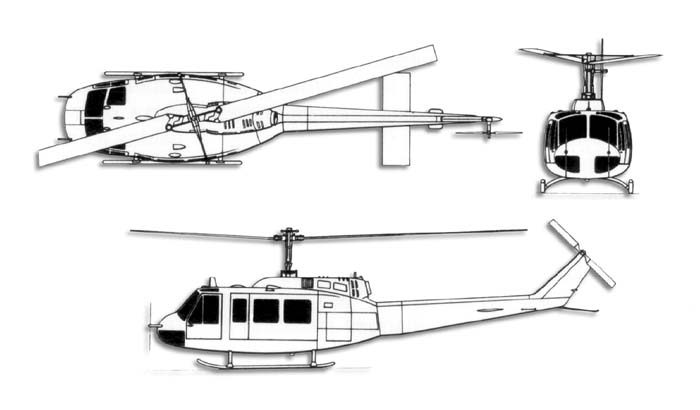
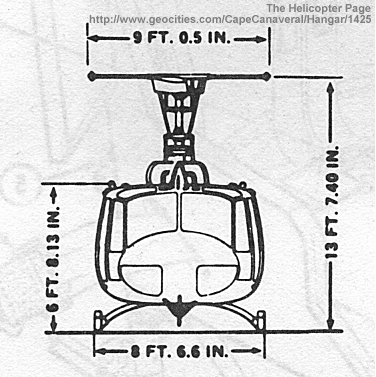
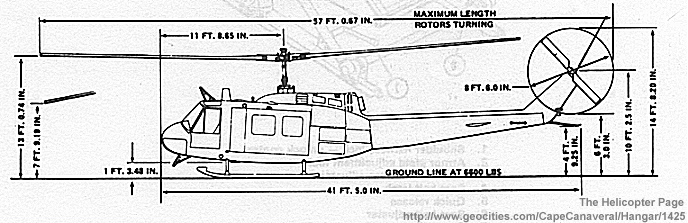
-
Anyone Please? I need help.
Thanks Alan -
Hi Alan,
I think people are waiting for you to startdoing it and then they can chime in with helpful suggestions.
So start something like this (with the "shoebox" technique): make a simple box where you apply the images (as high resolution as possible) of your helicopter as below. Then start retracing the outlines of it as precisely as possible. You can use Fredo's Bezier Spline plugin for smoother curves for it.
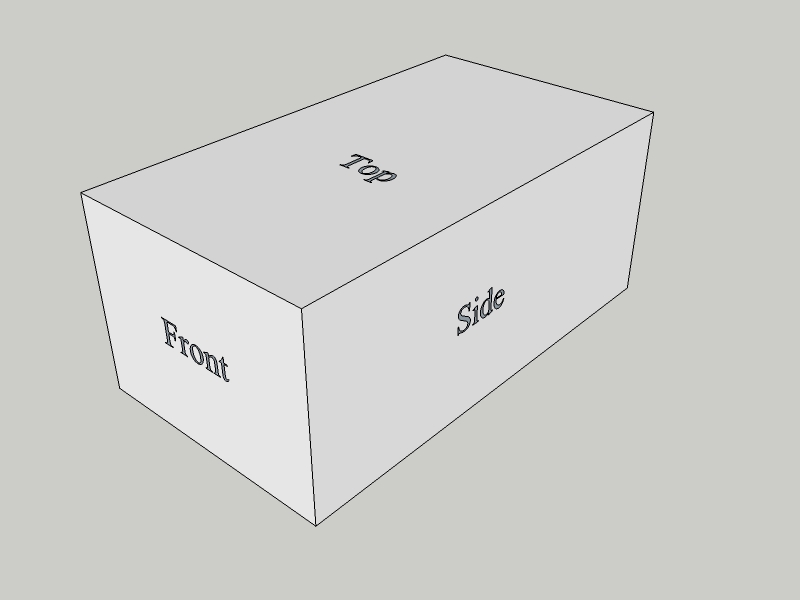
-
There are several good Car modeling tutorials using techniques of pasting ortho' views onto a box... do a Search on this site for them - unfortunately 'car' is too short to search for, so browse the Tutorial Forum - e.g. http://forums.sketchucation.com/viewtopic.php?f=18&t=3961&st=0&sk=t&sd=d&start=15
A Car is quite like a Plane ? -
Ok I can do that now that I am pointed in the right direction. Next question, Do I need Sketchup pro or can this be done with Sketchup 7?
-
@fireplug1111 said:
Ok I can do that now that I am pointed in the right direction. Next question, Do I need Sketchup pro or can this be done with Sketchup 7?
you can do with the free version. the pro is only required for exporting/importing various file formats.
-
Movies (animation export) is also possible with the free version (since v.6).
So definitely the free version will get you anywhere - with modelling at least.
-
Almost certainly v7.1 free will do everything you need - it has all of the tools - unless you want to make dynamic-components, export dwg files or use Layout for presentations etc - then Pro kicks in - but I'd expect 'free' to be more than enough for now...
You would also benefit from some Plugins to help make complex mesh surfaces more easily [e.g. my ExtrudeEdgesByRails which lets you pick a profile, two rails and a melding-profile as lines [as curves], and make a smooth meshed surface as you might find in a car or plane outer skin] - they'll all work in 'free' too.
However, I recommend that you get the basics learnt first, and then come back about the complexities...

-
Really all I need to do is take a front view and slice it up about every 6 inches or so using the true dimentions. I need this so I can print them out and use them as a template to build a R/C UH-1D helicopter. I guess this is way over my head and I might have to give up. I have no idea how to do any of this. That is why I asked for help and see if someone could do it for me.
Thanks anyways guys. -
You could probably find a suitable free model on the 3D Warehouse that would do ?
http://sketchup.google.com/3dwarehouse/search?q=helicopter+huey&styp=m&btnG=Search&reps=2
http://sketchup.google.com/3dwarehouse/details?mid=5ae11b134934f08a643ae903098a314&prevstart=0 ???
Perhaps you could do a bit of adjusting, simplification etc...
Then use Slicer ruby to make the slices - it even lays them out for you to cut out - and 'bob's your uncle'
http://forums.sketchucation.com/viewtopic.php?p=16694#p16694 -
@tig said:
You could probably find a suitable free model on the 3D Warehouse that would do ?
http://sketchup.google.com/3dwarehouse/search?q=helicopter+huey&styp=m&btnG=Search&reps=2
http://sketchup.google.com/3dwarehouse/details?mid=5ae11b134934f08a643ae903098a314&prevstart=0 ???
Perhaps you could do a bit of adjusting, simplification etc...
Then use Slicer ruby to make the slices - it even lays them out for you to cut out - and 'bob's your uncle'
http://forums.sketchucation.com/viewtopic.php?p=16694#p16694TIG- I tired to use slicer but it wont work. It says invalid volume and wont do anything... I dont like the Huey's in the Warehouse they dont look right. Thanks for the help anywyas.
-
Actually, I might think about making this model... as soon as I free up my schedule, which might be in a week or two.
I know what I'm doing, just that I'm lacking experience. So I might not be the top choice, if you want a pro find solo (lol rime!). -
@tig said:
You could probably find a suitable free model on the 3D Warehouse that would do ?
http://sketchup.google.com/3dwarehouse/search?q=helicopter+huey&styp=m&btnG=Search&reps=2
http://sketchup.google.com/3dwarehouse/details?mid=5ae11b134934f08a643ae903098a314&prevstart=0 ???
Perhaps you could do a bit of adjusting, simplification etc...
Then use Slicer ruby to make the slices - it even lays them out for you to cut out - and 'bob's your uncle'
http://forums.sketchucation.com/viewtopic.php?p=16694#p16694Bob's your Uncle: roughly translates to 'there ya go - that's all there is to it!' Just press this big red button that says 'Launch Missile', and "Bob's your uncle".



Hello! It looks like you're interested in this conversation, but you don't have an account yet.
Getting fed up of having to scroll through the same posts each visit? When you register for an account, you'll always come back to exactly where you were before, and choose to be notified of new replies (either via email, or push notification). You'll also be able to save bookmarks and upvote posts to show your appreciation to other community members.
With your input, this post could be even better 💗
Register Login


Advertisement