Quality of exported jpeg
-
Hello,
I'm working on a scene in sketchup but I'm running into a problem.
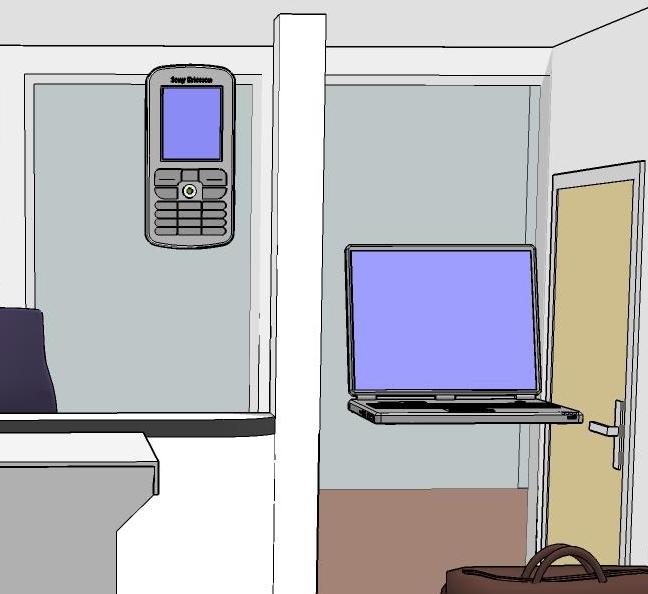
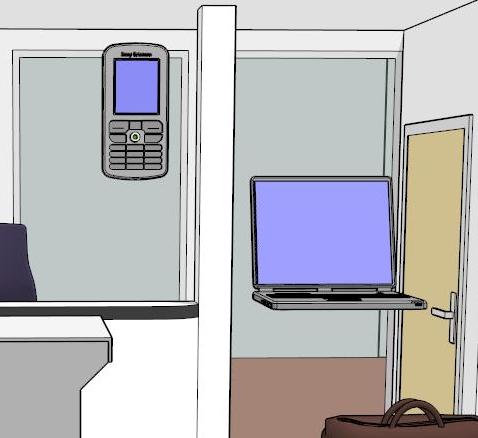
I need a 2500x1116 jpeg so tried exporting it, as you can see the lines are ugly.
A printscreen from the same scene look beter but is to small.
What am I doing wrong?, I've tried all of the options with exporting.Thanks
-
Turn on antialiasing in the export options
With best regards
PRSS -
Try exporting at double or triple the intended size and then resize in post edit.
-
@prss said:
Turn on antialiasing in the export options
With best regards
PRSSI find the AA poor and very slow. I do what Solo do, export x2 or x3 and size back down in Photoshop.
-
Something is wrong with your gravity settings... I see things floating around there

-
@thomthom said:
export x2 or x3 and size back down in Photoshop.
Or scale it with the free Pliska Image Resizer, the dead-easy way to scale lots of images for posting on forums and sending to clients:
http://download.cnet.com/PLiska-Image-Resizer/3000-2192_4-10411174.html -
The basic issue is that a line is always exported at 1 pixel. So if your whole image is 50 pixels wide a vertical line will be 1/50th of your total image. But if you're image is 500 pixels wide it will be only 1/500th of your total image (ie. thinner).
So when you export at a larger size the lines will be thinner in relation to the rest of your image.
-Brodie
-
Ok, thanks to all
-
@unknownuser said:
The basic issue is that a line is always exported at 1 pixel. So if your whole image is 50 pixels wide a vertical line will be 1/50th of your total image. But if you're image is 500 pixels wide it will be only 1/500th of your total image (ie. thinner).
So when you export at a larger size the lines will be thinner in relation to the rest of your image.
-Brodie
Yea, that is a problem some times. Option is to set a style with thick edges.
-
The BEST solution is to export from Layout7. Its renders are far better than from Sketchup directly and you can specify a line weight without having to use custom styles.



Hello! It looks like you're interested in this conversation, but you don't have an account yet.
Getting fed up of having to scroll through the same posts each visit? When you register for an account, you'll always come back to exactly where you were before, and choose to be notified of new replies (either via email, or push notification). You'll also be able to save bookmarks and upvote posts to show your appreciation to other community members.
With your input, this post could be even better 💗
Register Login


Advertisement